Hi,
Replace the CustomIdentityUserAppService I shared in my previous answer with the following code:
    [Dependency(ReplaceServices = true)]
    [ExposeServices(typeof(IIdentityUserAppService), typeof(IdentityUserAppService), typeof(CustomIdentityUserAppService))]
    public class CustomIdentityUserAppService : IdentityUserAppService
    {
        private const string ToEmail = "info@abp.io";

        private readonly IEmailSender _emailSender;
        private readonly ITemplateRenderer _templateRenderer;

        public CustomIdentityUserAppService(IdentityUserManager userManager, IIdentityUserRepository userRepository, IIdentityRoleRepository roleRepository, IOrganizationUnitRepository organizationUnitRepository, IIdentityClaimTypeRepository identityClaimTypeRepository, IdentityProTwoFactorManager identityProTwoFactorManager, IOptions<IdentityOptions> identityOptions, IDistributedEventBus distributedEventBus, ITemplateRenderer templateRenderer, IEmailSender emailSender)
            : base(userManager, userRepository, roleRepository, organizationUnitRepository, identityClaimTypeRepository, identityProTwoFactorManager, identityOptions, distributedEventBus)
        {
            _templateRenderer = templateRenderer;
            _emailSender = emailSender;
        }

        public override async Task<IdentityUserDto> CreateAsync(IdentityUserCreateDto input)
        {
            var identityUserDto = await base.CreateAsync(input);

            var emailBody = await _templateRenderer.RenderAsync("Hello", new HelloModel
            {
                Name = "John"
            });

            await _emailSender.SendAsync(
                ToEmail,
                "ABP Commercial",
                emailBody
            );

            return identityUserDto;
        }
    }
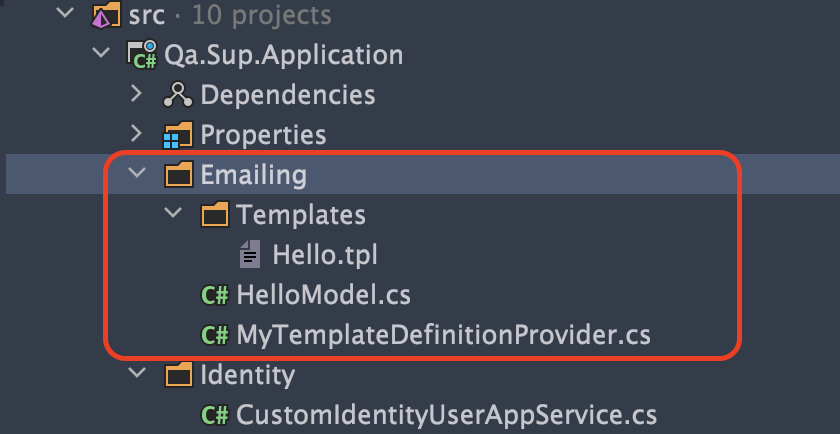
Then create a folder named Emailing and create the same structure as Emailing folder in the picture below:
Hello.tpl
    <!DOCTYPE html>
    <html lang="en" xmlns="http://www.w3.org/1999/xhtml">
    <head>
        <meta charset="utf-8" />
    </head>
    <body>
        hi, {{model.name}}
    </body>
    </html>
HelloModel.cs
    public class HelloModel
    {
        public string Name { get; set; }
    }
MyTemplateDefinitionProvider.cs
    public class MyTemplateDefinitionProvider : TemplateDefinitionProvider
    {
        public override void Define(ITemplateDefinitionContext context)
        {
            context.Add(
                new TemplateDefinition("Hello") //template name: "Hello"
                    .WithVirtualFilePath(
                        "/Emailing/Templates/Hello.tpl", //template content path
                        isInlineLocalized: true
                    )
            );
        }
    }
Then add the following code in MyProjectName.Application.csproj:
  <ItemGroup>
    <EmbeddedResource Include="Emailing\Templates\*.tpl" />
  </ItemGroup>
Finally, add the following code inside the ConfigureServices method in MyProjectNameApplicationModule:
            Configure<AbpVirtualFileSystemOptions>(options =>
            {
                options.FileSets.AddEmbedded<MyProjectNameApplicationModule>("MyProjectName.Emailing");
            });
When you add a user, you can find the outgoing mail in the Logs/logs.txt file (at the bottom of the MyProjectName.HttpApi.Host project).
For more information, you can refer to the following documents and demo application:
https://community.abp.io/articles/replacing-email-templates-and-sending-emails-jkeb8zzh
https://docs.abp.io/en/abp/latest/Text-Templating#replacing-the-existing-templates
https://docs.abp.io/en/abp/latest/Emailing
https://commercial.abp.io/modules/Volo.TextTemplateManagement
https://github.com/abpframework/abp-samples/tree/master/TextTemplateDemo
Hi,
The point we are trying to test here should not be Quartz. Currently your tests depend on Quartz, ie the behavior of a library, but this is not a good method.
In my view changing your Execute method as follows provides a more testable environment:
        public override async Task Execute(IJobExecutionContext context)
        {
            Logger.LogInformation("Starting:  EventReminderWorker...");


            // It might be better to write tests for this service
            await ServiceProvider
                .GetRequiredService<YourOperationService>()
                .EventReminder();


            Logger.LogInformation("Completed: EventReminderWorker...");
        }
Hi,
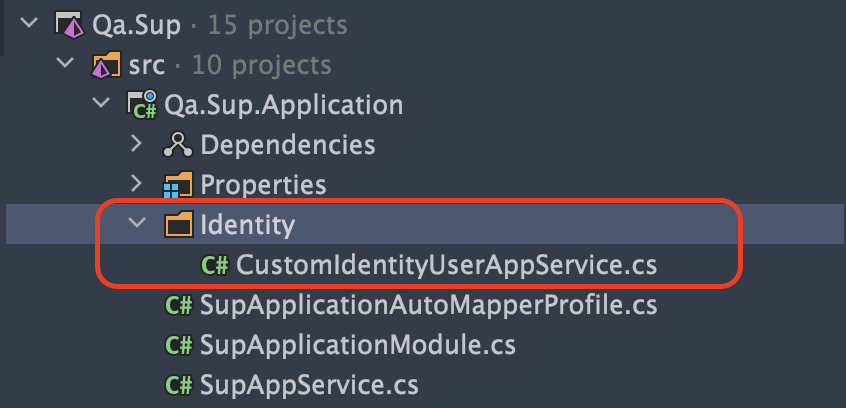
You can start by creating a class in the MyProjectName.Application project. Here is my file structure of the AppService I created:
Then you can customize it as follows 👇👇
    [Dependency(ReplaceServices = true)]
    [ExposeServices(typeof(IIdentityUserAppService), typeof(IdentityUserAppService), typeof(CustomIdentityUserAppService))]
    public class CustomIdentityUserAppService : IdentityUserAppService
    {
        public CustomIdentityUserAppService(IdentityUserManager userManager, IIdentityUserRepository userRepository, IIdentityRoleRepository roleRepository, IOrganizationUnitRepository organizationUnitRepository, IIdentityClaimTypeRepository identityClaimTypeRepository, IdentityProTwoFactorManager identityProTwoFactorManager, IOptions<IdentityOptions> identityOptions, IDistributedEventBus distributedEventBus)
            : base(userManager, userRepository, roleRepository, organizationUnitRepository, identityClaimTypeRepository, identityProTwoFactorManager, identityOptions, distributedEventBus)
        {
        }

        public override async Task<IdentityUserDto> CreateAsync(IdentityUserCreateDto input)
        {
            var identityUserDto = await base.CreateAsync(input);

            // ...
            Console.WriteLine("Sending email...");

            return identityUserDto;
        }
    }
For more information you can check this document.
Related answer: https://support.abp.io/QA/Questions/1668/Overriding-UI-of-Login-Page---Identity-Server#answer-3bdcd901-078a-260e-5aae-39fe9a763488
Actually, I faced the same problem, and deleting the following two lines that I said in my previous answer solved my problem.
Then remove the following two lines from the ConfigureAuthentication method in MyProjectNamePublicWebModule.
    options.DefaultScheme = "Cookies";
    options.DefaultChallengeScheme = "oidc";
I think you can search other places where this is used and delete and test the ones you find one by one.
However, since this issue has been resolved, I'm closing this here.
I open an internal issue for the production service to use the standard ABP microservice service template.
Hi,
To do this, you need to override the OnPostAsync method;
        // For example
        public override async Task<IActionResult> OnPostAsync(string action)
        {
            Console.WriteLine("OnPost - Before");
            var result = await base.OnPostAsync(action);
            Console.WriteLine("OnPost - After");

            return result;
        }
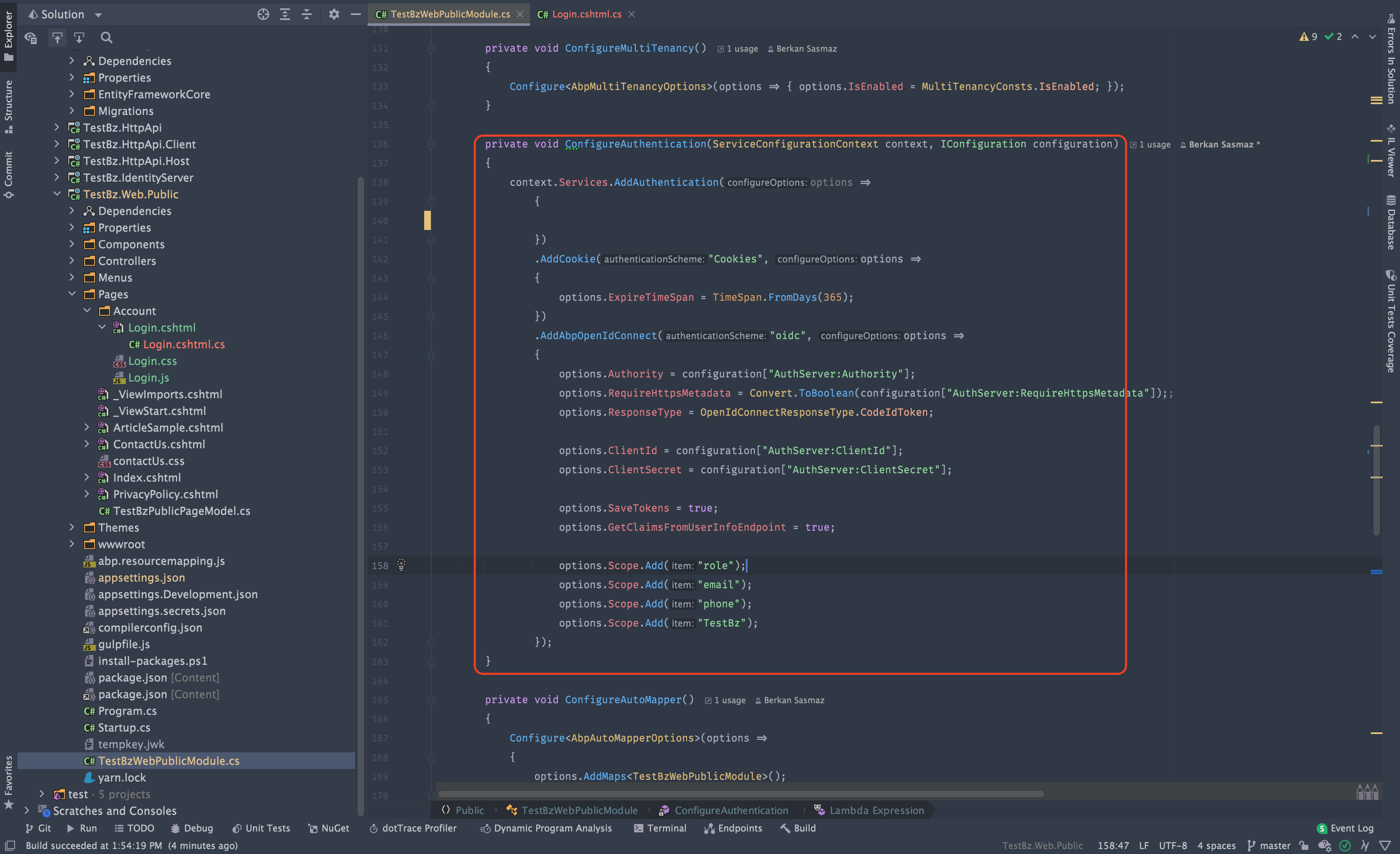
Then remove the following two lines from the ConfigureAuthentication method in MyProjectNamePublicWebModule.
    options.DefaultScheme = "Cookies";
    options.DefaultChallengeScheme = "oidc";
The final state should be as in the picture;
Finally, add the following code to the appsettings.json file of the MyProjectName.Web.Public project:
  "ConnectionStrings": {
    "Default": "MY-CONNECTION-STRING"
  }
You can try to run the application and login to the public web side.
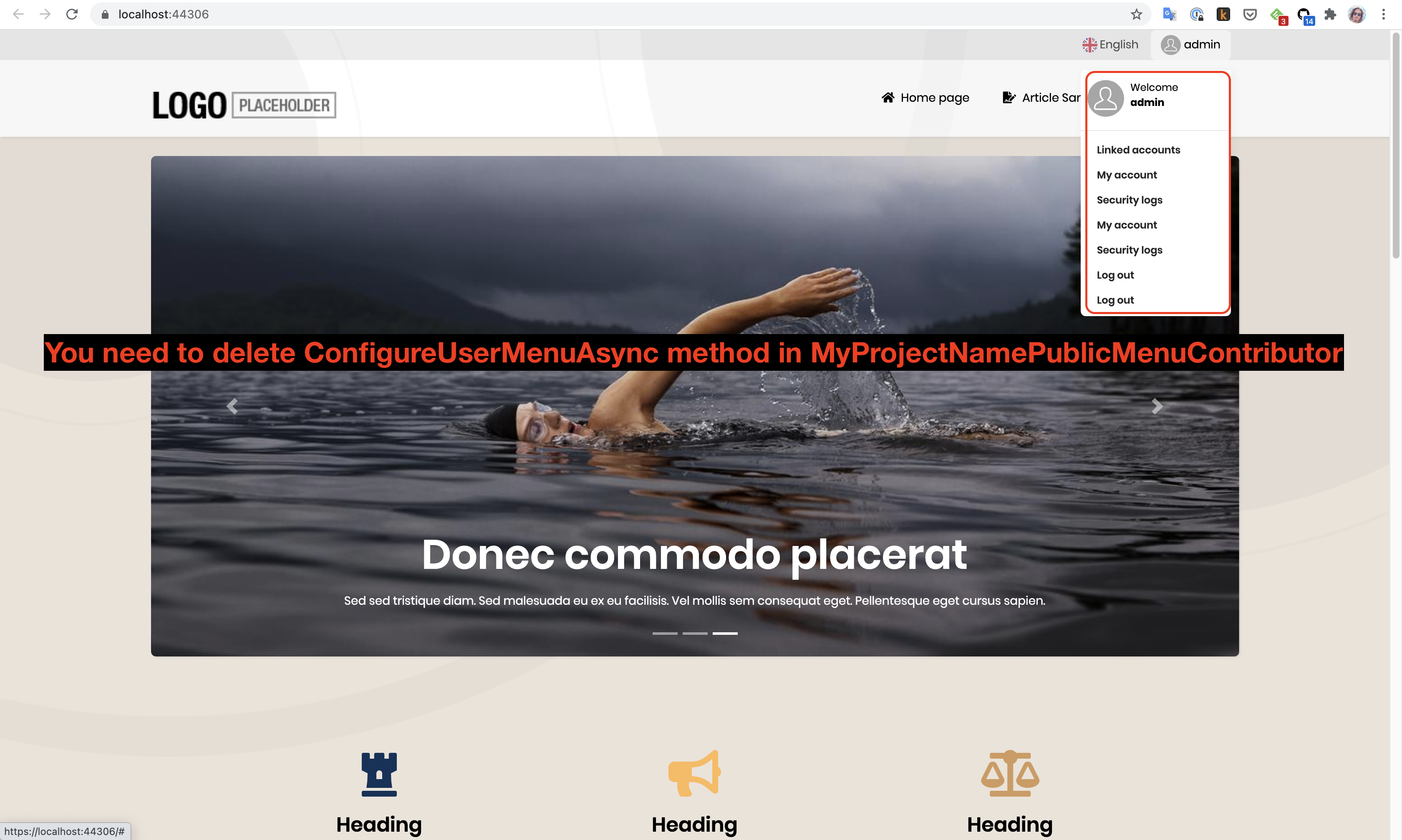
Note: If you encounter a problem like the picture below after logging in, remove the relevant places from MyProjectNamePublicMenuContributor.
As a result, you can now login via the Public web application and customize it as you wish.
Hi Albert :)
The password for Redis can be given via appsettings.json as in the picture below.
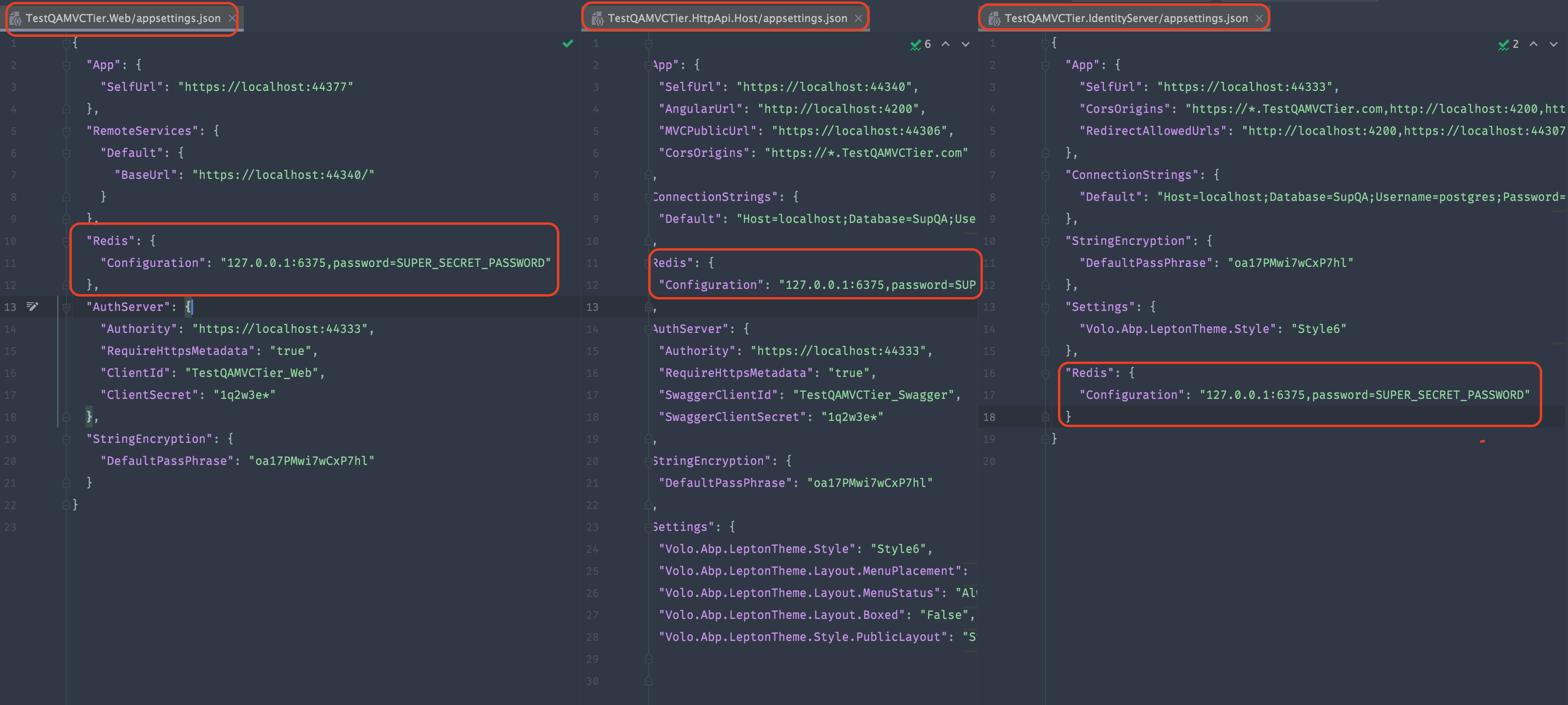
I haven't tried it as environment variables because if it reads from appsettings.json, we can be sure that it will read it as environment variables as well. For more information you can check here.
Hi,
In our previous conversations, you did not say that you want to do it on the public web side.
As a solution:
Compare the MyProjectNameWebPublicModule in the MyProjectName.Web.Public project with the MyProjectNameIdentityServerModule in the MyProjectName.IdentityServer project and add the missing ones to the MyProjectNameWebPublicModule. As a result, you will reach the view in the image below.
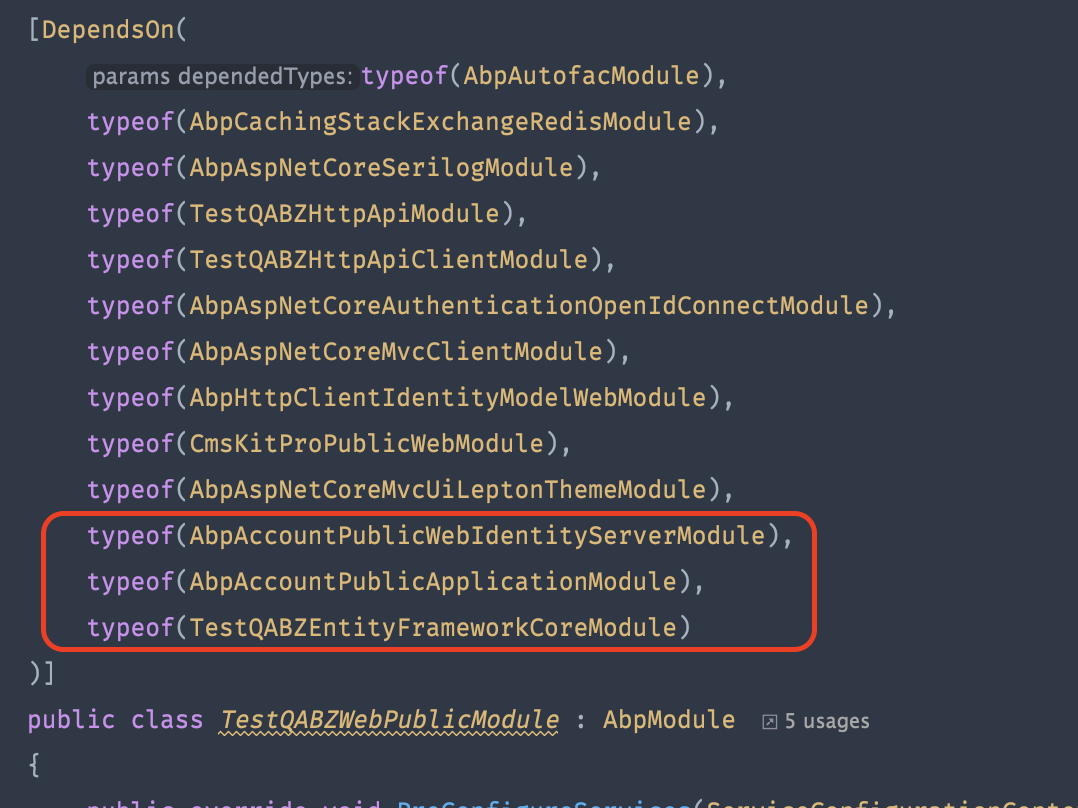
Please let us know if it works after you try it.
Hi,
To do this, you create a common Web project (eg MyProjectName.Web.Common) and move all the information you will use in common, such as MyProjectNameMenuContributor, there. Both projects must have a reference here.
There are two difficulties here:
For example, you must depend on GroupName for AuditLogs menu and some projects for required permissions, if any, so you can remove them from MyProjectName.Web to not reference them in two different places because those dependencies will already come with MyProjectName.Web.Common.
You must get the full URL information for the menus, you can do this in 3 ways.
a. Hard coded :(
b. By creating a class that holds your URL information to the MyProjectName.Domain.Shared project.
    public static class MyProjectNameExternalUrls
    {
#if DEBUG
        public const string MyProjectNameAccount = "https://localhost:44333";
        public const string MyProjectNameWeb = "https://localhost:44325";
#else
        public const string MyProjectNameAccount = "https://account.mydomain.io";
        public const string MyProjectNameWeb = "https://mydomain.io";
#endif
    }
The advantage of this is that the menu urls change according to the environment, and the disadvantage is that it duplicates the URL information. Because this information is already available in appsettings.json.
c. You can create the structure that suits your needs by using the Options pattern.
In my opinion, the shortest and acceptable one is to create a class like MyProjectNameExternalUrls, but if you have the time, the best solution is to design the necessary structure using the options pattern.
I hope the information I have provided will be of use to you :)









