Activities of "cstobler"

When I run dotnet tool install -g volo.abp.studio.cli, it says Tool is already installed. And then running either of the two get-source lines, it has the same outcome: Exception of type 'Volo.Abp.Studio.AbpStudioException' was thrown.

I did also try with --version 4.2.1, but that didn't work either. I will try this again intermittently in case this is a server error, but if there isn't a server issue, then assistance would be appreciated to get that account template.


I am trying to override the Account template based on this documentation here: https://dev.to/enisn/you-do-it-wrong-customizing-abp-login-page-correctly-l2k, and when I get to the part where I need to download the Account template so I can override it, I am not able to download it:

I have updated ABP CLI, I have updated ABP Studio, I have logged out and logged back in in the CLI, nothing seems to work. It keeps throwing an error, and the error message doesn't print out any useful information that helps me troubleshoot what is going on.

Additionally, I read somewhere that I can grab source files from ABP Suite, but ABP Suite isn't working for me at all. I go to add my solution, and it throws this:

I would ideally like to get this fixed so I can download files via CLI, but worst case scenario I would be ok if you just zipped it up and sent it to my email on file.

Thanks,

Charlie

Thanks for the follow-up. It was indeed the price id. I thought you passed the product id in and it would let them select which price to use (since I am using annual and monthly), but looks like I will need to setup separate plans for each price then.

Thanks for your help.

Charlie

That section in PreConfigureServices did the trick. However, I am having another related issue.

I am getting this error: So it is treating my Stripe product ID as if it were a price. However, I was under the impression I could use the Stripe product id when configuring the gateway plan:

Am I doing this incorrectly? Is there some other way to tie my plan in to a Stripe product?

Hi, I am attempting to setup self-service registration and subscription for customers. I am having an issue where when I try to go to the payment screen, it throws an error saying "Invalid URL", and when I go to Stripe, it shows a relative URL that I cannot seem to adjust.

For context, here is my register page model OnPostAsync:

public async Task<IActionResult> OnPostAsync()
{
    if (!ModelState.IsValid)
    {
        await OnGetAsync(); // reload editions
        return Page();
    }

    // Confirm we are NOT in tenant context
    if (_currentTenant.Id != null)
    {
        throw new Exception("Cannot register a tenant while already in a tenant context.");
        //return Forbid(); // Registration should only be done as host
    }

    StartSubscriptionResultDto resultDto = await _multiTenancyAppService.RegisterAndSubscribeAsync(new SaasTenantCreateDto
    {
        Name = Input.TenantName,
        AdminEmailAddress = Input.Email,
        AdminPassword = Input.Password,
        EditionId = Input.EditionId,
        ActivationState = Volo.Saas.TenantActivationState.Passive
    });

    return LocalRedirectPreserveMethod("/Payment/GatewaySelection?paymentRequestId=" + resultDto.PaymentRequestId);
}

And here is my RegisterAndSubscribeAsync method:

public async Task<StartSubscriptionResultDto> RegisterAndSubscribeAsync(SaasTenantCreateDto input)
{
    if (input.EditionId == null || input.EditionId == Guid.Empty)
    {
        throw new UserFriendlyException("Please select a valid edition.");
    }

    // 1) Create tenant via domain layer (no host permission needed)
    var tenant = await _tenantManager.CreateAsync(input.Name, editionId: input.EditionId);

    tenant.SetActivationState(input.ActivationState); // keep passive until payment succeeds
    await _tenantRepository.InsertAsync(tenant, autoSave: true);

    // 2) Publish TenantCreatedEto to seed admin user (same as TenantAppService does)
    await _eventBus.PublishAsync(new TenantCreatedEto
    {
        Id = tenant.Id,
        Name = tenant.Name,
        Properties =
    {
        {"AdminEmail", input.AdminEmailAddress},
        {"AdminPassword", input.AdminPassword}
    }
    });

    // 3) Start subscription (creates PaymentRequest with TenantId/EditionId extra props)
    PaymentRequestWithDetailsDto paymentRequest = await _subscriptionAppService.CreateSubscriptionAsync(input.EditionId ?? Guid.Empty, tenant.Id);

    return new StartSubscriptionResultDto
    {
        TenantId = tenant.Id,
        PaymentRequestId = paymentRequest.Id,
    };
}

I have tried to set the callbackurl, prepaymenturl, and postpaymenturl in appsettings, but that doesn't seem to do anything (stripe keys redacted for security):

"PaymentWebOptions": {
  "RootUrl": "https://armadasoftware.io",
  "CallBackUrl": "https://armadasoftware.io/Payment/Stripe/PostPayment",
  "PaymentGatewayWebConfigurationDictionary": {
    "Stripe": {
      "PrePaymentUrl": "https://armadasoftware.io/Payment/Stripe/PrePayment",
      "PostPaymentUrl": "https://armadasoftware.io/Payment/Stripe/PostPayment"
    }
  }
},
"Payment": {
  "Stripe": {
    "PublishableKey": "",
    "SecretKey": "",
    "WebhookSecret": ""
  }
},

When I get this error, I go to Stripe Webhook logs, and I find this: So it is saying the URL is invalid, and the success URL is a relative URL, which seems problematic, but I cannot seem to find a configuration or anything in the documentation that allows me to set a success URL such that it overrides this. I tried setting the success url in the stripe section of appsettings, but that didn't work either. Please advise me on how to set this so it overrides whatever default URL is being sent to Stripe here.

Beautiful! I tried so many things but I didn't try wrapping it in quotes! Glad to see it was an easy fix.

Thanks

Also, my repo is a bit of a mess right now, but Armada-ABP-Pro is my current working branch I am trying to deploy.

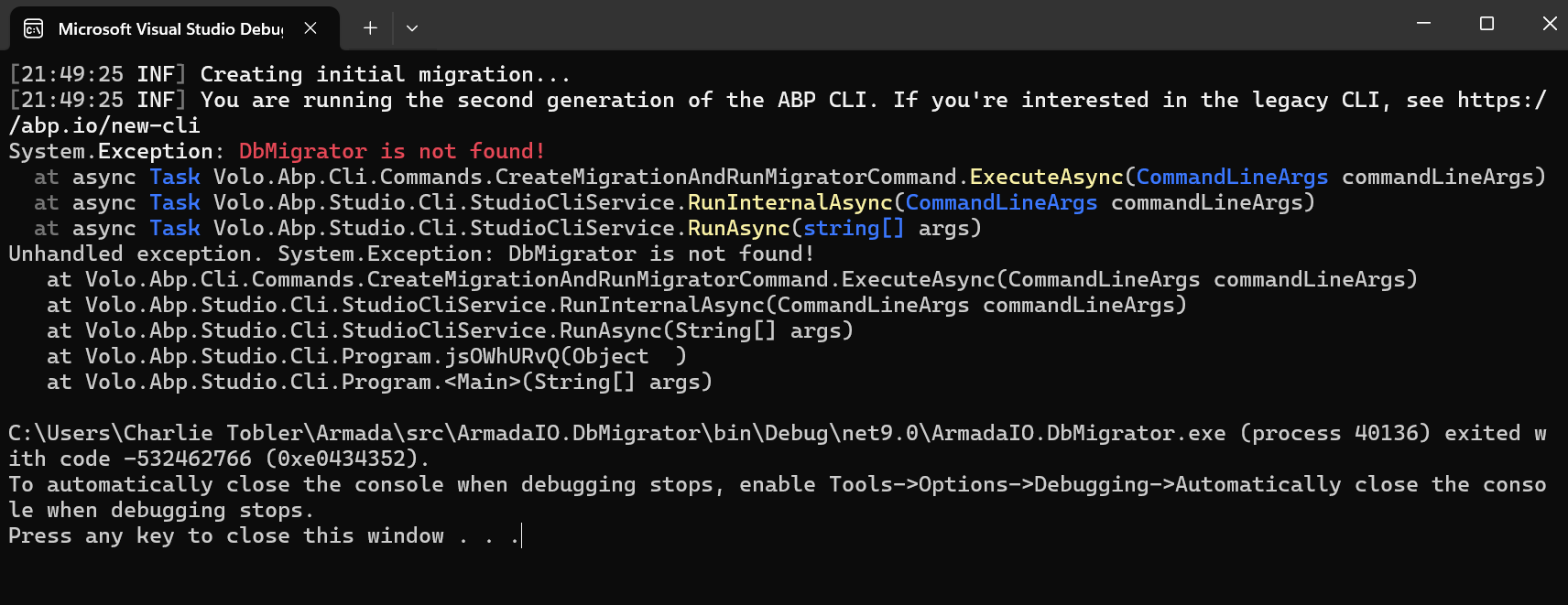
I sent you an invite. I don't have it in there anymore, but I previously also tried to get the DbMigrator line working (something like this from the documentation):

- name: Run migrations
        run: dotnet run -- "${{ secrets.CONNECTION_STRING }}" # Set your connection string as a secret in your repository settings
        working-directory: ./src/yourapp.DbMigrator # Replace with your project name

and I wasn't able to get it to work. I just defaulted to deploying DbMigrator separately as a WebJob, and it works, but it would be much better to be able to migrate on deploy. Not sure if there is anything I need to look out for there. I can make a new ticket for that issue if necessary.

Thanks

I have been working off of this documentation: https://abp.io/docs/latest/solution-templates/layered-web-application/deployment/azure-deployment/step3-deployment-github-action?UI=MVC&DB=EF&Tiered=No, and it does work to deploy to Azure, but if I have the line there to generate openiddict.pfx, it always fails, and it doesn't throw any error message that helps me understand what is going on.

For reference, here is my workflow (I also have never been able to make the DbMigrator work, and I may have to open a new ticket for that too if I can't get it to work):

# Docs for the Azure Web Apps Deploy action: https://github.com/Azure/webapps-deploy
# More GitHub Actions for Azure: https://github.com/Azure/actions

name: Build and deploy ASP.Net Core app to Azure Web App - armada

on:
  push:
    branches:
      - Armada-ABP-Pro
  workflow_dispatch:

jobs:
  build:
    runs-on: windows-latest
    permissions:
      contents: read #This is required for actions/checkout

    steps:
      - uses: actions/checkout@v4

      - name: Set up .NET Core
        uses: actions/setup-dotnet@v4
        with:
          dotnet-version: 'v9.0'

      - name: Install ABP CLI
        run: |
          dotnet tool install -g Volo.Abp.Cli
          abp install-libs
        shell: bash

      - name: Build with dotnet
        run: dotnet build --configuration Release

      - name: dotnet publish
        run: dotnet publish -c Release -r win-x64 --self-contained false -o "$env:DOTNET_ROOT\myapp"
        shell: pwsh
        working-directory: ./src/ArmadaIO.Web # Replace with your project name
        env:
          ASPNETCORE_ENVIRONMENT: Production

      - name: Generate openiddict.pfx
        run: dotnet dev-certs https -v -ep ${{env.DOTNET_ROOT}}\myapp\openiddict.pfx -p c41eb3e7-8a8e-429f-9052-0850406f2f11 # Replace with your password

      - name: Upload artifact for deployment job
        uses: actions/upload-artifact@v4
        with:
          name: .net-app
          path: ${{env.DOTNET_ROOT}}/myapp

  deploy:
    runs-on: windows-latest
    needs: build
    environment:
      name: 'Production'
      url: ${{ steps.deploy-to-webapp.outputs.webapp-url }}
    permissions:
      id-token: write #This is required for requesting the JWT
      contents: read #This is required for actions/checkout

    steps:
      - name: Download artifact from build job
        uses: actions/download-artifact@v4
        with:
          name: .net-app
      
      - name: Login to Azure
        uses: azure/login@v2
        with:
          client-id: ${{ secrets.AZUREAPPSERVICE_CLIENTID_D0E4A82237114C8FB52A40680A31F7B7 }}
          tenant-id: ${{ secrets.AZUREAPPSERVICE_TENANTID_AF7C7E6475CD4DE9A6FC1907FEBD8DF6 }}
          subscription-id: ${{ secrets.AZUREAPPSERVICE_SUBSCRIPTIONID_9000905F725645769C73D60324653A76 }}

      - name: Deploy to Azure Web App
        id: deploy-to-webapp
        uses: azure/webapps-deploy@v3
        with:
          app-name: 'armada'
          slot-name: 'Production'
          package: .

If I comment out the openiddict line, it runs and deploys (but ofc doesn't actually run and throws a startup error saying it can't find openiddict.pfx). If I uncomment the line, it just shows me this: and if I pull up the raw logs for that line it shows me this:

2025-08-20T20:23:04.5490958Z ##[group]Run dotnet dev-certs https -v -ep C:\Program Files\dotnet\myapp\openiddict.pfx -p [mypassword]
2025-08-20T20:23:04.5491858Z dotnet dev-certs https -v -ep C:\Program Files\dotnet\myapp\openiddict.pfx -p [mypassword]
2025-08-20T20:23:04.5526676Z shell: C:\Program Files\PowerShell\7\pwsh.EXE -command ". '{0}'"
2025-08-20T20:23:04.5526989Z env:
2025-08-20T20:23:04.5527153Z   DOTNET_ROOT: C:\Program Files\dotnet
2025-08-20T20:23:04.5527379Z ##[endgroup]
2025-08-20T20:23:05.1704144Z Specify --help for a list of available options and commands.
2025-08-20T20:23:05.3106943Z ##[error]Process completed with exit code 1.

So I feel stuck here. I did find this blog post: https://codejack.com/2022/12/deploying-abp-io-to-an-azure-appservice/, and I used it for testing, but that didn't work for me either. Here is my WebModule with the default code, as well as the commented code that I was using to test based on the blog post above:

public override void PreConfigureServices(ServiceConfigurationContext context)
{
    var hostingEnvironment = context.Services.GetHostingEnvironment();
    var configuration = context.Services.GetConfiguration();

    context.Services.PreConfigure<AbpMvcDataAnnotationsLocalizationOptions>(options =>
    {
        options.AddAssemblyResource(
            typeof(ArmadaResource),
            typeof(ArmadaIODomainModule).Assembly,
            typeof(ArmadaIODomainSharedModule).Assembly,
            typeof(ArmadaIOApplicationModule).Assembly,
            typeof(ArmadaIOApplicationContractsModule).Assembly,
            typeof(ArmadaIOWebModule).Assembly
        );
    });

    PreConfigure<OpenIddictBuilder>(builder =>
    {
        builder.AddValidation(options =>
        {
            options.AddAudiences("ArmadaIO");
            options.UseLocalServer();
            options.UseAspNetCore();
        });
    });

    if (!hostingEnvironment.IsDevelopment())
    {
        PreConfigure<AbpOpenIddictAspNetCoreOptions>(options =>
        {
            options.AddDevelopmentEncryptionAndSigningCertificate = false;
        });

        PreConfigure<OpenIddictServerBuilder>(serverBuilder =>
        {
            serverBuilder.AddProductionEncryptionAndSigningCertificate("openiddict.pfx", configuration["AuthServer:CertificatePassPhrase"]!);
            serverBuilder.SetIssuer(new Uri(configuration["AuthServer:Authority"]!));

            //serverBuilder.AddEncryptionCertificate(GetEncryptionCertificate(hostingEnvironment, configuration));
            //serverBuilder.AddSigningCertificate(GetSigningCertificate(hostingEnvironment, configuration));
        });
    }
}

//private X509Certificate2 GetSigningCertificate(IWebHostEnvironment hostingEnv,
//                        IConfiguration configuration)
//{
//    var fileName = $"cert-signing.pfx";
//    var passPhrase = configuration["ArmadaCertificate:X590:PassPhrase"];
//    var file = Path.Combine(hostingEnv.ContentRootPath, fileName);
//    if (File.Exists(file))
//    {
//        var created = File.GetCreationTime(file);
//        var days = (DateTime.Now - created).TotalDays;
//        if (days > 180)
//        {
//            File.Delete(file);
//        }
//        else
//        {
//            try
//            {
//                return new X509Certificate2(file, passPhrase, X509KeyStorageFlags.MachineKeySet);
//            }
//            catch (CryptographicException)
//            {
//                File.Delete(file);
//            }
//        }
//    }
//    // file doesn't exist, was deleted because it expired, or has an invalid passphrase
//    using var algorithm = RSA.Create(keySizeInBits: 2048);
//    var subject = new X500DistinguishedName("CN=Armada Signing Certificate");
//    var request = new CertificateRequest(subject, algorithm,
//                        HashAlgorithmName.SHA256, RSASignaturePadding.Pkcs1);
//    request.CertificateExtensions.Add(new X509KeyUsageExtension(
//                        X509KeyUsageFlags.DigitalSignature, critical: true));
//    var certificate = request.CreateSelfSigned(DateTimeOffset.UtcNow,
//                        DateTimeOffset.UtcNow.AddYears(2));
//    File.WriteAllBytes(file, certificate.Export(X509ContentType.Pfx, passPhrase));
//    return new X509Certificate2(file, passPhrase, X509KeyStorageFlags.MachineKeySet);
//}
//private X509Certificate2 GetEncryptionCertificate(IWebHostEnvironment hostingEnv,
//                             IConfiguration configuration)
//{
//    var fileName = $"cert-encryption.pfx";
//    var passPhrase = configuration["ArmadaCertificate:X590:PassPhrase"];
//    var file = Path.Combine(hostingEnv.ContentRootPath, fileName);
//    if (File.Exists(file))
//    {
//        var created = File.GetCreationTime(file);
//        var days = (DateTime.Now - created).TotalDays;
//        if (days > 180)
//        {
//            File.Delete(file);
//        }
//        else
//        {
//            try
//            {
//                return new X509Certificate2(file, passPhrase, X509KeyStorageFlags.MachineKeySet);
//            }
//            catch (CryptographicException)
//            {
//                File.Delete(file);
//            }
//        }
//    }
//    // file doesn't exist, was deleted because it expired, or has an invalid passphrase
//    using var algorithm = RSA.Create(keySizeInBits: 2048);
//    var subject = new X500DistinguishedName("CN=Armada Encryption Certificate");
//    var request = new CertificateRequest(subject, algorithm,
//                        HashAlgorithmName.SHA256, RSASignaturePadding.Pkcs1);
//    request.CertificateExtensions.Add(new X509KeyUsageExtension(
//                        X509KeyUsageFlags.KeyEncipherment, critical: true));
//    var certificate = request.CreateSelfSigned(DateTimeOffset.UtcNow,
//                        DateTimeOffset.UtcNow.AddYears(2));
//    File.WriteAllBytes(file, certificate.Export(X509ContentType.Pfx, passPhrase));
//    return new X509Certificate2(file, passPhrase, X509KeyStorageFlags.MachineKeySet);
//}

I was able to get this working one time in the past, but I can't seem to recreate it unfortunately. I did create an openiddict.pfx using the command in the terminal, then I uploaded it to my Azure certificates. That doesn't seem to work either. Perhaps I need to upload openiddict.pfx directly into the project root in Azure? I am not very knowledgeable about this, so I'm not sure what is safe or what could cause security issues.

Any advice here would be appreciated. Thanks.

Showing 31 to 40 of 62 entries
Boost Your Development
ABP Live Training
Packages
See Trainings
Mastering ABP Framework Book
The Official Guide
Mastering
ABP Framework
Learn More
Mastering ABP Framework Book
Made with ❤️ on ABP v10.1.0-preview. Updated on December 17, 2025, 07:08
1
ABP Assistant
🔐 You need to be logged in to use the chatbot. Please log in first.