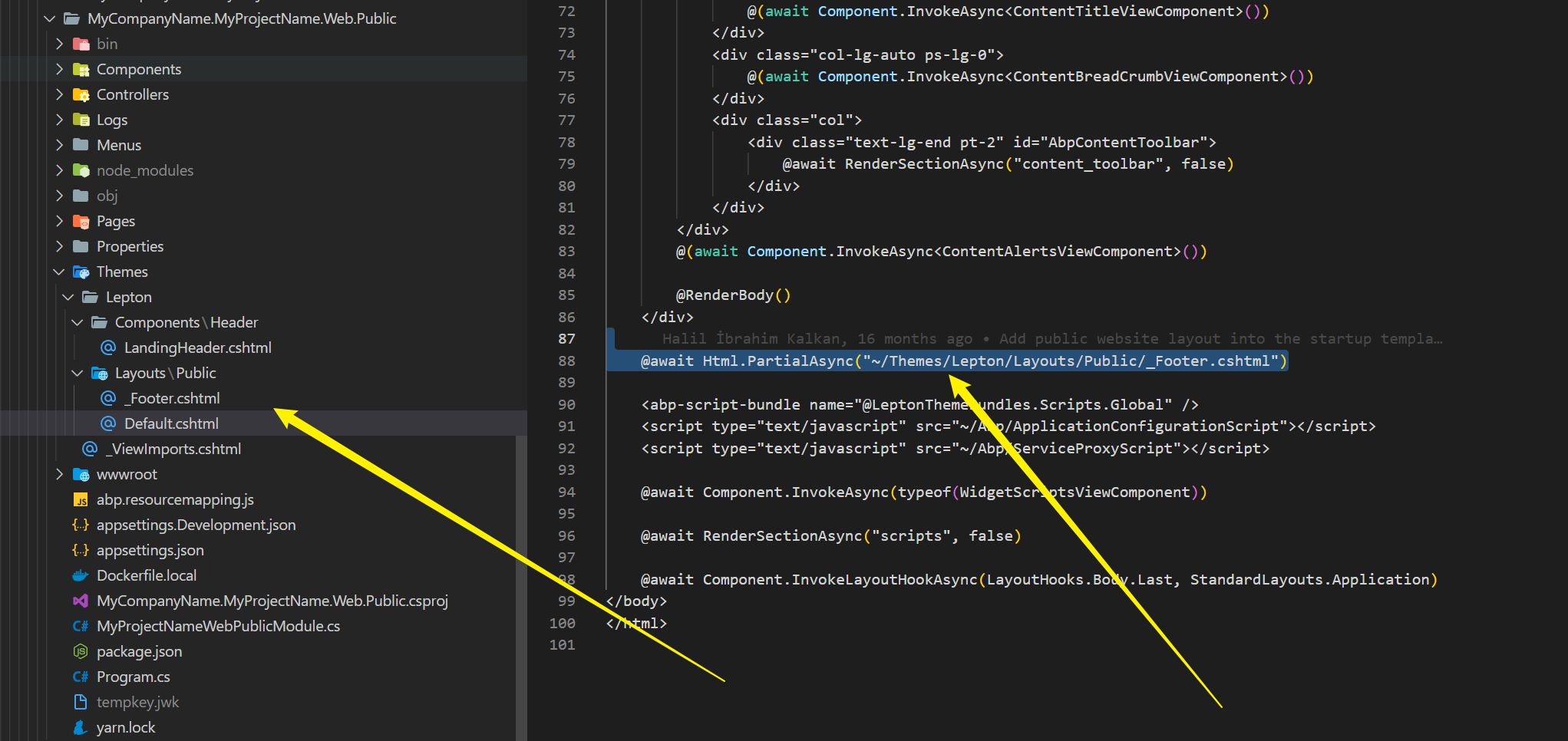
If using public site, a project named Public will be generated - leading to Public being part of a namespace.
Eg. MyApp.Web.Public.Menu
That leads to CA1716
warning CA1716: Rename namespace MyApp.Web.Public.Menu so that it no longer conflicts with the reserved language keyword 'Public'. Using a reserved keyword as the name of a namespace makes it harder for consumers in other languages to use the namespace.
❯ abp new AbpDebugTest -t app-pro -u blazor -d ef -o AbpDebugTest -dbms SQLite
[21:56:54 INF] ABP CLI (https://abp.io)
[21:56:54 INF] Version 6.0.1 (Stable)
[21:56:55 INF] Creating your project...
[21:56:55 INF] Project name: AbpDebugTest
[21:56:55 INF] Template: app-pro
[21:56:55 INF] Database provider: EntityFrameworkCore
[21:56:55 INF] DBMS: SQLite
[21:56:55 INF] UI Framework: Blazor
[21:56:55 INF] Output folder: C:\Repos\test\AbpDebugTest
[21:56:56 INF] Using cached template: app-pro, version: 6.0.1
[21:56:56 INF] Theme: LeptonX
[21:56:56 INF] Theme Style: System
[21:56:57 INF] Check out the documents at https://docs.abp.io/en/commercial/latest
[21:56:57 INF] 'AbpDebugTest' has been successfully created to 'C:\Repos\test\AbpDebugTest'
[21:56:57 INF] Creating initial migrations...
[21:57:09 INF] Initial migrations are created.
[21:57:09 INF] Installing client-side packages...
[21:57:10 INF] Found 1 projects.
[21:57:10 INF] C:\Repos\test\AbpDebugTest\src\AbpDebugTest.HttpApi.Host
[21:57:10 INF] Running Yarn on C:\Repos\test\AbpDebugTest\src\AbpDebugTest.HttpApi.Host
yarn install v1.22.19
info No lockfile found.
[1/4] Resolving packages...
warning @volo/abp.aspnetcore.mvc.ui.theme.leptonx > @volo/abp.aspnetcore.mvc.ui.theme.commercial > @abp/aspnetcore.mvc.ui.theme.shared > @abp/aspnetcore.mvc.ui > gulp > glob-watcher > chokidar@2.1.8: Chokidar 2 does not receive security updates since 2019. Upgrade to chokidar 3 with 15x fewer dependencies
warning @volo/abp.aspnetcore.mvc.ui.theme.leptonx > @volo/abp.aspnetcore.mvc.ui.theme.commercial > @abp/aspnetcore.mvc.ui.theme.shared > @abp/aspnetcore.mvc.ui > gulp > glob-watcher > chokidar > fsevents@1.2.13: fsevents 1 will break on node v14+ and could be using insecure binaries. Upgrade to fsevents 2.
warning @volo/abp.aspnetcore.mvc.ui.theme.leptonx > @volo/abp.aspnetcore.mvc.ui.theme.commercial > @abp/aspnetcore.mvc.ui.theme.shared > @abp/aspnetcore.mvc.ui > gulp > gulp-cli > matchdep > micromatch > snapdragon > source-map-resolve@0.5.3: See https://github.com/lydell/source-map-resolve#deprecated
warning @volo/abp.aspnetcore.mvc.ui.theme.leptonx > @volo/abp.aspnetcore.mvc.ui.theme.commercial > @abp/aspnetcore.mvc.ui.theme.shared > @abp/aspnetcore.mvc.ui > gulp > gulp-cli > matchdep > micromatch > snapdragon > source-map-resolve > resolve-url@0.2.1: https://github.com/lydell/resolve-url#deprecated
warning @volo/abp.aspnetcore.mvc.ui.theme.leptonx > @volo/abp.aspnetcore.mvc.ui.theme.commercial > @abp/aspnetcore.mvc.ui.theme.shared > @abp/aspnetcore.mvc.ui > gulp > gulp-cli > matchdep > micromatch > snapdragon > source-map-resolve > urix@0.1.0: Please see https://github.com/lydell/urix#deprecated
warning @volo/abp.aspnetcore.mvc.ui.theme.leptonx > @volo/abp.aspnetcore.mvc.ui.theme.commercial > @abp/aspnetcore.mvc.ui.theme.shared > @abp/aspnetcore.mvc.ui > gulp > gulp-cli > matchdep > micromatch > snapdragon > source-map-resolve > source-map-url@0.4.1: See https://github.com/lydell/source-map-url#deprecated
[2/4] Fetching packages...
[3/4] Linking dependencies...
warning "@volo/abp.aspnetcore.mvc.ui.theme.leptonx > @volo/abp.aspnetcore.mvc.ui.theme.commercial > @abp/aspnetcore.mvc.ui.theme.shared > @abp/bootstrap > bootstrap@5.2.3" has unmet peer dependency "@popperjs/core@^2.11.6".
[4/4] Building fresh packages...
success Saved lockfile.
Done in 32.57s.
[21:57:43 INF] Generating bundles for Blazor Wasm...
Building....:  (1/1)C:\Repos\test\AbpDebugTest\src\AbpDebugTest.Blazor\AbpDebugTest.Blazor.csproj
Executing...: dotnet build C:\Repos\test\AbpDebugTest\src\AbpDebugTest.Blazor\AbpDebugTest.Blazor.csproj
MSBuild version 17.4.0+18d5aef85 for .NET
  Determining projects to restore...
  Restored C:\Repos\test\AbpDebugTest\src\AbpDebugTest.Application.Contracts\AbpDebugTest.Application.Contracts.csproj (in 1.38 sec).
  Restored C:\Repos\test\AbpDebugTest\src\AbpDebugTest.HttpApi.Client\AbpDebugTest.HttpApi.Client.csproj (in 2.24 sec).
  Restored C:\Repos\test\AbpDebugTest\src\AbpDebugTest.Blazor\AbpDebugTest.Blazor.csproj (in 10.74 sec).
  1 of 4 projects are up-to-date for restore.
  AbpDebugTest.Domain.Shared -> C:\Repos\test\AbpDebugTest\src\AbpDebugTest.Domain.Shared\bin\Debug\netstandard2.0\AbpDebugTest.Domain.Shared.dll
  AbpDebugTest.Application.Contracts -> C:\Repos\test\AbpDebugTest\src\AbpDebugTest.Application.Contracts\bin\Debug\netstandard2.0\AbpDebugTest.Application.Contracts.dll
  AbpDebugTest.HttpApi.Client -> C:\Repos\test\AbpDebugTest\src\AbpDebugTest.HttpApi.Client\bin\Debug\netstandard2.0\AbpDebugTest.HttpApi.Client.dll
  AbpDebugTest.Blazor -> C:\Repos\test\AbpDebugTest\src\AbpDebugTest.Blazor\bin\Debug\net6.0\AbpDebugTest.Blazor.dll
  AbpDebugTest.Blazor (Blazor output) -> C:\Repos\test\AbpDebugTest\src\AbpDebugTest.Blazor\bin\Debug\net6.0\wwwroot

Build succeeded.
    0 Warning(s)
    0 Error(s)

Time Elapsed 00:00:16.54
[21:58:04 INF] Generating style bundle...
[21:58:04 INF] Style bundle has been generated successfully.
[21:58:04 INF] Generating script bundle...
[21:58:05 INF] Script bundle has been generated successfully.
[21:58:05 INF] Script and style references in the index.html file have been updated.
After that I opened the solution and started the dbmigrator.
[21:59:17 INF] Started database migrations...
[21:59:17 INF] Migrating schema for host database...
[21:59:19 INF] Executing host database seed...
[21:59:22 INF] Successfully completed host database migrations.
[21:59:22 INF] Successfully completed all database migrations.
[21:59:22 INF] You can safely end this process...

C:\Repos\test\AbpDebugTest\src\AbpDebugTest.DbMigrator\bin\Debug\net6.0\AbpDebugTest.DbMigrator.exe (process 64260) exited with code 0.
To automatically close the console when debugging stops, enable Tools->Options->Debugging->Automatically close the console when debugging stops.
Press any key to close this window . . .
The license issue does not appear anymore.
Tested abp suite again. It also does not show the error anymore. Everything seems to be fine now (I did not change anything).
Thank you for whatever you did there :D
hi
Can you able to debug for a brand new project created by cli?
Tested a fresh project created with abp new AbpDebugTest -t app -u blazor -d ef -o AbpDebugTest -dbms SQLite
and it works just fine.
seems to also happen in abp suite (without any debugging thingy)

Tested a fresh project using abp suite:
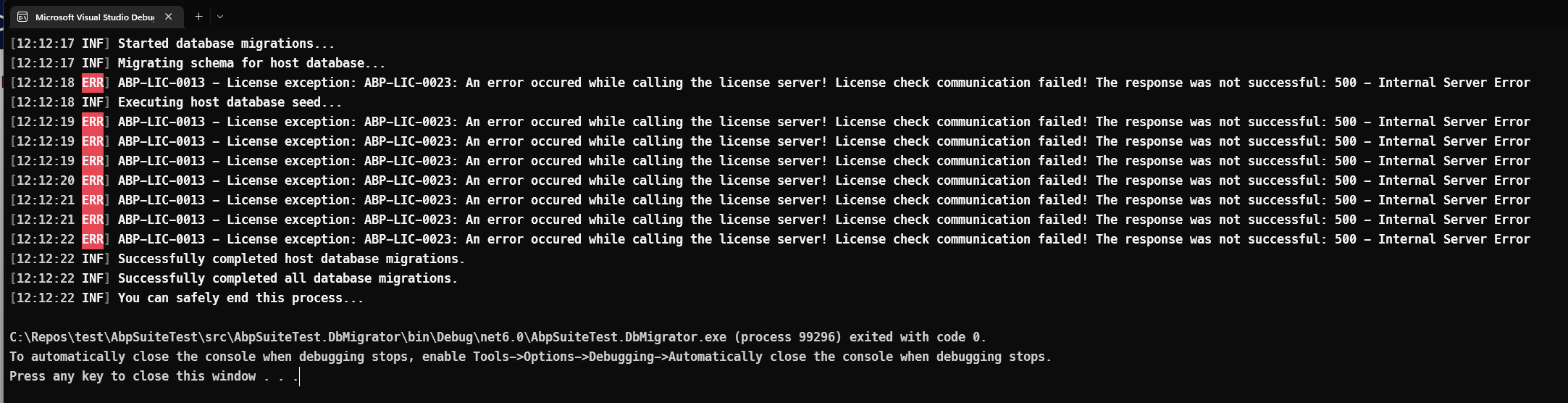
ABP-LIC-0013 - License exception: ABP-LIC-0023: An error occured while calling the license server! License check communication failed! The response was not successful: 500 - Internal Server Error
Hey :)
If I try to debug my solution I get above error. Already tried refreshing my login using abp logout and abp login.
I am not debugging inside of a container.
Need help here, because I am blocked >.< > Update: Seems like I am non blocking - just annoying
Hi jfistelmann
We are aware of MAUI Blazor's power, which makes existing blazor apps an app on each platform.
We are discussing that topic, but it's not clear yet and there will be no development about it in v6.0 as so far. Maybe in v7.0 but it's not clear, I can't say anything yet.
You can check this example: https://github.com/hikalkan/maui-abp-playing
And you can implement login flow via following this article on that infrastructure: https://community.abp.io/posts/integrating-maui-client-via-using-openid-connect-aqjjwsdf
Thank you very much. So it's nothing set in stone yet. Still collecting experience and we'll see how things evolve.
Hey,
just out of curiosity - here you say that you are using native UI instead of blazor hybrid. Is there any specific reason for that?
I wanted to take a look at blazor hybrid in order to hopefully maximize code reusage, that's why I'm asking.
hi
Please copy the
ApplicationLayoutand custom it like the default. You can download the source code of Letpton to get theApplicationLayout
Thank you, this did the trick.
To get the menu to the left side, following steps need to be performed.
First download Volo.Abp.LeptonTheme.
Then copy content from here:
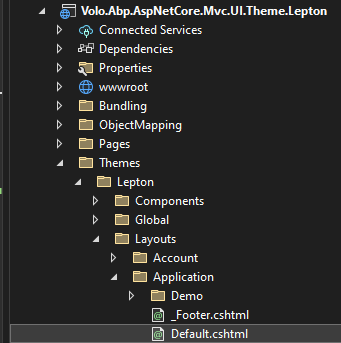
Insert it into your Default.cshtml
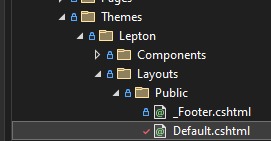
Change @await Html.PartialAsync("~/Themes/Lepton/Layouts/Application/_Footer.cshtml") to @await Html.PartialAsync("~/Themes/Lepton/Layouts/Public/_Footer.cshtml")
The drawback is that one now needs to monitor
ApplicationLayoutfor changes when updating abp
closing the issue... you can always reopen.
Hey albert :) The footer is missing, so this is not done yet :/
hi
Here's another way:
Update the
MyCompanyName.MyProjectName.Web.Public\Pages\_ViewStart.cshtmland using theGetApplicationLayout@using Volo.Abp.AspNetCore.Mvc.UI.Theming @inject IThemeManager ThemeManager @{ Layout = ThemeManager.CurrentTheme.GetApplicationLayout(); //GetPublicLayout }
Thank you, this works way better. Sadly the footer is gone >.<
hi jfistelmann
We will check this.
Hey maliming,
thank you very much. I just received an email that a ServiceBot closed this ticket. Was that on intention?