Hi, Thank you for the answare. Sorry but I need more details, I need add .resx file to localization. But this is only for Telerik Controls. Abp controls with blazorise must continue using the json files. But Telerik controls read automatically the resx files, then I only need can read this files to abp project to finally get the translations of messages. Then I need more details. How I can do to add this files to abp blazor app without create a Dictionary.
Thank you,
Johan
I need add telerik blazor resx files in spanish for localization of Telerik blazor controls. I read this answare https://support.abp.io/QA/Questions/2414/Localization-with-json-or-resx But I don't wants add this method: CreateDictionaryFromFileContent because I don't need use this translations in whole app it's only for telerik controls and this file it's changing each update of Telerik. How I can do this easily adding resx files directly to abp project?. Or referering telerik localization file directly to project?
Thank you,
Johan
Hi Shiwei,
I'm sorry this error it's coz I use Telerik controls, can you install a trial version?, and other error it's coz controls used for abp Blazorise use this nuget resourse BlazoriseMyGet, but now this source not found I don't know why. I fix that unchecked this source from nuget settings.
Thank you,
System.AggregateException: AggregateException_ctor_DefaultMessage (Could not load type Innovain.Sports.Contribution.ContributionHttpApiClientModule, INNOVAIN.SPORTS.CONTRIBUTION.HTTPAPI.CLIENT, Version=0.1.0.0, Culture=neutral, PublicKeyToken=null while decoding custom attribute: (null))
---> System.TypeLoadException: Could not load type Innovain.Sports.Contribution.ContributionHttpApiClientModule, INNOVAIN.SPORTS.CONTRIBUTION.HTTPAPI.CLIENT, Version=0.1.0.0, Culture=neutral, PublicKeyToken=null while decoding custom attribute: (null)
at System.Reflection.CustomAttribute.GetCustomAttributesBase(ICustomAttributeProvider , Type , Boolean )
at System.Reflection.CustomAttribute.GetCustomAttributes(ICustomAttributeProvider , Type , Boolean )
at System.Reflection.CustomAttribute.GetCustomAttributes(ICustomAttributeProvider , Boolean )
at System.Attribute.GetCustomAttributes(MemberInfo )
at System.Reflection.CustomAttributeExtensions.GetCustomAttributes(MemberInfo )
at Volo.Abp.Modularity.AbpModuleHelper.FindDependedModuleTypes(Type moduleType)
at Volo.Abp.Modularity.AbpModuleHelper.AddModuleAndDependenciesRecursively(List1 moduleTypes, Type moduleType, ILogger logger, Int32 depth) at Volo.Abp.Modularity.AbpModuleHelper.AddModuleAndDependenciesRecursively(List1 moduleTypes, Type moduleType, ILogger logger, Int32 depth)
at Volo.Abp.Modularity.AbpModuleHelper.FindAllModuleTypes(Type startupModuleType, ILogger logger)
at Volo.Abp.Modularity.ModuleLoader.FillModules(List1 modules, IServiceCollection services, Type startupModuleType, PlugInSourceList plugInSources) at Volo.Abp.Modularity.ModuleLoader.GetDescriptors(IServiceCollection services, Type startupModuleType, PlugInSourceList plugInSources) at Volo.Abp.Modularity.ModuleLoader.LoadModules(IServiceCollection services, Type startupModuleType, PlugInSourceList plugInSources) at Volo.Abp.AbpApplicationBase.LoadModules(IServiceCollection services, AbpApplicationCreationOptions options) at Volo.Abp.AbpApplicationBase..ctor(Type startupModuleType, IServiceCollection services, Action1 optionsAction)
at Volo.Abp.AbpApplicationWithExternalServiceProvider..ctor(Type startupModuleType, IServiceCollection services, Action1 optionsAction) at Volo.Abp.AbpApplicationFactory.Create(Type startupModuleType, IServiceCollection services, Action1 optionsAction)
at Volo.Abp.AbpApplicationFactory.Create[SportsBlazorModule](IServiceCollection services, Action1 optionsAction) at Microsoft.Extensions.DependencyInjection.ServiceCollectionApplicationExtensions.AddApplication[SportsBlazorModule](IServiceCollection services, Action1 optionsAction)
at Microsoft.AspNetCore.Components.WebAssembly.Hosting.AbpWebAssemblyHostBuilderExtensions.AddApplication[SportsBlazorModule](WebAssemblyHostBuilder builder, Action`1 options)
at Innovain.Sports.Blazor.Program.Main(String[] args)
Exception_EndOfInnerExceptionStack
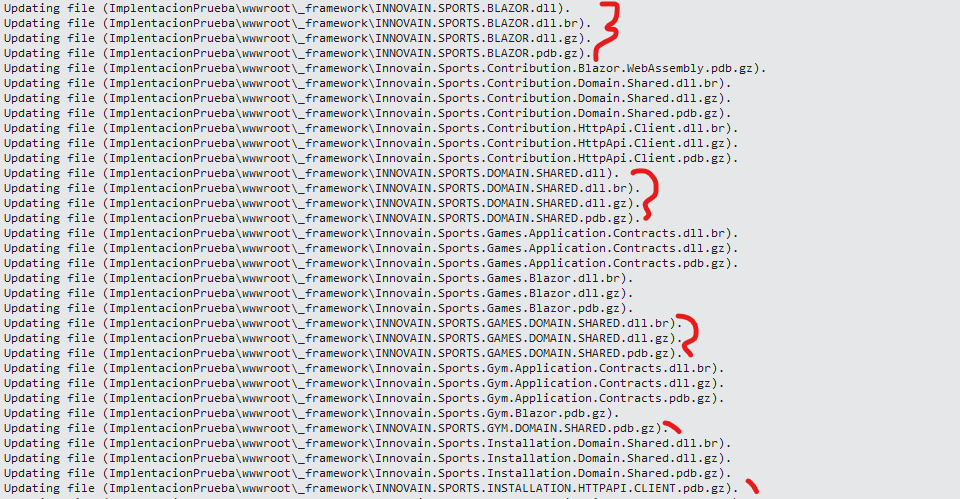
And this kind of messages when re-deploy:
44>D:\Innovain\Innovain.Sports\modules\Innovain.Sports.Games\src\Innovain.Sports.Games.Blazor\Pages\Games\Inscriptions.razor.cs(): warning CS1998: This async method lacks 'await' operators and will run synchronously. Consider using the 'await' operator to await non-blocking API calls, or 'await Task.Run(...)' to do CPU-bound work on a background thread. 64>INNOVAIN.SPORTS.CONTRIBUTION.HTTPAPI.CLIENT -> D:\INNOVAIN\INNOVAIN.SPORTS\MODULES\INNOVAIN.SPORTS.CONTRIBUTION\SRC\INNOVAIN.SPORTS.CONTRIBUTION.HTTPAPI.CLIENT\bin\Debug\netstandard2.0\INNOVAIN.SPORTS.CONTRIBUTION.HTTPAPI.CLIENT.dll 64>Innovain.Sports.Contribution.HttpApi.Client -> D:\Innovain\Innovain.Sports\modules\Innovain.Sports.Contribution\src\Innovain.Sports.Contribution.HttpApi.Client\bin\Debug\net7.0\Innovain.Sports.Contribution.HttpApi.Client.dll 59>INNOVAIN.SPORTS.GAMES.HTTPAPI.CLIENT -> D:\INNOVAIN\INNOVAIN.SPORTS\MODULES\INNOVAIN.SPORTS.GAMES\SRC\INNOVAIN.SPORTS.GAMES.HTTPAPI.CLIENT\bin\Debug\netstandard2.0\INNOVAIN.SPORTS.GAMES.HTTPAPI.CLIENT.dll 66>------ Rebuild All started: Project: Innovain.Sports.Games.HttpApi.Client.ConsoleTestApp, Configuration: Debug Any CPU ------
Thank you,
I need know how I can do to get api URL from separated blazor wasm module, if I write this:
var apiURL = _configuration.GetValue<string>("RemoteServices:BaseUrl");
Return null, coz it's called in module not in root application:
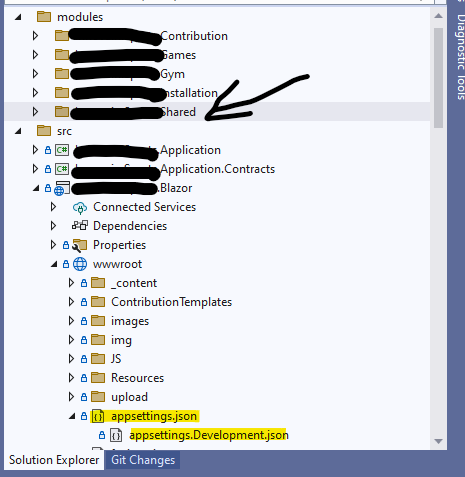
I need get BaseURL of blazor root application appsettings.json but from a module:
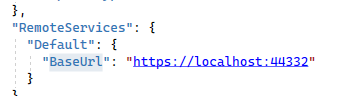
Thank you, I modified this file, and now found.
Hi now all abp project it's in 7.1.1 but I get this error:
ABP CLI 7.1.1 Generating style bundle... Style bundle has been generated successfully. Generating script bundle... Script bundle has been generated successfully. StartIndex cannot be less than zero. (Parameter 'startIndex') System.ArgumentOutOfRangeException: StartIndex cannot be less than zero. (Parameter 'startIndex') at System.String.Remove(Int32 startIndex, Int32 count) at Volo.Abp.Cli.Bundling.BundlingService.UpdatePlaceholders(String content, String placeholderStart, String placeholderEnd, String definitions) in D:\ci\Jenkins\workspace\abp-framework-release\abp\framework\src\Volo.Abp.Cli.Core\Volo\Abp\Cli\Bundling\BundlingService.cs:line 186 at Volo.Abp.Cli.Bundling.BundlingService.UpdateDependenciesInHtmlFileAsync(String directory, String styleDefinitions, String scriptDefinitions) in D:\ci\Jenkins\workspace\abp-framework-release\abp\framework\src\Volo.Abp.Cli.Core\Volo\Abp\Cli\Bundling\BundlingService.cs:line 171 at Volo.Abp.Cli.Bundling.BundlingService.BundleAsync(String directory, Boolean forceBuild, String projectType) in D:\ci\Jenkins\workspace\abp-framework-release\abp\framework\src\Volo.Abp.Cli.Core\Volo\Abp\Cli\Bundling\BundlingService.cs:line 107 at Volo.Abp.Cli.Commands.BundleCommand.ExecuteAsync(CommandLineArgs commandLineArgs) in D:\ci\Jenkins\workspace\abp-framework-release\abp\framework\src\Volo.Abp.Cli.Core\Volo\Abp\Cli\Commands\BundleCommand.cs:line 47 at Volo.Abp.Cli.CliService.RunInternalAsync(CommandLineArgs commandLineArgs) in D:\ci\Jenkins\workspace\abp-framework-release\abp\framework\src\Volo.Abp.Cli.Core\Volo\Abp\Cli\CliService.cs:line 169 at Volo.Abp.Cli.CliService.RunAsync(String[] args) in D:\ci\Jenkins\workspace\abp-framework-release\abp\framework\src\Volo.Abp.Cli.Core\Volo\Abp\Cli\CliService.cs:line 77
Hi,
I also followed this:
https://support.abp.io/QA/Questions/4294/Error-after-upgrading-6x-to-70-in-Blazor-WASM
I changed method. But command abp bundle not found for me in 7.1 I get next error:
ABP CLI 7.1.1 Unable to load one or more of the requested types. Could not load file or assembly 'Volo.Abp.Core, Version=7.2.0.0, Culture=neutral, PublicKeyToken=null'. Could not find or load a specific file. (0x80131621) System.Reflection.ReflectionTypeLoadException: Unable to load one or more of the requested types. Could not load file or assembly 'Volo.Abp.Core, Version=7.2.0.0, Culture=neutral, PublicKeyToken=null'. Could not find or load a specific file. (0x80131621) at System.Reflection.RuntimeModule.GetTypes(RuntimeModule module) at System.Reflection.Assembly.GetTypes() at Volo.Abp.Cli.Bundling.BundlingService.GetStartupModule(String assemblyPath) in D:\ci\Jenkins\workspace\abp-framework-release\abp\framework\src\Volo.Abp.Cli.Core\Volo\Abp\Cli\Bundling\BundlingService.cs:line 291 at Volo.Abp.Cli.Bundling.BundlingService.BundleAsync(String directory, Boolean forceBuild, String projectType) in D:\ci\Jenkins\workspace\abp-framework-release\abp\framework\src\Volo.Abp.Cli.Core\Volo\Abp\Cli\Bundling\BundlingService.cs:line 68 at Volo.Abp.Cli.Commands.BundleCommand.ExecuteAsync(CommandLineArgs commandLineArgs) in D:\ci\Jenkins\workspace\abp-framework-release\abp\framework\src\Volo.Abp.Cli.Core\Volo\Abp\Cli\Commands\BundleCommand.cs:line 47 at Volo.Abp.Cli.CliService.RunInternalAsync(CommandLineArgs commandLineArgs) in D:\ci\Jenkins\workspace\abp-framework-release\abp\framework\src\Volo.Abp.Cli.Core\Volo\Abp\Cli\CliService.cs:line 169 at Volo.Abp.Cli.CliService.RunAsync(String[] args) in D:\ci\Jenkins\workspace\abp-framework-release\abp\framework\src\Volo.Abp.Cli.Core\Volo\Abp\Cli\CliService.cs:line 77 System.IO.FileLoadException: Could not load file or assembly 'Volo.Abp.Core, Version=7.2.0.0, Culture=neutral, PublicKeyToken=null'. Could not find or load a specific file. (0x80131621) File name: 'Volo.Abp.Core, Version=7.2.0.0, Culture=neutral, PublicKeyToken=null' ---> System.IO.FileLoadException: Could not load file or assembly 'Volo.Abp.Core, Version=7.2.0.0, Culture=neutral, PublicKeyToken=null'. at System.Runtime.Loader.AssemblyLoadContext.<LoadFromPath>g____PInvoke|5_0(IntPtr ptrNativeAssemblyBinder, UInt16* ilPath, UInt16* niPath, ObjectHandleOnStack retAssembly) at System.Runtime.Loader.AssemblyLoadContext.LoadFromAssemblyPath(String assemblyPath) at System.Reflection.Assembly.LoadFrom(String assemblyFile) at System.Reflection.Assembly.LoadFromResolveHandler(Object sender, ResolveEventArgs args) at System.Runtime.Loader.AssemblyLoadContext.InvokeResolveEvent(ResolveEventHandler eventHandler, RuntimeAssembly assembly, String name)
If I install 7.2.0 version I get next error: ABP CLI 7.2.0-rc.1 Generating style bundle... Style bundle has been generated successfully. Generating script bundle... Script bundle has been generated successfully. StartIndex cannot be less than zero. (Parameter 'startIndex') System.ArgumentOutOfRangeException: StartIndex cannot be less than zero. (Parameter 'startIndex') at System.String.Remove(Int32 startIndex, Int32 count) at Volo.Abp.Cli.Bundling.BundlingService.UpdatePlaceholders(String content, String placeholderStart, String placeholderEnd, String definitions) in D:\ci\Jenkins\workspace\abp-volo-release\abp\framework\src\Volo.Abp.Cli.Core\Volo\Abp\Cli\Bundling\BundlingService.cs:line 186 at Volo.Abp.Cli.Bundling.BundlingService.UpdateDependenciesInHtmlFileAsync(String directory, String styleDefinitions, String scriptDefinitions) in D:\ci\Jenkins\workspace\abp-volo-release\abp\framework\src\Volo.Abp.Cli.Core\Volo\Abp\Cli\Bundling\BundlingService.cs:line 171 at Volo.Abp.Cli.Bundling.BundlingService.BundleAsync(String directory, Boolean forceBuild, String projectType) in D:\ci\Jenkins\workspace\abp-volo-release\abp\framework\src\Volo.Abp.Cli.Core\Volo\Abp\Cli\Bundling\BundlingService.cs:line 107 at Volo.Abp.Cli.Commands.BundleCommand.ExecuteAsync(CommandLineArgs commandLineArgs) in D:\ci\Jenkins\workspace\abp-volo-release\abp\framework\src\Volo.Abp.Cli.Core\Volo\Abp\Cli\Commands\BundleCommand.cs:line 47 at Volo.Abp.Cli.CliService.RunInternalAsync(CommandLineArgs commandLineArgs) in D:\ci\Jenkins\workspace\abp-volo-release\abp\framework\src\Volo.Abp.Cli.Core\Volo\Abp\Cli\CliService.cs:line 169 at Volo.Abp.Cli.CliService.RunAsync(String[] args) in D:\ci\Jenkins\workspace\abp-volo-release\abp\framework\src\Volo.Abp.Cli.Core\Volo\Abp\Cli\CliService.cs:line 77
Ok I followed this migration guides sure, but I think missing important things, well I created a new project with suite 7.1. And I fixed lot of my problems.
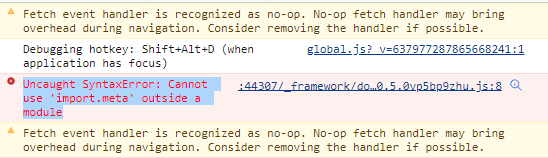
But now Blazor WebAssembly it's not charging.
In console log of web browser I see this error:
Thank you,
Hi, I already fixed this error, coz I didn't know public web site must be migrated to LeptonX, and I don't know if you have a guide to migrate public website to this, I can't found. Well I created new project and compare with my project and I do the corrections. But now I have other problem, after migrate to .Net 7 I having this issue:
[17:08:22 INF] User profile is available. Using 'C:\Users\AppData\Local\ASP.NET\DataProtection-Keys' as key repository and Windows DPAPI to encrypt keys at rest.
[17:08:23 INF] Initializing UI Database
[17:08:23 FTL] Host terminated unexpectedly!
System.MissingMethodException: Method not found: 'System.Collections.Generic.IList1<Microsoft.EntityFrameworkCore.Metadata.Conventions.IModelFinalizingConvention> Microsoft.EntityFrameworkCore.Metadata.Conventions.ConventionSet.get_ModelFinalizingConventions()'. at Microsoft.EntityFrameworkCore.InMemory.Metadata.Conventions.InMemoryConventionSetBuilder.CreateConventionSet() at Microsoft.EntityFrameworkCore.Metadata.Conventions.Internal.RuntimeConventionSetBuilder.CreateConventionSet() at Microsoft.EntityFrameworkCore.Infrastructure.ModelSource.CreateModel(DbContext context, IConventionSetBuilder conventionSetBuilder, ModelDependencies modelDependencies) at Microsoft.EntityFrameworkCore.Infrastructure.ModelSource.GetModel(DbContext context, ModelCreationDependencies modelCreationDependencies, Boolean designTime) at Microsoft.EntityFrameworkCore.Internal.DbContextServices.CreateModel(Boolean designTime) at Microsoft.EntityFrameworkCore.Internal.DbContextServices.get_Model() at Microsoft.EntityFrameworkCore.Infrastructure.EntityFrameworkServicesBuilder.<>c.<TryAddCoreServices>b__8_4(IServiceProvider p) at Microsoft.Extensions.DependencyInjection.ServiceLookup.CallSiteVisitor2.VisitCallSiteMain(ServiceCallSite callSite, TArgument argument)
at Microsoft.Extensions.DependencyInjection.ServiceLookup.CallSiteRuntimeResolver.VisitCache(ServiceCallSite callSite, RuntimeResolverContext context, ServiceProviderEngineScope serviceProviderEngine, RuntimeResolverLock lockType)
at Microsoft.Extensions.DependencyInjection.ServiceLookup.CallSiteRuntimeResolver.VisitScopeCache(ServiceCallSite callSite, RuntimeResolverContext context)
at Microsoft.Extensions.DependencyInjection.ServiceLookup.CallSiteVisitor2.VisitCallSite(ServiceCallSite callSite, TArgument argument) at Microsoft.Extensions.DependencyInjection.ServiceLookup.CallSiteRuntimeResolver.VisitConstructor(ConstructorCallSite constructorCallSite, RuntimeResolverContext context) at Microsoft.Extensions.DependencyInjection.ServiceLookup.CallSiteVisitor2.VisitCallSiteMain(ServiceCallSite callSite, TArgument argument)
at Microsoft.Extensions.DependencyInjection.ServiceLookup.CallSiteRuntimeResolver.VisitCache(ServiceCallSite callSite, RuntimeResolverContext context, ServiceProviderEngineScope serviceProviderEngine, RuntimeResolverLock lockType)
at Microsoft.Extensions.DependencyInjection.ServiceLookup.CallSiteRuntimeResolver.VisitScopeCache(ServiceCallSite callSite, RuntimeResolverContext context)
at Microsoft.Extensions.DependencyInjection.ServiceLookup.CallSiteVisitor2.VisitCallSite(ServiceCallSite callSite, TArgument argument) at Microsoft.Extensions.DependencyInjection.ServiceLookup.CallSiteRuntimeResolver.VisitConstructor(ConstructorCallSite constructorCallSite, RuntimeResolverContext context) at Microsoft.Extensions.DependencyInjection.ServiceLookup.CallSiteVisitor2.VisitCallSiteMain(ServiceCallSite callSite, TArgument argument)
at Microsoft.Extensions.DependencyInjection.ServiceLookup.CallSiteRuntimeResolver.VisitCache(ServiceCallSite callSite, RuntimeResolverContext context, ServiceProviderEngineScope serviceProviderEngine, RuntimeResolverLock lockType)
at Microsoft.Extensions.DependencyInjection.ServiceLookup.CallSiteRuntimeResolver.VisitScopeCache(ServiceCallSite callSite, RuntimeResolverContext context)
at Microsoft.Extensions.DependencyInjection.ServiceLookup.CallSiteVisitor2.VisitCallSite(ServiceCallSite callSite, TArgument argument) at Microsoft.Extensions.DependencyInjection.ServiceLookup.CallSiteRuntimeResolver.VisitConstructor(ConstructorCallSite constructorCallSite, RuntimeResolverContext context) at Microsoft.Extensions.DependencyInjection.ServiceLookup.CallSiteVisitor2.VisitCallSiteMain(ServiceCallSite callSite, TArgument argument)
at Microsoft.Extensions.DependencyInjection.ServiceLookup.CallSiteRuntimeResolver.VisitCache(ServiceCallSite callSite, RuntimeResolverContext context, ServiceProviderEngineScope serviceProviderEngine, RuntimeResolverLock lockType)
at Microsoft.Extensions.DependencyInjection.ServiceLookup.CallSiteRuntimeResolver.VisitScopeCache(ServiceCallSite callSite, RuntimeResolverContext context)
at Microsoft.Extensions.DependencyInjection.ServiceLookup.CallSiteVisitor2.VisitCallSite(ServiceCallSite callSite, TArgument argument) at Microsoft.Extensions.DependencyInjection.ServiceLookup.CallSiteRuntimeResolver.VisitConstructor(ConstructorCallSite constructorCallSite, RuntimeResolverContext context) at Microsoft.Extensions.DependencyInjection.ServiceLookup.CallSiteVisitor2.VisitCallSiteMain(ServiceCallSite callSite, TArgument argument)
at Microsoft.Extensions.DependencyInjection.ServiceLookup.CallSiteRuntimeResolver.VisitCache(ServiceCallSite callSite, RuntimeResolverContext context, ServiceProviderEngineScope serviceProviderEngine, RuntimeResolverLock lockType)
at Microsoft.Extensions.DependencyInjection.ServiceLookup.CallSiteRuntimeResolver.VisitScopeCache(ServiceCallSite callSite, RuntimeResolverContext context)
at Microsoft.Extensions.DependencyInjection.ServiceLookup.CallSiteVisitor2.VisitCallSite(ServiceCallSite callSite, TArgument argument) at Microsoft.Extensions.DependencyInjection.ServiceLookup.CallSiteRuntimeResolver.VisitConstructor(ConstructorCallSite constructorCallSite, RuntimeResolverContext context) at Microsoft.Extensions.DependencyInjection.ServiceLookup.CallSiteVisitor2.VisitCallSiteMain(ServiceCallSite callSite, TArgument argument)
at Microsoft.Extensions.DependencyInjection.ServiceLookup.CallSiteRuntimeResolver.VisitCache(ServiceCallSite callSite, RuntimeResolverContext context, ServiceProviderEngineScope serviceProviderEngine, RuntimeResolverLock lockType)
at Microsoft.Extensions.DependencyInjection.ServiceLookup.CallSiteRuntimeResolver.VisitScopeCache(ServiceCallSite callSite, RuntimeResolverContext context)
at Microsoft.Extensions.DependencyInjection.ServiceLookup.CallSiteVisitor2.VisitCallSite(ServiceCallSite callSite, TArgument argument) at Microsoft.Extensions.DependencyInjection.ServiceLookup.CallSiteRuntimeResolver.Resolve(ServiceCallSite callSite, ServiceProviderEngineScope scope) at Microsoft.Extensions.DependencyInjection.ServiceLookup.DynamicServiceProviderEngine.<>c__DisplayClass2_0.<RealizeService>b__0(ServiceProviderEngineScope scope) at Microsoft.Extensions.DependencyInjection.ServiceProvider.GetService(Type serviceType, ServiceProviderEngineScope serviceProviderEngineScope) at Microsoft.Extensions.DependencyInjection.ServiceProviderServiceExtensions.GetRequiredService(IServiceProvider provider, Type serviceType) at Microsoft.Extensions.DependencyInjection.ServiceProviderServiceExtensions.GetRequiredService[T](IServiceProvider provider) at Microsoft.EntityFrameworkCore.DbContext.get_DbContextDependencies() at Microsoft.EntityFrameworkCore.DbContext.get_ContextServices() at Microsoft.EntityFrameworkCore.DbContext.get_InternalServiceProvider() at Microsoft.EntityFrameworkCore.DbContext.Microsoft.EntityFrameworkCore.Infrastructure.IInfrastructure<System.IServiceProvider>.get_Instance() at Microsoft.EntityFrameworkCore.Infrastructure.Internal.InfrastructureExtensions.GetService[TService](IInfrastructure1 accessor)
at Microsoft.EntityFrameworkCore.Infrastructure.AccessorExtensions.GetService[TService](IInfrastructure`1 accessor)
at Microsoft.EntityFrameworkCore.Infrastructure.DatabaseFacade.get_ProviderName()
at Microsoft.EntityFrameworkCore.DatabaseFacadeExtensions.IsInMemory(DatabaseFacade database) in //src/HealthChecks.UI/Extensions/DatabaseFacadeExtensions.cs:line 11
at HealthChecks.UI.Core.HostedService.UIInitializationHostedService.ShouldMigrateDatabaseAsync(HealthChecksDb context) in //src/HealthChecks.UI/Core/HostedService/UIInitializationHostedService.cs:line 107
at HealthChecks.UI.Core.HostedService.UIInitializationHostedService.InitializeDatabaseAsync(IServiceProvider sp) in //src/HealthChecks.UI/Core/HostedService/UIInitializationHostedService.cs:line 48
at HealthChecks.UI.Core.HostedService.UIInitializationHostedService.StartAsync(CancellationToken cancellationToken) in //src/HealthChecks.UI/Core/HostedService/UIInitializationHostedService.cs:line 34
at Microsoft.Extensions.Hosting.Internal.Host.StartAsync(CancellationToken cancellationToken)
at Microsoft.Extensions.Hosting.HostingAbstractionsHostExtensions.RunAsync(IHost host, CancellationToken token)
at Microsoft.Extensions.Hosting.HostingAbstractionsHostExtensions.RunAsync(IHost host, CancellationToken token)
at Microsoft.Extensions.Hosting.HostingAbstractionsHostExtensions.Run(IHost host)
at Innovain.Sports.Program.Main(String[] args) in D:\Innovain\Innovain.Sports\src\Innovain.Sports.HttpApi.Host\Program.cs:line 32









