public class AssessmentFileColumnDto
{
    public string ColumnName { get; set; }
    public int From { get; set; }
    public int To { get; set; }
}
also if it helps, the example i sent above is sending of the file stream and extra data as 2 different properties to the endpoint.
This code base is using sends only one property containing the stream and the extra data i get a similar error
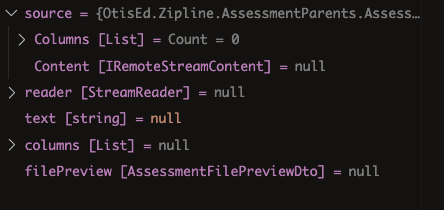
this the Service method
    public async Task<AssessmentFilePreviewDto> FilePreview2Async(AssessmentPreviewFixedFileDto source)
    {
        using var reader = new StreamReader(source.Content.GetStream());
        var text = await reader.ReadToEndAsync();

        // Get columns
        var columns = source.Columns;

        var filePreview = new AssessmentFilePreviewDto
        {
            Content = text.Trim('\0')
        };

        return filePreview;
    }
public class AssessmentPreviewFixedFileDto
{
    public IRemoteStreamContent Content { get; set; }
    public List<AssessmentFileColumnDto> Columns { get; set; }
}
here's the special form binding
Configure<AbpAspNetCoreMvcOptions>(options =>
{              options.ConventionalControllers.FormBodyBindingIgnoredTypes.Add(typeof(AssessmentPreviewFixedFileDto));
});
  previewFile(fileDto: AssessmentFileDto): void {
    this.parentService
      .filePreview2({
        content: fileDto as any,
        columns: [{ columnName: 'Col', from: 1, to: 3 }],
      })
      .subscribe(res => {
        const file = res.content;

        const csv = this.fileHelperService.parseCsv(
          file,
          this.parentHelperService.getDelimiter(fileDto['delimiter']),
        );

        this.csvFile = {
          headers: csv.meta.fields,
          rows: csv.data,
          errors: csv.errors,
        };

        this.isPreviewing = true;
      });
  }
proxy
  filePreview2 = (source: AssessmentPreviewFixedFileDto, config?: Partial<Rest.Config>) =>
    this.restService.request<any, AssessmentFilePreviewDto>({
      method: 'GET',
      url: '/api/app/assessment-parents/preview-2',
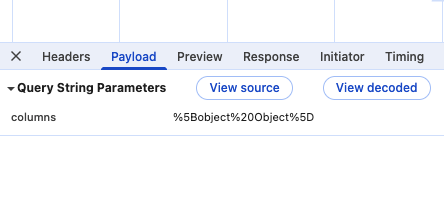
      params: { columns: source.columns },
      body: source.content,
    },
    { apiName: this.apiName,...config });
browser request
if u want i can share all the code, i still have ur email. or i can do something online w/ u. or if u have something u want me to try, i am willing to try out
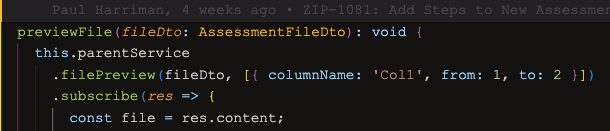
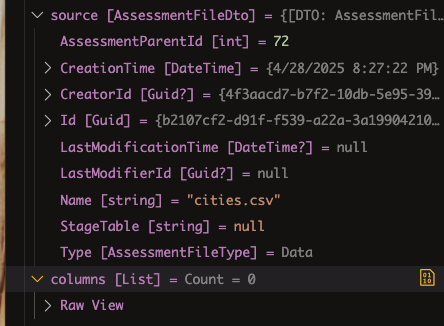
Since i already have a work around, i had to put back some of the code, but in the application, i get the source, no columns

I would like to know the answer on this question. But in truth I am using a work-around, So whenever I can get an answer will be good. We do have another ticket that is more pressing, and any attention that can be given to it, even though my ticket might take longer to resolve would be good: https://abp.io/support/questions/9225/401-on-ABP-API-Using-External-OpenID-Access-Token-Works-from-Browser-and-Swagger
Trying to upload a file with some other input data. I can send just the file up as a single input using this as an input: IRemoteStreamContent Content. but i need to send some other parameters.
I got an error that it could not deserialize my input dto so i added this to my module. This gets me by the Deserialization error, but my input has no data
        Configure<AbpAspNetCoreMvcOptions>(options =>
        {
            options.ConventionalControllers.FormBodyBindingIgnoredTypes.Add(typeof(PreviewFixedFileDto));
        });
interface for data i want to send to the end point
    public class PreviewFixedFileDto
    {
        public IRemoteStreamContent Content { get; set; }
        public List<AssessmentFileColumnDto> Columns { get; set; }
    }
public class FileColumnDto
{
    public string ColumnName { get; set; }
    public int From { get; set; }
    public int To { get; set; }
}
Angular Code
  previewFile(): void {
    const formData = new FormData();
    formData.append('source', this.file());

    this.parentService
      .fixedFilePreview({
        content: formData as any,
        columns: this.rows,
      })
      .subscribe(res => {
        console.log(res);
      });
  }
Also tried this:
  previewFile(): void {
    const formData = new FormData();
    formData.append('source', this.file());

    this.service
      .fixedFilePreview({
        content: {
          fileName: this.file().name,
          contentType: this.file().type,
          contentLength: this.file().size,
        },
        columns: this.rows,
      })
      .subscribe(res => {
        console.log(res);
      });
  }

I might have found something that works
I changed the Entity to inherit from Entity<long>
added
        [NotMapped]
        public override long Id
        {
            get { return 0; }
            protected set { }
        }
change the repo to public class EfCoreEdRepository : EfCoreRepository<DataDbContext, Ed>
I need to access 3 entities that do not have a primary key. the access needed is read only. It looks like I can do it from reading the documentation, but I am having difficulties.
For these entities i just need to show them in a grid and do some paging, filtering and advanced finds. So all I need is GetListAsync
we cannot update to .net 9, because of contract reasons. can we simply update the front-end to 9.1 without any bad side affects? we did update to 9.0.4 to get rid of the console errors for the for loop tracking issues
Was the External Provider settings removed?

We will try to dynamically patch the route w/ the route id and see if that works. so instead of putting code to patch the route in the app.component, we will put that code in the component we are navigating to
--UPDATE-- got a little bit further. we have some side effects with the left nav Models always being selected, even when we click on something like Home. thinking we need to unpatch. will give it some more time tomorrow
then, this solution will not work for us. our situation is we have a something like this:
Database Table Column
this first view shows all the databases then the user will select a database to see all the tables then the user select a table to see all the columns
if we cannot have an id as part of the route, then we would need to push navigation state to a service or something akin where state is not held in the routes.









