Hi ABP Support,
Using abp get-source Volo.Abp.LeptonXTheme -v 5.4.0 fails to download the source code. However, running the same command without specifying the version downloads successfully.
Environment:
3.0.6/Users/rex/.dotnet/tools/abpVolo.Abp.LeptonXTheme5.4.0/Users/rex/Downloads/tmpException message and full stack trace:
└─[$] abp get-source Volo.Abp.LeptonXTheme -v 5.4.0                   [10:36:08
[10:37:07 INF] Downloading source code of Volo.Abp.LeptonXTheme (v5.4.0)
[10:37:07 INF] Output folder: /Users/rex/Downloads/tmp
[10:37:24 ERR] Downloading source code failed for: Volo.Abp.LeptonXTheme
Volo.Abp.Studio.AbpStudioException: Exception of type
'Volo.Abp.Studio.AbpStudioException' was thrown.
  at async Task Volo.Abp.Studio.Modules.Installing.SourceCodeDownloader.
     DownloadSourceCodeAsync(string moduleName, string targetFolder, string
     version, bool includeNightly)
  at async Task Volo.Abp.Studio.Cli.Commands.StudioGetSourceCommand.ExecuteAsync(
     CommandLineArgs commandLineArgs)
  at async Task Volo.Abp.Studio.Cli.StudioCliService.RunInternalAsync(
     CommandLineArgs commandLineArgs)
  at async Task Volo.Abp.Studio.Cli.StudioCliService.RunAsync(string[] args)
┌─[rex@9f75d7da9134] - [~/Downloads/tmp] - [10737]
Steps to reproduce the issue:
/Users/rex/Downloads/tmp.abp get-source Volo.Abp.LeptonXTheme -v 5.4.0
Volo.Abp.Studio.AbpStudioException.abp get-source Volo.Abp.LeptonXTheme
Expected result:
abp get-source Volo.Abp.LeptonXTheme -v 5.4.0 should download the Volo.Abp.LeptonXTheme source code for version 5.4.0, or return a clear error message if that version is not available.
Actual result:
The version-specific download fails with a generic Volo.Abp.Studio.AbpStudioException, while the command without -v 5.4.0 works.
We are currently planning an upgrade of our system to ABP 10 and noticed that starting from ABP 10, the framework replaces AutoMapper with Mapperly as the default object mapping solution.
We would like to clarify the following points regarding this change:
Is it technically supported to use AutoMapper and Mapperly simultaneously within the same ABP 10+ application?
If both mapping libraries can coexist, are there any recommended best practices, limitations, or potential conflicts we should be aware of?
From the framework design perspective, does ABP 10 intend for Mapperly to fully replace AutoMapper, meaning that projects upgrading to ABP 10 are expected to standardize entirely on Mapperly?
If partial coexistence is possible, would this be officially supported long-term, or is it only considered a temporary transition approach?
Are there any migration guidelines or recommended strategies for projects that have extensive existing AutoMapper profiles and mappings?
Our current system contains a significant number of existing AutoMapper configurations. Before making architectural decisions, we would like to understand whether we must fully migrate to Mapperly or whether a phased transition strategy is officially supported and recommended.
Thank you very much for your guidance. We appreciate your clarification so that we can make the appropriate architectural decision for our upgrade.
We are using Angular + AuthServer (OpenIddict) for authentication, but the client reported that it takes 3-5 seconds from opening the application to reaching the login page. Is this normal, or how can we speed up this process?
I originally wanted to extend my subscription for one year. The original price was discounted by 40%, but why is the Black Friday discount even smaller now?
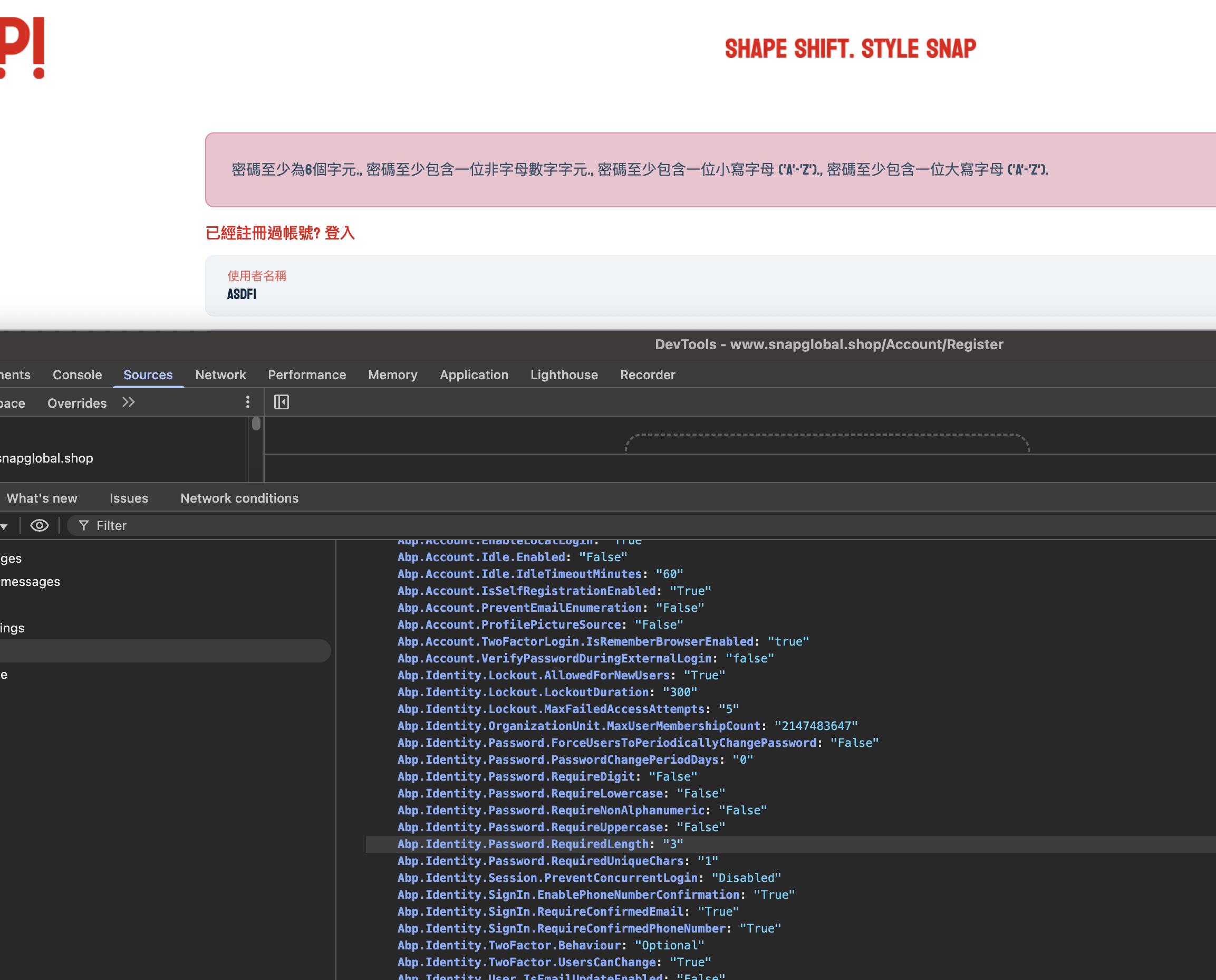
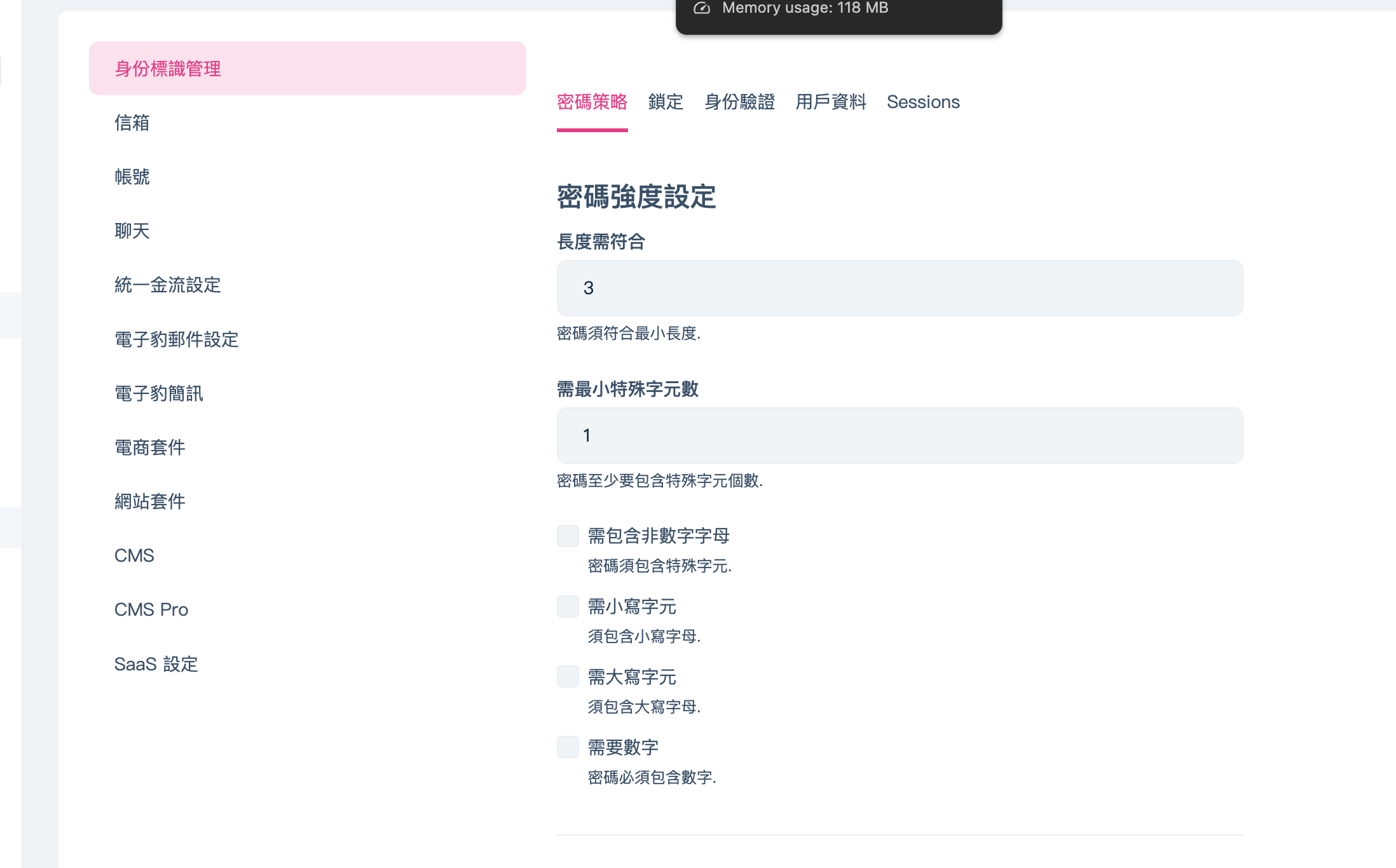
For example, I set the password length to 3 in the backend, but the frontend validation still requires a length of 6 when submitting.
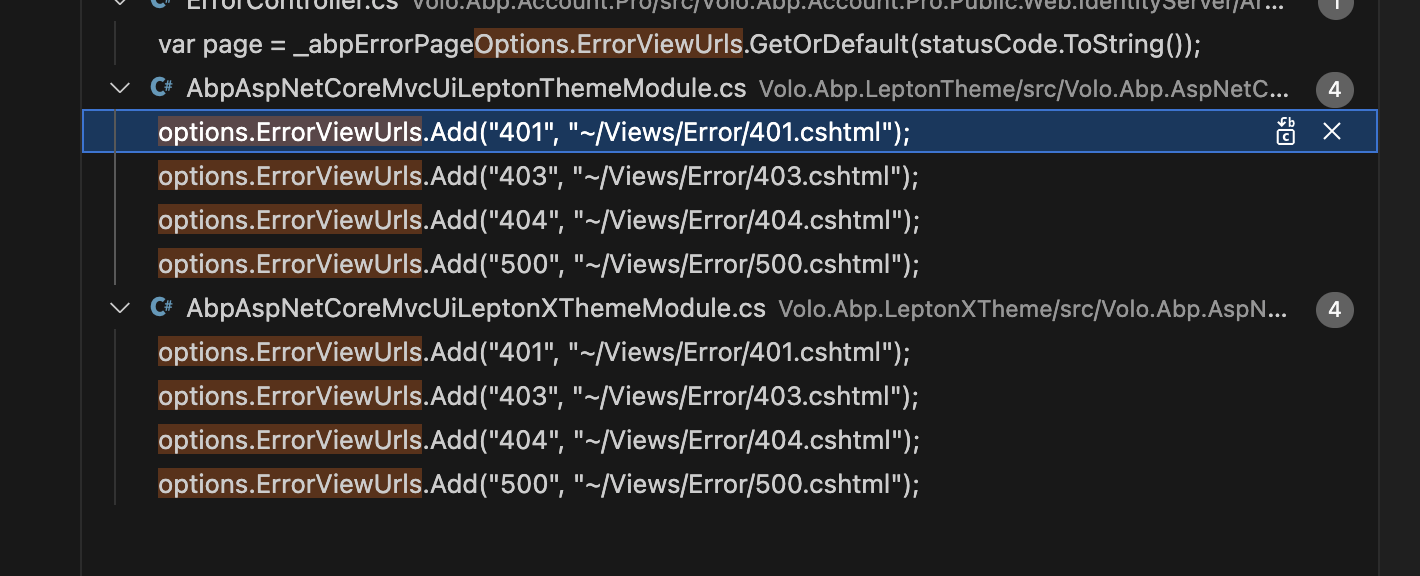
I tried to resolve it through inheritance, but it caused another error.
using Microsoft.Extensions.DependencyInjection;
using Volo.Abp.AspNetCore.Mvc.UI.Bundling;
using Volo.Abp.AspNetCore.Mvc.UI.Packages.JsTree;
using Volo.Abp.AspNetCore.Mvc.UI.Theme.Lepton;
using Volo.Abp.AspNetCore.Mvc.UI.Theme.Lepton.Bundling;
using Volo.Abp.AspNetCore.Mvc.UI.Theme.Lepton.ObjectMapping;
using Volo.Abp.AspNetCore.Mvc.UI.Theme.Lepton.Themes.Lepton.Libraries.JsTree;
using Volo.Abp.AspNetCore.Mvc.UI.Theme.Lepton.Toolbars;
using Volo.Abp.AspNetCore.Mvc.UI.Theme.Shared;
using Volo.Abp.AspNetCore.Mvc.UI.Theme.Shared.Bundling;
using Volo.Abp.AspNetCore.Mvc.UI.Theme.Shared.Toolbars;
using Volo.Abp.AspNetCore.Mvc.UI.Theming;
using Volo.Abp.AutoMapper;
using Volo.Abp.Modularity;
using Volo.Abp.VirtualFileSystem;

namespace Mulan.One.Public.Web.Themes.Lepton;

public class MulanAbpAspNetCoreMvcUiLeptonThemeModule : AbpAspNetCoreMvcUiLeptonThemeModule
{
    public override void ConfigureServices(ServiceConfigurationContext context)
    {
        Configure<AbpThemingOptions>(options =>
        {
            options.Themes.Add<LeptonTheme>();

            if (options.DefaultThemeName == null)
            {
                options.DefaultThemeName = LeptonTheme.Name;
            }
        });

        // 和 LeptonXTheme 重覆了,會造成 runtime 錯誤
        // ArgumentException: An item with the same key has already been added. Key: 401
        // Configure<AbpErrorPageOptions>(options =>
        // {
        //     options.ErrorViewUrls.Add("401", "~/Views/Error/401.cshtml");
        //     options.ErrorViewUrls.Add("403", "~/Views/Error/403.cshtml");
        //     options.ErrorViewUrls.Add("404", "~/Views/Error/404.cshtml");
        //     options.ErrorViewUrls.Add("500", "~/Views/Error/500.cshtml");
        // });

        Configure<AbpVirtualFileSystemOptions>(options =>
        {
            options.FileSets.AddEmbedded<AbpAspNetCoreMvcUiLeptonThemeModule>();
        });

        Configure<AbpToolbarOptions>(options =>
        {
            options.Contributors.Add(new LeptonThemeMainTopToolbarContributor());
        });

        Configure<AbpBundlingOptions>(options =>
        {
            options
                .StyleBundles
                .Add(LeptonThemeBundles.Styles.Global, bundle =>
                {
                    bundle
                        .AddBaseBundles(StandardBundles.Styles.Global)
                        .AddContributors(typeof(LeptonGlobalStyleContributor));
                });

            options
                .ScriptBundles
                .Add(LeptonThemeBundles.Scripts.Global, bundle =>
                {
                    bundle
                        .AddBaseBundles(StandardBundles.Scripts.Global)
                        .AddContributors(typeof(LeptonGlobalScriptContributor));
                });
        });

        Configure<AbpBundleContributorOptions>(options =>
        {
            options.Extensions<JsTreeStyleContributor>()
                .Add<LeptonJsTreeStyleContributorExtension>();
        });

        context.Services.AddAutoMapperObjectMapper<AbpAspNetCoreMvcUiLeptonThemeModule>();

        Configure<AbpAutoMapperOptions>(options =>
        {
            options.AddProfile<LeptonThemeAutoMapperProfile>(validate: true);
        });
    }
}
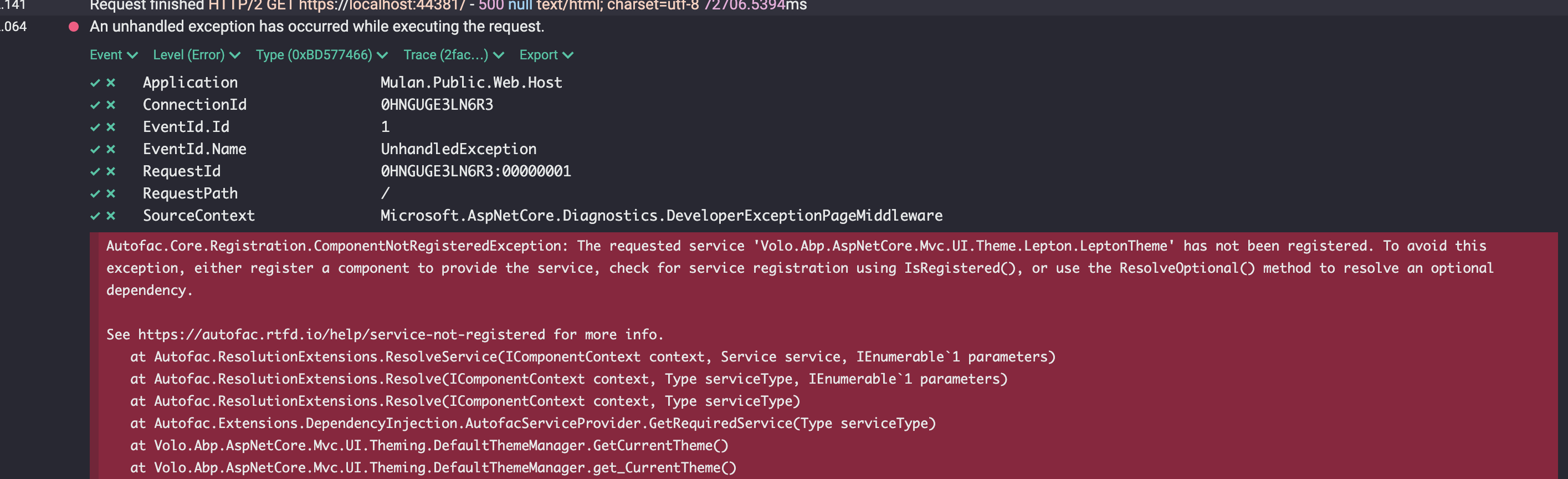
Are there any solutions to this problem?
internal class Program { private static async Task Main(string[] args) { using var app = await AbpApplicationFactory.CreateAsync<AbpEmailingModule>();
    await app.InitializeAsync();

    var settingProvider = app.ServiceProvider.GetRequiredService<ISettingProvider>();

    var test = await settingProvider.GetOrNullAsync(EmailSettingNames.DefaultFromAddress);
}
}
Unhandled exception. Volo.Abp.AbpException: Undefined setting: Abp.Mailing.DefaultFromAddress at Volo.Abp.Settings.SettingDefinitionManager.GetAsync(String name) at Volo.Abp.Settings.SettingProvider.GetOrNullAsync(String name) at TwAbp.Emailing.Surenotify.ConsoleTest.Program.Main(String[] args) in /Users/rex/Documents/surenotify-emailing/TwAbp.Emailing.Surenotify/TwAbp.Emailing.Surenotify.ConsoleTest/Program.cs:line 19 at TwAbp.Emailing.Surenotify.ConsoleTest.Program.<Main>(String[] args)
Process finished with exit code 134.
I would like to ask, if I have implemented both MailKit and another similar email sending module, how can I allow tenants to choose one of them to send emails through configuration?
In this case, you would typically need to capture the user's domain dynamically at runtime and set the RootUrl accordingly. Depending on how your application is structured, you might consider using the Request object to determine the domain of the current request and configure the RootUrl based on that.
For example:
.Configure<PaymentWebOptions>(options =>
{
    var currentDomain = HttpContext.Request.Host.Value; // Get the current domain dynamically
    options.RootUrl = $"https://{currentDomain}";
    options.CallbackUrl = $"https://{currentDomain}/Payment/Success";
    options.GatewaySelectionCheckoutButtonStyle = configuration["Payment:GatewaySelectionCheckoutButtonStyle"];
});
This approach grabs the domain from the current HTTP request, allowing each user to have their own dynamically configured RootUrl.
Even though I've disabled 2FA at the host/tenant level, the option still shows up in the menu.
Related docs: ABP - Two-Factor Authentication (User Side) https://abp.io/docs/latest/modules/identity/two-factor-authentication#user-side









