






Context: I am developing a Blazor Web App using the LeptonX theme, and I’m implementing a different branding logo for each tenant. To achieve this, I overrode the DefaultBrandingProvider class and overrode the LogoUrl property.
Issue: After I overrode the LogoUrl property, two issues appeared on the login page:
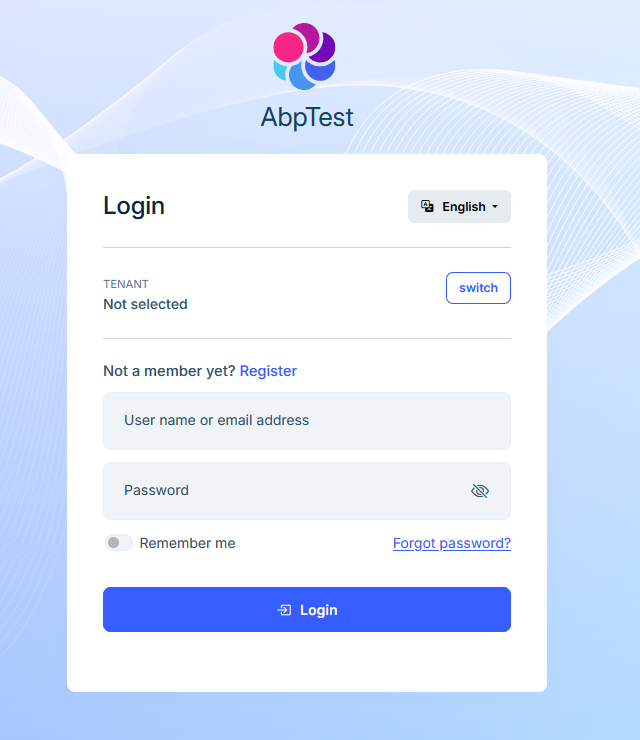
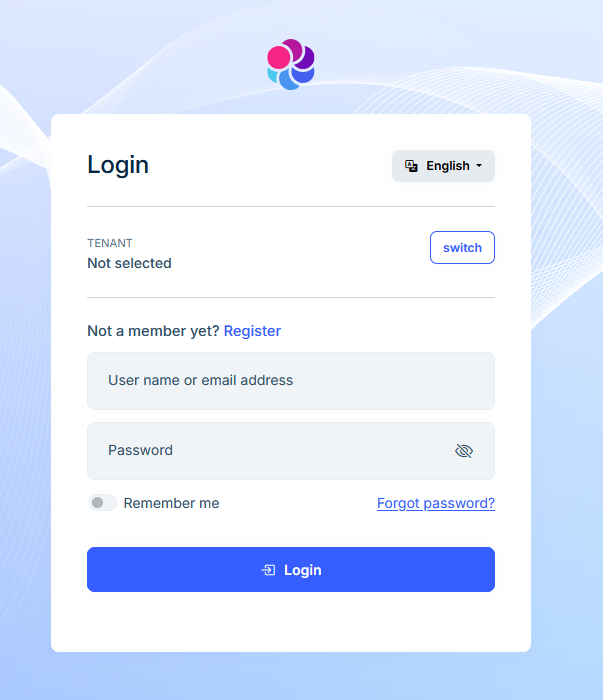
- The Application Name is no longer displayed — it previously appeared alongside the logo.
- The logo image now appears noticeably smaller than before.
Expected Behavior:
- The AppName should continue to appear on the login page, as it did before the LogoUrl override.
- The logo should maintain its original size.
[Dependency(ReplaceServices = true)]
public class AbpTabsBrandingProvider : DefaultBrandingProvider
{
    private IStringLocalizer<AbpTabsResource> _localizer;

    public AbpTabsBrandingProvider(IStringLocalizer<AbpTabsResource> localizer)
    {
        _localizer = localizer;
    }

    public override string AppName => "AbpTest";

    public override string LogoUrl => "/images/logo/leptonx/icon.svg";
}
Attachments:
Before overriding LogoUrl
After overriding LogoUrl
4 Answer(s)
-
0
- Solution
Why this happens
- In LeptonX/LeptonX Lite for Blazor, the login page header uses the Branding component. Its rendering logic is:
- If LogoUrl is set (not null/empty), it shows only the logo (no AppName text).
- If LogoUrl is null/empty, it shows the AppName text (and uses a default logo elsewhere if needed).
- Therefore, when you override LogoUrl, AppName is intentionally hidden.
- The logo size on the login page is controlled by the theme’s CSS for the Branding component. If your custom asset has extra whitespace or different intrinsic dimensions/aspect ratio, it can appear smaller.
- In LeptonX/LeptonX Lite for Blazor, the login page header uses the Branding component. Its rendering logic is:
Keep AppName visible and customize the logo Option A: Use LogoUrl only inside the app shell, not on the login page
- Override the login page Branding with your own component so you can render both logo and AppName:
- Create a custom Branding component override under your Web project to replace the theme’s Branding on the login page:
- Create file: /Themes/LeptonX/Components/Branding/Default.razor (path must match the theme component to override).
- Example implementation:
- Override the login page Branding with your own component so you can render both logo and AppName:
@inject Volo.Abp.Ui.Branding.IBrandingProvider Branding

      <div class="lpx-branding lpx-branding--login">
          <img src="@Branding.LogoUrl" alt="@Branding.AppName" class="lpx-branding__logo" />
          <div class="lpx-branding__title">@Branding.AppName</div>
      </div>

      @code { }
- Add minimal CSS to keep original sizing: - Add to wwwroot/global-styles.css (or your bundle):.lpx-branding--login { display: flex; flex-direction: column; align-items: center; gap: .5rem; } .lpx-branding__logo { height: 56px; /* similar to default */ width: auto; } .lpx-branding__title { font-size: 1.5rem; font-weight: 600; }- This ensures both the logo and AppName are shown on login regardless of LogoUrl.Option B: Do not override LogoUrl; use LeptonX CSS variables
- LeptonX supports logo customization via CSS variables. If you only set:
:root .lpx-theme-light {
      --lpx-logo: url('/images/logo/leptonx/icon-logo.svg');
      --lpx-logo-icon: url('/images/logo/leptonx/icon.svg');
    }
    :root .lpx-theme-dark,
    :root .lpx-theme-dim {
      --lpx-logo: url('/images/logo/leptonx/icon-logo.svg');
      --lpx-logo-icon: url('/images/logo/leptonx/icon.svg');
    }
- Keep DefaultBrandingProvider.LogoUrl = null (do not override), and keep AppName override as desired:[Dependency(ReplaceServices = true)] public class AbpTabsBrandingProvider : DefaultBrandingProvider { public override string AppName => "AbpTest"; // Do not override LogoUrl -> keep base.LogoUrl (null) so AppName is displayed }- The theme will use your CSS-defined logos in the layout while still showing AppName on the login page.- Keep the logo size consistent
- Ensure your SVG has a proper viewBox and no excessive whitespace.
- Control size with CSS in your override or by targeting the default selector:
/* If not overriding component, target default branding image on login */
    .lpx-auth .lpx-branding img,
    .lpx-auth .lpx-branding svg {
      height: 56px;
      width: auto;
    }
If your asset is small intrinsically, set a consistent height in CSS as above.
Per-tenant branding
- If you need tenant-specific logos:
- Keep the override in BrandingProvider, but move tenant logic into CSS variables or component override rather than setting LogoUrl. You can:
- Use settings per tenant to change CSS variables via a Layout Hook or a small style tag injected at runtime.
- Or override the Branding component and compute the URL per tenant, while still rendering AppName alongside the image (as in Option A).
- Keep the override in BrandingProvider, but move tenant logic into CSS variables or component override rather than setting LogoUrl. You can:
- If you need tenant-specific logos:
Summary of what to change
- Remove your override of LogoUrl (to show AppName again), and switch to LeptonX CSS variables for logos; or
- Keep LogoUrl override and override the Branding component for the login page to render both the image and AppName; and
- Add CSS to enforce a consistent logo height (e.g., 56px) on the login page.
- Sources
- Branding provider and general approach:
- No verified source available for this specific query.
- LeptonX Lite Blazor – Branding component (explains brand area with logo and company name):
- https://abp.io/docs/latest/ui-themes/lepton-x-lite/blazor
This response was generated by AI. If it didn’t solve your problem, feel free to post a new answer — our support team will jump in to help you soon.
Markdown supported.Copy, paste, or drag & drop images and files (max 100 MB per file, 100 MB total per post) -
0
hi
We will check and fix it.
I will share the
Themes/LeptonX/Layouts/Account/Default.cshtmlfile source code with you; you can override it now.Can you send an email to liming.ma@volosoft.com
Thanks.
Markdown supported.Copy, paste, or drag & drop images and files (max 100 MB per file, 100 MB total per post) -
0
I understand that overriding the login page in the theme is a workaround of this issue. The question is: Is there another workaround that does not override the theme? Also, is this considered a bug of the theme that we should expect to be fixed in the future?
Markdown supported.Copy, paste, or drag & drop images and files (max 100 MB per file, 100 MB total per post)



