






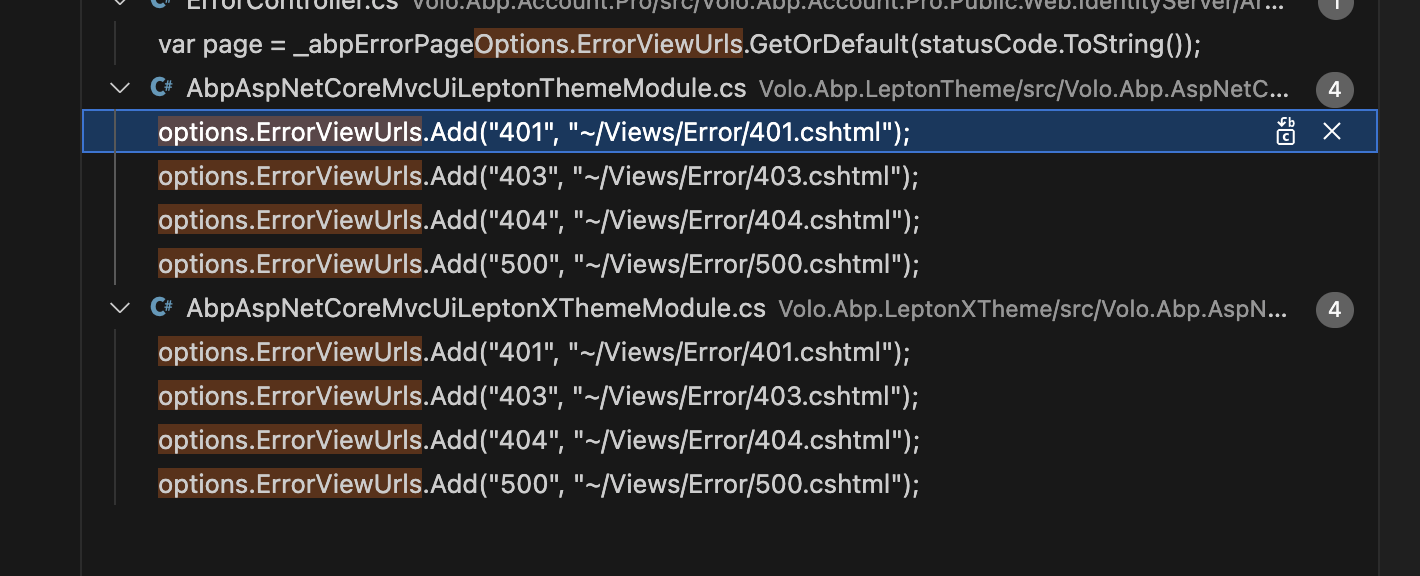
I tried to resolve it through inheritance, but it caused another error.
using Microsoft.Extensions.DependencyInjection;
using Volo.Abp.AspNetCore.Mvc.UI.Bundling;
using Volo.Abp.AspNetCore.Mvc.UI.Packages.JsTree;
using Volo.Abp.AspNetCore.Mvc.UI.Theme.Lepton;
using Volo.Abp.AspNetCore.Mvc.UI.Theme.Lepton.Bundling;
using Volo.Abp.AspNetCore.Mvc.UI.Theme.Lepton.ObjectMapping;
using Volo.Abp.AspNetCore.Mvc.UI.Theme.Lepton.Themes.Lepton.Libraries.JsTree;
using Volo.Abp.AspNetCore.Mvc.UI.Theme.Lepton.Toolbars;
using Volo.Abp.AspNetCore.Mvc.UI.Theme.Shared;
using Volo.Abp.AspNetCore.Mvc.UI.Theme.Shared.Bundling;
using Volo.Abp.AspNetCore.Mvc.UI.Theme.Shared.Toolbars;
using Volo.Abp.AspNetCore.Mvc.UI.Theming;
using Volo.Abp.AutoMapper;
using Volo.Abp.Modularity;
using Volo.Abp.VirtualFileSystem;

namespace Mulan.One.Public.Web.Themes.Lepton;

public class MulanAbpAspNetCoreMvcUiLeptonThemeModule : AbpAspNetCoreMvcUiLeptonThemeModule
{
    public override void ConfigureServices(ServiceConfigurationContext context)
    {
        Configure<AbpThemingOptions>(options =>
        {
            options.Themes.Add<LeptonTheme>();

            if (options.DefaultThemeName == null)
            {
                options.DefaultThemeName = LeptonTheme.Name;
            }
        });

        // 和 LeptonXTheme 重覆了,會造成 runtime 錯誤
        // ArgumentException: An item with the same key has already been added. Key: 401
        // Configure<AbpErrorPageOptions>(options =>
        // {
        //     options.ErrorViewUrls.Add("401", "~/Views/Error/401.cshtml");
        //     options.ErrorViewUrls.Add("403", "~/Views/Error/403.cshtml");
        //     options.ErrorViewUrls.Add("404", "~/Views/Error/404.cshtml");
        //     options.ErrorViewUrls.Add("500", "~/Views/Error/500.cshtml");
        // });

        Configure<AbpVirtualFileSystemOptions>(options =>
        {
            options.FileSets.AddEmbedded<AbpAspNetCoreMvcUiLeptonThemeModule>();
        });

        Configure<AbpToolbarOptions>(options =>
        {
            options.Contributors.Add(new LeptonThemeMainTopToolbarContributor());
        });

        Configure<AbpBundlingOptions>(options =>
        {
            options
                .StyleBundles
                .Add(LeptonThemeBundles.Styles.Global, bundle =>
                {
                    bundle
                        .AddBaseBundles(StandardBundles.Styles.Global)
                        .AddContributors(typeof(LeptonGlobalStyleContributor));
                });

            options
                .ScriptBundles
                .Add(LeptonThemeBundles.Scripts.Global, bundle =>
                {
                    bundle
                        .AddBaseBundles(StandardBundles.Scripts.Global)
                        .AddContributors(typeof(LeptonGlobalScriptContributor));
                });
        });

        Configure<AbpBundleContributorOptions>(options =>
        {
            options.Extensions<JsTreeStyleContributor>()
                .Add<LeptonJsTreeStyleContributorExtension>();
        });

        context.Services.AddAutoMapperObjectMapper<AbpAspNetCoreMvcUiLeptonThemeModule>();

        Configure<AbpAutoMapperOptions>(options =>
        {
            options.AddProfile<LeptonThemeAutoMapperProfile>(validate: true);
        });
    }
}
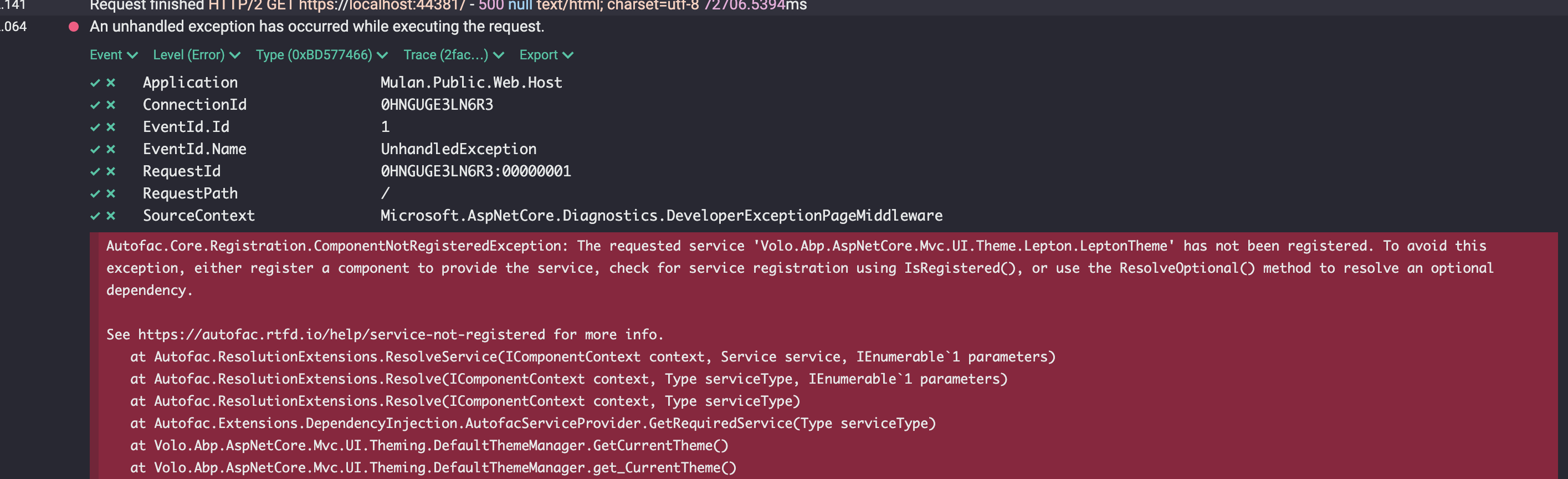
Are there any solutions to this problem?
4 Answer(s)
-
0
- Solution
You can’t load Lepton (v1) and LeptonX themes at the same time. Both modules register the same keys and services (e.g., AbpErrorPageOptions.ErrorViewUrls["401"], DefaultTheme, toolbar contributors, bundle names), which causes “An item with the same key has already been added” and “service not registered” errors. ABP supports only one active MVC theme per application.
Pick one theme and remove the other theme module(s) and registrations:
- If you want LeptonX:
- Remove AbpAspNetCoreMvcUiLeptonThemeModule from all DependsOn attributes and delete any custom module inheriting from AbpAspNetCoreMvcUiLeptonThemeModule.
- Add AbpAspNetCoreMvcUiLeptonXThemeModule to your Web module DependsOn.
- Remove any Configure<AbpErrorPageOptions>() entries you copied from Lepton to avoid duplicate keys; LeptonX already configures these.
- Ensure you register the theme in AbpThemingOptions only once (DefaultThemeName should be LeptonXTheme.Name or let LeptonX register itself).
- If you use LeptonX theme management/settings, add Volo.Abp.LeptonXTheme.Management.Domain.Shared to your Domain.Shared project and add [DependsOn(typeof(LeptonXThemeManagementDomainSharedModule))] to your domain shared module.
- If you want Lepton (v1):
- Remove AbpAspNetCoreMvcUiLeptonXThemeModule from DependsOn and any LeptonX nuget/package references.
- Keep AbpAspNetCoreMvcUiLeptonThemeModule and its options.
- If you want LeptonX:
Do not inherit one theme module from the other. Theme modules are independent and each configures its own services/options. Inheriting or registering both leads to duplicate option keys and missing service registrations for the “current theme” resolver.
After changes:
- Clean and rebuild to ensure only one theme remains:
- abp clean
- dotnet restore
- dotnet build
- If you switched to LeptonX and see “Undefined setting: Volo.Abp.LeptonXTheme.ApplicationLayout”, add the LeptonX theme management shared module as noted above.
- Clean and rebuild to ensure only one theme remains:
Code example (use LeptonX only):
using Volo.Abp.AspNetCore.Mvc.UI.Theming;
using Volo.Abp.Modularity;
using Volo.Abp.AspNetCore.Mvc.UI.Theme.LeptonX;

[DependsOn(
    typeof(AbpAspNetCoreMvcUiLeptonXThemeModule)
    // remove: typeof(AbpAspNetCoreMvcUiLeptonThemeModule)
)]
public class MyWebModule : AbpModule
{
    public override void ConfigureServices(ServiceConfigurationContext context)
    {
        Configure<AbpThemingOptions>(options =>
        {
            // Don’t add Lepton and LeptonX together
            options.Themes.Add<LeptonXTheme>();
            options.DefaultThemeName = LeptonXTheme.Name;
        });

        // Remove duplicate error page mapping if you had both:
        // Configure<AbpErrorPageOptions>(options => { ... }); // Not needed for LeptonX
    }
}
If you need to switch themes dynamically at runtime, implement a single theme that changes its resources/layouts based on a setting or cookie rather than loading two different theme modules simultaneously.
- Sources
- https://docs.abp.io/en/abp/latest/UI/AspNetCore/Theming
- https://github.com/abpframework/abp
This response was generated by AI. If it didn’t solve your problem, feel free to post a new answer — our support team will jump in to help you soon.
Markdown supported.Copy, paste, or drag & drop images and files (max 100 MB per file, 100 MB total per post)




