






Check the docs before asking a question: https://abp.io/docs/latest Check the samples to see the basic tasks: https://abp.io/docs/latest/samples The exact solution to your question may have been answered before, and please first use the search on the homepage.
Provide us with the following info:
🧐 Hint: If you are using the ABP Studio, you can see all the information about your solution from the configuration window, which opens when you right-click on the solution and click on the Solution Configuration button.
- Exception message and full stack trace:
- Steps to reproduce the issue:
How to configure OAuth2 in our application so that we can send and receive emails for Microsoft 365.
This is example image It admin send to me how they configure in other place:
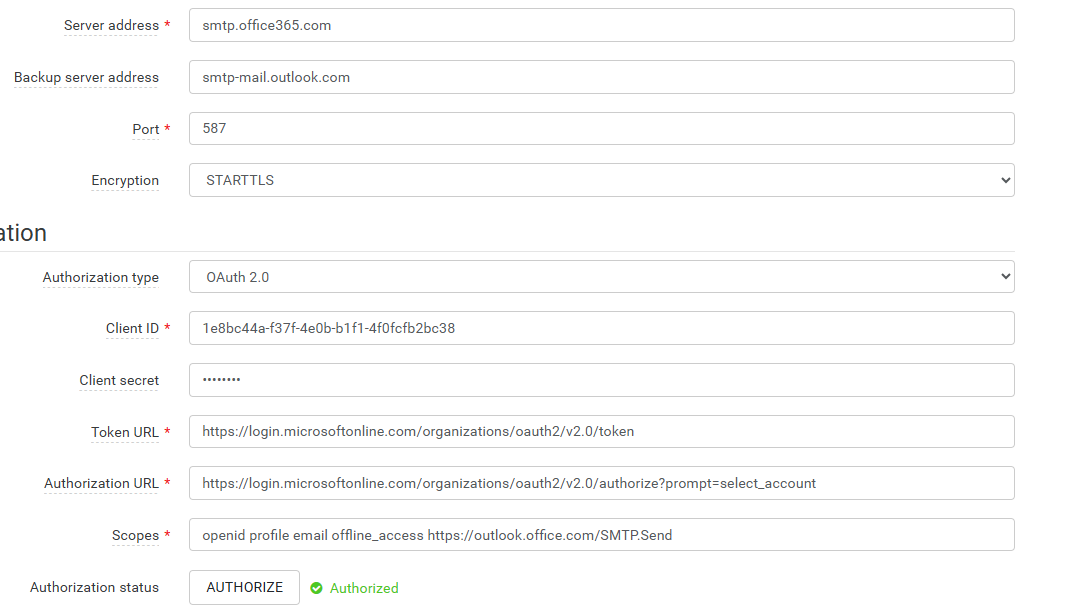
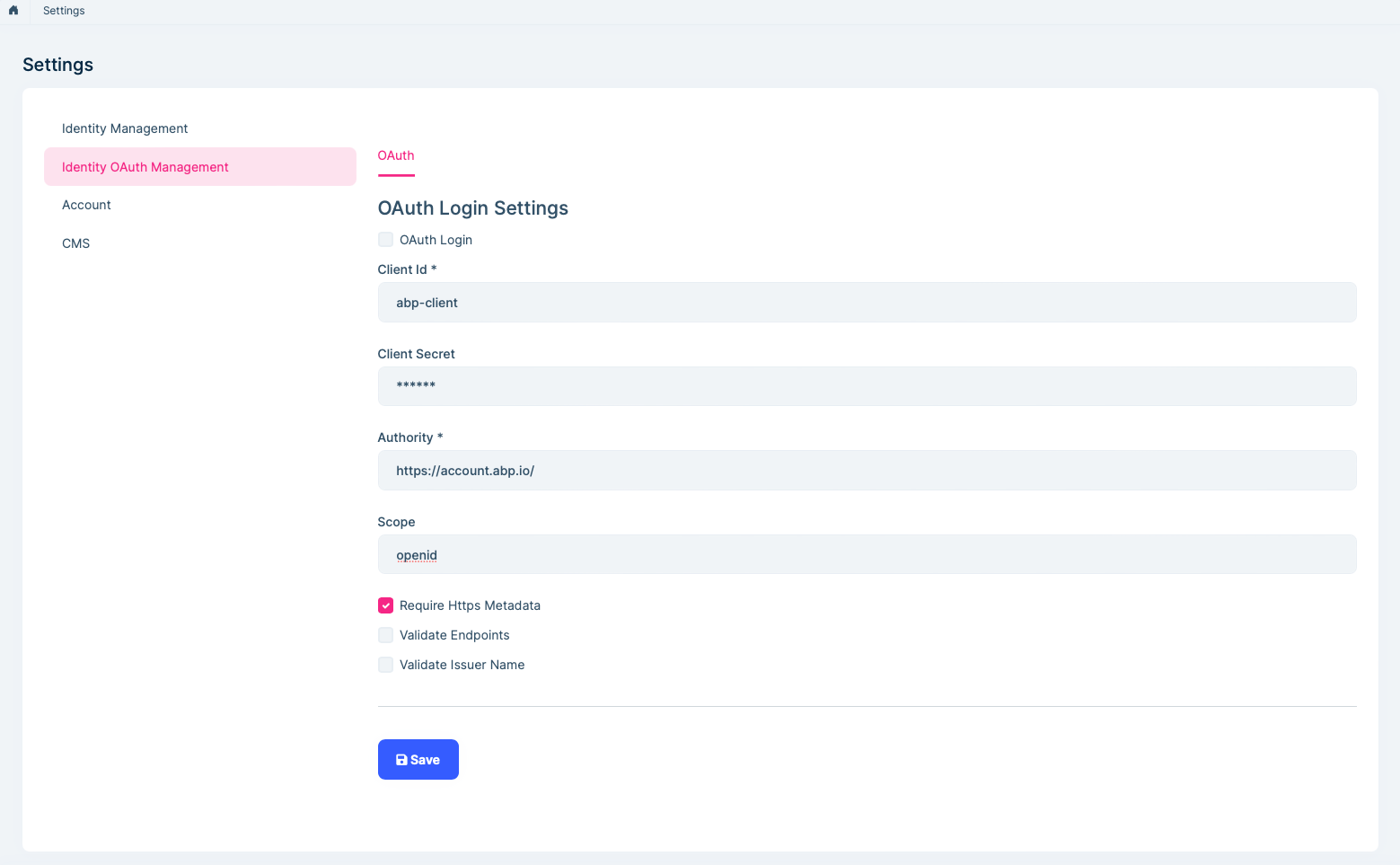
How should I set the following parameters: Client Id, Client secret, Authority, Schope and is this OAuth2? How do I know what values are for each field?
Thx
10 Answer(s)
-
0
- Solution
What that settings page is for
- The “OAuth Login Settings” under Identity > OAuth Management configures how your ABP application signs users in via an external OpenID Connect/OAuth2 identity provider (Authority). It is NOT for SMTP OAuth for sending/receiving emails. Those are two different things.
- To use Microsoft 365 (Exchange Online) to send mail via SMTP with OAuth2, configure ABP’s emailing system with Microsoft’s OAuth endpoints and scopes for SMTP, not the Identity OAuth login settings.
A) Configure Microsoft 365 SMTP (OAuth2) for ABP Emailing
- Register an app in Azure AD (Entra ID)
- Create “App registration”.
- Authentication:
- Add a Web redirect URI that your SMTP OAuth UI will use (depends on your SMTP/OAuth component or settings page URL; if you use a built-in UI, set the exact callback URL that UI requires).
- Certificates & secrets: create a Client secret.
- API permissions:
- Add delegated permission: SMTP.Send (from Office 365 Exchange Online).
- Also add OpenID Connect standard scopes: openid, profile, email, offline_access (for refresh tokens).
- Grant admin consent.
- SMTP server settings in ABP Emailing (e.g., in Settings UI or appsettings)
- Server address: smtp.office365.com
- Port: 587
- Encryption: STARTTLS
- OAuth2 parameters (for Microsoft 365)
- Client Id: the Application (client) ID from Azure app registration.
- Client Secret: the client secret you created.
- Authorization URL: https://login.microsoftonline.com/organizations/oauth2/v2.0/authorize
- Token URL: https://login.microsoftonline.com/organizations/oauth2/v2.0/token
- If your tenant is single-tenant, replace “organizations” with your Tenant ID or your tenant domain.
- Scopes (space-separated): openid profile email offline_access https://outlook.office.com/SMTP.Send
- Username: the mailbox address you will send from (e.g., no-reply@yourdomain.com). The account must be licensed and allowed to send with SMTP AUTH.
- Authorize/consent
- Use the “Authorize” button in your SMTP OAuth config UI to complete the user consent/authorization and store the refresh token. Ensure you sign in with the mailbox account that will send emails, or with an admin performing admin consent for delegated flow.
- Test sending email from ABP (e.g., trigger a notification or use a test email feature if available).
- Register an app in Azure AD (Entra ID)
B) What each field means (SMTP OAuth2 context)
- Client Id: The Azure AD app’s Application (client) ID.
- Client Secret: The secret created under Certificates & secrets for that app.
- Authority/Authorization URL: Microsoft’s authorize endpoint where the user consents and an auth code is issued. Use the v2.0 endpoint shown above.
- Token URL: Microsoft’s token endpoint that exchanges the auth code or refresh token for an access token for SMTP.
- Scope: Required permissions the app requests. Include openid profile email offline_access plus the SMTP scope https://outlook.office.com/SMTP.Send for Exchange Online SMTP AUTH.
- Yes, this is OAuth2: The SMTP authentication flow uses OAuth2 (Authorization Code + refresh tokens) to acquire access tokens that the SMTP client uses to send mail.
C) ABP Identity “OAuth Login Settings” (Authority, Client Id, Scope) are for user sign-in to your app, not for SMTP
- If you also want your users to log into your ABP app with Microsoft Entra ID:
- Authority: https://login.microsoftonline.com/{TenantId}/v2.0/
- Client Id: your Azure AD app’s client ID for interactive login to your app
- Client Secret: the secret of that app (if confidential client)
- Scope: openid profile email offline_access plus your API’s scopes if you protect APIs
- This does not configure emailing. Configure emailing separately as in section A.
- If you also want your users to log into your ABP app with Microsoft Entra ID:
D) ABP code/config pointers
- Emailing: configure the IEmailSender options or the settings provider your solution uses. For SMTP with OAuth2, use STARTTLS on smtp.office365.com:587 and wire your OAuth token acquisition to the mail sender if your edition provides a UI; otherwise store and refresh tokens securely and set the SMTP auth to use the OAuth access token when sending.
- Sources
- https://abp.io/docs/latest
- https://abp.io/docs/latest/framework/infrastructure/emailing
This response was generated by AI. If it didn’t solve your problem, feel free to post a new answer — our support team will jump in to help you soon.
Markdown supported.Copy, paste, or drag & drop images and files (max 100 MB per file, 100 MB total per post) -
0
hi
How to configure OAuth2 in our application so that we can send and receive emails for Microsoft 365.
The OAuth2 settings page is for External Login instead of sending/receiving emails
See https://abp.io/docs/latest/modules/identity/oauth-login
Thanks
Markdown supported.Copy, paste, or drag & drop images and files (max 100 MB per file, 100 MB total per post) -
0
Thank you. Perhaps it’s best if I describe our situation so you can advise us on the best way to proceed.
We installed the application at the customer’s site and have access to a Windows Server 2016 machine and IIS. The server does not have internet access.
In order to send emails from the application, the customer’s IT administrator asked that our application be registered as a user via OAuth2 so we can send mail.
We need guidance on how to configure email OAuth2 authentication for Microsoft 365.
It seems that the AI’s “Answer A” is what we need.
What is the correct format for the callback (redirect) URL — we use all default values?
Markdown supported.Copy, paste, or drag & drop images and files (max 100 MB per file, 100 MB total per post) -
0
Hi
Here are links they've sent me for you to check:
Authenticate an IMAP, POP or SMTP connection using OAuth
How to connect to Office 365 with IMAP, Oauth2 and Client Credential Grant Flow
Thanks
Markdown supported.Copy, paste, or drag & drop images and files (max 100 MB per file, 100 MB total per post) -
0
hi
I see, you can follow the https://github.com/alkampfergit/DotNetCoreOauth2 to get an access token and to override the
IEmailSenderservice to send the email.context.Services.Replace(ServiceDescriptor.Singleton<IEmailSender, YourOffice365EmailSender>());public class YourOffice365EmailSender : EmailSenderBase { public YourOffice365EmailSender(ICurrentTenant currentTenant, IEmailSenderConfiguration configuration, IBackgroundJobManager backgroundJobManager) : base(currentTenant, configuration, backgroundJobManager) { } protected override Task SendEmailAsync(MailMessage mail) { return Task.CompletedTask; } }Thanks.
Markdown supported.Copy, paste, or drag & drop images and files (max 100 MB per file, 100 MB total per post)



