






Hi, My application was originally on ABP 7.2. Later, we migrated it to 8.2, and now we need to upgrade it to 10.x. For that, we are first upgrading to 9.3, and then we plan to move to 10.x.
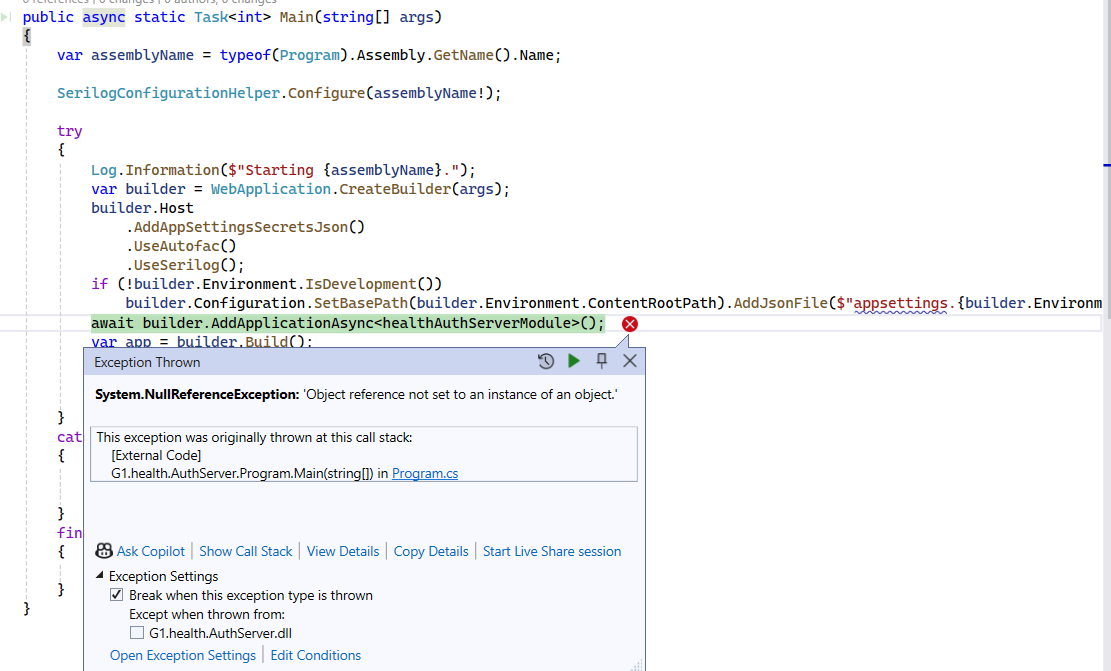
I am upgrading each solution individually. I started with the AuthServer and migrated it to 9.3. However, when I try to run the application after the migration, I am getting the below error.
//Stack Trace
at Volo.Abp.DependencyInjection.ConventionalRegistrarBase.IsConventionalRegistrationDisabled(Type type)
at Volo.Abp.DependencyInjection.DefaultConventionalRegistrar.AddType(IServiceCollection services, Type type)
at Volo.Abp.DependencyInjection.ConventionalRegistrarBase.AddTypes(IServiceCollection services, Type[] types)
at Volo.Abp.DependencyInjection.ConventionalRegistrarBase.AddAssembly(IServiceCollection services, Assembly assembly)
at Microsoft.Extensions.DependencyInjection.ServiceCollectionConventionalRegistrationExtensions.AddAssembly(IServiceCollection services, Assembly assembly)
at Volo.Abp.AbpApplicationBase.<ConfigureServicesAsync>d__29.MoveNext()
at Volo.Abp.AbpApplicationFactory.<CreateAsync>d__21.MoveNext() at Microsoft.Extensions.DependencyInjection.ServiceCollectionApplicationExtensions.<AddApplicationAsync>d__21.MoveNext()
at Microsoft.Extensions.DependencyInjection.WebApplicationBuilderExtensions.<AddApplicationAsync>d__0`1.MoveNext()
at G1.health.AuthServer.Program.
24 Answer(s)
-
0
- Solution The NullReferenceException on await builder.AddApplicationAsync<YourAuthServerModule>() typically happens after an incomplete migration of the hosting bootstrap to the new “minimal hosting” style introduced in ABP 8+. In ABP 9.x, your Program.cs should follow ABP’s current pattern and you must call InitializeApplicationAsync on the built app.
Do this:
- Ensure Program.cs is minimal-host style and ordered exactly like this:
using YourCompany.YourAuthServer; var builder = WebApplication.CreateBuilder(args); // host configuration (optional) builder.Host .AddAppSettingsSecretsJson() .UseAutofac(); // logging configuration (optional) builder.Host.UseSerilog(); // add ABP application await builder.AddApplicationAsync<YourAuthServerModule>(); var app = builder.Build(); await app.InitializeApplicationAsync(); await app.RunAsync();- Remove legacy Startup.cs usage. In ABP 9.x, you should not use services.AddApplication<TModule>() in Startup plus Host.CreateDefaultBuilder; use the Program.cs pattern above.
- Do not access builder.Environment before CreateBuilder(args). Ensure any path-based configuration runs after CreateBuilder and uses builder.Environment safely:
builder.Configuration .SetBasePath(builder.Environment.ContentRootPath) .AddJsonFile($"appsettings.json", optional: false, reloadOnChange: true) .AddJsonFile($"appsettings.{builder.Environment.EnvironmentName}.json", optional: true);- Make sure your module class depends on proper ABP modules for the AuthServer. For IdentityServer-based auth servers from older versions, transition to the OpenIddict-based module set if you already moved per migration guides. If you still use IdentityServer temporarily, ensure packages and module dependencies are consistent (same major/minor ABP version).
- Verify your project targets a supported framework for ABP 9.3 (net8.0 or net9.0 per your SDK) and all Volo.Abp.* packages are the same 9.3.x version across all projects.
- If you still hit the NullReferenceException, it’s typically due to an exception thrown inside the module pre-ConfigureServices that gets swallowed until AddApplicationAsync. Run with detailed errors to see the inner exception:
- Set ASPNETCORE_DETAILEDERRORS=true
- Temporarily wrap AddApplicationAsync to log inner exceptions:
try
    {
        await builder.AddApplicationAsync<YourAuthServerModule>();
    }
    catch (Exception ex)
    {
        Console.WriteLine(ex.ToString()); // inspect the real inner cause (often missing config or incompatible package)
        throw;
    }
Common actual causes found during 7.x → 9.x migrations:
- Missing or renamed configuration keys (OpenIddict/IdentityServer settings).
- Inconsistent Microsoft.Extensions.* or EF Core versions pulled by a project reference. Ensure consistent package versions and clear the NuGet cache (dotnet nuget locals all --clear).
- Old code calling app.UseStaticFiles() removed without adding app.MapAbpStaticAssets() when targeting .NET 9 (only if you already moved SDK).
- Sources
- ABP minimal hosting Program.cs pattern:
- https://abp.io/docs/latest/get-started/empty-aspnet-core-application
- ABP 9 migration overview (framework and hosting patterns):
- https://github.com/abpframework/abp
- ABP 9 supports both .NET 8 & 9; static assets note when on .NET 9:
- https://abp.io/community/articles/zpkznc4f
This response was generated by AI. If it didn’t solve your problem, feel free to post a new answer — our support team will jump in to help you soon.
Markdown supported.Copy, paste, or drag & drop images and files (max 100 MB per file, 100 MB total per post) -
0
[maliming] said: hi
Can you share your
logs.txtfile of AuthServer project?liming.ma@volosoft.com
Thanks.
Hi I have sent you the file please let me know if you require any further information
Markdown supported.Copy, paste, or drag & drop images and files (max 100 MB per file, 100 MB total per post) -
0
[maliming] said: hi
This is very strange. Could you share a project that reproduces the exception?
Thanks.
My application was originally built on ABP version 7.2. Later, we migrated it to 8.2, and now we need to upgrade it to 10.x. To achieve that, we are first upgrading it to 9.3, and during this upgrade I encountered the above issue. How can I share that?
Markdown supported.Copy, paste, or drag & drop images and files (max 100 MB per file, 100 MB total per post) -
0
[maliming] said: hi
You can share your latest project that can reproduce the exception.
Thanks.
Hi May we schedule a call to examine the issue, and if feasible, discuss the other two pending tickets during the same call?
Thanks
Markdown supported.Copy, paste, or drag & drop images and files (max 100 MB per file, 100 MB total per post) -
0
hi
Checking the source code in remote meetings will be very slow. If you can share a project recurrence problem, we will troubleshoot and resolve it as quickly as possible.
Thanks
Markdown supported.Copy, paste, or drag & drop images and files (max 100 MB per file, 100 MB total per post) -
0
[maliming] said: hi
Checking the source code in remote meetings will be very slow. If you can share a project recurrence problem, we will troubleshoot and resolve it as quickly as possible.
Thanks
Hi,
Instead of migrating directly to 9.3.0, I first migrated all backend services to 9.0.0, and that worked successfully. But when I attempted to do the same with the Angular application, I encountered with below runtime error.
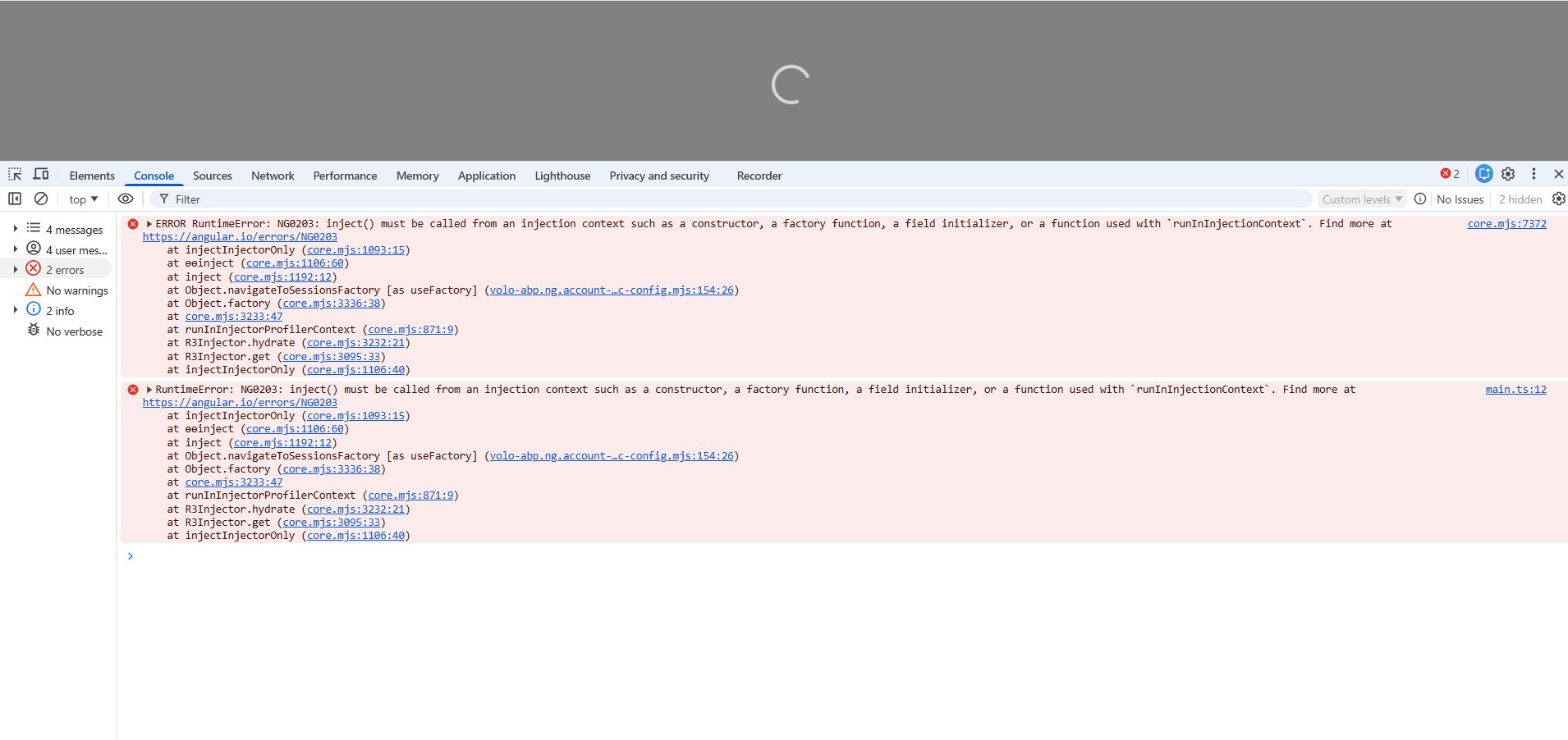
and also when i try to use the forLazy in the below it's giving compile time error { path: 'account', loadChildren: () => import('@volo/abp.ng.account/public').then(m => m.AccountPublicModule.forLazy()), },
Thanks
Markdown supported.Copy, paste, or drag & drop images and files (max 100 MB per file, 100 MB total per post) -
0
Hello,
Could you please provide version details in your
package.json? May also know whether you have migrated to the new builder system for Angular app?Markdown supported.Copy, paste, or drag & drop images and files (max 100 MB per file, 100 MB total per post) -
0
[sumeyye.kurtulus] said: Hello,
Could you please provide version details in your
package.json? May also know whether you have migrated to the new builder system for Angular app?No I have not done that i will check it once and below are package in my package.json file
"dependencies": { "@abp/ng.components": "~9.0.0", "@abp/ng.core": "~9.0.0", "@abp/ng.oauth": "~9.0.0", "@abp/ng.setting-management": "~9.0.0", "@abp/ng.theme.shared": "~9.0.0", "@abp/signalr": "~9.0.0", "@angular/animations": "~18.2.14", "@angular/common": "~18.2.14", "@angular/compiler": "~18.2.14", "@angular/core": "~18.2.14", "@angular/forms": "~18.2.14", "@angular/localize": "~18.2.14", "@angular/platform-browser": "~18.2.14", "@angular/platform-browser-dynamic": "~18.2.14", "@angular/router": "~18.2.14", "@fullcalendar/angular": "^6.1.17", "@fullcalendar/daygrid": "^6.1.17", "@fullcalendar/interaction": "^6.1.17", "@fullcalendar/timegrid": "^6.1.17", "@kolkov/angular-editor": "3.0.0-beta.2", "@microsoft/signalr": "^7.0.7", "@microsoft/signalr-protocol-msgpack": "^7.0.5", "@ng-select/ng-select": "^12.0.7", "@volo/abp.commercial.ng.ui": "~9.0.0", "@volo/abp.ng.account": "~9.0.0", "@volo/abp.ng.audit-logging": "~9.0.0", "@volo/abp.ng.chat": "~9.0.0", "@volo/abp.ng.file-management": "~9.0.0", "@volo/abp.ng.gdpr": "~9.0.0", "@volo/abp.ng.identity": "~9.0.0", "@volo/abp.ng.language-management": "~9.0.0", "@volo/abp.ng.openiddictpro": "~9.0.0", "@volo/abp.ng.saas": "~9.0.0", "@volo/abp.ng.text-template-management": "~9.0.0", "@volosoft/abp.ng.theme.lepton-x": "~4.0.", "@zoom/meetingsdk": "^3.11.0", "crypto-js": "^4.2.0", "date-fns": "^4.1.0", "html2canvas": "^1.4.1", "html2pdf.js": "^0.11.1", "jspdf": "^3.0.2", "jspdf-autotable": "^5.0.2", "ng-multiselect-dropdown": "^1.0.0", "ng-recaptcha": "^12.0.2", "ng2-pdf-viewer": "^10.4.0", "ngx-captcha": "^13.0.0", "rxjs": "7.8.0", "tslib": "^2.0.0", "typescript": "^5.3.0", "zone.js": "^0.14.0" },
Thanks
Markdown supported.Copy, paste, or drag & drop images and files (max 100 MB per file, 100 MB total per post) -
0
Thank you for providing extra details. I have checked your versions and I did not see anything problematic except this version
"@volosoft/abp.ng.theme.lepton-x": "~4.0." --> should be "~4.0.0"If this does not solve your problem, you can send a minimal reproducible example through this e-mail address: sumeyye.kurtulus@volosoft.com.
Thank you for your cooperation.
Markdown supported.Copy, paste, or drag & drop images and files (max 100 MB per file, 100 MB total per post) -
0
[sumeyye.kurtulus] said: Thank you for providing extra details. I have checked your versions and I did not see anything problematic except this version
"@volosoft/abp.ng.theme.lepton-x": "~4.0." --> should be "~4.0.0"If this does not solve your problem, you can send a minimal reproducible example through this e-mail address: sumeyye.kurtulus@volosoft.com.
Thank you for your cooperation.
Hi
I tried to send you the minimal reproducible example project, but I encountered the following issue:
mx.google.com rejected your message to the following email addresses: sumeyye.kurtulus@volosoft.com Your message wasn't delivered because the recipient's email provider rejected it.
Thanks
Markdown supported.Copy, paste, or drag & drop images and files (max 100 MB per file, 100 MB total per post) -
0
[maliming] said: hi
You can upload your project to https://wetransfer.com/ And send the download link to sumeyye.kurtulus@volosoft.com
Thanks.
Hi
I’ve uploaded the project, and here is the link. https://we.tl/t-Bi6l9MiFVu
Markdown supported.Copy, paste, or drag & drop images and files (max 100 MB per file, 100 MB total per post) -
0
Thank you for providing a sample. There may be a path resolution problem. So, could you try adding these paths to your
tsconfig.json"compilerOptions": { "paths": { "@angular/*":["node_modules/@angular/*"], "@abp/*":["node_modules/@abp/*"], "@volo/*":["node_modules/@volo/*"], "@volosoft/*":["node_modules/@volosoft/*"], "@swimlane/*": ["node_modules/@swimlane/*"], "@ngx-validate/core":["node_modules/@ngx-validate/core"], "@ng-bootstrap/ng-bootstrap": ["node_modules/@ng-bootstrap/ng-bootstrap"], "product-service": ["projects/product-service/src/public-api.ts"], "product-service/config": ["projects/product-service/config/src/public-api.ts"] } },Markdown supported.Copy, paste, or drag & drop images and files (max 100 MB per file, 100 MB total per post) -
0
[sumeyye.kurtulus] said: "@angular/":["node_modules/@angular/"], "@abp/":["node_modules/@abp/"], "@volo/":["node_modules/@volo/"], "@volosoft/":["node_modules/@volosoft/"], "@swimlane/": ["node_modules/@swimlane/"], "@ngx-validate/core":["node_modules/@ngx-validate/core"], "@ng-bootstrap/ng-bootstrap": ["node_modules/@ng-bootstrap/ng-bootstrap"],
The issue fixed. Thanks!
Markdown supported.Copy, paste, or drag & drop images and files (max 100 MB per file, 100 MB total per post) -
0
Thank you for the response. I am glad to hear that the problem is solved.
Markdown supported.Copy, paste, or drag & drop images and files (max 100 MB per file, 100 MB total per post) -
0
Hi Even though I have enabled the impersonation permission, the option is still not visible. The "Log in with this tenant" option is also missing under SaaS Tenants. This issue can be reproduced in the project that I shared.
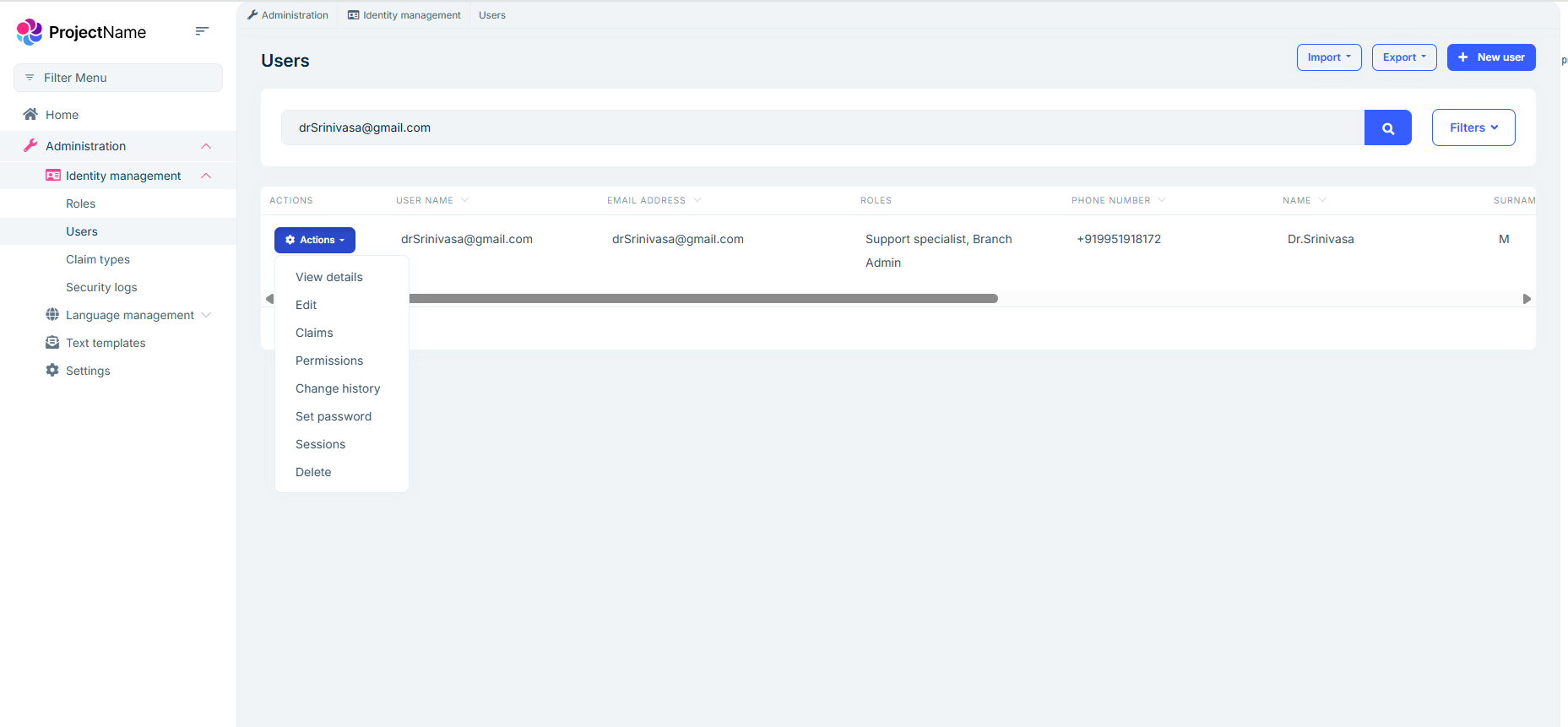 Markdown supported.Copy, paste, or drag & drop images and files (max 100 MB per file, 100 MB total per post)
 -
0
[maliming] said: hi
Can you add code below to the Angular project?
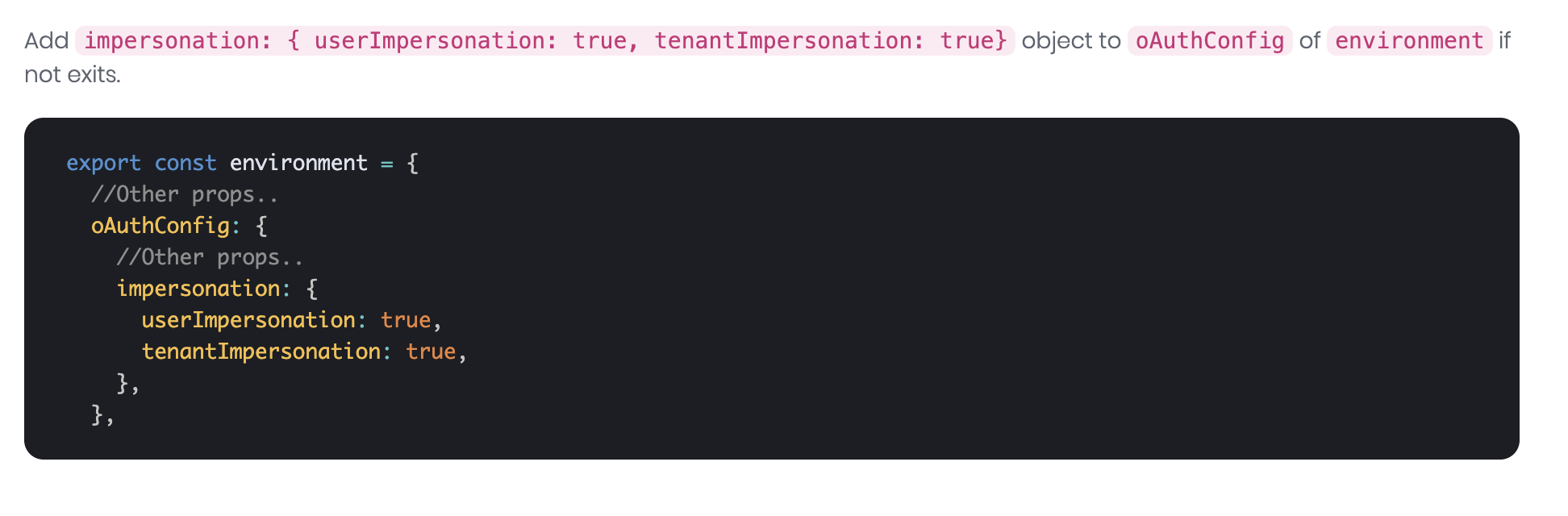
Thanks!. It worked
Markdown supported.Copy, paste, or drag & drop images and files (max 100 MB per file, 100 MB total per post) -
0
Hi When I change the two-factor authentication setting to Optional, it automatically switches back to Disabled by default.
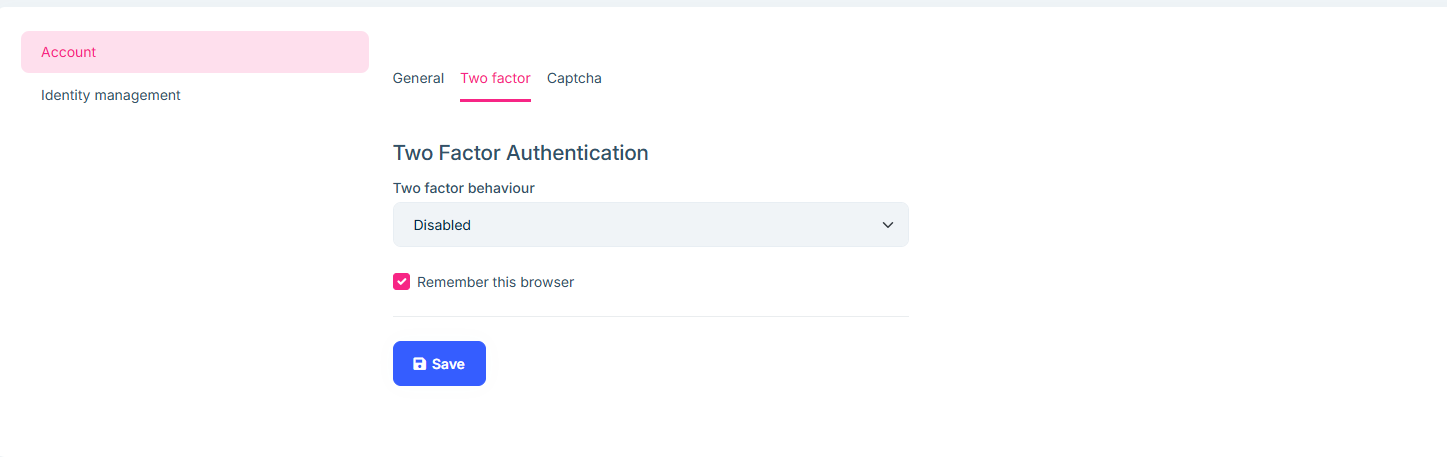
Please do not close the ticket. I will continue posting any migration issues I encounter, and once everything is resolved, I will close it.
Markdown supported.Copy, paste, or drag & drop images and files (max 100 MB per file, 100 MB total per post)



