






hello, when i want to deploy my project which the frontend is angular, i have modifed the environment.prod.ts file as below:
import { Environment } from '@abp/ng.core';
const baseUrl = 'http://10.136.36.151:4200';
const oAuthConfig = { issuer: 'https://10.136.36.151:44380/', redirectUri: baseUrl, clientId: 'NovaLab_App', responseType: 'code', scope: 'offline_access NovaLab', requireHttps: true, impersonation: { tenantImpersonation: true, userImpersonation: true, }, };
export const environment = { production: true, application: { baseUrl, name: 'NovaLab', }, oAuthConfig, apis: { default: { url: 'https://10.136.36.151:44380', rootNamespace: 'RZ.NovaLab', }, AbpAccountPublic: { url: oAuthConfig.issuer, rootNamespace: 'AbpAccountPublic', }, }, remoteEnv: { url: '/getEnvConfig', mergeStrategy: 'deepmerge', }, } as Environment;
but i want to visit the address : http://servieip:4200, report the error. 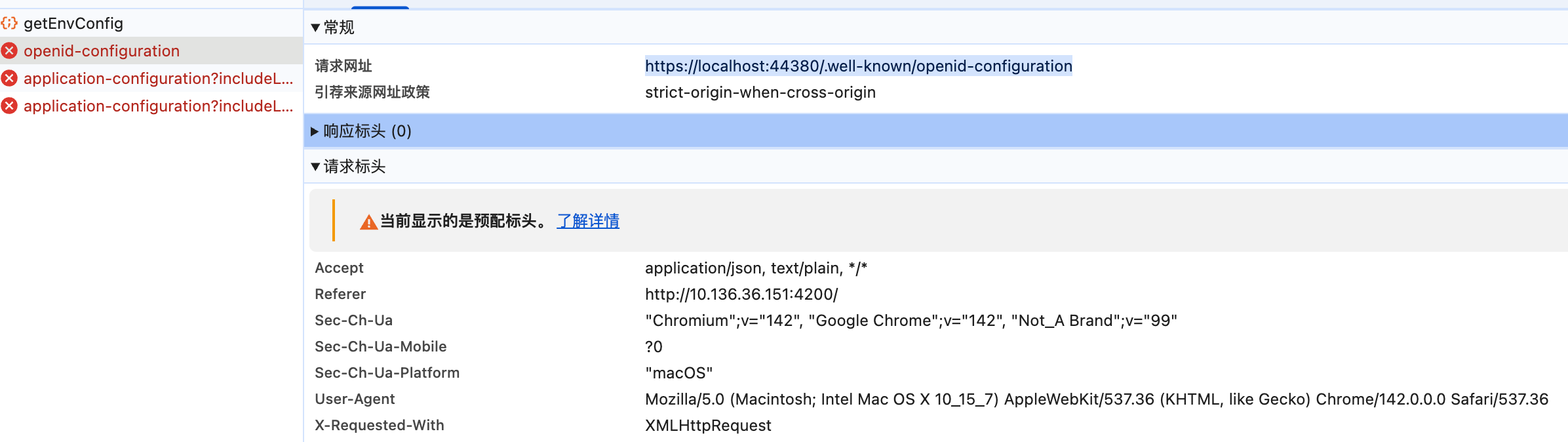
about the https://localhost:44380/.well-known/openid-configuration , but it should be https://sererhost:44380/.well-known/openid-configuration
Best regards Haiming
1 Answer(s)
-
0
- Solution To make the Angular app request the OpenID Connect discovery document from your real server host instead of https://localhost:44380, you must configure both the Angular environment and the backend Authority/SelfUrl consistently for your deployment host.
Do the following:
- Angular (environment.prod.ts)
- Set baseUrl to the public Angular URL you are using in production.
- Set oAuthConfig.issuer to your backend’s public HTTPS authority (with a trailing slash).
- Keep requireHttps = true for production (recommended).
- Example:
import { Environment } from '@abp/ng.core'; const baseUrl = 'http://serviceip:4200'; // or https if you have TLS on the SPA const oAuthConfig = { issuer: 'https://serverhost:44380/', // IMPORTANT: public HTTPS authority with trailing slash redirectUri: baseUrl, clientId: 'NovaLab_App', responseType: 'code', scope: 'offline_access NovaLab', requireHttps: true, impersonation: { tenantImpersonation: true, userImpersonation: true, }, }; export const environment = { production: true, application: { baseUrl, name: 'NovaLab', }, oAuthConfig, apis: { default: { url: 'https://serverhost:44380', // same host as issuer rootNamespace: 'RZ.NovaLab', }, AbpAccountPublic: { url: oAuthConfig.issuer, rootNamespace: 'AbpAccountPublic', }, }, remoteEnv: { url: '/getEnvConfig', mergeStrategy: 'deepmerge', }, } as Environment;- Backend (HttpApi.Host or AuthServer)
- Ensure App:SelfUrl equals your public HTTPS root (https://serverhost:44380).
- Set AuthServer:Authority to the same public HTTPS URL.
- If you’re behind a reverse proxy/loader (IIS, Nginx, Azure App Service, etc.), make sure the backend generates HTTPS endpoints inside the discovery document. Add forwarded headers and/or force scheme to https:
// Program.cs or the module's OnApplicationInitialization: app.UseForwardedHeaders(new ForwardedHeadersOptions { ForwardedHeaders = ForwardedHeaders.XForwardedProto | ForwardedHeaders.XForwardedFor }); // If your proxy doesn’t set X-Forwarded-Proto properly, force https as a fallback: app.Use(async (ctx, next) => { ctx.Request.Scheme = "https"; await next(); });- When using OpenIddict, ensure the issuer matches your public HTTPS authority:
PreConfigure<OpenIddictServerBuilder>(builder => { builder.SetIssuer(new Uri(configuration["AuthServer:Authority"]!)); // https://serverhost:44380 });- Common pitfalls to avoid
- Mismatch between Angular issuer and backend Authority/SelfUrl. They must point to the same public host and scheme.
- Missing trailing slash in issuer on Angular. Add it (…/).
- Using http in production: Angular’s OAuth library validates that all discovery document URLs are HTTPS when requireHttps is true. Ensure your discovery document (/.well-known/openid-configuration) shows HTTPS for issuer, authorization_endpoint, token_endpoint, jwks_uri, etc. If it shows http, fix proxy headers or force https as shown above.
After these changes, browsing http://serviceip:4200 (or https if applicable) should fetch the discovery document from https://serverhost:44380/.well-known/openid-configuration instead of https://localhost:44380, and complete the OIDC flow successfully.
- Sources
- OpenIddict Angular Migration (issuer trailing slash)
- https://abp.io/docs/latest/release-info/migration-guides/openiddict-angular
- Related support threads on ensuring issuer/authority match and HTTPS discovery behind proxies
- https://abp.io/support/questions/4338
- https://abp.io/support/questions/10011
This response was generated by AI. If it didn’t solve your problem, feel free to post a new answer — our support team will jump in to help you soon.
Markdown supported.Copy, paste, or drag & drop images and files (max 100 MB per file, 100 MB total per post)


