






cliCheck the docs before asking a question: https://abp.io/docs/latest Check the samples to see the basic tasks: https://abp.io/docs/latest/samples The exact solution to your question may have been answered before, and please first use the search on the homepage.
Provide us with the following info:
🧐 Hint: If you are using the ABP Studio, you can see all the information about your solution from the configuration window, which opens when you right-click on the solution and click on the Solution Configuration button.
- Exception message and full stack trace: Every link button can not click.
- Steps to reproduce the issue:
- I have deploy my web site https://erp2.loda.net
- I click Login button on home page
- but I can not click
25 Answer(s)
-
0
- Solution Most common reasons a Blazor Server app’s buttons/links don’t respond after deployment are that the interactive circuit can’t start. Verify these deployment items in order:
Ensure WebSockets are enabled on the host
- Blazor Server requires a SignalR connection (WebSockets preferred; falls back to SSE/LongPolling). If WebSockets are disabled, UI won’t become interactive and clicks won’t work.
- IIS: Enable the WebSocket Protocol feature for the site/app pool. Azure App Service: turn WebSockets On in Configuration > General settings.
- After enabling, restart the app.
Confirm SignalR traffic is not blocked by proxy/load balancer
- If you’re behind a reverse proxy, configure ForwardedHeaders to preserve scheme/host so SignalR endpoints and cookies work correctly.
- In your web app, add ForwardedHeaders middleware per ASP.NET Core guidance when deploying behind proxies.
Check that the blazor.server.js and static assets are being served
- Open browser dev tools > Network tab and look for:
- _framework/blazor.server.js
- _blazor (SignalR connect)
- If these fail, clicks won’t work. Ensure Static Files are enabled and not blocked by web.config or proxy.
- Open browser dev tools > Network tab and look for:
Verify the app is truly Blazor Server (not Blazor Web App misconfigured)
- For ABP 10.0.0 and Blazor Server, render mode should be InteractiveServer (default for Server template). If you migrated to .NET 8 Blazor Web App, ensure Interactive modes are properly configured and antiforgery is enabled; otherwise no interactivity.
If hosted as a sub-application (virtual directory), set the base href
- When running under a sub-path, wrong base href breaks navigation and asset loading (and thus interactivity).
- For Blazor, set the base tag in App.razor appropriately (e.g., <base href="/myapp/">) if deployed under a sub-path.
IIS-specific quick checklist
- Enable WebSocket Protocol feature.
- Remove/disable WebDAV module/handler if it interferes.
- Ensure Compression/ARR isn’t blocking WebSocket upgrade. If necessary, exclude the _blazor path from compression.
Azure App Service quick checklist
- Turn WebSockets On.
- If using ARR/Proxies, ensure sticky sessions are enabled or configure SignalR Service if scaling out.
- Verify no forced HTTP/HTTPS scheme mismatch (use forwarded headers config when behind front-ends).
If you can’t click the Login button on your public site specifically:
- Open dev tools Console and Network, reload the page, and verify that:
- _framework/blazor.server.js returns 200.
- _blazor?negotiate returns 200 and then a WebSocket (101 Switching Protocols) or SSE/long-polling connection is established.
- If negotiate/connection fails, fix WebSockets/proxy as above. This is the root cause in most reported cases.
Code snippets (only if you are behind a proxy/load balancer):
- Add forwarded headers
public override void OnApplicationInitialization(ApplicationInitializationContext context) { var app = context.GetApplicationBuilder(); // ... app.UseForwardedHeaders(new ForwardedHeadersOptions { ForwardedHeaders = Microsoft.AspNetCore.HttpOverrides.ForwardedHeaders.XForwardedFor | Microsoft.AspNetCore.HttpOverrides.ForwardedHeaders.XForwardedProto | Microsoft.AspNetCore.HttpOverrides.ForwardedHeaders.XForwardedHost }); // ... app.UseConfiguredEndpoints(); }- Sources
- ABP Blazor UI overview (Blazor Server requires SignalR; interactivity depends on the live connection):
- https://abp.io/docs/10.0//framework/ui/blazor/overall
- Forwarded headers for reverse proxies (required when behind load balancers/CDNs):
- https://abp.io/docs/10.0//deployment/forwarded-headers
- IIS deployment notes (base href for sub-apps, WebDAV removal):
- https://abp.io/docs/10.0//solution-templates/layered-web-application/deployment/deployment-iis
- Prior ABP support cases showing WebSockets as the fix for unresponsive Blazor Server apps after deploy:
- https://abp.io/support/questions/1999
- https://abp.io/support/questions/2020
- ABP docs and samples home:
- https://abp.io/docs/latest
- https://abp.io/docs/latest/samples
This response was generated by AI. If it didn’t solve your problem, feel free to post a new answer — our support team will jump in to help you soon.
-
0
hi
This URL
https://erp2.loda.net/_framework/blazor.server.jshas a 404 error.Have you published your app using the
dotnet publishcommand?We also don't use the
blazor.server.jsin our template project.We are using the
_framework/blazor.web.jsCan you test your web server via a new 10.0.0 project?
Thanks.
-
0
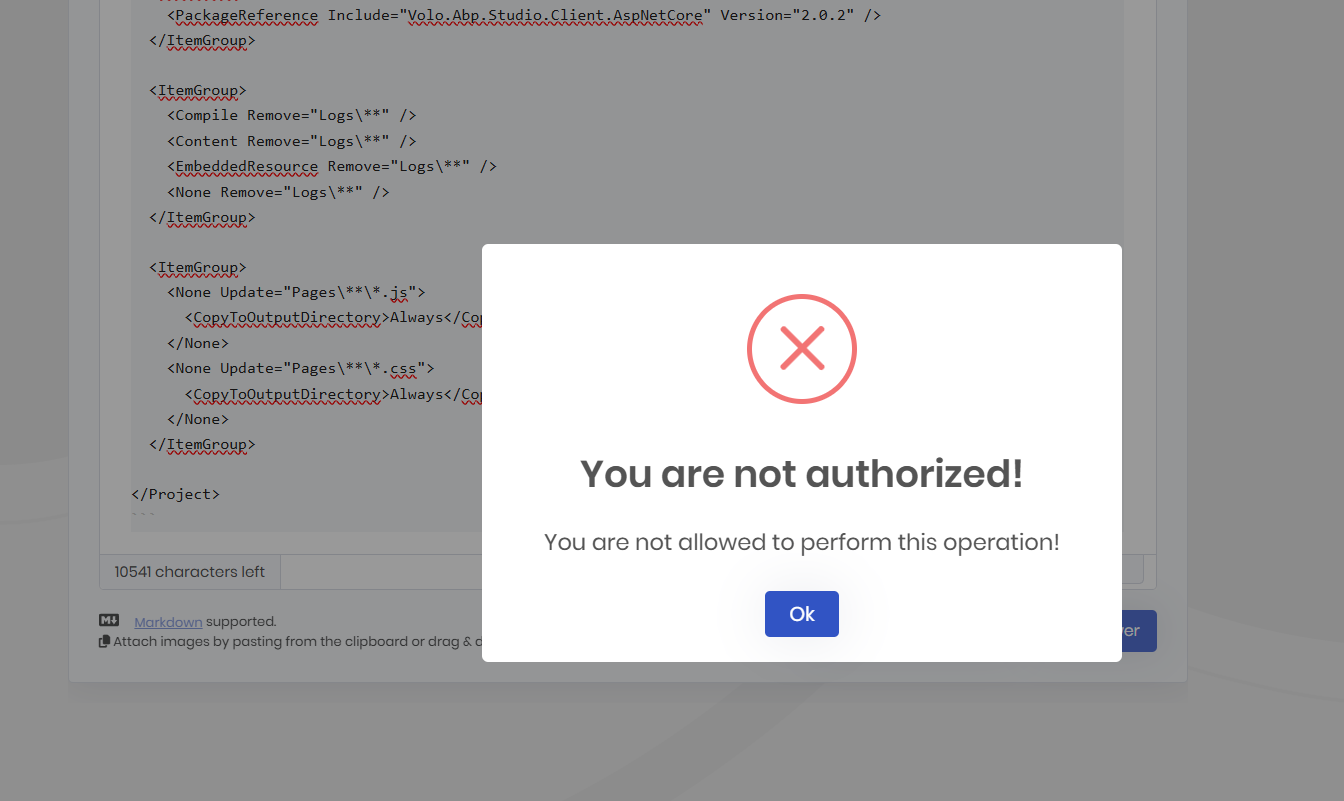
我要在markdown编辑器里发3个代码块,被阻止了。所以我给maliming@abp.io发了个邮件。
-
0
-
0
先前我也是用mardown的语法三个波浪加三个波浪,竟然触发了cloudfare的拦截,说我被blocked了。。。
现在是ABP的警告框。
但是我刚刚给你发的邮件,被退回来啦
-
0
你好 我的email: liming.ma@volosoft.com
-
0
QQ邮箱的Web界面太落伍了,还没有引入AI。你几年前就是我的通讯录联系人了。重新发送了。
我的Dockerfile是WindSurf生成的,不是我以前那样用VIsual Studio 2026来生成; .csproj也被WindSurf改了两个包,因为你默认的包里有WebAssembly字样的包,被移除了。

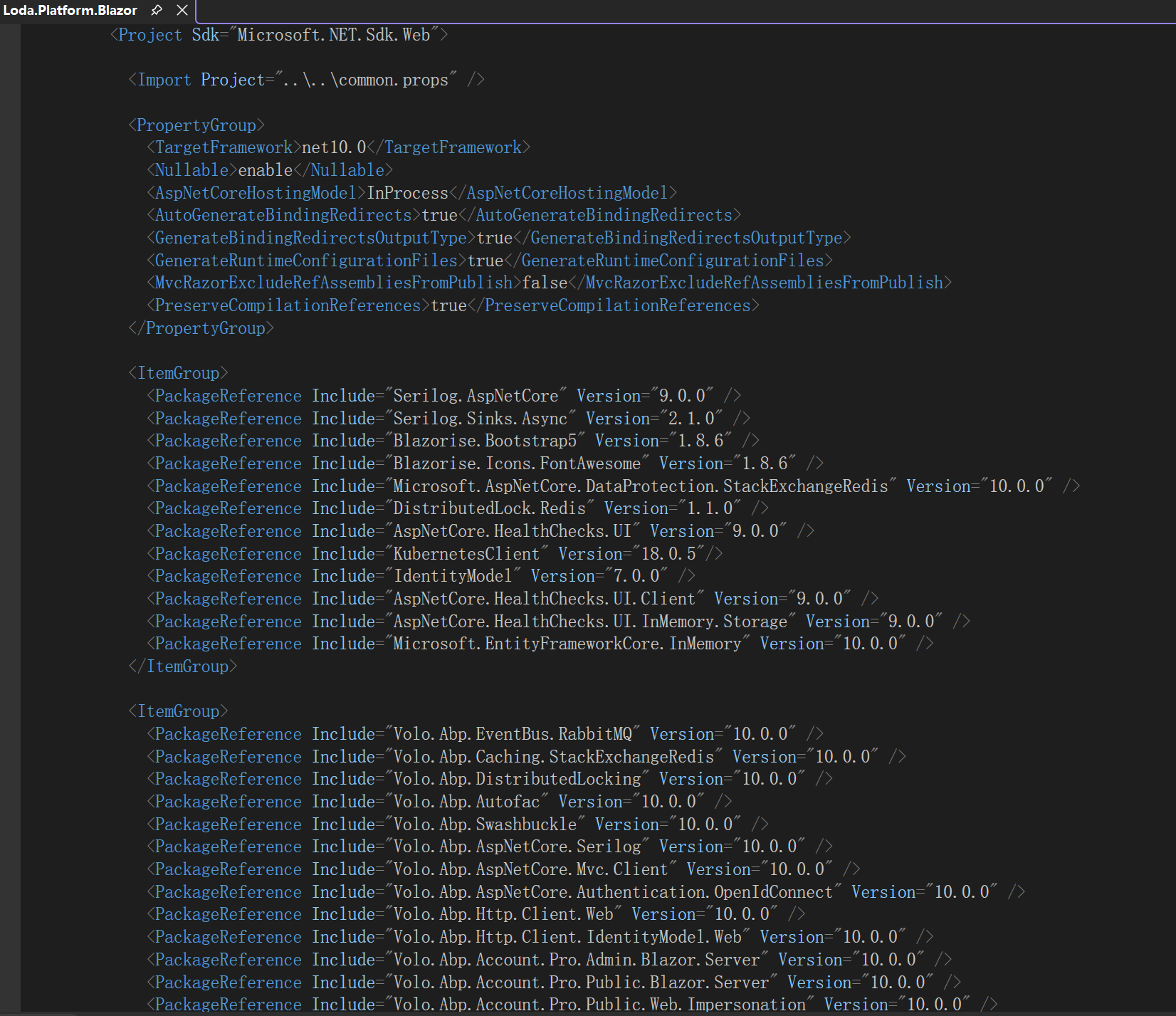

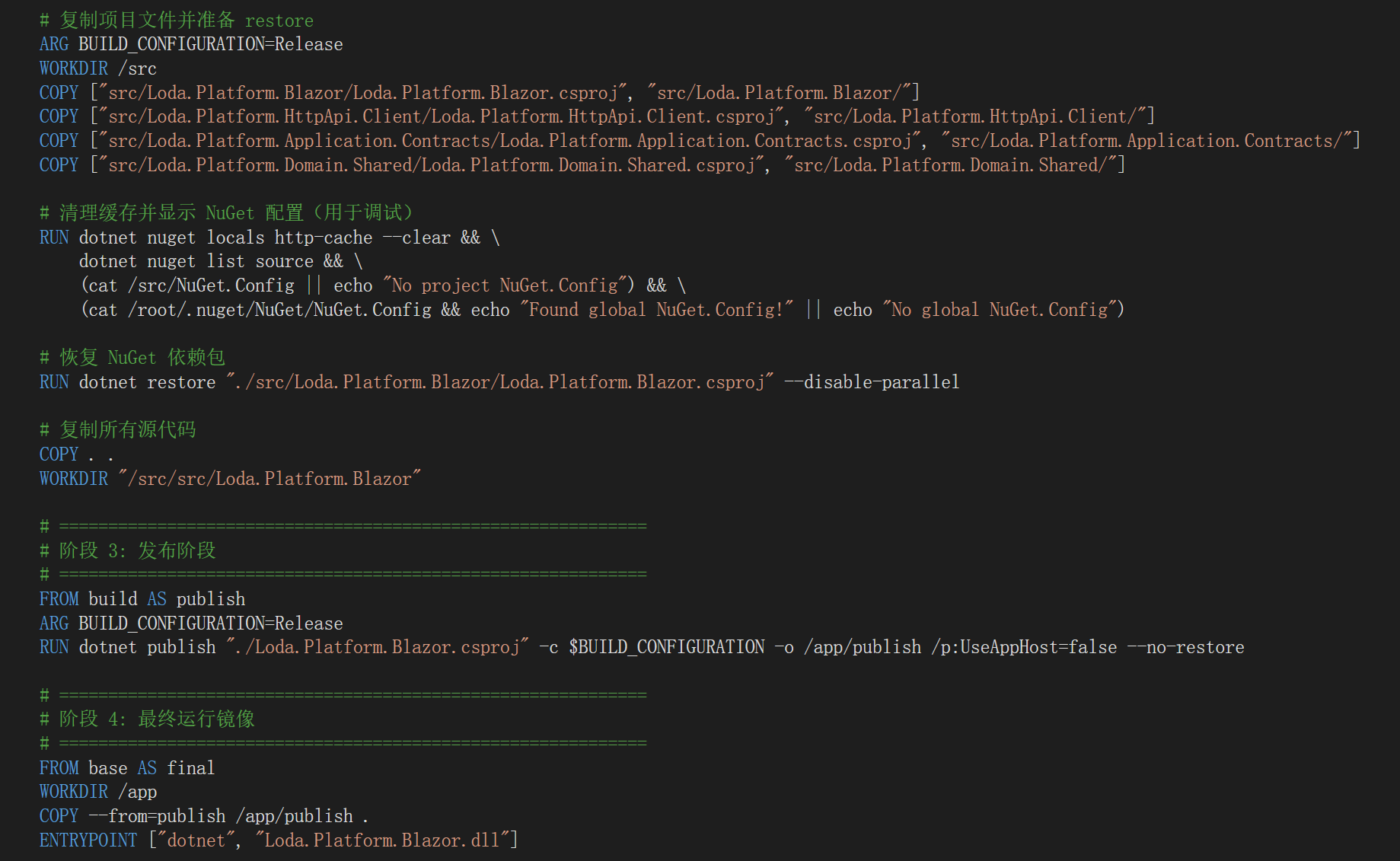
你们得多提交点东西给AI训练。我最近高度依赖WindSurf,没想到它能给我改这么多错误,连dotnet publish都搞出问题来。
-
0
请检查下dotnet publish后的发布文件
_framework/blazor.web.js应该在发布后wwwroot文件夹中. -
0
# cd wwwroot # ls _content 'favicon copy.ico.gz' favicon.ico.gz global-scripts.js.gz global-styles.css.gz Loda.Platform.Blazor.styles.css 'favicon copy.ico' favicon.ico global-scripts.js global-styles.css images Loda.Platform.Blazor.styles.css.br 'favicon copy.ico.br' favicon.ico.br global-scripts.js.br global-styles.css.br libs Loda.Platform.Blazor.styles.css.gz # -
0
试试
ls -R命令显示所有文件 -
0
根本没有_framework这个文件夹呢
我截取一部分:
# ls -R ./_content/Volo.Saas.Host.Blazor/libs: chart ./_content/Volo.Saas.Host.Blazor/libs/chart: chart.min.js chart.min.js.br chart.min.js.gz ./images: getting-started logo ./images/getting-started: bg-01.png discord.svg.br img-community.png instagram.svg.br stack-overflow.svg.br x-white.svg.br youtube.svg.br book.png discord.svg.gz img-support.png instagram.svg.gz stack-overflow.svg.gz x-white.svg.gz youtube.svg.gz discord.svg img-blog.png instagram.svg stack-overflow.svg x-white.svg youtube.svg ./images/logo: leptonx ./images/logo/leptonx: icon.svg icon.svg.br icon.svg.gz logo-dark.svg logo-dark.svg.br logo-dark.svg.gz logo-light.svg logo-light.svg.br logo-light.svg.gz ./libs:``` -
0
我是Blazor Server的项目呢?我目前还没有开始使用Blazor WebAssembly。
-
0
当我使用
dotnet publish一个blazor server项目后, wwwroot会出现这些Javascript
-
0
cd "e:\gitlab\platform\deploy\blazor-server\src\Loda.Platform.Blazor"

dotnet clean
dotnet publish -c Release -o .\publish-test
这个文件缺失,是我的发布行为的问题。我本地这么干干净净发布,是会有这个文件夹的。
-
0
那你给我解释一下,为什么我这个Blazor Server的项目(发布),ABP框架用的文件貌似是Blazor WebAssembly的呢?
发布没有_framework文件夹的事我自己去搞定。
-
0
WindSurf现在让我这样干,我还是等你吃完饭回复我一下啊。因为你说ABP是采用web.js。 但是我现在发布到https://erp2.loda.net 确实是纯粹的Blazor Server。
我现在去学习什么是BlazorWebApp。
已做两处关键修改:
PlatformBlazorModule.cs 第 131 行:IsBlazorWebApp = false(改回纯 Blazor Server) App.razor 第 50 行:引用改回 blazor.server.js 这样 Docker 构建时会按标准 Blazor Server 模式生成 framework 目录。
-
0
Blazor Wasm 和 Server 都会使用_framework/blazor.web.js 文件
这些blazor框架文件默认会在发布后出现在wwwroot文件夹内
你可以创建微软和abp的blazor server项目模版来测试默认行为
-
0
我刚刚去ChatGPT学习了一下,Blazor Web App才是未来啊。我现在以同样的名字,去ABP Studio生成全新的代码,UI选择Blazor Web App试试?
-
0
你可以先试试Blazor Server, 它和web app差不多. webapp是混合了server和wasm
-
0
[maliming] said: 你可以先试试Blazor Server, 它和web app差不多. webapp```
那我就要修改这里,改成_framework/blazor.server.js
才适配Blazor.Server?
我们已经用了2年的Blazor Server了。
-
0
你可以创建一个新项目, 然后检查App.razor文件的内容.
之后测试 dotnet publish 后的wwwroot文件夹
-
0
我跟你隆重的反馈第一个问题:
我从.NET 6.0到.NET 8.0,都是自己“想当然的”“优化”了Visual Studio 2022默认生成的Dockerfile
它默认是3步
- dotnet restore
- dotnet build
- dotnet publish 我在后边每一步,都加开关,build的时候就不restore,publish的时候就不要再次build了。
过去的几年,我这个技巧是没有问题的。
但是到了Blazor WebApp这里,就会导致发布之后,没有_framework文件夹。
我取消自己山寨的优化,就搞定了这个问题。
-
0
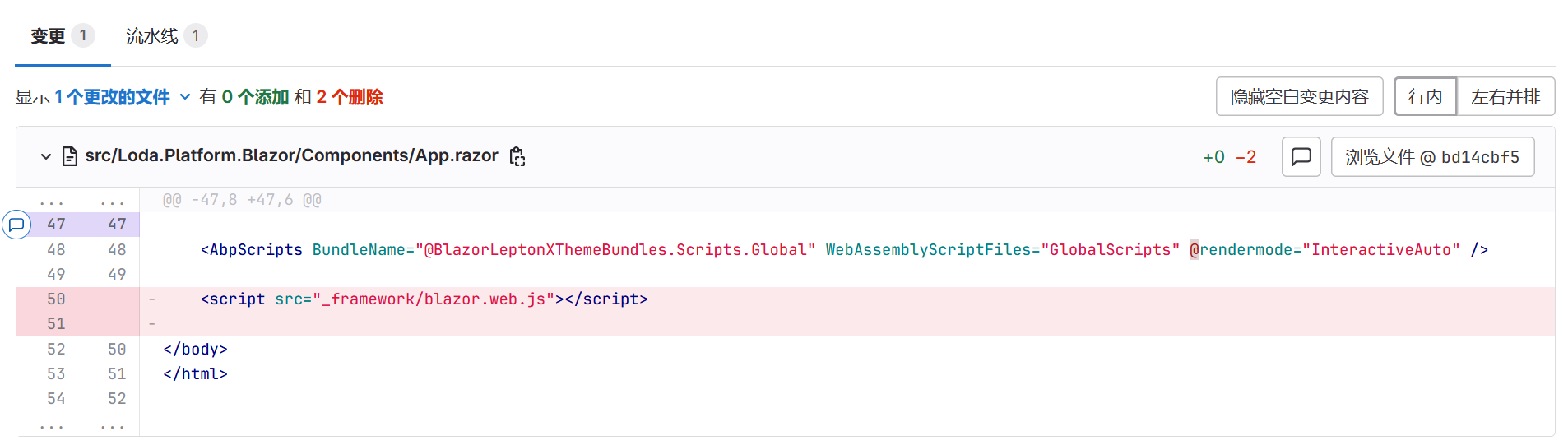
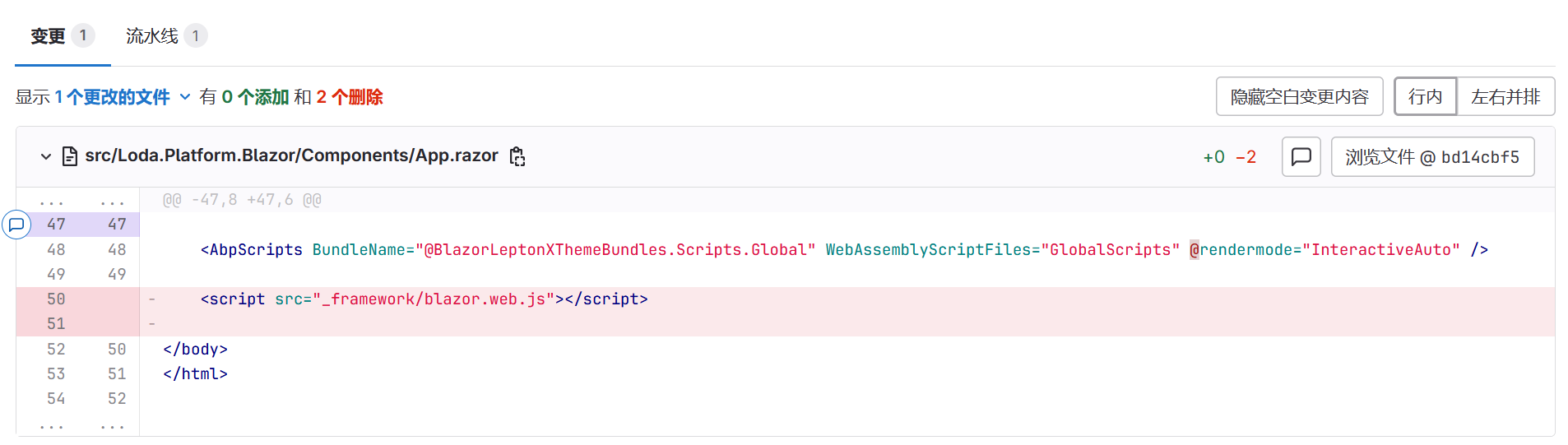
下边的意见,来自WIndSurf里免费的GPT 5.1,我折腾了48个小时。最后按它的指引,删除了这一句,就搞定了我的Blazor的WebApp的部署。
我觉得你们得重视这件事。你们模板里这样搞,别的ABP用户,真的能成功工作吗?
在 Blazor Web App 模式下,这行会让
blazor.web.js被 重复加载和初始化,导致电路初始化状态错乱,经常在刷新或 DOM 更新时抛出:Circuit host not initializedstartCircuitIfNotStartedrefreshRootComponents相关错误
Nginx 反向代理 (
prod-erp2-app.conf) 的配置是针对/、/_framework/、/loda-signalr-hubs/的,整体是按 Blazor Server 的最佳实践写的,目前没有看到会触发这个特定错误的问题,所以根因在前端启动方式,而不是反代。不再手动加载
_framework/blazor.web.js,让框架自己管理脚本加载和电路初始化。这样可以避免 同一页面上两次启动 Blazor,按经验这个能解决你现在在
https://app.loda.net上看到的那串Circuit host not initialized异常。 -
0
貌似我的理解有问题哈。不加上那个js,页面按钮全部不工作。现在我用git回退到了ABP Studio最初胜场的App.razor,然后一番折腾,貌似没问题了。回头再来报告。
-
0
好的 👍



