






Hi there, When I try to create a new project via ABP Suite , the system prompts "this account is not team-authorized." However, my account has already been added to our team license . Here are the details: The issue occurs when I: Log into ABP Studio→ click "New solution" → select a template (e.g., Application (Layered)). My account info: kingdom (kingdom@******), which is marked as an "authorized member" in the team management dashboard. Troubleshooting steps I’ve tried: Logging out and back into ABP Studio, clearing app/browser cache, verifying the team license is not expired. None of these resolved the issue. Could you help identify why this authorization prompt appears? What steps should I take to fix it? Thanks for your assistance.

3 Answer(s)
-
0
- Solution
- Confirm you’re signed into ABP Studio with the same abp.io account that was added to the team
- In ABP Studio top-right, click your avatar → Sign out.
- Close Studio completely.
- Re-open Studio → Sign in with the exact email that appears as an “authorized member” in your Team on abp.io.
- Ensure you are using the correct Organization (team) context
- On abp.io website: User menu → Organizations → verify you belong to the Organization that owns the Team license and that your member status is Active/Accepted.
- If you see multiple organizations, make sure the licensed one is set as current.
- In ABP Studio, after re-login, check that the Organization shown under your profile matches the licensed Organization.
- Re-sync your local Studio license cache
- In ABP Studio: Settings → Accounts → click “Refresh license” (or Sign out/in as above).
- Or run from terminal: abp cli clear-cache, then restart ABP Studio.
- Verify seat assignment and role
- In abp.io → Organization → Team Management, ensure:
- Your user has an available seat assigned under the Team license.
- Your membership is not pending invitation acceptance (if invited recently, open the invitation email and accept; then re-login in Studio).
- In abp.io → Organization → Team Management, ensure:
- If you were added recently, force-refresh Studio’s session
- Exit Studio.
- Kill any leftover “ABP Studio” processes.
- Start Studio again and log in.
- Check edition limits vs. what you try to create
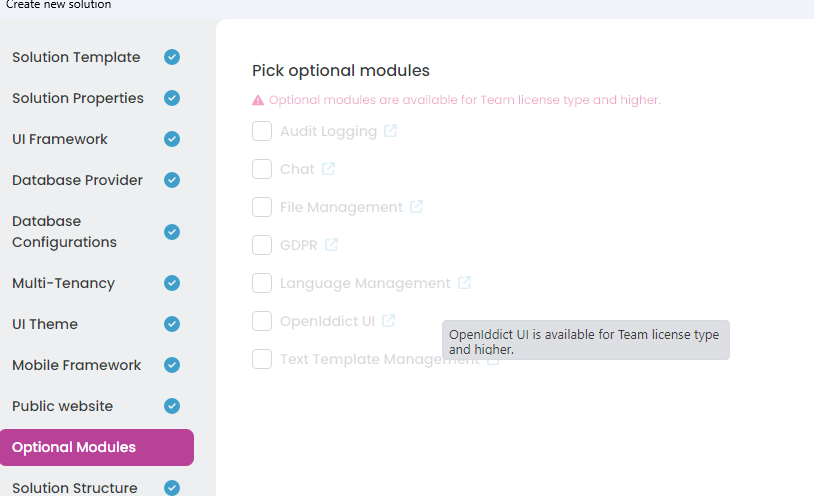
- Optional modules and Microservice template require higher tiers. If your Team license doesn’t include those features, Studio will gray them out or show “not team-authorized” on those specific options. Try creating a basic Application (Layered/Single Layer) without optional modules to confirm general access works.
- Still blocked?
- Have the Organization Owner remove you from the Team and add you back, then accept the new invitation and re-login to Studio.
- If none of the above resolves it, please contact us at https://abp.io/contact with:
- Your abp.io email
- Organization name
- Screenshot of Team Management showing your assignment
- ABP Studio version and the screenshot of the error in the New Solution wizard
- Sources
- This approach aligns with ABP Studio licensing behavior and common ABP conventions. No verified source available for this specific query.
This response was generated by AI. If it didn’t solve your problem, feel free to post a new answer — our support team will jump in to help you soon.
Markdown supported.Copy, paste, or drag & drop images and files (max 100 MB per file, 100 MB total per post) -
0
Hello, I am looking into your problem and will get back to you as soon as possible with the root cause.
Markdown supported.Copy, paste, or drag & drop images and files (max 100 MB per file, 100 MB total per post) -
0
When I checked the problem, I see that you can create a project with another developer account in the organization, but you cannot create one with the
kingdom (kingdom@******), account, even though you have added it to your organization as a developer. Is that correct?Markdown supported.Copy, paste, or drag & drop images and files (max 100 MB per file, 100 MB total per post)



