






0
kwanp created
Hi I just start with abp and try to follow Get Started with ABP : https://abp.io/docs/latest/get-started/layered-web-application?UI=NG&DB=EF&Tiered=No
But the service project cannot start and just shutdown ABP Studio
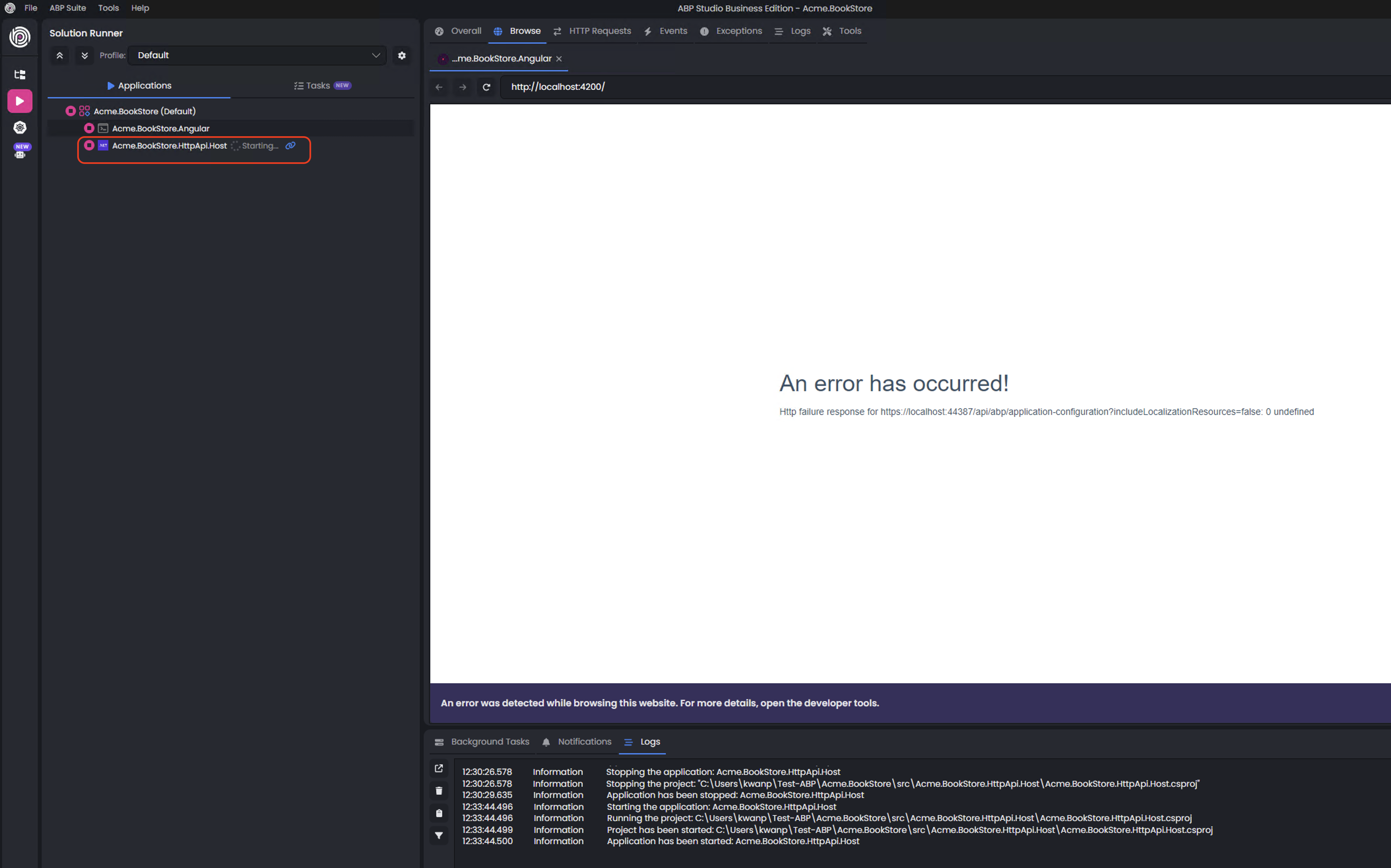
Thank you
Markdown supported.
Copy, paste, or drag & drop images and files (max 100 MB per file, 100 MB total per post)
4 Answer(s)
-
0
- Solution Based on your screenshot and the “Http failure response for https://localhost:xxxxx/api/abp/application-configuration?includeLocalizationResources=false” message in the Angular tab while HttpApiHost is stuck on “Starting…”, the Angular app can’t reach a healthy backend. In ABP Angular, the first call is always to /api/abp/application-configuration; if it fails, the UI shows that error.
Apply the checklist below exactly in this order:
Trust and use HTTPS dev certificate
- Run in a terminal:
- dotnet dev-certs https --trust
- Close and reopen ABP Studio, then start the solution again.
- Run in a terminal:
Ensure the HttpApiHost really runs and listens
- In ABP Studio’s Logs pane for Acme.BookStore.HttpApiHost, look for “Now listening on: https://localhost:PORT” and “Application started.”
- If it keeps stopping:
- Check appsettings.json ConnectionStrings:Default points to a reachable SQL Server.
- If first run, the database may be missing. Run the DbMigrator project once to create/seed the DB, then start HttpApiHost again.
Fix ports in Angular environment
- Open angular/src/environments/environment.ts and verify:
- environment.oAuthConfig.issuer = "https://localhost:{HttpApiHostHttpsPort}"
- environment.apis.default.url = "https://localhost:{HttpApiHostHttpsPort}"
- The port must match the HTTPS port printed by HttpApiHost at startup.
- Open angular/src/environments/environment.ts and verify:
Enable CORS for Angular origin
- In HttpApiHost appsettings.json under App:
- Add Angular dev origin to CorsOrigins and RedirectAllowedUrls: "App": { "SelfUrl": "https://localhost:{HttpApiHostHttpsPort}", "ClientUrl": "http://localhost:4200", "CorsOrigins": "http://localhost:4200", "RedirectAllowedUrls": "http://localhost:4200" }
- Restart HttpApiHost.
- In HttpApiHost appsettings.json under App:
Use HTTPS in Angular OAuth config
- For default templates requireHttps is true. Keep HTTPS and ensure your dev certificate is trusted:
- oAuthConfig.requireHttps: true
- issuer uses https, not http.
- For default templates requireHttps is true. Keep HTTPS and ensure your dev certificate is trusted:
Clear stale Angular dev state
- In the angular folder:
- yarn (or npm install)
- yarn start
- If still failing, clear browser cache and try again.
- In the angular folder:
Confirm application-configuration endpoint manually
- Open the browser to:
- https://localhost:{HttpApiHostHttpsPort}/api/abp/application-configuration?includeLocalizationResources=false
- If you don’t get a JSON response (200), check HttpApiHost logs for the exception (connection string, migrations, or certificate issues).
- Open the browser to:
Most common root causes for exactly this symptom:
- Missing DB/migrations: run DbMigrator first.
- Mismatched ports between Angular environment and HttpApiHost.
- Untrusted HTTPS dev cert (especially on a fresh machine).
- Missing CORS entries for http://localhost:4200.
- Sources
- Get Started – Layered application (Angular + EF Core)
https://abp.io/docs/latest/get-started/layered-web-application?UI=NG&DB=EF&Tiered=No
This response was generated by AI. If it didn’t solve your problem, feel free to post a new answer — our support team will jump in to help you soon.
Markdown supported.Copy, paste, or drag & drop images and files (max 100 MB per file, 100 MB total per post)



