






We are trying to deploy to a Kubernetes cluster external to the local team with ABP Studio. To connect to the cluster, we modified the config file in the .kube directory.
After a lot of hard work, I have managed to deploy the services and charts to the cluster, but now there are several errors.
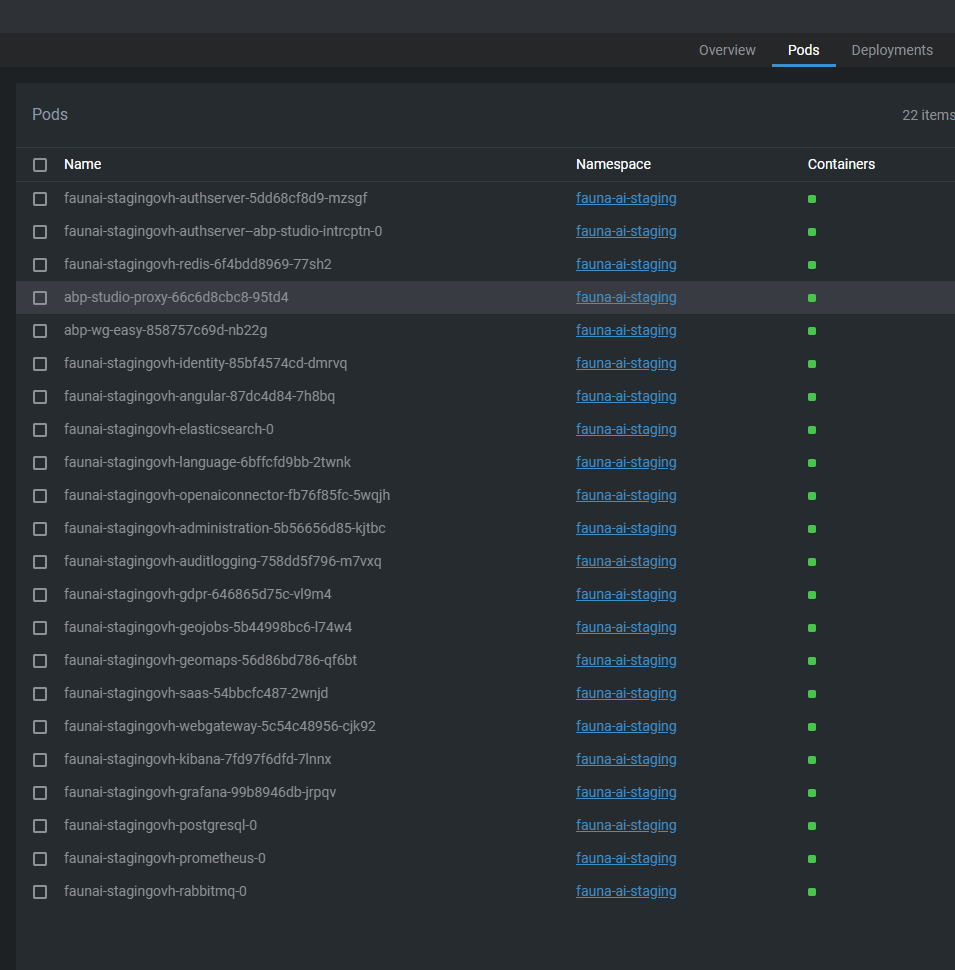
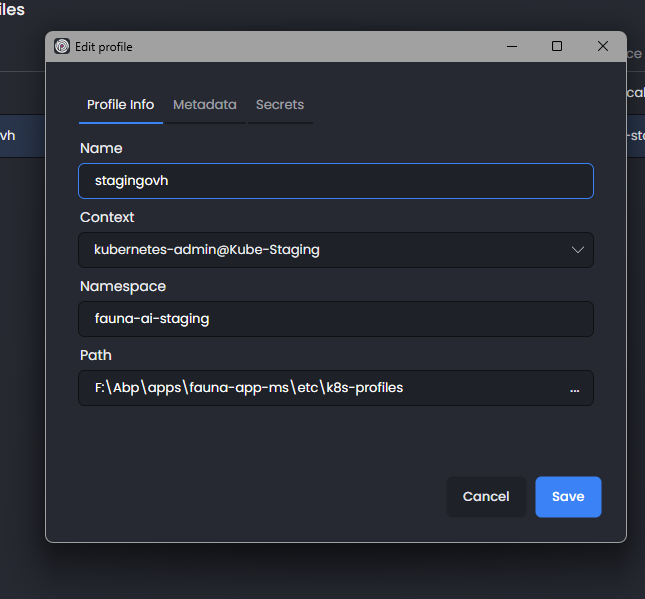
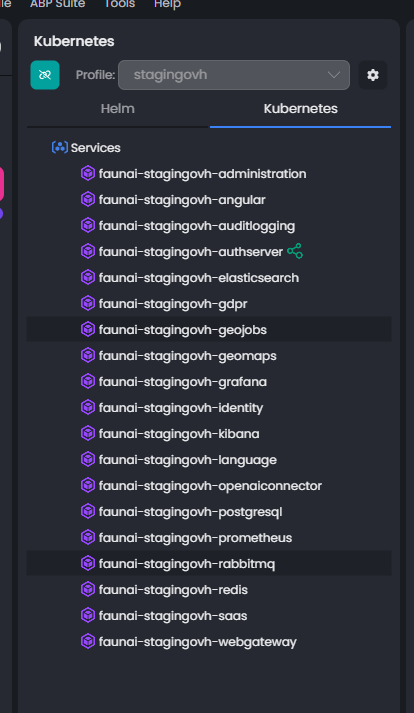
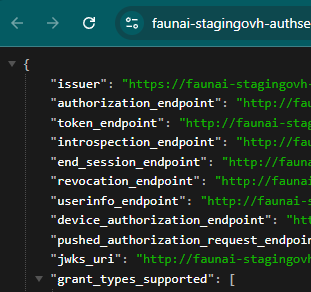
The authserver is exposing the OIDC endpoints with HTTP instead of HTTPS. This causes the Angular application to reject the endpoints, and no matter how many configurations I have tried to prevent it from validating or ignoring them, it continues to fail. So, I decided to try the interceptors, and that's where the big problem arose.
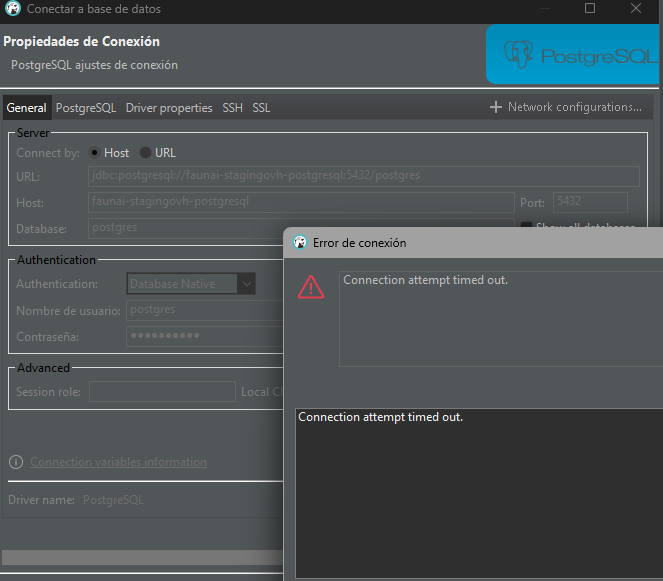
 No matter how hard I try to connect to the services deployed in the cluster (Postgres, Redis, etc.) from my local computer connected to the cluster and with WireGuard, all attempts to connect to these services and endpoints time out.
So when it comes to intercepting the request, the service cannot connect to either the database or Redis.
No matter how hard I try to connect to the services deployed in the cluster (Postgres, Redis, etc.) from my local computer connected to the cluster and with WireGuard, all attempts to connect to these services and endpoints time out.
So when it comes to intercepting the request, the service cannot connect to either the database or Redis.
 I would like more information about the configuration, secrets, metadata, and other aspects of ABP Studio because the documentation is very scarce. In addition, you have not updated the release notes for ABP Studio versions for a long time, which makes it difficult to know what improvements you have made in terms of application templates, configurations, and commands.
I kindly request that you provide a solution and the aforementioned documentation as soon as possible, as we need to validate the development and implementation of the application as soon as possible.
7 Answer(s)
-
0
- Solution Based on your screenshots and symptoms there are two separate issues:
A) AuthServer discovery shows HTTP endpoints (Angular rejects them) B) ABP Studio interception cannot reach cluster services (timeouts to Postgres/Redis via WireGuard)
Fix A – make discovery document fully HTTPS behind ingress/reverse proxy
- Ensure the AuthServer publishes HTTPS URLs in the discovery document, even if Kestrel listens on HTTP behind an ingress. Add both settings below:
- App settings: "AuthServer": { "Authority": "https://your-auth-host", "RequireHttpsMetadata": true }
- Module configuration (set issuer and relax OpenIddict transport only if you must run plain HTTP internally):
public override void PreConfigureServices(ServiceConfigurationContext context) { var configuration = context.Services.GetConfiguration(); PreConfigure<OpenIddictServerBuilder>(builder => { builder.SetIssuer(new Uri(configuration["AuthServer:Authority"]!)); }); } public override void ConfigureServices(ServiceConfigurationContext context) { var env = context.Services.GetHostingEnvironment(); var configuration = context.Services.GetConfiguration(); if (!env.IsDevelopment()) { // Honor X-Forwarded-* to build correct HTTPS URLs and cookies context.Services.Configure<ForwardedHeadersOptions>(o => { o.ForwardedHeaders = ForwardedHeaders.XForwardedFor | ForwardedHeaders.XForwardedProto | ForwardedHeaders.XForwardedHost; o.KnownNetworks.Clear(); o.KnownProxies.Clear(); }); } // If you cannot keep RequireHttpsMetadata=true, add this to avoid OpenIddict rejecting HTTP (not recommended for production): if (!configuration.GetValue<bool>("AuthServer:RequireHttpsMetadata")) { Configure<OpenIddictServerAspNetCoreOptions>(options => { options.DisableTransportSecurityRequirement = true; }); } } public override void OnApplicationInitialization(ApplicationInitializationContext context) { var app = context.GetApplicationBuilder(); var env = context.GetEnvironment(); if (!env.IsDevelopment()) { app.UseForwardedHeaders(); } // Optional hard override if your proxy doesn’t forward scheme correctly: // app.Use((ctx, next) => { ctx.Request.Scheme = "https"; return next(); }); app.UseRouting(); app.UseAuthentication(); app.UseAuthorization(); app.UseConfiguredEndpoints(); }- In your ingress/reverse proxy (nginx/ingress controller) forward these headers:
- X-Forwarded-Proto $scheme
- X-Forwarded-Host $host
- X-Forwarded-For $proxy_add_x_forwarded_for
- Host $host
- Seed/ensure RedirectAllowedUrls, CorsOrigins and clients use the same public https origin as Authority.
- Verify the discovery document now shows https for all endpoints and jwks_uri.
Fix B – ABP Studio interception timeouts to in-cluster services
- ABP Studio’s tunnel relies on:
- The VPN client connected (abp-wg-easy and abp-studio-proxy pods healthy)
- Local hosts file entries for service DNS names
- The cluster allowing access to ClusterIP services via the VPN CIDR
- Checklist:
- Confirm “Connected” state in Studio and abp-wg-easy-vpn + abp-studio-proxy pods are Running.
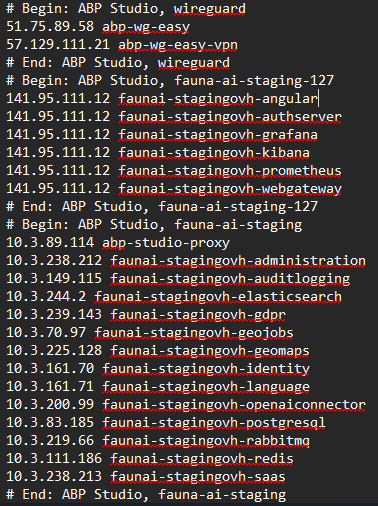
- Ensure your OS hosts file contains the entries Studio added (your screenshot shows them). Do not override them with other entries.
- Verify your local machine can resolve and ping ClusterIP addresses (e.g., nslookup fauna-ai-staging-postgresql then ping that IP). If ICMP is blocked, test TCP:
- Test DB: psql or tcp ping via PowerShell: Test-NetConnection fauna-ai-staging-postgresql -Port 5432
- Test Redis: Test-NetConnection fauna-ai-stagingovh-redis -Port 6379
- If these time out:
- Check your cluster network policies: allow traffic from the WireGuard VPN CIDR to service ClusterIPs/ports (5432, 6379, etc.).
- Check firewall rules on the cluster nodes for the VPN interface.
- Ensure no corporate VPN/split-tunnel is overriding the ABP WireGuard route to the cluster CIDR.
- When intercepting a service, start your local service with Kestrel (not IIS Express) and let Studio inject environment variables so it uses in-cluster connection strings and Redis.
- If you see “Authorization failed! Given policy has not granted.” while debugging intercepted apps, run the create-tls-secret.ps1 in etc/helm and restart the app.
Notes specific to Angular and GW
- Angular strict discovery validation requires all discovery URLs be https. After applying Fix A, Angular should stop rejecting the endpoints.
- Make sure all microservices/gateway use ForwardedHeaders and that their RemoteServices.BaseUrl, AuthServer.Authority, and SelfUrl point to public https hosts (not internal service names) when serving browser traffic via the gateway.
- For 127.0.0.1 client IPs in logs, enable ForwardedHeaders in every service/app so ABP can read the real client IP from X-Forwarded-For.
- Sources
- ABP Studio – Kubernetes interception (includes TLS secret note and interception behavior)
- https://abp.io/docs/latest/studio/kubernetes
- Community thread (OpenIddict HTTPS behind proxy; issuer/authority and forwarded headers patterns)
- https://abp.io/support/questions/4338
- Community article: Kubernetes tunnel and interception with ABP Studio (explains VPN, hosts entries, interception)
- https://abp.io/community/articles/h11utnq8
This response was generated by AI. If it didn’t solve your problem, feel free to post a new answer — our support team will jump in to help you soon.
-
0
Thank you for reporting these issues. We appreciate you bringing them to our attention. We will start reviewing them on Monday and get back to you with updates as soon as possible.
-
0
The authserver is exposing the OIDC endpoints with HTTP instead of HTTPS. This causes the Angular application to reject the endpoints, and no matter how many configurations I have tried to prevent it from validating or ignoring them, it continues to fail.
I have created internal issues regarding this problem, and we will do our best to resolve them in the next Studio release. After solving the problem, I will provide you with a solution.
No matter how hard I try to connect to the services deployed in the cluster (Postgres, Redis, etc.) from my local computer connected to the cluster and with WireGuard, all attempts to connect to these services and endpoints time out. So when it comes to intercepting the request, the service cannot connect to either the database or Redis.
I will create a separate internal issue for this problem as well, but it may be low priority. It's difficult to say anything without reviewing it. I will update this after a detailed review.
I would like more information about the configuration, secrets, metadata, and other aspects of ABP Studio because the documentation is very scarce.
I will create a separate internal issue for this topic as well.
In addition, you have not updated the release notes for ABP Studio versions for a long time, which makes it difficult to know what improvements you have made in terms of application templates, configurations, and commands.
We will update it within today. Thank you for your understanding.
-
0
Hello again,
Following up on the first point you mentioned earlier regarding the AuthServer exposing OIDC endpoints over HTTP instead of HTTPS:
“The authserver is exposing the OIDC endpoints with HTTP instead of HTTPS. This causes the Angular application to reject the endpoints, and no matter how many configurations I have tried to prevent it from validating or ignoring them, it continues to fail.”
We have made several adjustments in the templates and configuration to address this behavior and ensure that the Angular application can start and work correctly behind reverse proxies and Kubernetes environments.
If you apply the changes below (shown in the screenshots), the Angular application should work as expected. Please note that
MyProjectNameis a placeholder and must be replaced with your own project name.What was changed
1. Angular production configuration
Font optimization is disabled in
angular.jsonto avoid build-time issues in containerized environments: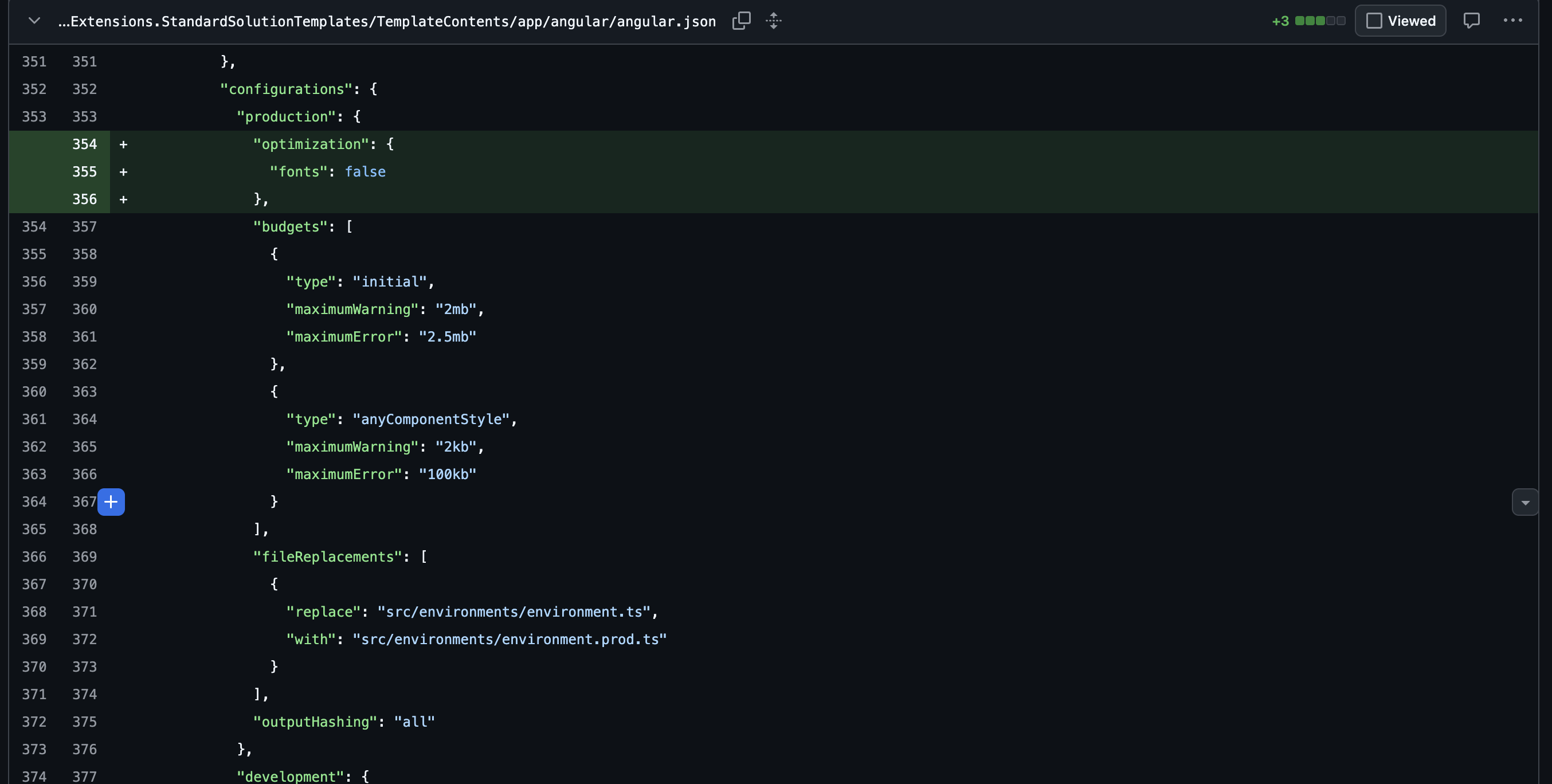
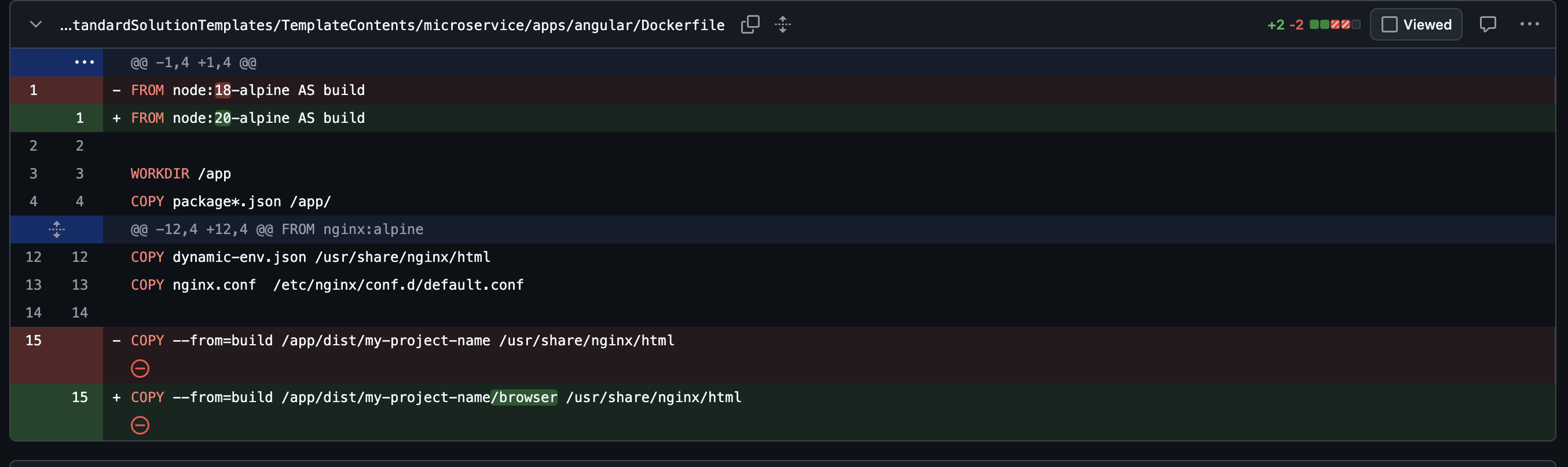
2. Angular Dockerfile updates
- The Node version is updated:
- The correct Angular output directory is copied (Angular now outputs to
browser):
3. AuthServer forwarded headers configuration
To correctly handle HTTPS termination at the reverse proxy level, the AuthServer configuration was updated:
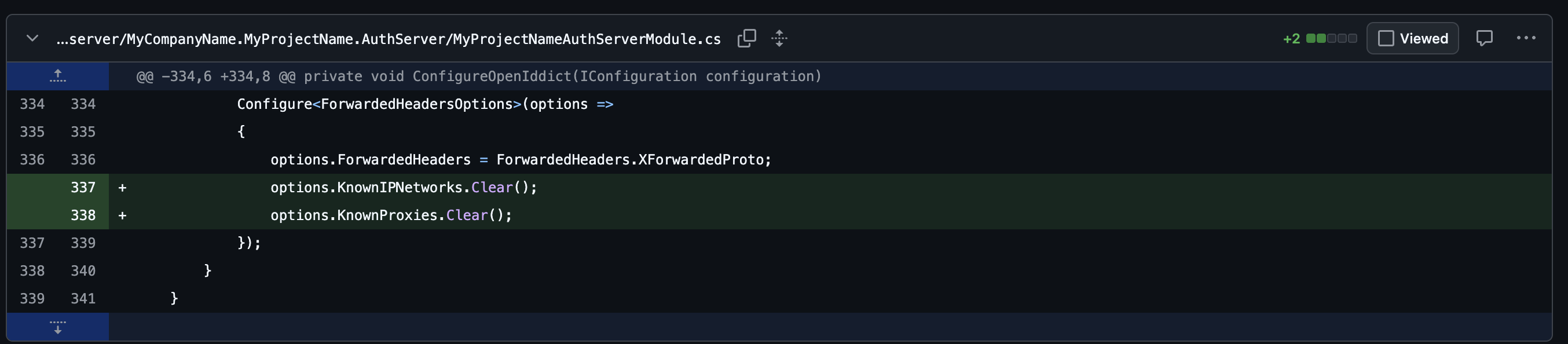
This ensures that the AuthServer correctly respects the original HTTPS scheme when running behind NGINX or an ingress controller.
4. Angular OAuth configuration
In the Angular Helm ConfigMap,
requireHttpsis set tofalsefor internal cluster communication: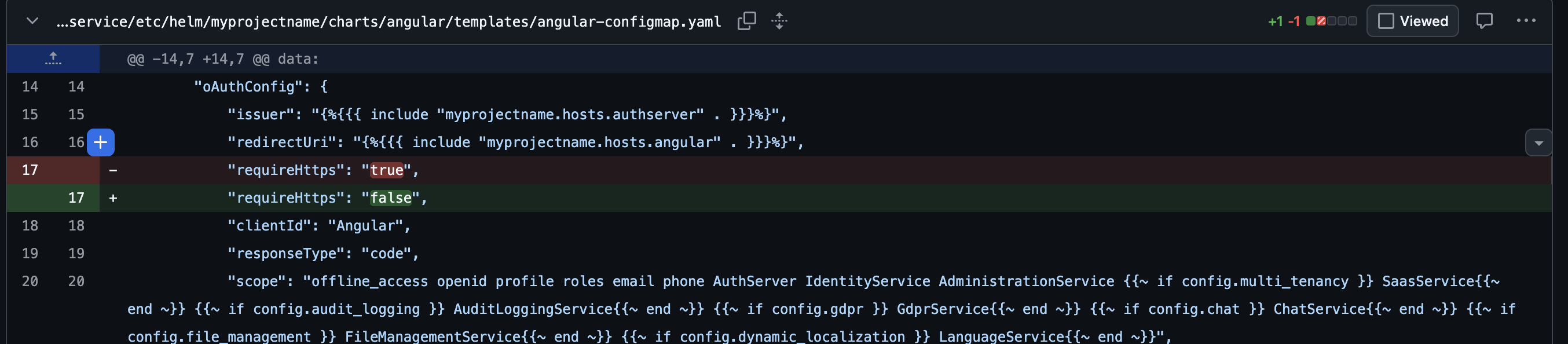
This prevents Angular from rejecting the OIDC endpoints when HTTPS is terminated upstream.
Result
With these changes applied and after rebuilding/redeploying:
- The Angular application should start correctly
- OIDC endpoint validation should no longer fail due to HTTP/HTTPS mismatch
Please let us know if you continue to face issues after applying these changes.
Best regards, Berkan
-
0
Hello Berkam. Thank you for your attention. The Angular application is now running thanks to the changes you indicated and the AI in the first message sent. I have already applied some of your suggested changes, as we work with several Angular applications and the Docker file correction is something we have been applying for a couple of updates now...
Ultimately, the important thing in a production and staging environment is that the backend is exposed via HTTPS, so the solution indicated by the AI solved that part.
Regarding the template and handling of microservice solutions, I see quite a few flaws and areas for improvement.
Although it indicates which context should be used for the connection to install a few Helm components, in some cases, such as in the VPN part, current-context is used, so the user must change the context manually through commands or the file. In my case, leaving the currencontext as docker-desktop causes the VPN installation to fail.
On the other hand, something quite common and worth noting is that when you use Kubernetes outside of a local environment, you cannot access locally compiled Docker images, so extra, repetitive configuration of the external Docker registry is necessary to build, push, and pull the entire flow, especially when you want to test in staging environments, and you would need to indicate an imagePullSecretName in the globals as well. in the globals as well (I understand that this must be added manually and that the registry repository can be added through metadata and taken into account in the Docker build, push, and pull flow).
Here are some examples of these changes that have been made, and I look forward to a solution to the VPN issue.
helm\{appname}\values.{xxxx}.yaml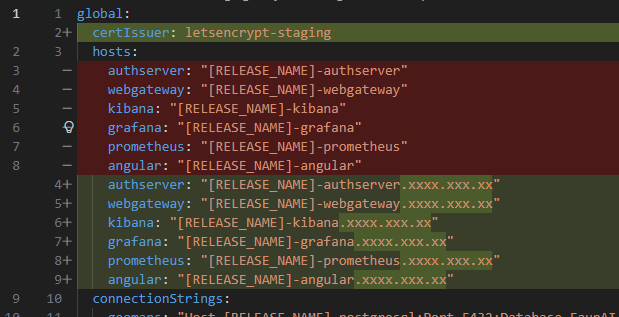
helm\{appname}\values.yaml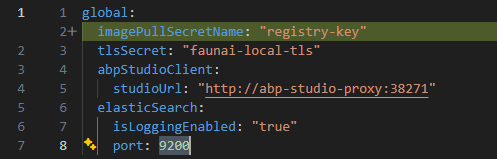
helm\build-image.ps1Shearch better way...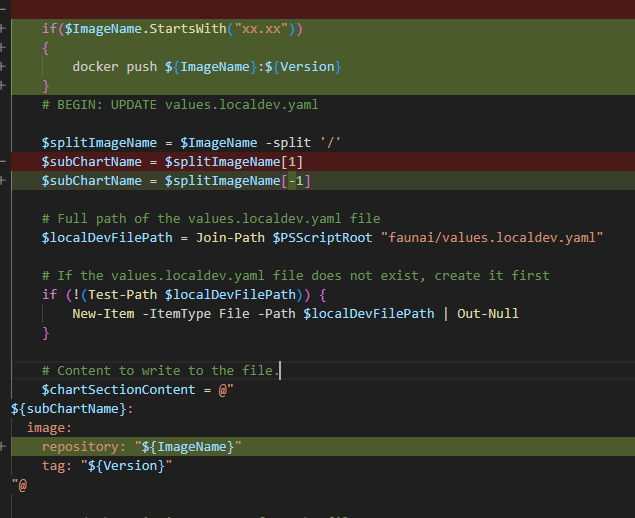
etc\helm\{appname}\charts\administration\templates\administration.yaml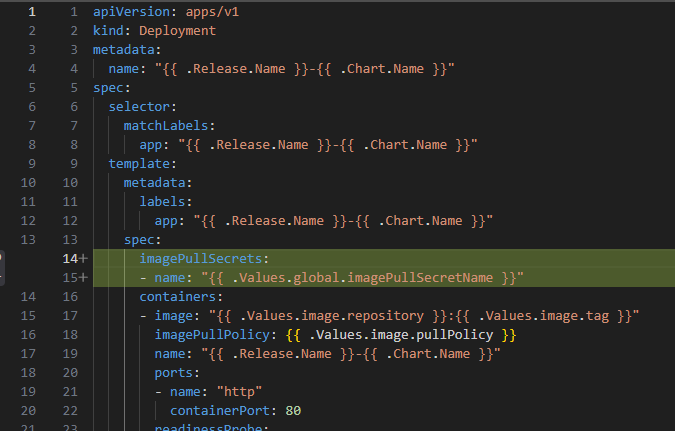
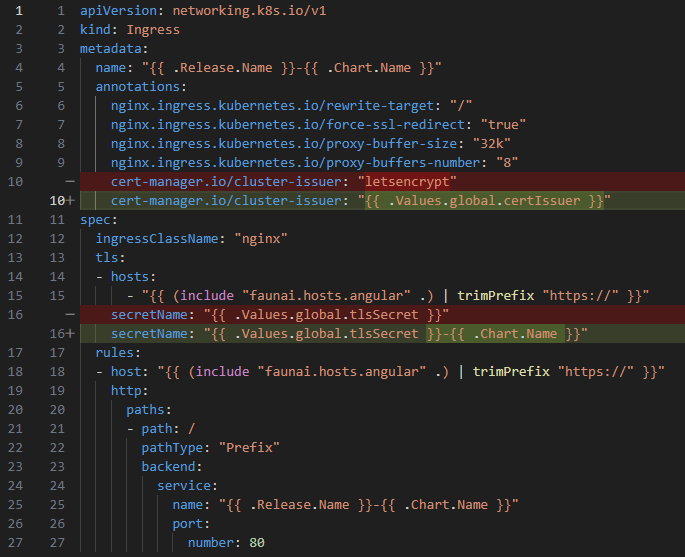
find better way for this..
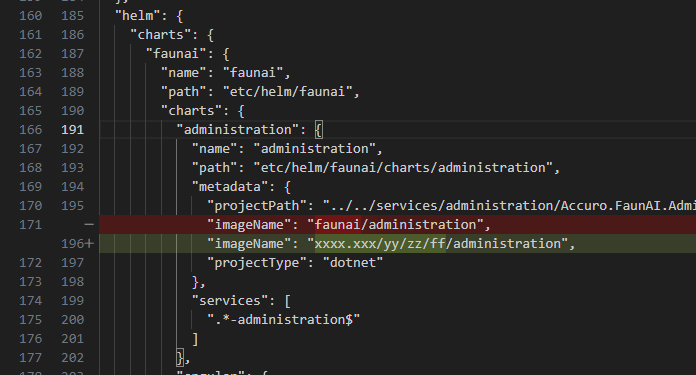
Best regards and thank you very much.
-
0
Hello Sroman,
First of all, thank you very much for your valuable insights. They will be very useful in understanding and solving the problem. As I said, although it is not a priority, we will definitely look into this remote cluster connection problem. Thank you for your patience 🙏
Issue(for abp team): https://github.com/volosoft/abp-studio/issues/4142
-
0
For the "http/https"problem on OIDC with AuthServer, this approach by microsoft might help: https://learn.microsoft.com/en-us/aspnet/core/host-and-deploy/proxy-load-balancer?view=aspnetcore-10.0#when-it-isnt-possible-to-add-forwarded-headers-and-all-requests-are-secure
app.Use((context, next) =>
{
    context.Request.Scheme = "https";
    return next(context);
});



