






We are using ABP.IO v10 and with the built-in Inbox/Outbox pattern for message processing in a micro service approach.
We would like to understand whether it is possible to scale message consumption horizontally:
Is it supported to have multiple application instances or background workers consuming messages from the same Inbox while using the Inbox/Outbox flow?
Specifically:
Can multiple instances safely process messages from the same Inbox without the risk of duplicate processing? Does ABP v10 provide built-in concurrency control (such as row locking, leasing, or optimistic concurrency) for Inbox message consumption?
If this scenario is not supported out of the box, is there a recommended approach in ABP v10 to achieve parallel consumption (e.g., partitioning inboxes, custom locking, or integration with a message broker)?
Our goal is to scale consumers while preserving the at-least-once guarantees provided by the Inbox/Outbox pattern.
9 Answer(s)
-
0
- Solution
- Short answer
- Yes, you can run multiple instances of the same application (or multiple background workers) with ABP’s Inbox/Outbox enabled and safely consume from the same Inbox. ABP uses a distributed lock and idempotency to prevent double handling. This supports horizontal scale-out while preserving at-least-once delivery semantics.
- Concurrency control/protections:
- Outbox: Background publisher is protected by a distributed lock to avoid concurrent publishing of the same outbox record across instances.
- Inbox: Each received distributed event is stored first and deduplicated (idempotency check) before handlers run; a distributed lock is taken around processing to avoid concurrent execution of the same inbox record by multiple instances.
- What you must do
- Use a distributed lock provider (mandatory for multi-instance):
- Install an IDistributedLockProvider implementation (e.g., Redis, SqlServer, etc.) and register it once at startup:
- Use a distributed lock provider (mandatory for multi-instance):
using Medallion.Threading;
     using Medallion.Threading.Redis;
     using StackExchange.Redis;

     context.Services.AddSingleton<IDistributedLockProvider>(sp =>
     {
         var configuration = context.Services.GetConfiguration();
         var mux = ConnectionMultiplexer.Connect(configuration["Redis:Configuration"]); // e.g., "127.0.0.1"
         return new RedisDistributedSynchronizationProvider(mux.GetDatabase());
     });
- Ensure all instances share the same distributed lock backend.- Configure the event boxes per DB context:
Configure<AbpDistributedEventBusOptions>(options =>
     {
         options.Outboxes.Configure(config => { config.UseDbContext<MyDbContext>(); });
         options.Inboxes.Configure(config => { config.UseDbContext<MyDbContext>(); });
     });
- Outbox/Inbox tables must live in the same database as your business data to execute in a single transaction.- Run as many instances as needed. ABP’s background workers will:
- Outbox: only one instance acquires the lock to publish a specific batch/record at a time; retries handle transient failures.
- Inbox: the message is persisted first; duplicate deliveries are discarded using the stored processed record; processing is wrapped with a lock to avoid concurrent execution for the same message.
On duplicates and ordering
- The pattern is at-least-once. Duplicates can still be delivered by the broker, but the inbox idempotency record prevents re-processing. Your handlers should be idempotent (safe on re-run) as a best practice.
- Ordering across partitions/consumers is not guaranteed by ABP; rely on your broker or design handlers to be order-independent.
If you need higher parallelism
- Use your broker’s partitioning/competing-consumers capabilities (e.g., RabbitMQ multiple consumers on a queue, Kafka partitions) – ABP’s inbox will still dedupe.
- Use selectors (EventSelector/HandlerSelector) to split inboxes per module or message category to reduce contention.
- For extreme multi-database/multi-tenant scenarios, consider a specialized implementation (e.g., custom IEventInbox/IEventOutbox provider), but it’s not required for typical scaling.
Not supported/out-of-scope
- Exactly-once processing is not provided; ABP provides at-least-once with idempotency and distributed locking.
- Sources
- Distributed Event Bus (Outbox/Inbox, configuration, custom providers):
- https://abp.io/docs/latest/framework/infrastructure/event-bus/distributed/
This response was generated by AI. If it didn’t solve your problem, feel free to post a new answer — our support team will jump in to help you soon.
Markdown supported.Copy, paste, or drag & drop images and files (max 100 MB per file, 100 MB total per post) -
0
we would like to clarify the runtime behaviour of the Inbox processing in ABP.IO v10 when multiple instances are running.
For example:
If the Inbox contains 10 or more pending items
And 2 (or more) application instances are running with Inbox processing enabled
What is the expected behavior?
Will each instance pick different Inbox items and process them in parallel?
Or does only one instance consume and process Inbox messages while the others remain idle?
If parallel processing is supported, how does ABP prevent two instances from processing the same Inbox item?
Understanding this behaviour is important for us to properly size and scale our deployment.
Thank you.
Markdown supported.Copy, paste, or drag & drop images and files (max 100 MB per file, 100 MB total per post) -
0
hi
The
InboxProcessoruses distributed locks to prevent messages from being processed multiple times.That is, there will be only one processor processing the message at a time.
https://github.com/abpframework/abp/blob/rel-10.0/framework/src/Volo.Abp.EventBus/Volo/Abp/EventBus/Distributed/InboxProcessor.cs#L88
The new
Failure Retry Policy for InboxProcessorin 10.0: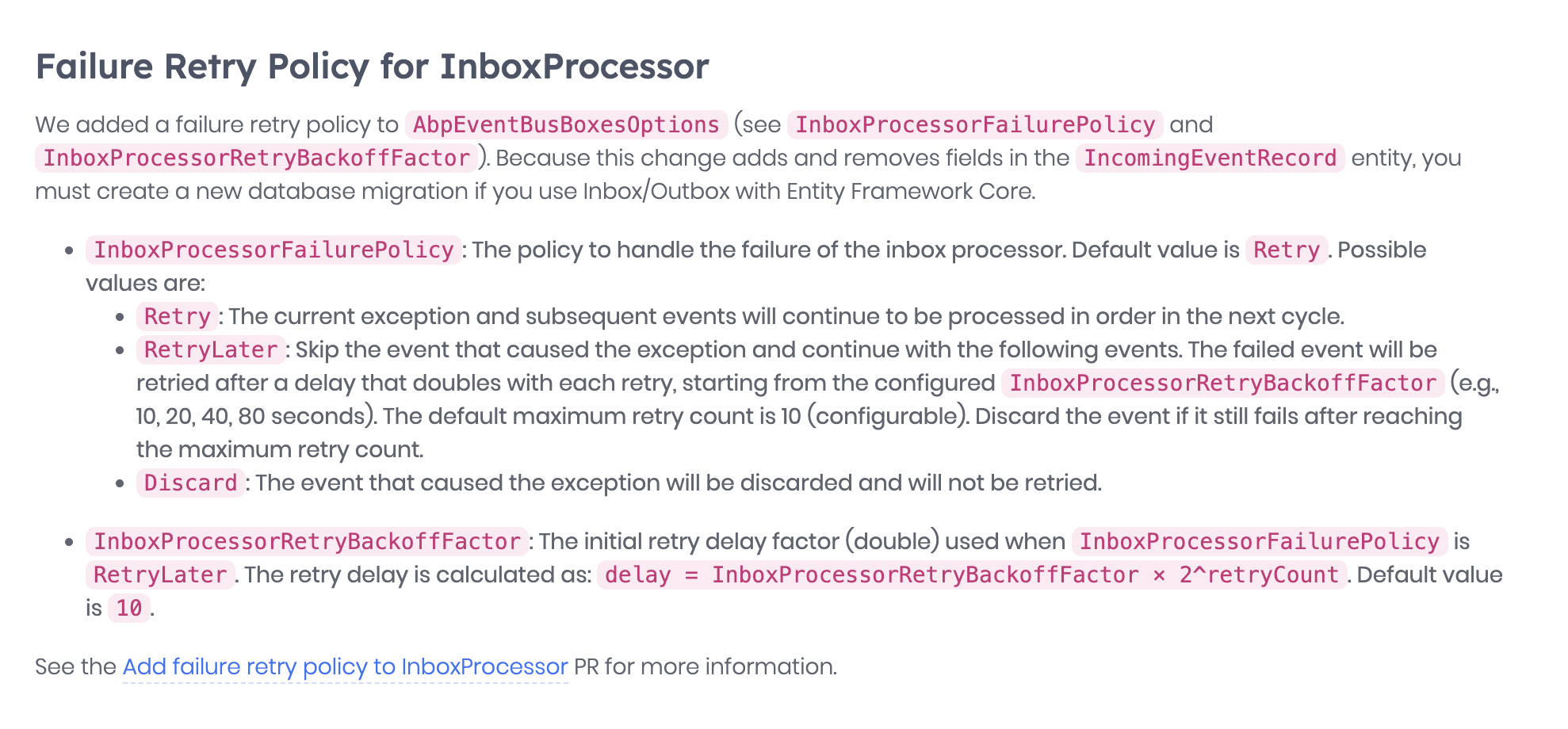
https://abp.io/docs/10.0/release-info/migration-guides/abp-10-0#failure-retry-policy-for-inboxprocessor
Thanks
Markdown supported.Copy, paste, or drag & drop images and files (max 100 MB per file, 100 MB total per post) -
0
We need to support horizontal scaling to handle the volume of events being published to the Service Bus. At present, a single service instance processing the inbox can take several hours to complete, regardless of the compute resources allocated. Could you please advise on recommended approaches or architectural patterns to enable parallel or distributed inbox processing in this scenario?
Markdown supported.Copy, paste, or drag & drop images and files (max 100 MB per file, 100 MB total per post) -
0
Thank you for the advice — we’re going to follow the approach of using dedicated workers for specific events, which should help us process events faster.
However, we still have a concern around message intake. At the moment, we need to consume more messages from the Service Bus in order to populate the Inbox table more quickly, so that there are always enough messages available for inbox processing.
In other words, even if we scale out the workers that process inbox messages, we appear to be limited by how fast messages are pulled from the Service Bus and written into the Inbox table.
Is there a recommended way in ABP v10 to:
Increase or parallelize message consumption from the Service Bus for the Inbox, or
Configure multiple consumers/listeners that safely populate the Inbox table while still preserving idempotency and ordering guarantees?
Any guidance on best practices for scaling the message ingestion into the Inbox (not just inbox processing) would be very helpful.
Markdown supported.Copy, paste, or drag & drop images and files (max 100 MB per file, 100 MB total per post) -
0
hi
We will try the inbox processers and go from there.
Thanks
Markdown supported.Copy, paste, or drag & drop images and files (max 100 MB per file, 100 MB total per post)



