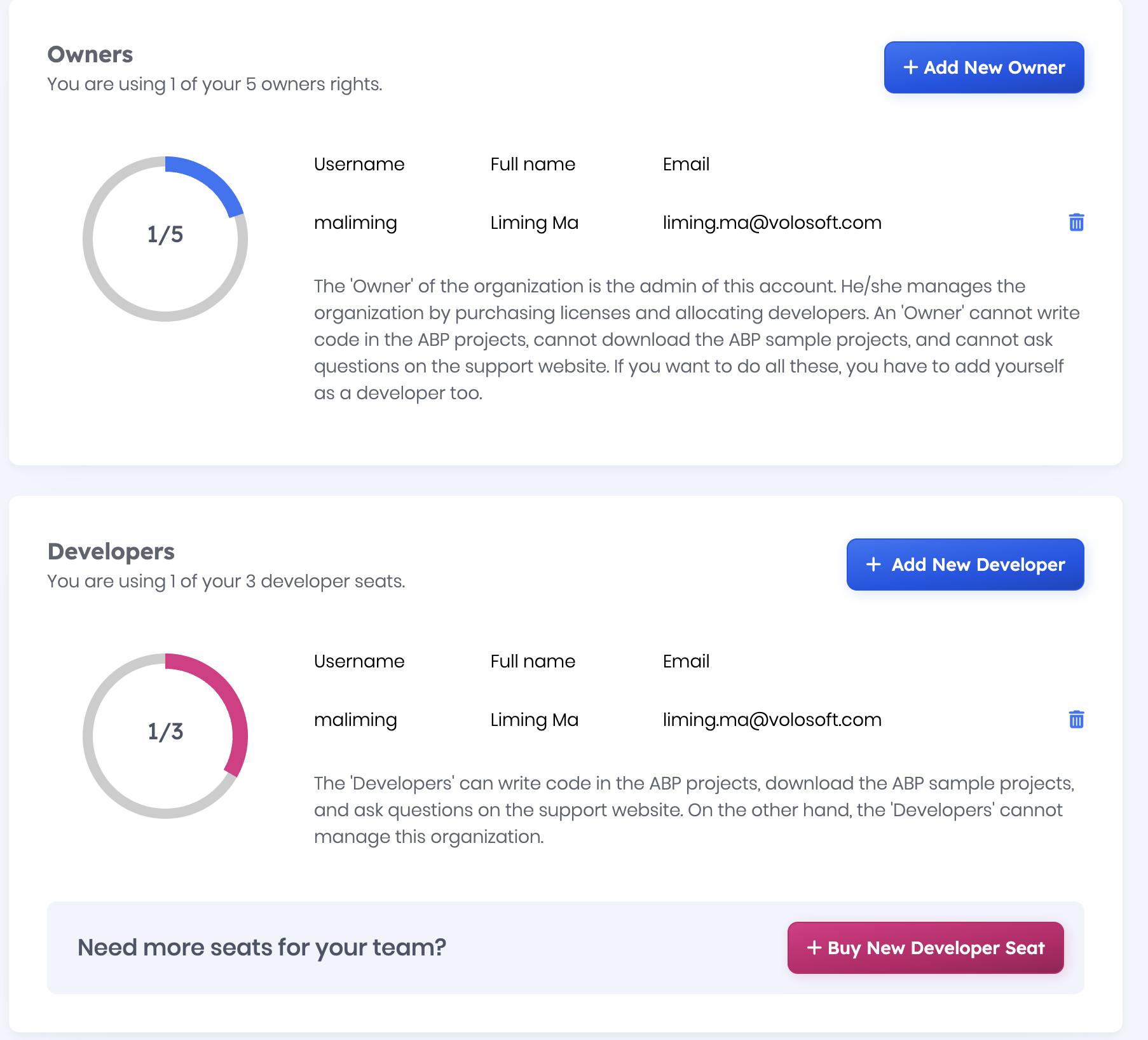
Hi,
I’m using the LeptonX theme and would like to modify the top menu layout, so I’m looking for the source code of that layout. I’ve read through the customization menu, but it’s very limited.
I also tried abp get-source Volo.Abp.LeptonXTheme but i got the following errors
Volo.Abp.Studio.AbpStudioException: Exception of type 'Volo.Abp.Studio.AbpStudioException' was thrown.
  at async Task Volo.Abp.Studio.Modules.Installing.SourceCodeDownloader.DownloadSourceCodeAsync(string moduleName,
     string targetFolder, string version, bool includeNightly)
  at async Task Volo.Abp.Studio.Cli.Commands.StudioGetSourceCommand.ExecuteAsync(CommandLineArgs commandLineArgs)
  at async Task Volo.Abp.Studio.Cli.StudioCliService.RunInternalAsync(CommandLineArgs commandLineArgs)
  at async Task Volo.Abp.Studio.Cli.StudioCliService.RunAsync(string[] args)
Can someone please help me?
Regards,
16 Answer(s)
-
0
- Solution
LeptonX MVC layouts (including the top menu layout) are Razor files in the LeptonX theme package. To customize the top menu, override the corresponding .cshtml files in your Web project by copying them with the exact same folder structure. ABP will automatically prefer your local files over the theme’s embedded ones.
Steps:
Get the LeptonX theme source (optional but helpful to see the original files):
- If you have access to the theme sources, use ABP CLI: abp get-source Volo.Abp.LeptonXTheme
- In the downloaded repo, find:
aspnet-core/volo/src/Volo.Abp.AspNetCore.Mvc.UI.Theme.LeptonX/Themes/LeptonX/Layouts/Application/
Key files:
- TopMenuLayout.cshtml -> top menu layout
- SideMenuLayout.cshtml -> side (left) menu layout Additionally, reusable pieces (header, navbar, user menu, etc.) are under: Themes/LeptonX/Components/...
Override the top menu layout in your MVC app:
- Create the same folder structure in your Web project: YourProject.Web/Views/ Then add the following (exact path and names are critical): YourProject.Web/Themes/LeptonX/Layouts/Application/TopMenuLayout.cshtml
- Copy the original TopMenuLayout.cshtml into that path.
- Modify it as needed (e.g., rearrange toolbar/menu, add extra sections/partials).
- If you need to customize the menu rendering itself or header elements, also override the related theme components found under: Themes/LeptonX/Components/<ComponentName>/Default.cshtml Create matching folders and copy/edit the component views you want to change.
Switch your application to use the top menu layout:
- Ensure your application layout selection (usually configured by the theme/layout provider or the selected layout in your pages) uses the TopMenuLayout.cshtml. In ABP MVC, LeptonX decides the layout file per page. If a page doesn’t pick the top layout by default, you can force it per-page: @{ Layout = "/Themes/LeptonX/Layouts/Application/TopMenuLayout.cshtml"; }
- Alternatively, if your project already uses the Top Menu layout globally, just overriding the file is enough; your customized version will take effect.
Notes/tips:
- Keep the path casing and hierarchy exactly the same as the theme’s files to override correctly.
- You do not need to embed resources or change bundling for Razor overrides.
- If you only want to change CSS/spacing, prefer CSS overrides first. For structural changes (moving items, adding containers), edit the Razor files.
- For menu items themselves (entries), use your MenuContributor; for the layout and placement (top vs. side), change the layout .cshtml.
- Sources
- ABP Basic Theme sample (shows how overriding theme Razor files by matching folder structure works):
- https://github.com/abpframework/abp/blob/dev/modules/basic-theme/src/Volo.Abp.AspNetCore.Mvc.UI.Theme.Basic/Themes/Basic/Components/Menu/Default.cshtml
This response was generated by AI. If it didn’t solve your problem, feel free to post a new answer — our support team will jump in to help you soon.
Markdown supported.Copy, paste, or drag & drop images and files (max 100 MB per file, 100 MB total per post) -
0
just note that i tried from the bot answer above and still not working.
Markdown supported.Copy, paste, or drag & drop images and files (max 100 MB per file, 100 MB total per post) -
0
abp license Team CLI version 2.1.3 which is latest
Markdown supported.Copy, paste, or drag & drop images and files (max 100 MB per file, 100 MB total per post) -
0
I dont think i have access to that.
Markdown supported.Copy, paste, or drag & drop images and files (max 100 MB per file, 100 MB total per post) -
0
is it possible to have it emailed? I notice a some users in the past have it emailed.
Markdown supported.Copy, paste, or drag & drop images and files (max 100 MB per file, 100 MB total per post) -
0
Hi,
I just tried to login as the owner, but im still getting the same error.
Regards,
Markdown supported.Copy, paste, or drag & drop images and files (max 100 MB per file, 100 MB total per post) -
0
v4.3.6
Thanks,
Markdown supported.Copy, paste, or drag & drop images and files (max 100 MB per file, 100 MB total per post) -
0
Sent.
Regards,
Markdown supported.Copy, paste, or drag & drop images and files (max 100 MB per file, 100 MB total per post) -
0
Got it,
Thanks
Markdown supported.Copy, paste, or drag & drop images and files (max 100 MB per file, 100 MB total per post)