






Trying to replace our Blazor Wasm application to WebApp and gets this in the local dev of Blazor WebApp:
11:29:02 ERR] Exception occurred while processing message.
System.Net.Http.HttpRequestException: Response status code does not indicate success: 401 (Unauthorized).
   at System.Net.Http.HttpResponseMessage.EnsureSuccessStatusCode()
   at Microsoft.AspNetCore.Authentication.OpenIdConnect.OpenIdConnectHandler.GetUserInformationAsync(OpenIdConnectMessage message, JwtSecurityToken jwt, ClaimsPrincipal principal, AuthenticationProperties properties)
   at Microsoft.AspNetCore.Authentication.OpenIdConnect.OpenIdConnectHandler.HandleRemoteAuthenticateAsync()
[11:29:02 INF] Error from RemoteAuthentication: Response status code does not indicate success: 401 (Unauthorized)..
[11:29:02 ERR] An unhandled exception has occurred while executing the request.
Microsoft.AspNetCore.Authentication.AuthenticationFailureException: An error was encountered while handling the remote login.
 ---> System.Net.Http.HttpRequestException: Response status code does not indicate success: 401 (Unauthorized).
   at System.Net.Http.HttpResponseMessage.EnsureSuccessStatusCode()
   at Microsoft.AspNetCore.Authentication.OpenIdConnect.OpenIdConnectHandler.GetUserInformationAsync(OpenIdConnectMessage message, JwtSecurityToken jwt, ClaimsPrincipal principal, AuthenticationProperties properties)
   at Microsoft.AspNetCore.Authentication.OpenIdConnect.OpenIdConnectHandler.HandleRemoteAuthenticateAsync()
   --- End of inner exception stack trace ---
   at Microsoft.AspNetCore.Authentication.RemoteAuthenticationHandler`1.HandleRequestAsync()
   at Microsoft.AspNetCore.Authentication.AuthenticationMiddleware.Invoke(HttpContext context)
   at Volo.Abp.AspNetCore.Security.AbpSecurityHeadersMiddleware.InvokeAsync(HttpContext context, RequestDelegate next)
   at Microsoft.AspNetCore.Builder.UseMiddlewareExtensions.InterfaceMiddlewareBinder.<>c__DisplayClass2_0.<<CreateMiddleware>b__0>d.MoveNext()
--- End of stack trace from previous location ---
   at Volo.Abp.AspNetCore.Tracing.AbpCorrelationIdMiddleware.InvokeAsync(HttpContext context, RequestDelegate next)
   at Microsoft.AspNetCore.Builder.UseMiddlewareExtensions.InterfaceMiddlewareBinder.<>c__DisplayClass2_0.<<CreateMiddleware>b__0>d.MoveNext()
--- End of stack trace from previous location ---
   at Microsoft.AspNetCore.Localization.RequestLocalizationMiddleware.Invoke(HttpContext context)
   at Microsoft.AspNetCore.RequestLocalization.AbpRequestLocalizationMiddleware.InvokeAsync(HttpContext context, RequestDelegate next)
   at Microsoft.AspNetCore.Builder.UseMiddlewareExtensions.InterfaceMiddlewareBinder.<>c__DisplayClass2_0.<<CreateMiddleware>b__0>d.MoveNext()
--- End of stack trace from previous location ---
   at Microsoft.AspNetCore.Diagnostics.DeveloperExceptionPageMiddlewareImpl.Invoke(HttpContext context)
[11:29:02 INF] Setting culture and ui-culture to the response. culture: sv, ui-culture: sv
And the log from the auth server gives:
[10:29:02 INF] The request URI matched a server endpoint: Token.
[10:29:02 INF] The token request was successfully extracted: {
  "client_id": "BlazorWebApp",
  "client_secret": "[redacted]",
  "code": "[redacted]",
  "grant_type": "authorization_code",
  "redirect_uri": "https://localhost:44346/signin-oidc"
}.
[10:29:02 INF] The token request was successfully validated.
[10:29:02 INF] Executing endpoint 'Volo.Abp.OpenIddict.Controllers.TokenController.HandleAsync (Volo.Abp.OpenIddict.AspNetCore)'
[10:29:02 INF] Route matched with {action = "Handle", controller = "Token", area = "", page = ""}. Executing controller action with signature System.Threading.Tasks.Task`1[Microsoft.AspNetCore.Mvc.IActionResult] HandleAsync() on controller Volo.Abp.OpenIddict.Controllers.TokenController (Volo.Abp.OpenIddict.AspNetCore).
[10:29:02 INF] Skipping the execution of current filter as its not the most effective filter implementing the policy Microsoft.AspNetCore.Mvc.ViewFeatures.IAntiforgeryPolicy
[10:29:02 INF] Executing SignInResult with authentication scheme (OpenIddict.Server.AspNetCore) and the following principal: System.Security.Claims.ClaimsPrincipal.
[10:29:02 INF] The token '3a1e7bd4-5293-5f82-8180-a638db5cb5fa' was successfully marked as redeemed.
[10:29:02 INF] The response was successfully returned as a JSON document: {
  "access_token": "[redacted]",
  "token_type": "Bearer",
  "expires_in": 3599,
  "scope": "openid profile roles email phone AuthServer IdentityService AdministrationService SaasService AuditLoggingService GdprService ChatService",
  "id_token": "[redacted]"
}.
[10:29:02 INF] Executed action Volo.Abp.OpenIddict.Controllers.TokenController.HandleAsync (Volo.Abp.OpenIddict.AspNetCore) in 62.1836ms
[10:29:02 INF] Executed endpoint 'Volo.Abp.OpenIddict.Controllers.TokenController.HandleAsync (Volo.Abp.OpenIddict.AspNetCore)'
[10:29:02 INF] Request finished HTTP/1.1 POST http://auth.staging.myproject.io/connect/token - 200 3079 application/json;charset=UTF-8 147.4217ms
[10:29:02 INF] Request starting HTTP/1.1 GET http://auth.staging.myproject.io/connect/userinfo - null null
[10:29:02 WRN] Unknown proxy: [::ffff:10.244.1.23]:38956
[10:29:02 INF] The request URI matched a server endpoint: UserInfo.
[10:29:02 INF] The userinfo request was successfully extracted: {}.
[10:29:02 INF] The userinfo request was rejected because the mandatory 'access_token' parameter was missing.
[10:29:02 INF] The response was successfully returned as a challenge response: {
  "error": "missing_token",
  "error_description": "The mandatory 'access_token' parameter is missing.",
  "error_uri": "https://documentation.openiddict.com/errors/ID2029"
}.
[10:29:02 INF] Request finished HTTP/1.1 GET http://auth.staging.myproject.io/connect/userinfo - 302 0 null 1.6405ms
[10:29:02 INF] Request starting HTTP/1.1 GET http://auth.staging.myproject.io/Error?httpStatusCode=401 - null null
12 Answer(s)
-
0
1. Solution
The flow on your AuthServer is actually succeeding (authorization code + token). The failure happens after that, when the Blazor WebApp’s
OpenIdConnectHandlertries to call/connect/userinfo:- AuthServer log:
The userinfo request was rejected because the mandatory 'access_token' parameter was missing. - Blazor WebApp log:
OpenIdConnectHandler.GetUserInformationAsync(...)->HttpRequestException 401 Unauthorized
So:
- The Blazor WebApp is configured with
GetClaimsFromUserInfoEndpoint = true. - But the handler is not sending an access token to
/connect/userinfo(most commonly because tokens are not saved).
There are two practical ways to fix this for a Blazor WebApp with ABP/OpenIddict.
Option A (recommended): Stop calling the UserInfo endpoint
In ABP with OpenIddict, the standard user claims (subject, name, email, roles, etc.) are already available in the ID token, as long as you request the right scopes. In most cases you don’t need
/connect/userinfoat all.Configure your Blazor WebApp authentication like this (Program.cs / Startup):
builder.Services
    .AddAuthentication(options =>
    {
        options.DefaultScheme = CookieAuthenticationDefaults.AuthenticationScheme;
        options.DefaultChallengeScheme = OpenIdConnectDefaults.AuthenticationScheme;
    })
    .AddCookie()
    .AddOpenIdConnect(OpenIdConnectDefaults.AuthenticationScheme, options =>
    {
        options.Authority = configuration["AuthServer:Authority"]; // e.g. https://auth.staging.myproject.io
        options.RequireHttpsMetadata = true;

        options.ClientId = "BlazorWebApp";
        options.ClientSecret = configuration["AuthServer:ClientSecret"]; // your client secret
        options.ResponseType = OpenIdConnectResponseType.Code;
        options.UsePkce = true;

        // Tokens can still be saved if you want to call APIs later
        options.SaveTokens = true;

        // IMPORTANT: disable UserInfo call to avoid your 401 error
        options.GetClaimsFromUserInfoEndpoint = false;

        // Request the scopes that ABP/OpenIddict uses to put claims into id_token
        options.Scope.Clear();
        options.Scope.Add("openid");
        options.Scope.Add("profile");
        options.Scope.Add("email");
        options.Scope.Add("phone");
        options.Scope.Add("roles");
        options.Scope.Add("offline_access");

        // Plus any API scopes you need, e.g.:
        options.Scope.Add("AuthServer");
        options.Scope.Add("IdentityService");
        options.Scope.Add("AdministrationService");
        options.Scope.Add("SaasService");
        options.Scope.Add("AuditLoggingService");
        options.Scope.Add("GdprService");
        options.Scope.Add("ChatService");
    });
Also ensure that in your AuthServer/OpenIddict client definition for
"BlazorWebApp"the same scopes are allowed.With
GetClaimsFromUserInfoEndpoint = false, the handler will not call/connect/userinfo, so themissing_token/ 401 error disappears, and the Blazor WebApp uses the claims inid_token.
Option B: Keep UserInfo and send a valid access token
If you explicitly want to use
/connect/userinfo:- Make sure the WebApp saves tokens:
options.SaveTokens = true; options.GetClaimsFromUserInfoEndpoint = true;- Keep the same scopes as in option A (so an access token is actually issued).
- Ensure your
"BlazorWebApp"client in AuthServer:- Has those scopes assigned.
- Issues an access token with an audience accepted by AuthServer’s OpenIddict validation (in your current log the first issue is simply missing token; if you later see “token had no valid audience”, that’s an audience/scope configuration problem).
But since ABP/OpenIddict already includes the usual claims in
id_token, Option A is usually simpler and more robust, especially when migrating from Blazor WASM to Blazor WebApp.
2. Sources
- ABP OpenIddict deployment & validation/audience notes (relevant when using access tokens and UserInfo):
- https://abp.io/docs/latest/solution-templates/layered-web-application/deployment/openiddict-deployment
This response was generated by AI. If it didn’t solve your problem, feel free to post a new answer — our support team will jump in to help you soon.
- AuthServer log:
-
0
hi
It seems your Blazor app doesn't get the access token.
Trying to replace our Blazor Wasm application to WebApp
Can you check your Blazor app
Program.csandModule.cscode with a new template project?The new solution will have two projects.
Blazor and Blazor.Client, and it uses
App.razorandRoutes.razorThanks.
-
0
Thanks,
The thing is that we started from the Blazor WebApp template without any code from our Blazor Wasm solution.
Then we started the required Redis instance on the local development machine. We also did the changes in appsettings.json to use our staging environment on Kubernetes cloud.
Hence, the code is unmodified from the code generator, and we use (same version as all our services and apps, Microservice template 9.2.3).
The only changes, is the blazor/MyProject.Blazor/Properties/launchSettings.json and */appsettings.json (to get the same port numbers as our old Wasm app).
However, when we use ABP Studio, it seems it generats for dotnet 10 / ABP 10. Despite "Change version to 9.2.3" in the studio. I guess that can generate problems. How can we generate with Dotnet 9 and 9.2.3?
-
0
- Solution
ABP Studio always generates the latest stable ABP version it supports (and the corresponding .NET version). That’s why, if your Studio is up‑to‑date and the latest platform version is 10.x, new solutions will target ABP 10 / .NET 10, even if your existing services are on 9.2.3.
To generate a microservice template on ABP 9.2.3 with .NET 9, use the ABP CLI instead of Studio:
- Make sure you have the .NET 9 SDK installed.
- Install or update ABP CLI:
dotnet tool install -g Volo.Abp.Studio.Cli # or, if already installed: dotnet tool update -g Volo.Abp.Studio.Cli- Create a new microservice solution targeting 9.2.3 explicitly:
abp new MyProject \
     -t microservice-pro \
     -v 9.2.3
Or (non‑Pro template):
abp new MyProject \
     -t microservice \
     -v 9.2.3
The
-v/--versionflag is the key part – it forces the solution to be created with that exact ABP version (thus using .NET 9 for ABP 9.x).- Open the generated solution in your IDE and then:
- Copy over the
appsettings.jsonandlaunchSettings.jsonchanges you already made. - Reapply any small modifications you did in the previous WebApp attempt (if any).
- Run the solution; it will now be on ABP 9.2.3 / .NET 9, consistent with your existing microservices.
- Copy over the
You can still afterwards open this CLI-generated solution in ABP Studio (for Solution Runner, health checks, etc.); Studio will work fine with a solution created via CLI at 9.2.3 – you just shouldn’t ask Studio to “upgrade/switch to stable 10.x” if you want to stay on 9.2.3.
If you later decide to move everything to ABP 10 / .NET 10, you can then use
abp updateor Studio’s upgrade features across the whole solution at once.- Sources
- ABP CLI usage and
--versionswitch:
https://abp.io/docs/latest/cli - Getting started and solution creation options (Studio vs CLI):
https://abp.io/get-started
This response was generated by AI. If it didn’t solve your problem, feel free to post a new answer — our support team will jump in to help you soon.
-
0
hi
How can we generate with Dotnet 9 and 9.2.3?
You can install the old Studio.
https://abp.io/api/abp-studio/download/r/windows/abp-studio-1.1.2-stable-full.nupkg
https://abp.io/docs/latest/studio/version-mapping
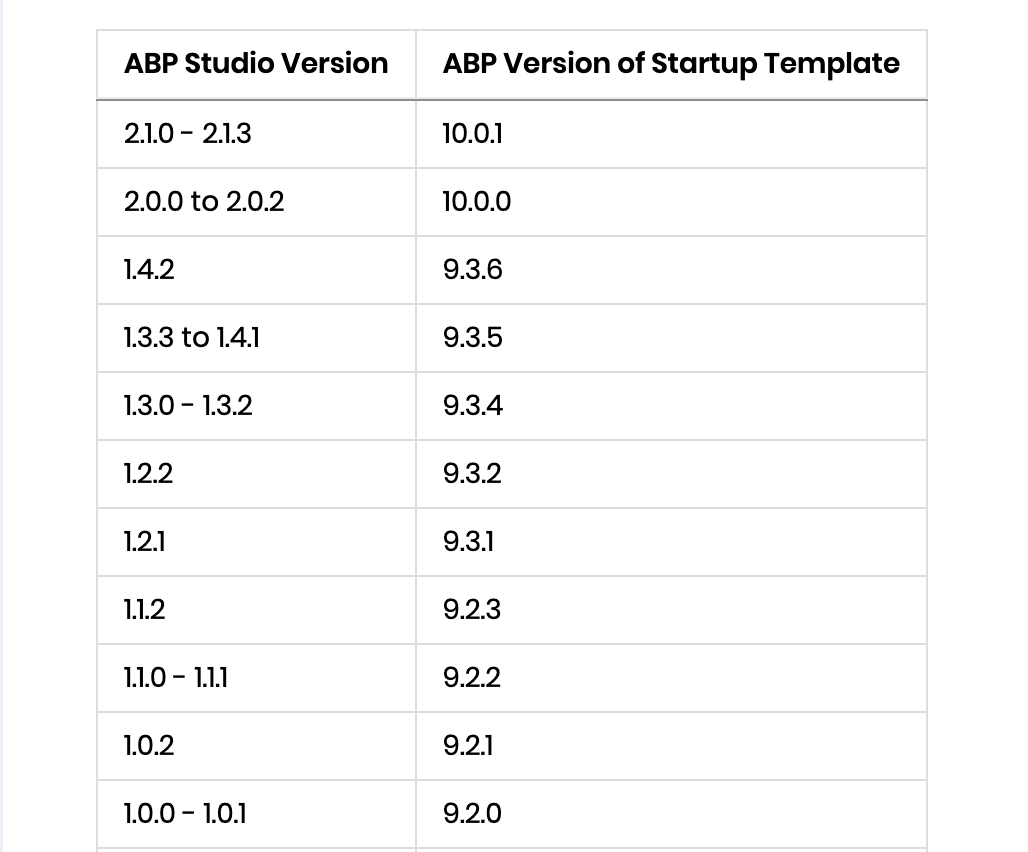
Thanks.
-
0
Thanks,
I will try to generate a new solution with ABP Studio 1.1.2 instead. However, I need an URL for MacOS (Intel chip).. can you give me that url instead?
-
0
- Solution
For ABP Studio 1.1.2 on macOS (Intel), you can use this download URL:
- macOS (Intel) installer:
https://abp.io/api/abp-studio/download/r/osx/abp-studio-1.1.2-stable-full.nupkg
Download that package and install ABP Studio from it; this version maps to ABP 9.2.3, so new solutions you generate will target ABP 9.2.3 / .NET 9, matching your existing microservice stack.
- Sources
- ABP Studio–ABP version mapping table:
- https://abp.io/docs/latest/studio/version-mapping
This response was generated by AI. If it didn’t solve your problem, feel free to post a new answer — our support team will jump in to help you soon.
-
0
hi
https://abp.io/api/abp-studio/download/r/osx/abp-studio-1.1.2-stable-full.nupkg
-
0
Thanks,
Sorry, I don't understand how to install a nupkg file. I thought it was ABP Studio, desktop application I need to download and install?
-
0
hi
Can you try with
AbpDevTools:Make sure you have installed the Studio. Don't uninstall it.
> dotnet tool update -g AbpDevTools

> abpdev abp-studio switch 1.1.2
Thanks.
-
0
Thanks!
That worked, I now can generate new 9.2.3 solutions :-)
-
0
Great!



