Hello everyone,
I'm facing an issue while setting up WebJob project wich include a custom abp module. My solution uses two different databases: a "Default" one and a secondary one called "Communications" which belongs to a custom module.
The Problem When I run the WebJob, it fails during the host initialization with exception showed below. Also noticed that abp modules "communications" dbcontext isn't accesibles , and I can't query any repository implemented there
My Setup
- DbContexts: I have my main AppDbContext and a second one in a module:
C#
[ConnectionStringName("Communications")] public class CommunicationsDbContext : AbpDbContext<CommunicationsDbContext>, ICommunicationsDbContext { // ... } 2. WebJob Module Configuration: I am trying to configure the options as follows in my WebJob module:
C#
[DependsOn( typeof(AbpAutofacModule), typeof(AbpEntityFrameworkCoreSqlServerModule), typeof(CommunicationsEntityFrameworkCoreModule), typeof(AbpPermissionManagementEntityFrameworkCoreModule) )] public class MyWebJobModule : AbpModule { public override void ConfigureServices(ServiceConfigurationContext context) { context.Services.AddAbpDbContext<CommunicationsDbContext>(options => { options.AddDefaultRepositories(includeAllEntities: true); });
    Configure<AbpDbContextOptions>(options => {
        options.Configure<CommunicationsDbContext>(opts => {
            opts.UseSqlServer();
        });
        options.Configure(opts => {
            opts.UseSqlServer();
        });
    });
}
} 3. AppSettings.json: Both connection strings are present:
JSON
{ "ConnectionStrings": { "Default": "...", "Communications": "..." } } What I've tried: I ensured the [ConnectionStringName] attribute is present in the CommunicationsDbContext.
I added the DependsOn attribute for all required modules.
I confirmed that the Communications connection string exists in the execution project.
Despite this, the system keeps saying "No configuration found" for either the module DbContext or the PermissionManagementDbContext.
What is the correct way to map a secondary module DbContext to its specific connection string in a standalone WebJob application? Is there any special configuration required for Autofac to pick up these configurations correctly in .NET 9?
Thanks in advance!
Volo.Abp.PermissionManagement.AbpPermissionManagementDomainModule[0]
An exception was thrown while activating Volo.Abp.PermissionManagement.EntityFrameworkCore.PermissionManagementDbContext -> ?:Microsoft.EntityFrameworkCore.DbContextOptions1[[Volo.Abp.PermissionManagement.EntityFrameworkCore.PermissionManagementDbContext, Volo.Abp.PermissionManagement.EntityFrameworkCore, Version=9.3.5.0, Culture=neutral, PublicKeyToken=null]]. Autofac.Core.DependencyResolutionException: An exception was thrown while activating Volo.Abp.PermissionManagement.EntityFrameworkCore.PermissionManagementDbContext -> ?:Microsoft.EntityFrameworkCore.DbContextOptions1[[Volo.Abp.PermissionManagement.EntityFrameworkCore.PermissionManagementDbContext, Volo.Abp.PermissionManagement.EntityFrameworkCore, Version=9.3.5.0, Culture=neutral, PublicKeyToken=null]].
---> Volo.Abp.AbpException: No configuration found for Microsoft.EntityFrameworkCore.DbContext, Microsoft.EntityFrameworkCore, Version=9.0.10.0, Culture=neutral, PublicKeyToken=adb9793829ddae60! Use services.Configure<AbpDbContextOptions>(...) to configure it.
at Volo.Abp.EntityFrameworkCore.DependencyInjection.DbContextOptionsFactory.Configure[TDbContext](AbpDbContextOptions options, AbpDbContextConfigurationContext1 context) at Volo.Abp.EntityFrameworkCore.DependencyInjection.DbContextOptionsFactory.Create[TDbContext](IServiceProvider serviceProvider) at Autofac.Extensions.DependencyInjection.AutofacRegistration.<>c__DisplayClass5_0.<Register>b__1(IComponentContext context, IEnumerable1 parameters)
at Autofac.Core.Activators.Delegate.DelegateActivator.ActivateInstance(IComponentContext context, IEnumerable1 parameters) at Autofac.Core.Activators.Delegate.DelegateActivator.<ConfigurePipeline>b__2_0(ResolveRequestContext context, Action1 next)
at Autofac.Core.Resolving.Middleware.DelegateMiddleware.Execute(ResolveRequestContext context, Action1 next) at Autofac.Core.Resolving.Pipeline.ResolvePipelineBuilder.<>c__DisplayClass14_0.<BuildPipeline>b__1(ResolveRequestContext context) at Autofac.Core.Resolving.Middleware.DisposalTrackingMiddleware.Execute(ResolveRequestContext context, Action1 next)
at Autofac.Core.Resolving.Pipeline.ResolvePipelineBuilder.<>c__DisplayClass14_0.<BuildPipeline>b__1(ResolveRequestContext context)
at Autofac.Extensions.DependencyInjection.KeyedServiceMiddleware.Execute(ResolveRequestContext context, Action1 next) at Autofac.Core.Resolving.Pipeline.ResolvePipelineBuilder.<>c__DisplayClass14_0.<BuildPipeline>b__1(ResolveRequestContext context) at Autofac.Core.Resolving.Middleware.ActivatorErrorHandlingMiddleware.Execute(ResolveRequestContext context, Action1 next)
--- End of inner exception stack trace ---
at Autofac.Core.Resolving.Middleware.ActivatorErrorHandlingMiddleware.Execute(ResolveRequestContext context, Action1 next) at Autofac.Core.Resolving.Pipeline.ResolvePipelineBuilder.<>c__DisplayClass14_0.<BuildPipeline>b__1(ResolveRequestContext context) at Autofac.Core.Pipeline.ResolvePipeline.Invoke(ResolveRequestContext context) at Autofac.Core.Resolving.Middleware.RegistrationPipelineInvokeMiddleware.Execute(ResolveRequestContext context, Action1 next)
at Autofac.Core.Resolving.Pipeline.ResolvePipelineBuilder.<>c__DisplayClass14_0.<BuildPipeline>b__1(ResolveRequestContext context)
at Autofac.Core.Resolving.Middleware.SharingMiddleware.Execute(ResolveRequestContext context, Action1 next) at Autofac.Core.Resolving.Pipeline.ResolvePipelineBuilder.<>c__DisplayClass14_0.<BuildPipeline>b__1(ResolveRequestContext context) at Autofac.Core.Resolving.Pipeline.ResolvePipelineBuilder.<>c__DisplayClass14_0.<BuildPipeline>b__1(ResolveRequestContext context) at Autofac.Core.Resolving.Middleware.CircularDependencyDetectorMiddleware.Execute(ResolveRequestContext context, Action1 next)
at Autofac.Core.Resolving.Pipeline.ResolvePipelineBuilder.<>c__DisplayClass14_0.<BuildPipeline>b__1(ResolveRequestContext context)
at Autofac.Core.Pipeline.ResolvePipeline.Invoke(ResolveRequestContext context)
at Autofac.Core.Resolving.ResolveOperation.GetOrCreateInstance(ISharingLifetimeScope currentOperationScope, ResolveRequest& request)
at Autofac.Core.Resolving.ResolveOperation.ExecuteOperation(ResolveRequest& request)
at Autofac.Core.Resolving.ResolveOperation.Execute(ResolveRequest& request)
at Autofac.Core.Lifetime.LifetimeScope.ResolveComponent(ResolveRequest& request)
at Autofac.Core.Lifetime.LifetimeScope.Autofac.IComponentContext.ResolveComponent(ResolveRequest& request)
at Autofac.ResolutionExtensions.TryResolveService(IComponentContext context, Service service, IEnumerable1 parameters, Object& instance) at Autofac.ResolutionExtensions.ResolveService(IComponentContext context, Service service, IEnumerable1 parameters)
at Autofac.ResolutionExtensions.Resolve(IComponentContext context, Type serviceType, IEnumerable1 parameters) at Autofac.ResolutionExtensions.Resolve(IComponentContext context, Type serviceType) at Autofac.Extensions.DependencyInjection.AutofacServiceProvider.GetRequiredService(Type serviceType) at Microsoft.Extensions.DependencyInjection.ServiceProviderServiceExtensions.GetRequiredService[T](IServiceProvider provider) at Volo.Abp.Uow.EntityFrameworkCore.UnitOfWorkDbContextProvider1.CreateDbContextWithTransactionAsync(IUnitOfWork unitOfWork)
at Volo.Abp.Uow.EntityFrameworkCore.UnitOfWorkDbContextProvider1.CreateDbContextAsync(IUnitOfWork unitOfWork) at Volo.Abp.Uow.EntityFrameworkCore.UnitOfWorkDbContextProvider1.CreateDbContextAsync(IUnitOfWork unitOfWork, String connectionStringName, String connectionString)
at Volo.Abp.Uow.EntityFrameworkCore.UnitOfWorkDbContextProvider1.GetDbContextAsync() at Volo.Abp.Domain.Repositories.EntityFrameworkCore.EfCoreRepository2.GetDbSetAsync()
at Volo.Abp.Domain.Repositories.EntityFrameworkCore.EfCoreRepository2.GetQueryableAsync() at Volo.Abp.Domain.Repositories.EntityFrameworkCore.EfCoreRepository2.GetListAsync(Boolean includeDetails, CancellationToken cancellationToken)
at Castle.DynamicProxy.AsyncInterceptorBase.ProceedAsynchronous[TResult](IInvocation invocation, IInvocationProceedInfo proceedInfo)
at Volo.Abp.Castle.DynamicProxy.CastleAbpMethodInvocationAdapterWithReturnValue1.ProceedAsync() at Volo.Abp.Uow.UnitOfWorkInterceptor.InterceptAsync(IAbpMethodInvocation invocation) at Volo.Abp.Castle.DynamicProxy.CastleAsyncAbpInterceptorAdapter1.InterceptAsync[TResult](IInvocation invocation, IInvocationProceedInfo proceedInfo, Func3 proceed) at Volo.Abp.PermissionManagement.StaticPermissionSaver.UpdateChangedPermissionGroupsAsync(IEnumerable1 permissionGroupRecords)
at Volo.Abp.PermissionManagement.StaticPermissionSaver.SaveAsync()
at Volo.Abp.PermissionManagement.StaticPermissionSaver.SaveAsync()
at Volo.Abp.PermissionManagement.StaticPermissionSaver.SaveAsync()
at Volo.Abp.PermissionManagement.StaticPermissionSaver.SaveAsync()
at Volo.Abp.PermissionManagement.AbpPermissionManagementDomainModule.<>c__DisplayClass8_0.<<SaveStaticPermissionsToDatabaseAsync>b__1>d.MoveNext()
5 Answer(s)
-
0
- Solution
In your WebJob you are essentially missing a proper EF Core configuration for the ABP module DbContexts (like
PermissionManagementDbContext). The error:No configuration found for Microsoft.EntityFrameworkCore.DbContext … Use services.Configure<AbpDbContextOptions>(...) to configure it.
means that no
AbpDbContextOptionsconfiguration has been applied for that DbContext type in this host.A good pattern for a WebJob / worker that uses multiple DbContexts is:
- Do not re‑register or reconfigure DbContexts that are already registered in your module’s EFCore modules.
- Depend on your application’s main EF Core module, which already configures SQL Server and the module DbContexts (including PermissionManagement).
- Only add configuration for your extra DbContext if it is not already configured in its own
*EntityFrameworkCoreModule.
1.1. Module dependencies
Instead of configuring EF Core manually in
MyWebJobModule, reuse the same EFCore module configuration that your main application uses.Assume your main EFCore module is
MyAppEntityFrameworkCoreModule(the one in your.EntityFrameworkCoreproject that callsoptions.UseSqlServer()).Update your WebJob module like this:
[DependsOn(
    typeof(AbpAutofacModule),
    typeof(AbpEntityFrameworkCoreSqlServerModule),
    typeof(MyAppEntityFrameworkCoreModule),           // <-- main app EF Core module
    typeof(CommunicationsEntityFrameworkCoreModule), // <-- your custom module
    typeof(AbpPermissionManagementEntityFrameworkCoreModule)
)]
public class MyWebJobModule : AbpModule
{
    public override void ConfigureServices(ServiceConfigurationContext context)
    {
        // Typically NOTHING else needs to be done here for EF Core.
        // MyAppEntityFrameworkCoreModule & CommunicationsEntityFrameworkCoreModule
        // already register and configure their DbContexts.
    }
}
Key points:
AbpEntityFrameworkCoreSqlServerModulesupplies the provider integration.MyAppEntityFrameworkCoreModuleconfiguresAbpDbContextOptions(globalUseSqlServer()and module DbContexts like PermissionManagement, etc.).CommunicationsEntityFrameworkCoreModuleshould already callAddAbpDbContext<CommunicationsDbContext>and configure SQL Server for that DbContext.
When you depend on those, all their
PreConfigureServices/ConfigureServicesmethods run in the WebJob host as well, so all module DbContexts get their provider configuration.
1.2. Remove local, conflicting EF configuration
In your current
MyWebJobModuleyou have:public override void ConfigureServices(ServiceConfigurationContext context) { context.Services.AddAbpDbContext<CommunicationsDbContext>(options => { options.AddDefaultRepositories(includeAllEntities: true); }); Configure<AbpDbContextOptions>(options => { options.Configure<CommunicationsDbContext>(opts => { opts.UseSqlServer(); }); options.Configure(opts => { opts.UseSqlServer(); }); }); }This is problematic in a couple of ways:
Duplicated registration:
IfCommunicationsEntityFrameworkCoreModulealready callsAddAbpDbContext<CommunicationsDbContext>, registering it again in the WebJob module is unnecessary and can cause confusion.Global
options.Configure(opts => opts.UseSqlServer());:
This configures the default EF Core options, but if any other module (e.g. a different database provider, or mis‑ordered configuration) overwrites or doesn’t see it, you end up with “No configuration found…” for some DbContexts.
The safest and cleanest fix is:
- Remove the
AddAbpDbContext<CommunicationsDbContext>call fromMyWebJobModule. - Remove the
Configure<AbpDbContextOptions>block entirely fromMyWebJobModule. - Let
MyAppEntityFrameworkCoreModuleandCommunicationsEntityFrameworkCoreModulebe the only places that configure DbContexts & providers.
Your WebJob module becomes:
[DependsOn(
    typeof(AbpAutofacModule),
    typeof(AbpEntityFrameworkCoreSqlServerModule),
    typeof(MyAppEntityFrameworkCoreModule),
    typeof(CommunicationsEntityFrameworkCoreModule),
    typeof(AbpPermissionManagementEntityFrameworkCoreModule)
)]
public class MyWebJobModule : AbpModule
{
    public override void ConfigureServices(ServiceConfigurationContext context)
    {
        // No EF Core configuration here.
    }
}
1.3. Connection strings for multiple databases
Your existing setup with:
[ConnectionStringName("Communications")]
public class CommunicationsDbContext : AbpDbContext<CommunicationsDbContext>, ICommunicationsDbContext
{
    // ...
}
and
"ConnectionStrings": {
  "Default": "...",
  "Communications": "..."
}
is exactly the correct ABP way to bind a specific DbContext to a named connection string in a multi‑database scenario.
No extra
AbpDbConnectionOptionsconfiguration is needed here, because:ConnectionStringName("Communications")tells ABP to use theCommunicationsnamed connection string for this DbContext.- All module/system DbContexts (including
PermissionManagementDbContext) will use"Default"unless otherwise specified.
Once you fix the module dependencies & remove redundant configuration as above, both
DefaultandCommunicationsDbContexts will work inside your WebJob.
1.4. Autofac / .NET 9 considerations
There is nothing special you must do for Autofac or .NET 9 beyond:
- Using
UseServiceProviderFactory(new AutofacServiceProviderFactory())andUseAutofac()in your WebJob host builder. - Ensuring you call
AbpApplicationFactory.Create<MyWebJobModule>(...)(or similar) so ABP modules are initialized in this process.
If your WebJob uses the standard ABP + Autofac host setup, ABP’s EF Core integration will behave the same as in your web app.
- Sources
- Verified reference solution for configuring multiple DbContexts (and providers) and the correct use of
AbpDbContextOptions.Configure<TDbContext>:
https://abp.io/support/questions/3579
This response was generated by AI. If it didn’t solve your problem, feel free to post a new answer — our support team will jump in to help you soon.
Markdown supported.Copy, paste, or drag & drop images and files (max 100 MB per file, 100 MB total per post) -
0
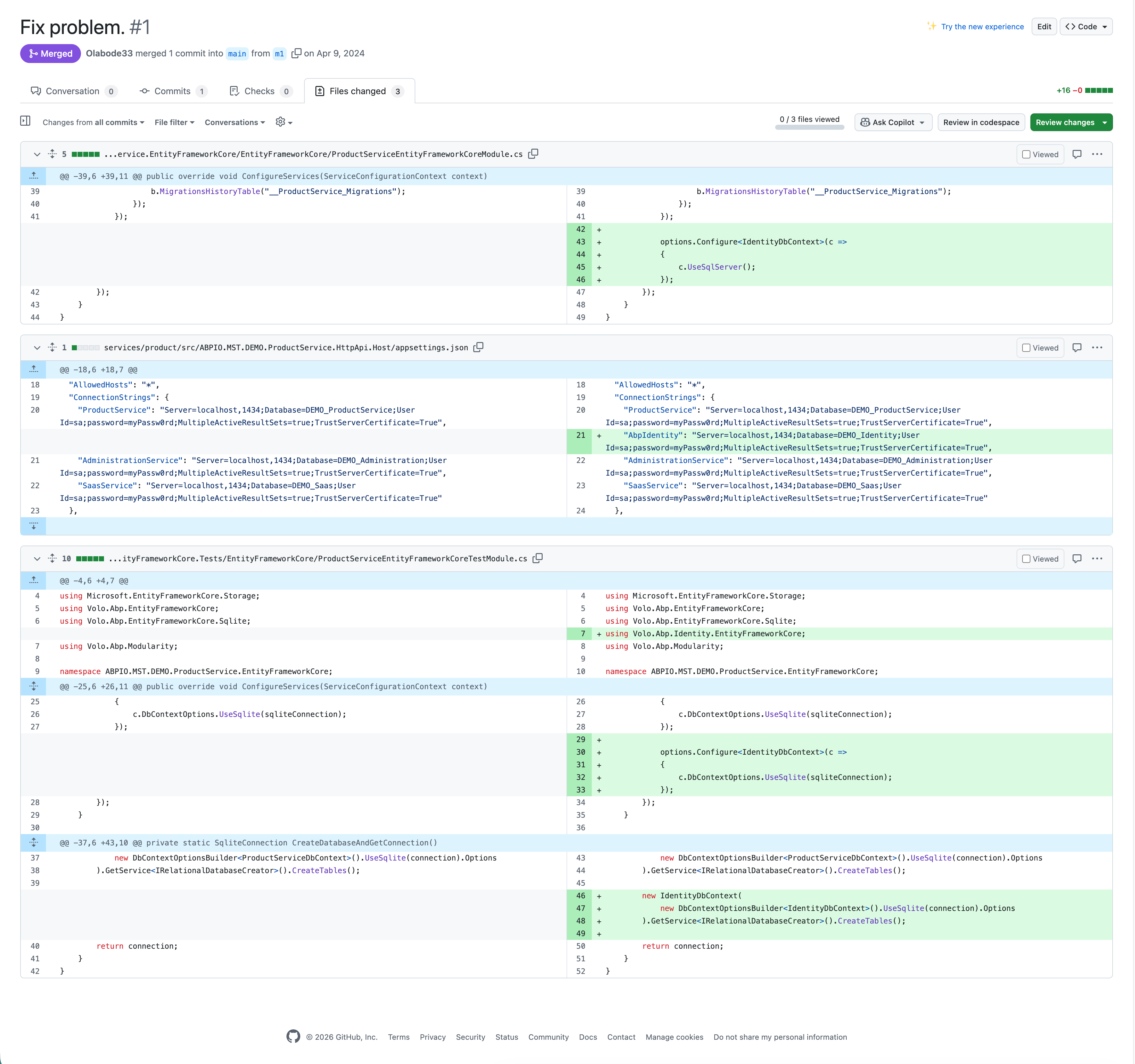
Hi ...I think my issue is very similar to this one : https://abp.io/support/questions/7004/Activation-Error-connecting-to-IdentityDbContext-in-my-EntityFrameworkCore-project-Microservice-Template But the fix isn't shown in the thread, and the link is broken. Do you remember what you did there?
Markdown supported.Copy, paste, or drag & drop images and files (max 100 MB per file, 100 MB total per post) -
0
- Solution
In that older ticket (similar to your case), the actual fix was:
Configure
AbpDbContextOptionsso that module DbContexts (likeIdentityDbContext,PermissionManagementDbContext,AuditLoggingDbContext, etc.) get a provider configuration (e.g.UseSqlServer()).In the microservice template, only the service’s own
DbContext(e.g.MyServiceDbContext) was being configured, so when ABP tried to resolve a module DbContext, it threw:No configuration found for Microsoft.EntityFrameworkCore.DbContext … Use services.Configure<AbpDbContextOptions>(...) to configure it.
The answer from that thread was essentially one of these two patterns:
Option A – Global provider for all DbContexts
Configure<AbpDbContextOptions>(options =>
{
    // Existing per-DbContext configuration for your own context
    options.Configure<MyServiceDbContext>(c =>
    {
        c.UseSqlServer(b =>
        {
            b.MigrationsHistoryTable("__MyService_Migrations", MyServiceDbProperties.DbSchema);
        });
    });

    // This is the key line that fixed the error:
    options.UseSqlServer(); // applies to all other DbContexts without explicit config
});
This makes all unconfigured DbContexts (Identity, PermissionManagement, etc.) use SQL Server.
Option B – Configure each module DbContext explicitly
If you don’t want a global default, you can instead configure the specific module DbContexts:
Configure<AbpDbContextOptions>(options =>
{
    options.Configure<MyServiceDbContext>(c =>
    {
        c.UseSqlServer(b =>
        {
            b.MigrationsHistoryTable("__MyService_Migrations", MyServiceDbProperties.DbSchema);
        });
    });

    // Example: if you needed to configure a module DbContext explicitly
    options.Configure<AbpAuditLoggingDbContext>(c =>
    {
        c.UseSqlServer();
    });

    // same idea would apply for IdentityDbContext, PermissionManagementDbContext, etc.
});
In that ticket, adding
options.UseSqlServer();(Option A) is what actually fixed the “No configuration found” activation error forIdentityDbContext.You can apply the same approach in your WebJob / microservice host:
- Put this
Configure<AbpDbContextOptions>(...)in the relevant EFCore module (e.g.YourServiceEntityFrameworkCoreModuleused by that host). - Ensure the host module
[DependsOn]that EFCore module so this configuration runs in that process.
- Sources
- Verified guidance for fixing “No configuration found for DbContext” in a microservice template by configuring
AbpDbContextOptions:
https://docs.abp.io/en/abp/latest/Entity-Framework-Core#abpdbcontextoptions
https://abp.io/support/questions/6880
This response was generated by AI. If it didn’t solve your problem, feel free to post a new answer — our support team will jump in to help you soon.
Markdown supported.Copy, paste, or drag & drop images and files (max 100 MB per file, 100 MB total per post)