






Check the docs before asking a question: https://abp.io/docs/latest Check the samples to see the basic tasks: https://abp.io/docs/latest/samples The exact solution to your question may have been answered before, and please first use the search on the homepage.
Provide us with the following info:
🧐 Hint: If you are using the ABP Studio, you can see all the information about your solution from the configuration window, which opens when you right-click on the solution and click on the Solution Configuration button.
Template: microservice
Created ABP Studio Version: 0.9.26
Current ABP Studio Version: 2.1.6
Multi-Tenancy: Yes
UI Framework: angular
Theme: leptonx
Theme Style: system
Database Provider: ef
Database Management System: sqlserver
Mobile Framework: none
Public Website: No
Include Tests: Yes
Dynamic Localization: Yes
Kubernetes Configuration: Yes
Grafana Dashboard: Yes
Use Local References: No
Optional Modules:
- GDPR
- FileManagement
- TextTemplateManagement
- AuditLogging
- Chat
- OpenIddictAdmin
Exception message and full stack trace:
Steps to reproduce the issue:
Hi,
The intention is to provide the application name at runtime. For this purpose in angular's ConfigMap the application name in dynamic-env.json is provided as helm .Values.global.application.name:
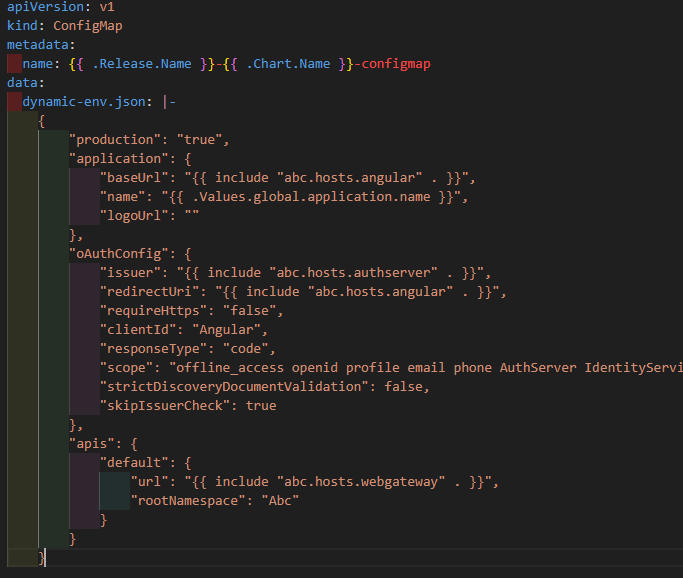
According to abp documentation I've modified the environment.prod.ts to provide remoteEnv,
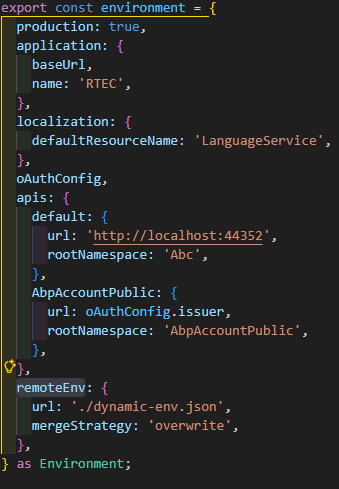
I confirm that the dynamic-env.jsonis properly fetched. But any way the application name coresponds to the value from environment.prod.ts. Any ideas?
12 Answer(s)
-
0
hi
I will check and confirm this.
Thanks,.
-
0
hi
Can you check if there is an empty
dynamic-env.jsonin your Angular app?Thanks.
-
0
Yes. Is empty. Is populated only throught kube manifests during deployment to the kubernetes cluster.
-
0
hi
Can you share the current response JSON content of
dynamic-env.json?Thanks.
-
0
{ "production": "true", "application": { "baseUrl": "https://sia.rtec.md", "name": "RTEC", "logoUrl": "" }, "oAuthConfig": { "issuer": "https://authserver.sia.rtec.md", "redirectUri": "https://sia.rtec.md", "requireHttps": "false", "clientId": "Angular", "responseType": "code", "scope": "offline_access openid profile email phone AuthServer IdentityService AdministrationService AuditLoggingService GdprService ChatService SaasService FileManagementService LanguageService EmployeeService BankingService OrganizationService AcquisitionService CustomerService ProjectionService MonitoringService BridgeService NotificationService EventManagementService", "strictDiscoveryDocumentValidation": false, "skipIssuerCheck": true }, "apis": { "default": { "url": "https://webgateway.sia.rtec.md", "rootNamespace": "Abc" } } }
-
0
Thanks. I will ask our angular team.
-
0
In Kubernetes the application name from the ConfigMap (
dynamic-env.json, e.g..Values.global.application.name) is loaded correctly viaremoteEnvand merged into the Angular environment. However, ABP’s Angular theme reads environment only once at bootstrap (fromenvironment.prod.ts) and doesn’t re‑apply it after remoteEnv runs, so visual elements like the app name still come fromenvironment.prod.ts. In other words, the ConfigMap is correct and affects the runtime env, but the current theme code doesn’t use theapplication.namefromdynamic-env.jsonunless you add custom code that does so.You can let us know if you need further assistance. Thank you for your cooperation.
-
0
Can you suggest how can I change the application name after the bootstrap?
-
0
This depends on how you want the name to be used. For example, if you are working on the logo and the name is already derived from the environment files, there is no need to define a global value in the YAML configuration.
-
0
Hi,
I want to have the posibility to define for different client different application name. That's why I need to provide the application name from kube manifest and to have the possibility to update the application after the angular bootstrap.
Cheers, Yulian
-
0
Hello,
You can achieve this by manipulating the environment response in your
app.config.ts. Here is an example:import { provideAbpThemeShared, withValidationBluePrint, withHttpErrorConfig, } from '@abp/ng.theme.shared'; export const appConfig: ApplicationConfig = { providers: [ provideAppInitializer(() => { const environmentService = inject(EnvironmentService); return new Promise<void>(resolve => { const checkEnvironment = () => { const env = environmentService.getEnvironment(); if (env?.application?.name) { document.title = env.application.name; console.log('✅ Application name updated from ConfigMap:', env.application.name); console.log('✅ Logo URL:', env.application.logoUrl); resolve(); } else { setTimeout(checkEnvironment, 50); } }; setTimeout(checkEnvironment, 100); setTimeout(() => { console.warn('⚠️ Remote environment not loaded within timeout'); resolve(); }, 5000); }); }), provideLogo(), { provide: LOGO_URL_TOKEN, useFactory: () => { const environmentService = inject(EnvironmentService); const env = environmentService.getEnvironment(); return env?.application?.logoUrl || ''; }, }, { provide: LOGO_APP_NAME_TOKEN, useFactory: () => { const environmentService = inject(EnvironmentService); const env = environmentService.getEnvironment(); return env?.application?.name || 'ProjectName'; }, }, ], };Thank you for your cooperation.
-
0
Thanks a lot.



