






We have conducted a Sonatype security scan on our ABP solution, and it's flagging high security vulnerabilities in some of the components within ABP itself.
Have you come across this before, and how would we go about resolving it? Is there a way to update components?
- Template: app
- Created ABP Studio Version: 2.1.2
- Current ABP Studio Version: 2.1.6
- Tiered: No
- Multi-Tenancy: No
- UI Framework: blazor-server
- Theme: leptonx
- Theme Style: light
- Theme Menu Placement: side
- Database Provider: ef
- Database Management System: sqlserver
- Separate Tenant Schema: No
- Mobile Framework: none
- Public Website: No
- Social Login: Yes
- Include Tests: No
- Kubernetes Configuration: No
- Distributed Event Bus: none
- Use Local References: No
- Optional Modules:
- AuditLogging
- Selected Languages: English
- Default Language: English
- Create Command: abp new CardNavigator -t app --ui-framework blazor-server --database-provider ef --database-management-system sqlserver --theme leptonx --skip-migration --skip-migrator --no-tests --without-cms-kit --dont-run-install-libs --dont-run-bundling --no-multi-tenancy -no-saas -no-gdpr -no-openiddict-admin-ui -no-file-management -no-language-management -no-text-template-management
8 Answer(s)
-
0
- What you’re seeing / is this known?
Yes, this kind of report is common when running SAST/SCA tools (Sonatype, GitHub Advanced Security, etc.) on ABP-based solutions.
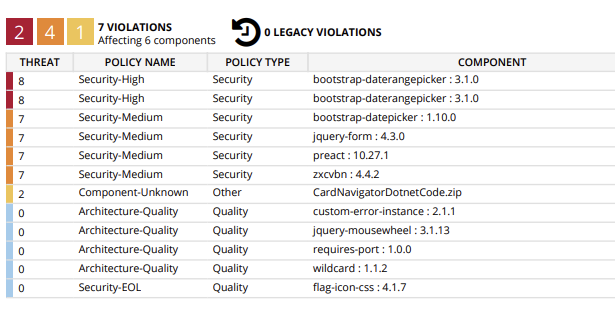
The items in your screenshot (e.g.bootstrap-daterangepicker,bootstrap-datepicker,jquery-form,preact,zxcvbn, etc.) are front-end dependencies that come from ABP’s NPM packages (themes, modules, etc.), not from your ownpackage.jsondirectly.ABP regularly upgrades both NuGet and NPM dependencies, but scanners sometimes:
- Flag older versions that are still in a given ABP release.
- Or raise false-positives against minified browser JS (we’ve had such a case with Toast UI editor before).
- Or flag issues that are not reachable in normal usage of ABP (e.g. specific, unused code paths).
- How to update / ensure you’re on latest dependencies
To make sure you’re using the newest versions that ABP provides:
Update ABP NuGet packages & solution version
From command line in your solution root:
abp updateOr use ABP Studio → Update All ABP Packages.
This brings your solution up to the latest compatible ABP Framework / ABP Commercial version and in turn updates referenced front‑end packages (because each ABP version pins specific NPM versions).
Re-install front-end libraries
In your Blazor Server UI project folder (the one with
package.json):
abp install-libsThis:
- Restores
node_modules(according to the ABP NPM package versions). - Rebuilds
wwwroot/libsfrom those packages.
If you’ve customized
package.jsonIf you added your own dependencies there, also run:
yarn install
   # or
   npm install
Then re-run your bundling process (if you use a custom one).
After these steps, you are on the latest JS/CSS stack for your ABP version. Many scanners will stop flagging older vulnerabilities once those versions are updated.
- Can I update specific libraries myself?
In most cases, those components are encapsulated inside ABP’s own NPM packages (e.g. LeptonX theme, account/auth UI, etc.). That means:
- You cannot reliably bump only
bootstrap-daterangepickerorpreactby editing yourpackage.json, because:- ABP’s scripts and styles may rely on specific versions.
- Overriding them ad‑hoc may break the theme or modules.
You have three realistic options:
Preferred: wait for / request ABP to upgrade them
- Keep your solution on the latest ABP version (as above).
- If Sonatype still reports serious, confirmed vulnerabilities, open a support ticket with:
- Exact package name & version.
- CVE / advisory links.
- Sonatype report details.
The ABP team regularly does bulk upgrades of third‑party libraries. If there is a newer safe version of one of those libraries, they generally upgrade it in upcoming releases.
Remove the library if unused
If you are sure you don’t use the functionality that brings a specific library, you can:
- Find which ABP JS bundle includes it (in
/wwwroot/libsand the related bundling contributor in your UI project). - Override the bundling configuration to exclude that file or entire library, and test your UI.
This is advanced and you must manually verify nothing breaks.
- Find which ABP JS bundle includes it (in
Full custom front-end
For extreme security requirements, some teams:
- Stop relying on ABP’s front-end bundles.
- Build their own UI assets from scratch (only with libraries they vet and pin).
- Use ABP only on the server side.
This gives full control, but you lose ABP’s ready-made UI integration.
- What if Sonatype still flags issues after upgrading?
If you:
- Are on the latest ABP version,
- Have run
abp install-libs, - Still get high‑severity findings on ABP-supplied libraries,
then:
Confirm the vulnerability is real and version-specific
Some findings (especially for minified JS) are pattern based and can be false-positives. Check whether the CVE/advisory:- Mentions that exact version, and
- Applies to browser-side usage in your context.
If confirmed, raise it with ABP
Provide the full Sonatype report and CVE references so the ABP team can:- Upgrade the library in the next release, or
- Replace/remove it if it’s obsolete.
Temporary mitigation / exception
Until ABP publishes a release containing the upgraded dependency, many customers:- Document the risk and create a temporary allow/ignore rule in their SCA tool (bounded by ABP version), or
- Remove the unused feature/module that pulls that library (if applicable).
Summary of what you should do now
In your solution root:
abp update- In your Blazor Server UI project:
abp install-libsRe-run the Sonatype scan.
For any remaining high-severity items:
- Collect: package name, version, CVE/advisory, and Sonatype evidence.
- Open an ABP support ticket or issue with those details so the library can be upgraded or evaluated.
This is the supported and safe way to deal with security scan findings in an ABP solution, without breaking the LeptonX theme or ABP modules.
This response was generated by AI. If it didn’t solve your problem, feel free to post a new answer — our support team will jump in to help you soon.
Markdown supported.Copy, paste, or drag & drop images and files (max 100 MB per file, 100 MB total per post) -
0
how do i -> Override the bundling configuration to exclude that file or entire library, and test your UI.
Markdown supported.Copy, paste, or drag & drop images and files (max 100 MB per file, 100 MB total per post) -
0
- Create a bundle contributor that removes the file(s)
In your Blazor Server UI project (the one that has the theme), add a class like this:
using System;
using System.Linq;
using Volo.Abp.AspNetCore.Mvc.UI.Bundling;
using Volo.Abp.AspNetCore.Components.Server.Theming.Bundling; // for BlazorStandardBundles

namespace CardNavigator.Web.Bundling;

public class RemoveVulnerableScriptsContributor : BundleContributor
{
    public override void ConfigureBundle(BundleConfigurationContext context)
    {
        // Example: remove ALL bootstrap-daterangepicker scripts
        var toRemove = context.Files
            .Where(f => f.Contains("bootstrap-daterangepicker", StringComparison.OrdinalIgnoreCase))
            .ToList();

        foreach (var file in toRemove)
        {
            context.Files.Remove(file);
        }

        // You can repeat the same pattern for other libraries:
        // - bootstrap-datepicker
        // - jquery-form
        // - zxcvbn
        // etc.
        //
        // Example:
        // var datepicker = context.Files
        //     .Where(f => f.Contains("bootstrap-datepicker", StringComparison.OrdinalIgnoreCase))
        //     .ToList();
        // foreach (var file in datepicker)
        // {
        //     context.Files.Remove(file);
        // }
    }
}
Adjust the
Contains(...)checks to match the actual paths you see underwwwroot/libs(e.g./libs/bootstrap-daterangepicker/daterangepicker.js).- Register the contributor on the global script bundle
In your Blazor Server host module (e.g.
CardNavigatorWebModule), insideConfigureServices:using Volo.Abp.AspNetCore.Mvc.UI.Bundling; using Volo.Abp.AspNetCore.Components.Server.Theming.Bundling; // BlazorStandardBundles public override void ConfigureServices(ServiceConfigurationContext context) { Configure<AbpBundlingOptions>(options => { // For Blazor Server global scripts options.ScriptBundles .Configure(BlazorStandardBundles.Scripts.Global, bundle => { bundle.AddContributors(typeof(RemoveVulnerableScriptsContributor)); }); // If you also need to remove CSS, do the same with StyleBundles: // options.StyleBundles.Configure(BlazorStandardBundles.Styles.Global, bundle => // { // bundle.AddContributors(typeof(RemoveVulnerableStylesContributor)); // }); }); }If your project is using the classic MVC bundles instead (e.g. for an MVC host), use
StandardBundles.Scripts.Globalinstead ofBlazorStandardBundles.Scripts.Global.Rebuild the static assets and test
From the UI project folder:
abp install-libs- Build and run the app.
- Open the browser dev tools → Network tab and confirm that the removed JS/CSS files are no longer requested.
- Re-run the Sonatype scan.
This way you are not touching ABP’s NPM packages directly; you are just customizing the final bundles to exclude specific files or entire libraries.
This response was generated by AI. If it didn’t solve your problem, feel free to post a new answer — our support team will jump in to help you soon.
Markdown supported.Copy, paste, or drag & drop images and files (max 100 MB per file, 100 MB total per post) -
0
hi
We will check and upgrade all possible npm packages.
You can use
resolutionsin yourpackages.jsonto force updates.You can remove the
yarn.lock. Then run theabp install-libscommand again.{ "version": "0.1.0", "name": "my-app", "private": true, "dependencies": { "@volo/abp.aspnetcore.mvc.ui.theme.lepton": "~10.1.0-rc.1", "@abp/tui-editor": "~10.1.0-rc.1", "tui-code-snippet": "1.5.2", "@volo/account": "~10.1.0-rc.1", "@abp/cms-kit": "~10.1.0-rc.1", "slugify": "1.4.6", "@abp/jstree": "~10.1.0-rc.1" }, "resolutions": { "jquery-form": "4.3.0" } }Markdown supported.Copy, paste, or drag & drop images and files (max 100 MB per file, 100 MB total per post) -
0
hi
Some of the packages don't have a patch version.
eg:
jquery-formCan you share the details of your security report?
liming.ma@volosoft.com
Thanks.
Markdown supported.Copy, paste, or drag & drop images and files (max 100 MB per file, 100 MB total per post) -
0
Due to security restrictions I cant send you the full report but here are the vulnerabilities they highlighted, wee had a similar report done on a v9 solution which has a lot more in so it has gone down in v10 which is good
 Markdown supported.Copy, paste, or drag & drop images and files (max 100 MB per file, 100 MB total per post)
 -
0
hi
These third-party JS libraries haven't released the latest patches. You can try upgrading
bootstrap-datepickerto1.10.1, but there's currently no way to fix the others.jquery-from has a patch PR but didn't merged
https://github.com/jquery-form/form/pull/586
Thanks.
Markdown supported.Copy, paste, or drag & drop images and files (max 100 MB per file, 100 MB total per post)



