






Hi ABP Support Team,
We have an ABP Commercial project A (our main product) that is already live and running in production.
Now we have a new requirement for a subset of tenants: we want to provide CMS functionality (CMS Kit + Public Website) for those tenants.
To explore this, we created a separate ABP project B using the ABP template with CMS Kit and Public Website enabled, and we’ve already done some customizations in project B.
At this point, we want to bring this CMS capability into our main project A, and we are considering two approaches:
Option 1: Convert project B into a module and integrate it into project A
Make B a reusable module and then include it in A.
Option 2: Install CMS Kit + Public Website into project A directly, and migrate our customizations from project B
We need guidance on:
- Which option is the recommended approach for long-term maintainability and upgrade safety (especially since A is already live)?
- If option 1 is feasible, what is the recommended way to extract what we built in B (CMS + Public Website customizations) into a proper ABP module and integrate it into A (projects to reference, DependsOn setup, migrations, UI packages, etc.)?
- If option 2 is preferred, what is the safest migration path to move the B customizations into A after installing CMS Kit + Public Website (including any typical pitfalls around global features, migrations, and unified admin/public layout configuration)?
Our goal is to keep one main solution (A), enable CMS features only where needed, and avoid creating an architecture that becomes difficult to maintain across ABP upgrades.
Thanks in advance for your recommendation and the best-practice steps to implement it.
18 Answer(s)
-
0
- Which option is better?
For a long‑lived, upgrade‑friendly Commercial solution, Option 2 is the recommended path:
- Use your existing, already‑running solution A as the main solution.
- Install CMS Kit(.Pro) into A and add a Public Website project into A, then
- Manually merge / move your customizations from B into A.
This aligns with how ABP team advises adding Public Website/CMS Kit to existing apps:
you generate a new solution with Public Website, then move that project into your existing solution rather than trying to “convert” another solution into a module.From an official support answer:
“Create a new blank application (that includespublic websiteproject) with the same options with your existing application.
Move thepublic websiteproject from the newly created solution to your existing solution.”
(support question: “add public website (and CMS kit) to existing application?”)Using a separate “B as a module” works, but:
- you’ll continually fight template drift and module‑solution mismatches,
- upgrades are harder (you must track and manually merge ABP template/public-website changes into B‑module forever).
So, for maintainability and upgrade safety: Option 2.
- If you did Option 1: how to convert B into a module and integrate into A?
This is technically feasible, but more complex/fragile than Option 2.
High‑level steps if you insist on Option 1:
- Refactor B into a proper ABP Application Module
- Ensure B follows the module layering pattern:
B.DomainB.Domain.SharedB.ApplicationB.Application.ContractsB.HttpApiB.HttpApi.Host(optional if you want a separate host)B.Web(for the public website UI)
- Each should have its own
AbpModuleclass, with proper[DependsOn]attributes, e.g.:
- Ensure B follows the module layering pattern:
// B.Domain.Shared [DependsOn( typeof(AbpDddDomainSharedModule), typeof(CmsKitDomainSharedModule) // if you depend on CmsKit )] public class BDomainSharedModule : AbpModule { } // B.Domain [DependsOn( typeof(AbpDddDomainModule), typeof(BDomainSharedModule), typeof(CmsKitDomainModule) )] public class BDomainModule : AbpModule { }- Make sure B doesn’t redefine infrastructure that A already has (e.g., EF Core DbContext, identity, SaaS, etc.).
Database & migrations
- If B currently has its own DbContext & migrations:
- Decide whether you want:
- Shared DbContext with A (recommended for a monolith), or
- Separate schema / connection string.
- Decide whether you want:
- If sharing A’s DbContext:
- Move B’s entity mappings into A’s DbContext project and regenerate migrations there.
- If keeping a separate DbContext:
- Keep B’s
B.EntityFrameworkCorewith its own migrations & connection string.
- Keep B’s
- If B currently has its own DbContext & migrations:
Wire the module into A
- Reference B’s projects from A’s solution (csproj references).
- In A’s startup module(s),
DependsOnthe B modules you need, e.g.:
[DependsOn(
         typeof(BWebModule),
         typeof(CmsKitPublicWebModule) // if used
     )]
     public class AWebModule : AbpModule
     {
     }
UI integration
- If B.Web is a full Public Website (layout, theme, CMS pages):
- Treat it as A’s Public Website project:
- Add a project reference from A’s solution.
- Configure routing,
app.UseEndpoints, etc., as in a standard ABP Public Website.
- Treat it as A’s Public Website project:
- Ensure one consistent theme (often LeptonX) and do not duplicate theme modules.
- If B.Web is a full Public Website (layout, theme, CMS pages):
Multi‑tenancy
- If B contains tenant‑aware components, ensure it uses ABP’s multi‑tenancy as in A (same
ICurrentTenant, tenant resolvers, etc.). - Use features / settings to control which tenants see the CMS/public website (see section 3.4 below).
- If B contains tenant‑aware components, ensure it uses ABP’s multi‑tenancy as in A (same
Because this essentially recreates what the ABP “Application Module” template already gives you, and you also must keep up with Public Website template changes, this option is usually not worth the maintenance cost unless you are building a generic module to reuse in multiple, unrelated solutions.
- Option 2 in detail: safest way to install CMS Kit + Public Website into A and migrate customizations
3.1. Add CMS Kit to existing solution A
- Install module via CLI (run in A’s solution root):
# Open-source abp add-module Volo.CmsKit --skip-db-migrations # Commercial (Pro) abp add-module Volo.CmsKit.Pro --skip-db-migrations- Enable CMS global features in
YourProjectNameDomainSharedModule(orGlobalFeatureConfigurator):
GlobalFeatureManager.Instance.Modules.CmsKit(cmsKit =>
   {
       cmsKit.EnableAll();
   });

   GlobalFeatureManager.Instance.Modules.CmsKitPro(cmsKitPro =>
   {
       cmsKitPro.EnableAll();
   });
Run EF Core migrations (A’s DbContext project):
- Add migration including CMS tables.
- Update DB.
This is the officially documented install path for CMS Kit into an existing solution.
3.2. Add a Public Website project into A
There is no direct “add public website” CLI command to an existing solution. Official guidance:
- Create a new temp solution C with the same options as A but with Public Website enabled:
abp new TempSolution --with-public-website [other-options-matching-A]In solution C, locate the Public Website project (e.g.
TempSolution.Public.Web).Copy that project into A’s solution:
- Add the project folder under A’s
srcdirectory. - Add it to A’s
.sln. - Fix namespaces and project names if needed.
- Add the project folder under A’s
Update references:
- Ensure A’s Public Website project references:
- A’s
Domain.Shared,Application.Contracts,HttpApi.Clientetc., as in C. Volo.CmsKit.Public.Web/Volo.CmsKit.Pro.Public.Web(they should already be referenced from the template).
- A’s
- Ensure A’s
DbMigrator(if used) knows about the CMS migrations (usually automatic if using the unified DbContext).
- Ensure A’s Public Website project references:
This step gives you a canonical, up‑to‑date Public Website layer, exactly as ABP expects, now living inside solution A.
3.3. Migrate customizations from B into A
From your experimental solution B (created with CMS Kit + Public Website):
Identify what you actually changed in B:
- New/changed pages (
Pages/Public/...), view models, components. - Theme customizations (styles, partials, layouts).
- CMS Kit usage: custom menus, widgets, blogs, etc. (often mostly data seeded via UI, not code).
- New/changed pages (
Copy over custom UI code:
- For page customizations in
B.Public.Web:- Move them into corresponding folders in
A.Public.Web:Pages/Public/...Themes/LeptonX/...overrides
- Resolve namespace / module differences (A vs B project names).
- Move them into corresponding folders in
- For CMS‑specific views (blogs, dynamic pages, widgets) you extended:
- Overwrite or extend the relevant Razor Pages in A’s Public Website project.
- For page customizations in
Copy/merge application/domain logic (if any) from B into A:
- Application services, DTOs, domain services used by the public website.
- Add these to A’s Application/Domain projects instead of B’s.
Re‑run and verify migrations if you added new entities for B that need DB tables in A.
Test all flows in A:
- Admin CMS management (blogs, pages, menus, etc.).
- Public website display of your custom pages/features.
- Multi‑tenancy behavior (see 3.4).
This is conceptually the same as “upgrading imported module source code by re‑downloading and merging” that ABP support often suggests for modules: you bring in a fresh template version and then merge your custom changes on top.
3.4. Enable CMS/Public Website only for specific tenants
With everything in a single solution A, you still want only a subset of tenants to have CMS/public web capability.
Use a combination of:
Feature management / settings per tenant
- Define a feature (e.g.
CmsKit.Enabled) or reuse existing module features. - In host UI, enable that feature only for selected tenants.
- In Public Website project and/or CMS menus, check the feature before showing pages or allowing access.
- Define a feature (e.g.
Tenant‑specific DNS + tenant resolvers
- Use domain/subdomain‑based tenant resolution so only tenants that have a configured domain actually hit the public website.
- Tenants without a mapped domain will effectively have no public website.
Permission control
- Grant CMS admin permissions only to tenants that should manage content.
This is aligned with ABP’s feature system + multi‑tenancy model and avoids duplicating application code per tenant.
4. Summary
Recommended:
- Keep A as the only main solution.
- Install CMS Kit(.Pro) into A.
- Add a Public Website project to A by generating a temp solution and moving its public‑web project.
- Merge customizations from B (code only) into A’s projects.
- Use features + tenant configuration to expose CMS/public web only for selected tenants.
Avoid:
- Treating a full solution (B) as a “module” and embedding it inside A.
It goes against ABP’s modularity patterns and complicates upgrades significantly.
- Treating a full solution (B) as a “module” and embedding it inside A.
Sources
- CMS Kit module docs (installation, global features, unified/public/admin packages)
- https://abp.io/docs/latest/modules/cms-kit
- ABP Modularity basics (module structure, DependsOn, module best practices)
- https://abp.io/docs/latest/framework/architecture/modularity/basics
This response was generated by AI. If it didn’t solve your problem, feel free to post a new answer — our support team will jump in to help you soon.
Markdown supported.Copy, paste, or drag & drop images and files (max 100 MB per file, 100 MB total per post) -
0
hi
CMS-Kit is already a reusable module. so you can use
Option 2: Install CMS Kit + Public Website into project A directly, and migrate our customizations from project BThanks.
Markdown supported.Copy, paste, or drag & drop images and files (max 100 MB per file, 100 MB total per post) -
0
Hi @maliming,
We tried the same approach in our setup. Our Project A is an ABP solution with Angular UI + .NET backend.
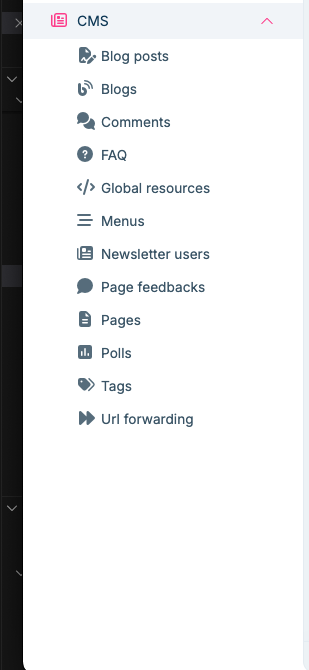
- After installing CMS Kit in Project A, the backend side (DB migrations, tables, etc.) got updated successfully, but we couldn’t see any CMS Kit UI/menu on the Angular side. From what we understand, the CMS Kit UI is currently available only for MVC/Razor Pages (and Blazor Server via MVC/Razor hosting), not for Angular, so our tenants won’t have a UI to manage pages/menus/content from the Angular application.
For reference, the CMS management screen is working fine for us in a separate Razor Pages-based project (screenshot attached). -
- Is there any official command or recommended approach to add the Public Website to an existing Angular + .NET solution (i.e., to generate/add the Web.Public project/folder into our current solution structure)? If there is no direct CLI command, please confirm the recommended way
Would appreciate guidance on the best supported path for an Angular UI solution where tenants need CMS management capabilities.
Markdown supported.Copy, paste, or drag & drop images and files (max 100 MB per file, 100 MB total per post) - After installing CMS Kit in Project A, the backend side (DB migrations, tables, etc.) got updated successfully, but we couldn’t see any CMS Kit UI/menu on the Angular side. From what we understand, the CMS Kit UI is currently available only for MVC/Razor Pages (and Blazor Server via MVC/Razor hosting), not for Angular, so our tenants won’t have a UI to manage pages/menus/content from the Angular application.
For reference, the CMS management screen is working fine for us in a separate Razor Pages-based project (screenshot attached). -
-
0
- There is currently no Angular admin UI for CMS Kit
- CMS Kit’s management UI (the menu you showed: Pages, Menus, Blogs, etc.) is implemented only for:
- MVC / Razor Pages (and Blazor Server hosted on MVC/Razor)
- For Angular, there is no built‑in CMS Kit admin UI yet.
This is also reflected in support answers where CMS Kit Angular support is explicitly taken to the roadmap and not yet available.
So in an Angular + .NET solution, installing CMS Kit:
- correctly adds the backend (entities, application services, migrations, APIs),
- but does not add any Angular menu or pages for CMS management – that is expected today.
- Recommended approach for Angular + .NET when tenants need CMS management
The supported, upgrade‑friendly setup is:
- Keep your main product as Angular UI + .NET backend.
- Add a Razor-based admin + Public Website for CMS management and public content, within the same backend solution.
Concretely:
2.1. Backend: Install CMS Kit in your existing solution A
You already did this, but for completeness:
- Add CMS Kit(.Pro) module on the backend (
abp add-module Volo.CmsKit/.Pro). - Enable CMS global features in
Domain.Shared(or GlobalFeatureConfigurator). - Add EF Core migration and update the DB.
This gives:
- Unified CMS entities, APIs, and multi‑tenant support for all UIs (Angular, Razor, Public Website).
2.2. Add Public Website (and optionally MVC admin UI) to an existing Angular solution
There is no CLI command that injects a Web.Public project into an existing Angular-only solution.
The recommended and supported way is:
Generate a temporary solution C with:
- Same options as your existing solution A
- UI: MVC (or MVC with Blazor, depending on what you want)
- Public Website enabled
For example:
abp new TempSolution -u mvc --with-public-website [other-options-matching-A]In solution C:
- Locate the Admin Web project (e.g.
TempSolution.Web) – this contains the CMS management UI you see in your screenshot. - Locate the Public Website project (e.g.
TempSolution.Public.Web).
- Locate the Admin Web project (e.g.
Copy these projects into solution A:
- Copy the project folders into A’s
srcfolder. - Add them to A’s
.sln. - Fix namespaces / project names if desired (rename
TempSolution.WebtoYourProduct.Web, etc.).
- Copy the project folders into A’s
Wire references:
- Ensure the copied Web/Web.Public projects reference:
- A’s
Domain.Shared,Application.Contracts,HttpApi,HttpApi.Client, etc., instead of TempSolution’s.
- A’s
- Ensure your DbMigrator (if you use one) is referencing A’s EF Core project that already has the CMS migrations.
- Ensure the copied Web/Web.Public projects reference:
Run & test:
- Run A’s backend host (HttpApi.Host or unified host).
- Run the Razor Admin Web project:
- You should see the CMS menu (Pages, Menus, Blogs, …) for tenants.
- Run the Public Website project for the front‑facing CMS content.
From your Angular app, you can:
- Add menu entries that navigate to the Razor admin site (e.g., open
/cms-adminin a new tab or same tab). - Configure domains / routes so that:
app.yourtenant.com→ Angular SPA (your main product)portal.yourtenant.com→ CMS Public Websiteadmin.yourtenant.comor/cms→ Razor admin (with CMS menu)
All share the same multi‑tenant backend and database.
- Answering your specific questions
- After installing CMS Kit in Project A, backend ok, but no CMS UI/menu in Angular?
Correct and expected:
- There is no official Angular CMS Kit admin UI yet.
- Only backend APIs and application services are added for Angular projects.
To give tenants a CMS management UI today, you must use a Razor-based admin UI (or build your own Angular UI against CMS APIs).
- Is there an official command or recommended approach to add Public Website to an existing Angular + .NET solution?
- No dedicated CLI command to append “Web.Public” to an existing Angular solution.
- Recommended approach:
- Generate a new temp solution with Public Website + MVC,
- Then move the Web and Web.Public projects into your existing solution (A),
- Update project references to use A’s backend projects.
This is exactly the same pattern ABP recommends when adding Public Website to an existing solution of any UI type.
- Practical setup pattern for your scenario
To satisfy: one main solution, Angular product UI, CMS for some tenants, maintainable over upgrades:
- Keep A as the only main solution.
- Backend:
- CMS Kit installed & configured (already done).
- Admin CMS UI:
- Add MVC Web project from temp solution C into A.
- Tenants use this site to manage Pages, Menus, Blogs, etc.
- Public Website UI:
- Add Web.Public project from C into A.
- Configure per‑tenant domains and features so only a subset of tenants get public sites.
- Angular app integration:
- In Angular, add menu items (route entries) pointing to:
- CMS admin URL (Razor site) for authorized tenants.
- Public website URL if you want “View Site” links.
- In Angular, add menu items (route entries) pointing to:
Upgrade path:
- When ABP updates CMS Kit and Public Website templates, you compare with a fresh temp solution of the new version and merge changes into your Web/Web.Public projects – same as normal ABP upgrade practice for customized UI projects.
Sources
- CMS Kit module docs (features, UI types, public website) – verified:
- https://abp.io/docs/latest/modules/cms-kit
- ABP Modularity / solution structure basics – verified:
- https://abp.io/docs/latest/framework/architecture/modularity/basics
This response was generated by AI. If it didn’t solve your problem, feel free to post a new answer — our support team will jump in to help you soon.
Markdown supported.Copy, paste, or drag & drop images and files (max 100 MB per file, 100 MB total per post) -
0
[abpdevPro] said: Hi @maliming,
We tried the same approach in our setup. Our Project A is an ABP solution with Angular UI + .NET backend.
- After installing CMS Kit in Project A, the backend side (DB migrations, tables, etc.) got updated successfully, but we couldn’t see any CMS Kit UI/menu on the Angular side. From what we understand, the CMS Kit UI is currently available only for MVC/Razor Pages (and Blazor Server via MVC/Razor hosting), not for Angular, so our tenants won’t have a UI to manage pages/menus/content from the Angular application.
For reference, the CMS management screen is working fine for us in a separate Razor Pages-based project (screenshot attached). -
- Is there any official command or recommended approach to add the Public Website to an existing Angular + .NET solution (i.e., to generate/add the Web.Public project/folder into our current solution structure)? If there is no direct CLI command, please confirm the recommended way
Would appreciate guidance on the best supported path for an Angular UI solution where tenants need CMS management capabilities.
Hi @maliming , Need response from you on this - not satisifed with the response of AI.
Markdown supported.Copy, paste, or drag & drop images and files (max 100 MB per file, 100 MB total per post) - After installing CMS Kit in Project A, the backend side (DB migrations, tables, etc.) got updated successfully, but we couldn’t see any CMS Kit UI/menu on the Angular side. From what we understand, the CMS Kit UI is currently available only for MVC/Razor Pages (and Blazor Server via MVC/Razor hosting), not for Angular, so our tenants won’t have a UI to manage pages/menus/content from the Angular application.
For reference, the CMS management screen is working fine for us in a separate Razor Pages-based project (screenshot attached). -
-
0
hi
If option 2 is preferred, what is the safest migration path to move the B customizations into A after installing CMS Kit + Public Website (including any typical pitfalls around global features, migrations, and unified admin/public layout configuration)?
Can you explain this more?
Typically, you just need to copy code from B to A. If your B app has some settings/permssions you can write some code to get and write to app A.
Thanks.
Markdown supported.Copy, paste, or drag & drop images and files (max 100 MB per file, 100 MB total per post) -
0
hi
Which parts are you confused about?
Because from what I see, your needs are already working in MVC. Once we release CMS Kit support for Angular, you'll be able to use it in Angular as well.
If your question isn't related to the UI, then what is it about?
Thanks.
Markdown supported.Copy, paste, or drag & drop images and files (max 100 MB per file, 100 MB total per post) -
0
mailming , Its working with fresh project creation via ABP Studio , when CMS Kit is opted during generation.
But for an existing project , when we add CMS KIT , navigation links are getting updated but the CMS admin Module and Public site is not loading .
We will be requesting for a live support to Tarik , so that we can have appropriate advice to proceed.
Markdown supported.Copy, paste, or drag & drop images and files (max 100 MB per file, 100 MB total per post) -
0
hi
But for an existing project , when we add CMS KIT , navigation links are getting updated but the CMS admin Module and Public site is not loading .
If your app has the same CMSKit module and configuration code as a ' fresh project `, it should work.
Can you share the existing project source code?
Remote check code will be difficult.
Thanks.
Markdown supported.Copy, paste, or drag & drop images and files (max 100 MB per file, 100 MB total per post) -
0
Yes, sure - here you can find the attached github repo - https://github.com/Amitavpanda-omiyal/CMSModuleDemo
CMSModuleTest - is the project made of angular and .net - where we want to add CMSKit + Public website and want to have all features of CMS Kit.
Please once have a look.
Markdown supported.Copy, paste, or drag & drop images and files (max 100 MB per file, 100 MB total per post) -
0
hi
I have joined the repository.
But for an existing project , when we add CMS KIT , navigation links are getting updated but the CMS admin Module and Public site is not loading .
Can you share the steps?
Thanks.
Markdown supported.Copy, paste, or drag & drop images and files (max 100 MB per file, 100 MB total per post) -
0
[maliming] said: hi
I have joined the repository.
But for an existing project , when we add CMS KIT , navigation links are getting updated but the CMS admin Module and Public site is not loading .
Can you share the steps?
Thanks.
We have shared repository access. Below are the exact steps we followed and the issue we are facing.
Steps Performed
We created a fresh ABP solution using ABP Studio:
- .NET backend + Angular UI
- Public Website option was NOT selected
- CMS Kit was NOT selected during initial project creation
After project creation, we installed CMS Kit using the ABP CLI with the required configurations.
- The CMS Kit installation completed successfull
- All required database tables were created
- Migrations ran without issues
At this point, we expected CMS Kit to be usable from the UI.
Expected Behavior
After installing CMS Kit, we expected:
- CMS Kit-related UI modules (Blogs, Pages, Menus, etc.) to appear
- Admins to be able to:
- Create blog posts
- Create CMS pages
- Manage menus
- These pages/content to be usable once the public website is enabled
Actual Behavior
- CMS Kit tables exist in the database
- CMS Kit APIs/services seem installed
- However:
- No CMS Kit module appears in the UI
- There is no admin UI for managing blogs, pages, or menus
- Public website functionality is not available
Markdown supported.Copy, paste, or drag & drop images and files (max 100 MB per file, 100 MB total per post) -
0
hi
No CMS Kit module appears in the UI There is no admin UI for managing blogs, pages, or menus Public website functionality is not available
These features need to wait for Angular support.
We will add the Angular CMS Kit pro implementation feature in abp 10.2 version.
Thanks.
Markdown supported.Copy, paste, or drag & drop images and files (max 100 MB per file, 100 MB total per post)



