






I am getting an error(image of the error is provided) that i think is related to a jQuery version mismatch between the local and dev environments. When i am working on the project in local, everything is just fine and the project works i am able to log in succesfully and continue interacting with the project. However when i push the project to upstream and the project goes through our CI/CD pipeline and is released, i am not able to login using accounts that are valid and registered under the system. On the dev environment in the developer console i see this error "Uncaught TypeError: n.parseJSON is not a function" and i presume that this is a jQuery related error, because on the local environment, after starting the app and typing jQuery.fn.jquery to see the jQuery version the number that it returns is "3.7.1, but on the dev environment entering the command jQuery.fn.jquery returns 4.0.0. I do not get the same error on the local environment.
-I have pulled the version that has errors on the dev environment into local in a clean folder and i am still not able to replicate the error, i am able to login just fine -On "yarn.lock" files of both local and dev environments the jQuery version is 3.7.1
"@abp/jquery@~9.0.2": version "9.0.2" resolved "https://registry.yarnpkg.com/@abp/jquery/-/jquery-9.0.2.tgz#3d1d103757be6ce3594a3eda7dbb10f7229eb59f%22 integrity sha512-fNYv1DvpAwoCmzW2AVd4IuzjNMoEfjJ5mPp+dqPloAkFPelsgptnMnuguwI2ihDdyr1p/4/K/KfALRfpMJXmmA== dependencies: "@abp/core" "~9.0.2" jquery "~3.7.1"
Contents of my package.json file { "version": "1.0.0", "name": "my-app", "private": true, "dependencies": { "@abp/tui-editor": "^9.0.2", "@volo/abp.aspnetcore.mvc.ui.theme.leptonx": "~4.0.3", "@volo/account": "~9.0.2", "@volo/audit-logging": "~9.0.2", "@volo/identity": "~9.0.2", "@volo/language-management": "~9.0.2", "@volo/saas": "~9.0.2", "apexcharts": "^4.0.0", "flatpickr": "^4.6.13", "vue": "^3.4.31", "jquery-ui": "^1.14.1", "pivottable": "^2.23.0" } }
The result i get after typing "abp --version": 2.1.6

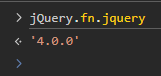

How can i fix this issue Best Regards
2 Answer(s)
-
0
- Solution
jQuery.fn.jqueryshowing 4.0.0 on the deployed dev environment means somewhere in your built bundles another jQuery (4.x) is being loaded after ABP’s@abp/jquery(3.7.1).
LeptonX + ABP 9.0.2 is built and tested with jQuery 3.7.1, and jQuery 4 is not supported – that’s why you getn.parseJSON is not a functiononly on dev.To fix it, you must ensure that only jQuery 3.7.1 is used in the public web/auth server application that serves the login page.
Do the following steps:
1. Lock jQuery to 3.7.1 in your front‑end
Add a
resolutionsblock to yourpackage.jsonto force all packages to use jQuery 3.7.1:{ "name": "my-app", "version": "1.0.0", "private": true, "dependencies": { "@abp/tui-editor": "^9.0.2", "@volo/abp.aspnetcore.mvc.ui.theme.leptonx": "~4.0.3", "@volo/account": "~9.0.2", "@volo/audit-logging": "~9.0.2", "@volo/identity": "~9.0.2", "@volo/language-management": "~9.0.2", "@volo/saas": "~9.0.2", "apexcharts": "^4.0.0", "flatpickr": "^4.6.13", "vue": "^3.4.31", "jquery-ui": "^1.14.1", "pivottable": "^2.23.0" }, "resolutions": { "jquery": "3.7.1", "**/jquery": "3.7.1" } }Then, re‑install using Yarn (so that CI and local both use the same versions):
# On local
rm -rf node_modules
yarn install
yarn build # or the command that builds your bundles
Commit both
package.jsonandyarn.lock, push, and make sure your CI pipeline runsyarn install(notnpm install) so that it respectsyarn.lockandresolutions.If your CI has a
package-lock.jsonfrom earlier runs, delete it from the repo and ensure the CI configuration is not usingnpm ciagainst it.
2. Check that no extra jQuery is referenced in your MVC / login layout
Since you’re using tiered with a separate MVC/Auth Server (LeptonX theme), verify these files in the web/auth project:
_Layout.cshtml(orAccountLayout.cshtmldepending on customization)- Any other shared layout included by the login page
Make sure there is no additional
<script>tag that includes jQuery from a CDN or fromwwwroot/lib/jqueryetc.
All you should see is the ABP/LeptonX bundle, for example:@section scripts { @await RenderSectionAsync("Scripts", required: false) @await BundleManager.RenderScriptsAsync() }If you have something like:
<script src="https://code.jquery.com/jquery-4.0.0.min.js"></script>or any local
jquery-4.*.js, remove it.
The only jQuery instance must come from@abp/jquery(3.7.1) via the ABP bundles.
3. Confirm on the deployed environment
After updating CI to use Yarn + the new
resolutionsand removing any extra jQuery<script>tags:- Deploy to your dev environment.
- Open the login page in a hard‑refreshed browser window (Ctrl+F5).
- In the console, run:
jQuery.fn.jqueryIt should now print:
"3.7.1"- Try logging in with a valid user – the
Uncaught TypeError: n.parseJSON is not a functionshould be gone.
If it still shows
4.0.0, check the Network tab → filter by “jquery” to see from which file/url jQuery 4 is being loaded; remove that reference or force it to use 3.7.1.
- Sources
- LeptonX MVC theme usage and bundling (shows it relies on the ABP bundling system and its JS stack):
https://abp.io/docs/latest/themes/lepton-x
This response was generated by AI. If it didn’t solve your problem, feel free to post a new answer — our support team will jump in to help you soon.
Markdown supported.Copy, paste, or drag & drop images and files (max 100 MB per file, 100 MB total per post) -
0
hi
Your
jquery-uidepends on the new 4.0 jQuery.https://www.npmjs.com/package/jquery-ui/v/1.14.1?activeTab=code
	"dependencies": {
		"jquery": ">=1.12.0 <5.0.0"
	},
Please specify the jQuery version in your
package.json,and remove theyarn.lock, then run theabp install-libscommand again."resolutions": { "jquery": "3.7.1", }Markdown supported.Copy, paste, or drag & drop images and files (max 100 MB per file, 100 MB total per post)



