






Hello,
We are experiencing an issue while migrating an existing project from ABP 6 to ABP 8.3 and from .NET 6 to .NET 8.0, specifically related to LeptonX.
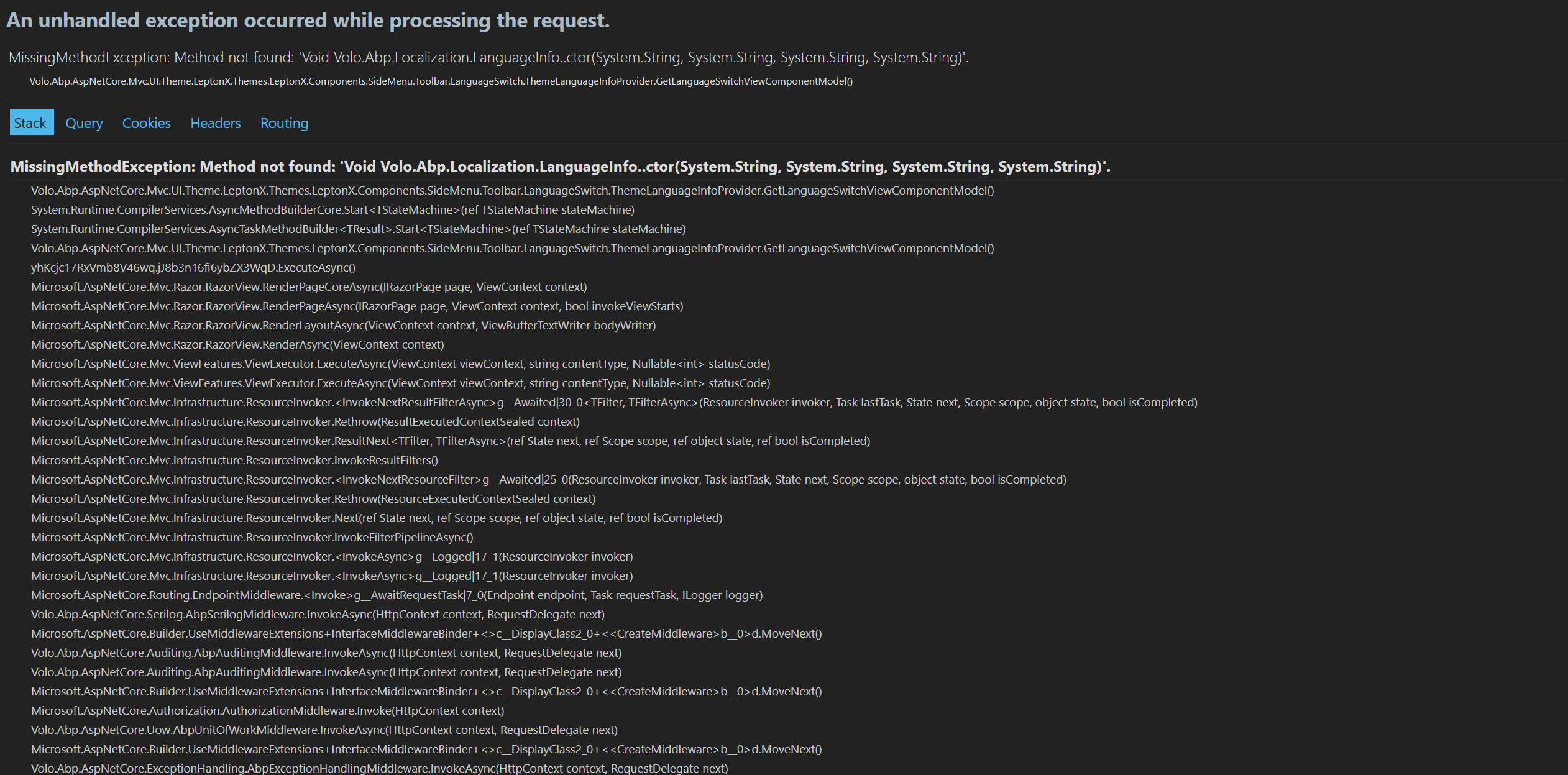
After upgrading all ABP packages to 8.3 and updating the UI theme package Volo.Abp.AspNetCore.Mvc.UI.Theme.LeptonX to version 3.1, we are getting the following runtime error:
System.MissingMethodException: Method not found: 'Void Volo.Abp.Localization.LanguageInfo..ctor(System.String, System.String, System.String, System.String)'.
   at Volo.Abp.AspNetCore.Mvc.UI.Theme.LeptonX.Themes.LeptonX.Components.SideMenu.Toolbar.LanguageSwitch.ThemeLanguageInfoProvider.GetLanguageSwitchViewComponentModel()
   at System.Runtime.CompilerServices.AsyncMethodBuilderCore.Start[TStateMachine](TStateMachine& stateMachine)
   at Volo.Abp.AspNetCore.Mvc.UI.Theme.LeptonX.Themes.LeptonX.Components.SideMenu.Toolbar.LanguageSwitch.ThemeLanguageInfoProvider.GetLanguageSwitchViewComponentModel()
   at yhKcjc17RxVmb8V46wq.jJ8b3n16fi6ybZX3WqD.ExecuteAsync()
   at Microsoft.AspNetCore.Mvc.Razor.RazorView.RenderPageCoreAsync(IRazorPage page, ViewContext context)
   at Microsoft.AspNetCore.Mvc.Razor.RazorView.RenderPageAsync(IRazorPage page, ViewContext context, Boolean invokeViewStarts)
   at Microsoft.AspNetCore.Mvc.Razor.RazorView.RenderLayoutAsync(ViewContext context, ViewBufferTextWriter bodyWriter)
   at Microsoft.AspNetCore.Mvc.Razor.RazorView.RenderAsync(ViewContext context)
   at Microsoft.AspNetCore.Mvc.ViewFeatures.ViewExecutor.ExecuteAsync(ViewContext viewContext, String contentType, Nullable`1 statusCode)
   at Microsoft.AspNetCore.Mvc.ViewFeatures.ViewExecutor.ExecuteAsync(ViewContext viewContext, String contentType, Nullable`1 statusCode)
   at Microsoft.AspNetCore.Mvc.Infrastructure.ResourceInvoker.<InvokeNextResultFilterAsync>g__Awaited|30_0[TFilter,TFilterAsync](ResourceInvoker invoker, Task lastTask, State next, Scope scope, Object state, Boolean isCompleted)
   at Microsoft.AspNetCore.Mvc.Infrastructure.ResourceInvoker.Rethrow(ResultExecutedContextSealed context)
   at Microsoft.AspNetCore.Mvc.Infrastructure.ResourceInvoker.ResultNext[TFilter,TFilterAsync](State& next, Scope& scope, Object& state, Boolean& isCompleted)
   at Microsoft.AspNetCore.Mvc.Infrastructure.ResourceInvoker.InvokeResultFilters()
--- End of stack trace from previous location ---
   at Microsoft.AspNetCore.Mvc.Infrastructure.ResourceInvoker.<InvokeNextResourceFilter>g__Awaited|25_0(ResourceInvoker invoker, Task lastTask, State next, Scope scope, Object state, Boolean isCompleted)
   at Microsoft.AspNetCore.Mvc.Infrastructure.ResourceInvoker.Rethrow(ResourceExecutedContextSealed context)
   at Microsoft.AspNetCore.Mvc.Infrastructure.ResourceInvoker.Next(State& next, Scope& scope, Object& state, Boolean& isCompleted)
   at Microsoft.AspNetCore.Mvc.Infrastructure.ResourceInvoker.InvokeFilterPipelineAsync()
--- End of stack trace from previous location ---
   at Microsoft.AspNetCore.Mvc.Infrastructure.ResourceInvoker.<InvokeAsync>g__Logged|17_1(ResourceInvoker invoker)
   at Microsoft.AspNetCore.Mvc.Infrastructure.ResourceInvoker.<InvokeAsync>g__Logged|17_1(ResourceInvoker invoker)
   at Microsoft.AspNetCore.Routing.EndpointMiddleware.<Invoke>g__AwaitRequestTask|7_0(Endpoint endpoint, Task requestTask, ILogger logger)
   at Volo.Abp.AspNetCore.Serilog.AbpSerilogMiddleware.InvokeAsync(HttpContext context, RequestDelegate next)
   at Microsoft.AspNetCore.Builder.UseMiddlewareExtensions.InterfaceMiddlewareBinder.<>c__DisplayClass2_0.<<CreateMiddleware>b__0>d.MoveNext()
--- End of stack trace from previous location ---
   at Volo.Abp.AspNetCore.Auditing.AbpAuditingMiddleware.InvokeAsync(HttpContext context, RequestDelegate next)
   at Volo.Abp.AspNetCore.Auditing.AbpAuditingMiddleware.InvokeAsync(HttpContext context, RequestDelegate next)
   at Microsoft.AspNetCore.Builder.UseMiddlewareExtensions.InterfaceMiddlewareBinder.<>c__DisplayClass2_0.<<CreateMiddleware>b__0>d.MoveNext()
--- End of stack trace from previous location ---
   at Microsoft.AspNetCore.Authorization.AuthorizationMiddleware.Invoke(HttpContext context)
   at Volo.Abp.AspNetCore.Uow.AbpUnitOfWorkMiddleware.InvokeAsync(HttpContext context, RequestDelegate next)
   at Microsoft.AspNetCore.Builder.UseMiddlewareExtensions.InterfaceMiddlewareBinder.<>c__DisplayClass2_0.<<CreateMiddleware>b__0>d.MoveNext()
--- End of stack trace from previous location ---
   at Volo.Abp.AspNetCore.ExceptionHandling.AbpExceptionHandlingMiddleware.InvokeAsync(HttpContext context, RequestDelegate next)
   at Volo.Abp.AspNetCore.ExceptionHandling.AbpExceptionHandlingMiddleware.InvokeAsync(HttpContext context, RequestDelegate next)
   at Microsoft.AspNetCore.Builder.UseMiddlewareExtensions.InterfaceMiddlewareBinder.<>c__DisplayClass2_0.<<CreateMiddleware>b__0>d.MoveNext()
--- End of stack trace from previous location ---
   at Microsoft.AspNetCore.Builder.ApplicationBuilderAbpOpenIddictMiddlewareExtension.<>c__DisplayClass0_0.<<UseAbpOpenIddictValidation>b__0>d.MoveNext()
--- End of stack trace from previous location ---
   at Cincaporc.WebApp.Middleware.Logging.SessionLoggingMiddleware.InvokeAsync(HttpContext context, RequestDelegate next) in C:\Users\level4\source\repos\Cincaporc\Cincaporc.WebApp\src\Cincaporc.WebApp.Middleware\Logging\SessionLoggingMiddleware.cs:line 23
   at Microsoft.AspNetCore.Builder.UseMiddlewareExtensions.InterfaceMiddlewareBinder.<>c__DisplayClass2_0.<<CreateMiddleware>b__0>d.MoveNext()
--- End of stack trace from previous location ---
   at Microsoft.AspNetCore.Authentication.AuthenticationMiddleware.Invoke(HttpContext context)
   at Volo.Abp.AspNetCore.Security.AbpSecurityHeadersMiddleware.InvokeAsync(HttpContext context, RequestDelegate next)
   at Microsoft.AspNetCore.Builder.UseMiddlewareExtensions.InterfaceMiddlewareBinder.<>c__DisplayClass2_0.<<CreateMiddleware>b__0>d.MoveNext()
--- End of stack trace from previous location ---
   at Volo.Abp.AspNetCore.Tracing.AbpCorrelationIdMiddleware.InvokeAsync(HttpContext context, RequestDelegate next)
   at Microsoft.AspNetCore.Builder.UseMiddlewareExtensions.InterfaceMiddlewareBinder.<>c__DisplayClass2_0.<<CreateMiddleware>b__0>d.MoveNext()
--- End of stack trace from previous location ---
   at Microsoft.AspNetCore.Localization.RequestLocalizationMiddleware.Invoke(HttpContext context)
   at Microsoft.AspNetCore.RequestLocalization.AbpRequestLocalizationMiddleware.InvokeAsync(HttpContext context, RequestDelegate next)
   at Microsoft.AspNetCore.Builder.UseMiddlewareExtensions.InterfaceMiddlewareBinder.<>c__DisplayClass2_0.<<CreateMiddleware>b__0>d.MoveNext()
--- End of stack trace from previous location ---
   at Microsoft.AspNetCore.Diagnostics.DeveloperExceptionPageMiddlewareImpl.Invoke(HttpContext context)
What is confusing to us is the following:
In our previous ABP version, we were creating LanguageInfo instances using a constructor with 4 parameters
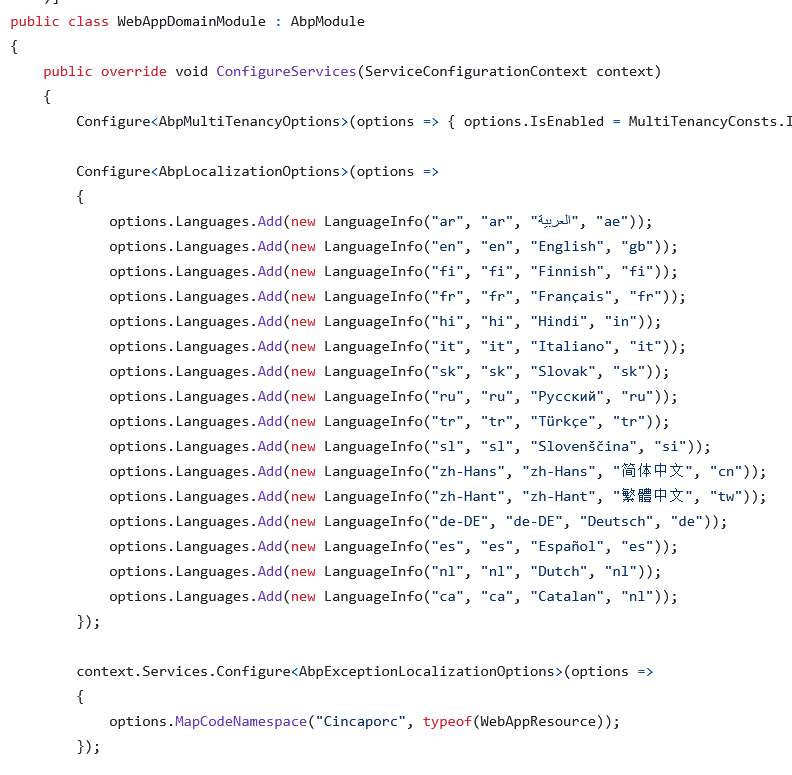
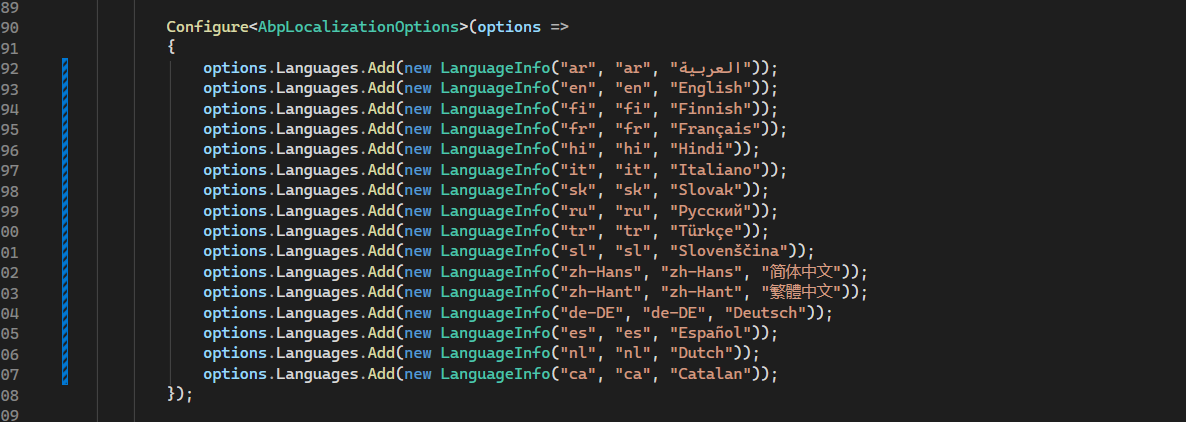
After upgrading, we updated our code to use the 3-parameter constructor, as required by the newer ABP packages (see PROOF_2.png).
We then inspected the method mentioned in the exception:
Volo.Abp.AspNetCore.Mvc.UI.Theme.LeptonX.Themes.LeptonX.Components.SideMenu.Toolbar.LanguageSwitch.ThemeLanguageInfoProvider.GetLanguageSwitchViewComponentModel()
In the LeptonX source code (v3.1) this method also uses the 3-parameter LanguageInfo constructor:
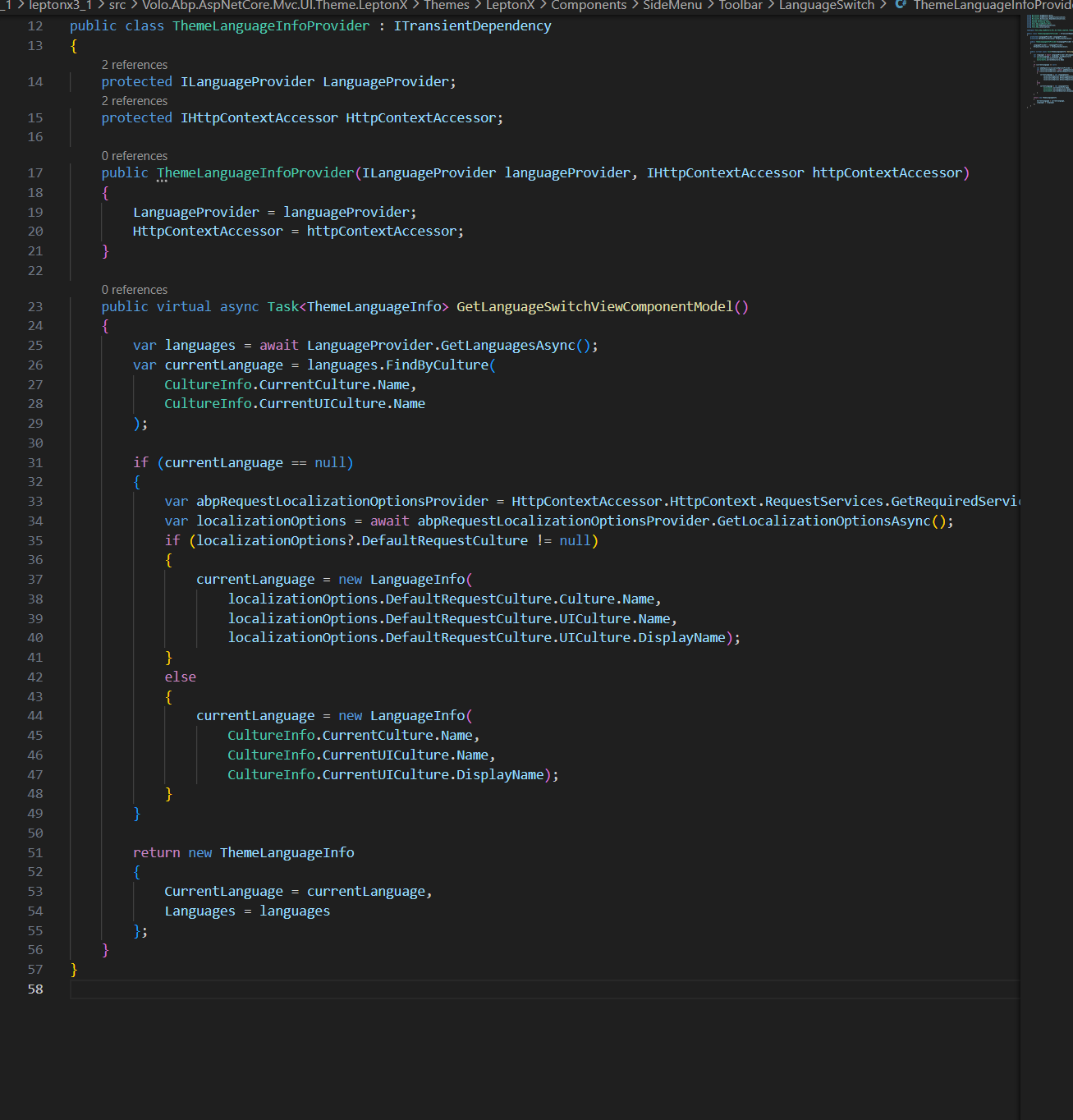
Because of this, we do not understand why the application is still trying to resolve the 4-parameter constructor at runtime.
Thank you in advance for your support.
Best regards,
2 Answer(s)
-
0
- Solution
The runtime error:
MissingMethodException: Method not found:
'Void Volo.Abp.Localization.LanguageInfo..ctor(System.String, System.String, System.String, System.String)'
is caused by a version mismatch between your ABP Framework packages and the LeptonX theme package.
- You are using ABP 8.3.x
- But LeptonX is 3.1.x
In ABP 8.3 the
LanguageInfotype (fromVolo.Abp.Localization) exposes only the 3‑parameter constructor.
LeptonX 3.1 was compiled against an earlier ABP version where the 4‑parameter constructor still existed. At runtime, the CLR tries to call that old 4‑parameter constructor and fails withMissingMethodException.Fix
- Open your web project
.csprojand update the LeptonX package:
<PackageReference Include="Volo.Abp.AspNetCore.Mvc.UI.Theme.LeptonX" Version="3.3.*" />(or explicitly, e.g.
3.3.0/3.3.1, matching your ABP 8.3 minor version).- Ensure all ABP packages are aligned on the same version (8.3.x):
dotnet list packageIf you see mixed versions, update them so every
Volo.Abp.*package is8.3.xand LeptonX is3.3.x.- Clean and rebuild:
abp clean
dotnet restore
dotnet build
dotnet run
After upgrading LeptonX to 3.3.x, it will be compiled against the correct
LanguageInfoconstructor (3 parameters), and theMissingMethodExceptionwill be gone.
- Sources
- LeptonX theme docs (general versioned theme docs, confirm you’re on the right major ABP line):
https://abp.io/docs/latest/ui-themes/lepton-x/
This response was generated by AI. If it didn’t solve your problem, feel free to post a new answer — our support team will jump in to help you soon.
Markdown supported.Copy, paste, or drag & drop images and files (max 100 MB per file, 100 MB total per post)



