Hello Team,
I have configured OAuth login in the Identity Management module. However, the current setup requires creating an external user with a username and password before allowing external login. I referred to the following documentation: https://abp.io/docs/commercial/latest/modules/identity/oauth-login
My requirement is different:
- Users already exist in the system.
- I want them to log in using Azure AD credentials (external/common password), not the ABP password.
- There should be no need to manually add or create external users.
- OAuth configuration must be tenant-based, so each tenant can manage its own Azure AD OAuth settings. I am using Azure AD as the external provider.
Could you please guide me on how to configure this scenario?
25 Answer(s)
-
0
hi
, the current setup requires creating an external user with a username and password before allowing external login.
You don't need to create a user with a password manually.
If your username and password pass the check in OAuth check. Abp will handle it.
check the external user login logic here:
https://github.com/abpframework/abp/blob/rel-10.1/modules/identity/src/Volo.Abp.Identity.AspNetCore/Volo/Abp/Identity/AspNetCore/AbpSignInManager.cs#L54-L81
Thanks.
Markdown supported.Copy, paste, or drag & drop images and files (max 100 MB per file, 100 MB total per post) -
0
[maliming] said: hi
, the current setup requires creating an external user with a username and password before allowing external login.
You don't need to create a user with a password manually.
If your username and password pass the check in OAuth check. Abp will handle it.
check the external user login logic here:
https://github.com/abpframework/abp/blob/rel-10.1/modules/identity/src/Volo.Abp.Identity.AspNetCore/Volo/Abp/Identity/AspNetCore/AbpSignInManager.cs#L54-L81
Thanks.
Thank you. I am able to log in successfully on my local environment, but I am facing issues on the production environment. Could you please help check if there are any missing or additional configurations required for production?
Markdown supported.Copy, paste, or drag & drop images and files (max 100 MB per file, 100 MB total per post) -
0
hi
There are no extra steps in the production environment for the external login feature.
Can you share the debug logs?
https://abp.io/support/questions/8622/How-to-enable-Debug-logs-for-troubleshoot-problems
liming.ma@volosoft.com
Thanks
Markdown supported.Copy, paste, or drag & drop images and files (max 100 MB per file, 100 MB total per post) -
0
[maliming] said: hi
There are no extra steps in the production environment for the external login feature.
Can you share the debug logs?
https://abp.io/support/questions/8622/How-to-enable-Debug-logs-for-troubleshoot-problems
liming.ma@volosoft.com
Thanks
Hi
Which redirect URI should be configured in the Azure App Registration—auth(AuthServer) or API (Host)?
Thanks
Markdown supported.Copy, paste, or drag & drop images and files (max 100 MB per file, 100 MB total per post) -
0
[maliming] said: hi
External login doesn't need the redirect URL
Hi
I am using Azure AD, so I mean setting the redirect URI in the App Registration in Azure.
Thank you
Markdown supported.Copy, paste, or drag & drop images and files (max 100 MB per file, 100 MB total per post) -
0
[maliming] said: hi
Is the external login problem solved?
Thanks.
Hi
No, I have enabled the logs and will share them with you.
Thanks
Markdown supported.Copy, paste, or drag & drop images and files (max 100 MB per file, 100 MB total per post) -
0
[maliming] said: hi
Thanks. Let's check it one by one.
Hi
I am getting below error in the log
2026-01-29 23:28:35.361 -06:00 [ERR] Get access token error: {"error":"invalid_request","error_description":"AADSTS900144: The request body must contain the following parameter: 'resource'. Trace ID: bd09e2e7-dd33-4dad-8301-cc1e06f31b00 Correlation ID: 1f7c9c95-06e4-41db-aaa8-74dc015e4631 Timestamp: 2026-01-30 05:28:35Z","error_codes":[900144],"timestamp":"2026-01-30 05:28:35Z","trace_id":"bd09e2e7-dd33-4dad-8301-cc1e06f31b00","correlation_id":"1f7c9c95-06e4-41db-aaa8-74dc015e4631","error_uri":"https://login.microsoftonline.com/error?code=900144"} Volo.Abp.AbpException: Get access token error: {"error":"invalid_request","error_description":"AADSTS900144: The request body must contain the following parameter: 'resource'. Trace ID: bd09e2e7-dd33-4dad-8301-cc1e06f31b00 Correlation ID: 1f7c9c95-06e4-41db-aaa8-74dc015e4631 Timestamp: 2026-01-30 05:28:35Z","error_codes":[900144],"timestamp":"2026-01-30 05:28:35Z","trace_id":"bd09e2e7-dd33-4dad-8301-cc1e06f31b00","correlation_id":"1f7c9c95-06e4-41db-aaa8-74dc015e4631","error_uri":"https://login.microsoftonline.com/error?code=900144"} at Volo.Abp.Identity.ExternalLoginProviders.OAuth.OAuthExternalLoginManager.GetAccessTokenAsync(String userName, String password) at Volo.Abp.Identity.ExternalLoginProviders.OAuth.OAuthExternalLoginManager.AuthenticateAsync(String userName, String password)
New error in the Logs
2026-01-29 23:49:48.925 -06:00 [ERR] Get access token error: {"error":"invalid_grant","error_description":"AADSTS50076: Due to a configuration change made by your administrator, or because you moved to a new location, you must use multi-factor authentication to access '00000003-0000-0000-c000-000000000000'. Trace ID: 63406391-cbd1-4701-8f7c-b6af61c93f00 Correlation ID: 0ee99e11-e50b-49c5-906d-c19462111edf Timestamp: 2026-01-30 05:49:48Z","error_codes":[50076],"timestamp":"2026-01-30 05:49:48Z","trace_id":"63406391-cbd1-4701-8f7c-b6af61c93f00","correlation_id":"0ee99e11-e50b-49c5-906d-c19462111edf","error_uri":"https://login.microsoftonline.com/error?code=50076","suberror":"basic_action"} Volo.Abp.AbpException: Get access token error: {"error":"invalid_grant","error_description":"AADSTS50076: Due to a configuration change made by your administrator, or because you moved to a new location, you must use multi-factor authentication to access '00000003-0000-0000-c000-000000000000'. Trace ID: 63406391-cbd1-4701-8f7c-b6af61c93f00 Correlation ID: 0ee99e11-e50b-49c5-906d-c19462111edf Timestamp: 2026-01-30 05:49:48Z","error_codes":[50076],"timestamp":"2026-01-30 05:49:48Z","trace_id":"63406391-cbd1-4701-8f7c-b6af61c93f00","correlation_id":"0ee99e11-e50b-49c5-906d-c19462111edf","error_uri":"https://login.microsoftonline.com/error?code=50076","suberror":"basic_action"} at Volo.Abp.Identity.ExternalLoginProviders.OAuth.OAuthExternalLoginManager.GetAccessTokenAsync(String userName, String password) at Volo.Abp.Identity.ExternalLoginProviders.OAuth.OAuthExternalLoginManager.AuthenticateAsync(String userName, String password)
Markdown supported.Copy, paste, or drag & drop images and files (max 100 MB per file, 100 MB total per post) -
0
hi
The error is returned by Azure AD. Your Azure AD tenant is currently configured to require Multi-Factor Authentication (MFA) or Conditional Access for Microsoft Graph. Because of this, the OAuth2 password (ROPC) flow is blocked by Azure AD and cannot be used.
This behavior is controlled only by Azure AD. Your Azure AD administrator would need to review the tenant’s security settings (such as Conditional Access or MFA policies) to determine whether the password flow is permitted in your environment.
Thanks.
Markdown supported.Copy, paste, or drag & drop images and files (max 100 MB per file, 100 MB total per post) -
0
[maliming] said: hi
The error is returned by Azure AD. Your Azure AD tenant is currently configured to require Multi-Factor Authentication (MFA) or Conditional Access for Microsoft Graph. Because of this, the OAuth2 password (ROPC) flow is blocked by Azure AD and cannot be used.
This behavior is controlled only by Azure AD. Your Azure AD administrator would need to review the tenant’s security settings (such as Conditional Access or MFA policies) to determine whether the password flow is permitted in your environment.
Thanks.
Hi
However, it’s working fine in the local environment. How should this case be handled in the OAuth login settings?
Thanks
Markdown supported.Copy, paste, or drag & drop images and files (max 100 MB per file, 100 MB total per post) -
0
[maliming] said: hi
Perhaps your
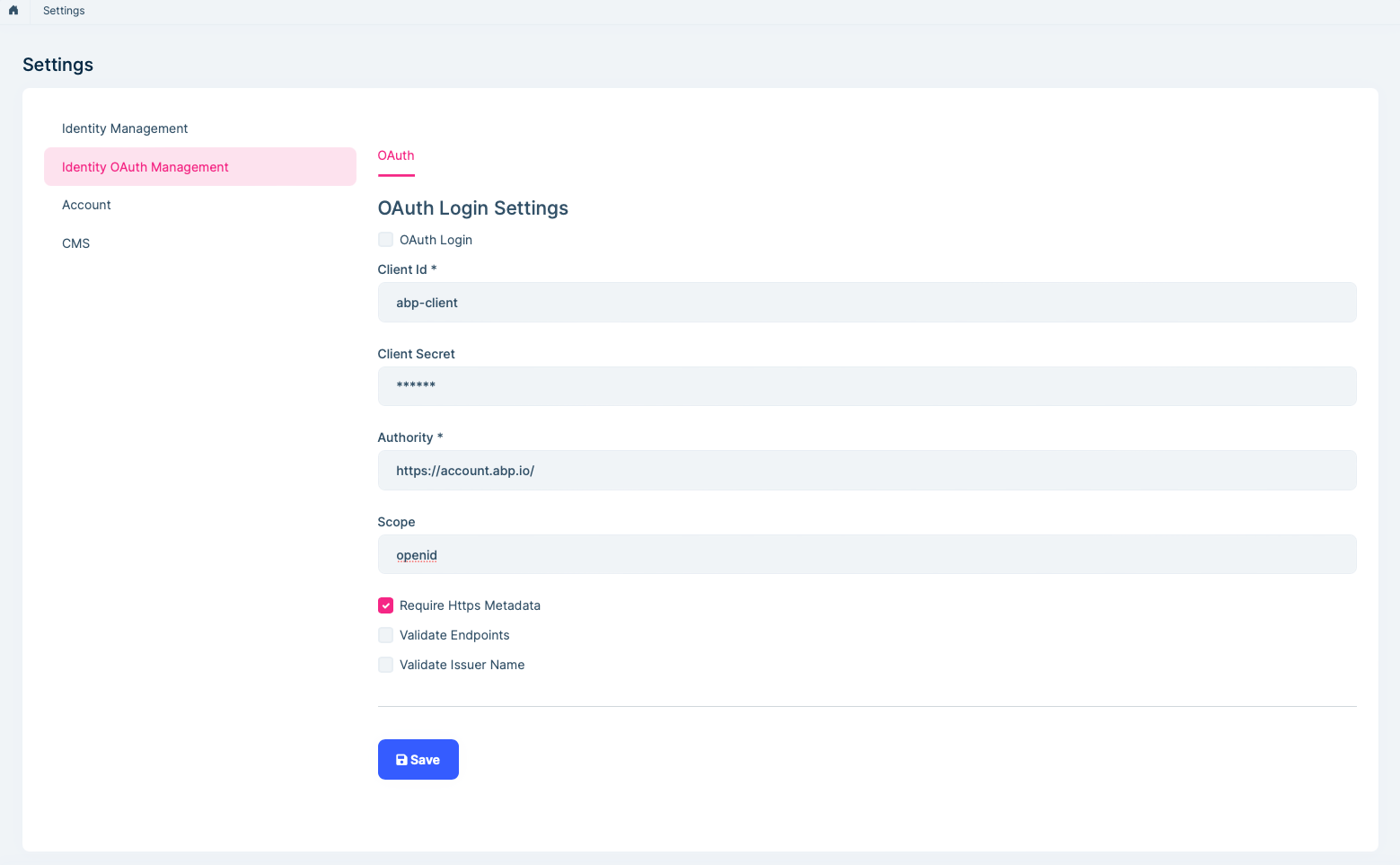
OAuth Login Settingsdiffer between the local and production environments.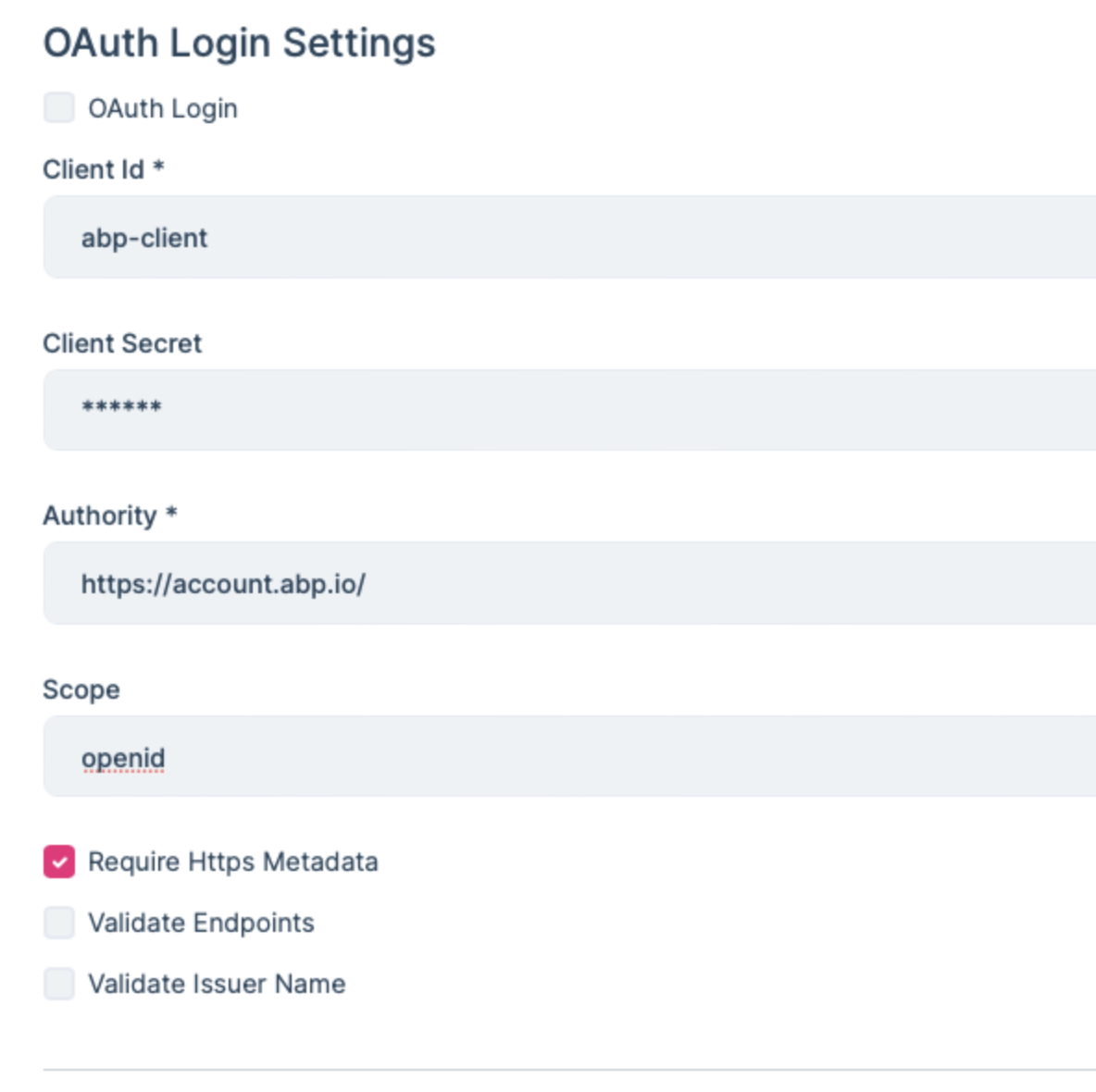
Thanks
Hi
No, I have used same configuration on both.
Thanks
Markdown supported.Copy, paste, or drag & drop images and files (max 100 MB per file, 100 MB total per post) -
0
hi
"error_description":"AADSTS50076: Due to a configuration change made by your administrator, or because you moved to a new location, you must use multi-factor authentication to access '00000003-0000-0000-c000-000000000000'. Trace ID: 63406391-cbd1-4701-8f7c-b6af61c93f00 Correlation ID: 0ee99e11-e50b-49c5-906d-c19462111edf Timestamp: 2026-01-30 05:49:48Z",
because you moved to a new location
Perhaps your IP address has changed?
I mean your local computer and remote server.
Thanks.
Markdown supported.Copy, paste, or drag & drop images and files (max 100 MB per file, 100 MB total per post) -
0
[maliming] said: hi
"error_description":"AADSTS50076: Due to a configuration change made by your administrator, or because you moved to a new location, you must use multi-factor authentication to access '00000003-0000-0000-c000-000000000000'. Trace ID: 63406391-cbd1-4701-8f7c-b6af61c93f00 Correlation ID: 0ee99e11-e50b-49c5-906d-c19462111edf Timestamp: 2026-01-30 05:49:48Z",
because you moved to a new location
Perhaps your IP address has changed?
I mean your local computer and remote server.
Thanks.
Hi
Yes, the IP address is different for both environments. Could you please help us understand how to handle this case, or advise if any manual configuration is required?
thanks
Markdown supported.Copy, paste, or drag & drop images and files (max 100 MB per file, 100 MB total per post) -
0
hi
If needed, your Azure AD administrator can review Conditional Access or Named Location settings and decide whether the server IP should be treated as trusted.
Thanks.
Markdown supported.Copy, paste, or drag & drop images and files (max 100 MB per file, 100 MB total per post) -
0
Hi maliming ,
I am able to login in dev environment. but not for production.I am getting below error in the auth logs
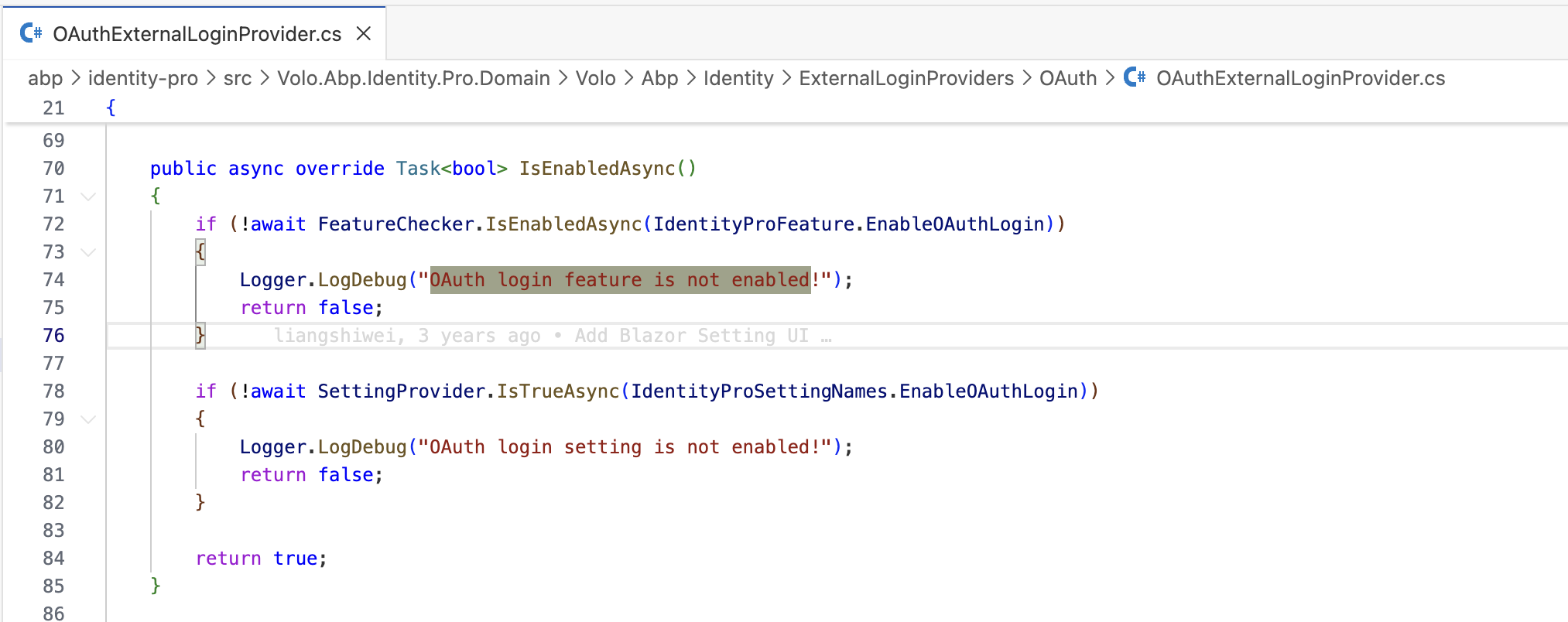
2026-02-02 21:19:52.389 -06:00 [INF] Executing handler method Volo.Abp.Account.Public.Web.Pages.Account.LoginModel.OnPostAsync - ModelState is "Valid" 2026-02-02 21:19:52.419 -06:00 [WRN] Ldap login feature is not enabled! 2026-02-02 21:19:52.421 -06:00 [WRN] OAuth login feature is not enabled! 2026-02-02 21:19:52.553 -06:00 [INF] Executed handler method OnPostAsync, returned result Microsoft.AspNetCore.Mvc.RazorPages.PageResult.
Thanks
Markdown supported.Copy, paste, or drag & drop images and files (max 100 MB per file, 100 MB total per post) -
0
hi
2026-02-02 21:19:52.419 -06:00 [WRN] Ldap login feature is not enabled! 2026-02-02 21:19:52.421 -06:00 [WRN] OAuth login feature is not enabled!
Can you enable the
OAuthfeature in settings page?Manage host features
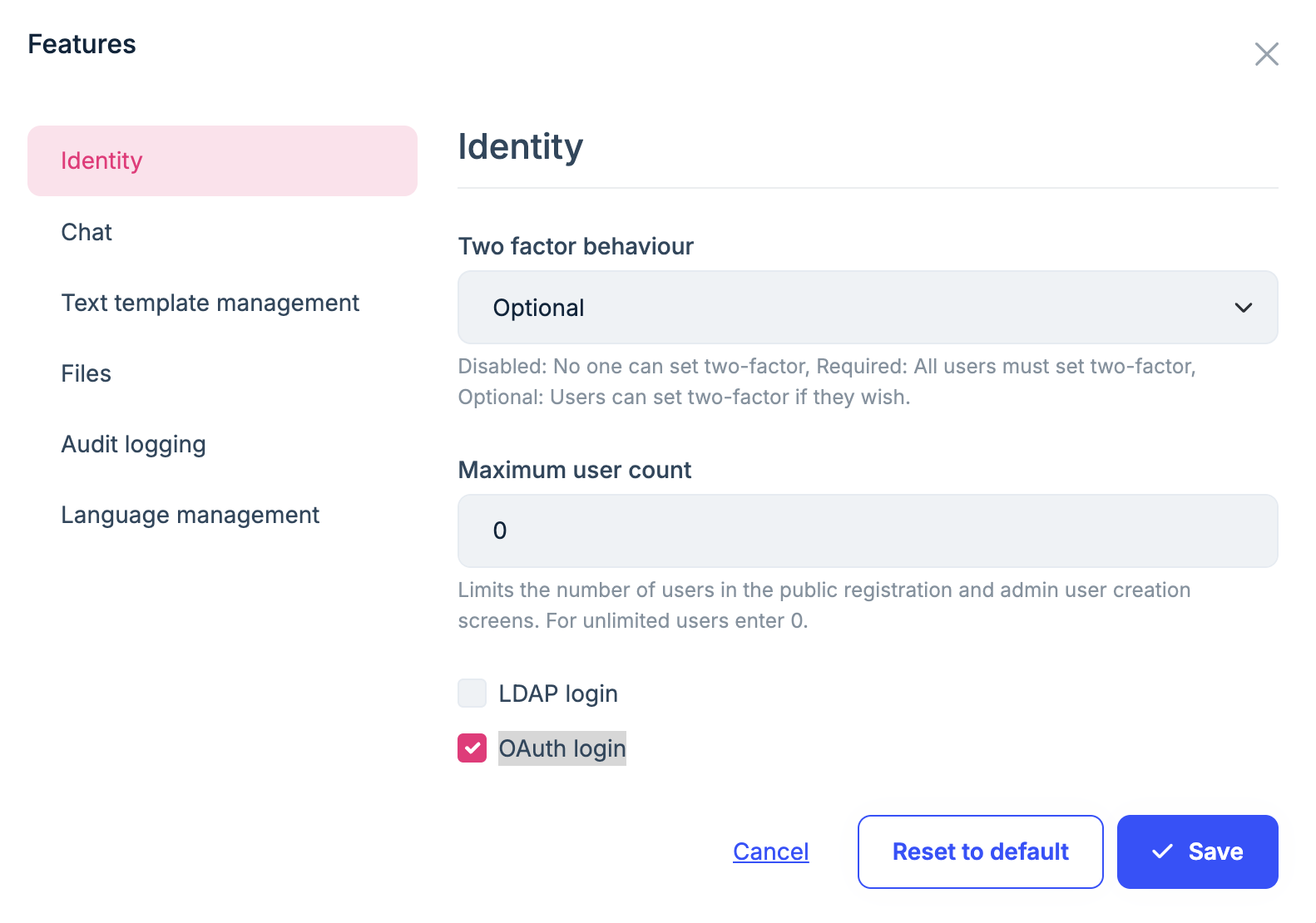
Thanks.
Markdown supported.Copy, paste, or drag & drop images and files (max 100 MB per file, 100 MB total per post) -
0
[maliming] said: hi
2026-02-02 21:19:52.419 -06:00 [WRN] Ldap login feature is not enabled! 2026-02-02 21:19:52.421 -06:00 [WRN] OAuth login feature is not enabled!
Can you enable the
OAuthfeature in settings page?Manage host features
Thanks.
Hi
Yes, It's already enabled.
Thanks
Markdown supported.Copy, paste, or drag & drop images and files (max 100 MB per file, 100 MB total per post) -
0
[maliming] said: hi
If the current tenant is not the host, you need to enable it on the tenant side.
Thanks.
Hi
I have enabled also for tenant. I have same new logs after enabled
2026-02-03 01:22:39.268 -06:00 [INF] Try to use LDAP for external authentication 2026-02-03 01:22:39.268 -06:00 [WRN] Ldap login feature is not enabled! 2026-02-03 01:22:39.269 -06:00 [INF] Try to use OAUTH for external authentication 2026-02-03 01:22:39.270 -06:00 [WRN] OAuth login feature is not enabled!
Thanks
Markdown supported.Copy, paste, or drag & drop images and files (max 100 MB per file, 100 MB total per post) -
0
Hi
I have enabled the OAuth feature at the edition level and it is "false" in application-configurations response. Is it applied to associate tenants? If not then please provide steps to enable the OAuth feature
Thanks
Markdown supported.Copy, paste, or drag & drop images and files (max 100 MB per file, 100 MB total per post) -
0
hi
Can you enable it for a tenant?
I think this PR fixes the tenant/edition features problem
https://github.com/abpframework/abp/pull/22632
Thanks.
Markdown supported.Copy, paste, or drag & drop images and files (max 100 MB per file, 100 MB total per post)