






16 Answer(s)
-
0
- Yes. In an ABP Angular solution, the template already includes a sample Dockerfile for the Angular app under the angular folder (typically named
Dockerfile.local) and it uses nginx to serve the builtdistoutput.
Example (as shown in ABP docs):
FROM nginx:alpine-slim
WORKDIR /app
COPY dist/BookStore /usr/share/nginx/html
COPY dynamic-env.json /usr/share/nginx/html
COPY /nginx.conf  /etc/nginx/conf.d/default.conf
Notes for ABP Angular:
dynamic-env.jsonis used for runtime environment overriding (so you can change env without rebuilding the image).nginx.confmaps/getEnvConfigto serve that JSON file.
Build & image creation (manual):
yarnnpm run build:proddocker build -f Dockerfile.local -t mycompany/myapp-angular:latest .
- https://abp.io/docs/latest/solution-templates/layered-web-application/deployment/deployment-docker-compose
- https://docs.abp.io/en/abp/latest/UI/Angular/Environment#remoteenvironment
This response was generated by AI. If it didn’t solve your problem, feel free to post a new answer — our support team will jump in to help you soon.
- Yes. In an ABP Angular solution, the template already includes a sample Dockerfile for the Angular app under the angular folder (typically named
-
0
I created this for deployment, but I’m not sure where the issue is. We are using a microservices-based architecture. ? # ===================== STAGE 1: Build ===================== FROM node:20-bullseye AS builder
WORKDIR /app
CA certificates
RUN apt-get update
&& apt-get install -y --no-install-recommends ca-certificates curl
&& rm -rf /var/lib/apt/lists/*Corporate CA certs (paths are relative to build context root)
COPY xxxxxxxxx.crt /usr/local/share/ca-certificates/ COPY xxxxxx.crt /usr/local/share/ca-certificates/ RUN update-ca-certificates
Copy Angular workspace manifests (NOT root)
COPY apps/angular/package.json apps/angular/yarn.lock ./apps/angular/
Install deps inside Angular workspace
WORKDIR /app/apps/angular RUN yarn install --frozen-lockfile --network-timeout 300000
Copy Angular sources only (faster + safer than copying whole repo)
COPY apps/angular/ ./
Build Angular
RUN yarn build:prod
===================== STAGE 2: Runtime =====================
FROM nginx:stable-alpine
CA certificates runtime
RUN apk add --no-cache ca-certificates COPY xxxxxx.crt /usr/local/share/ca-certificates/ COPY xxxxx.crt /usr/local/share/ca-certificates/ RUN update-ca-certificates
Use your existing nginx.conf (from apps/angular/)
COPY apps/angular/nginx.conf /etc/nginx/conf.d/default.conf
Copy Angular SSR browser output (ABP Angular typically produces /browser)
COPY --from=builder /app/apps/angular/dist/ventra-hub-structure/browser/ /usr/share/nginx/html/
Minimal dynamic env file for your /getEnvConfig endpoint
RUN cat > /usr/share/nginx/html/dynamic-env.json <<'EOF' { "production": true, "application": { "baseUrl": "http://localhost:8080", "name": "VentraHubStructure" }, "apis": { "default": { "url": "http://host.docker.internal:44356" } }, "oAuthConfig": { "issuer": "http://host.docker.internal:44317/", "redirectUri": "http://localhost:8080", "clientId": "Angular", "responseType": "code", "requireHttps": false } } EOF
EXPOSE 80 CMD ["nginx", "-g", "daemon off;"]
-
0
hi
We are using a microservices-based architecture.
The ABP microservice template already includes a Docker file for each application. If your microservice template was created earlier, you can create a new one and check the Docker file in it.
Thank you.
-
0
we have docker file for all containr runnin on docker ,but att the moment Angular project is not running on Docker/ only this page open
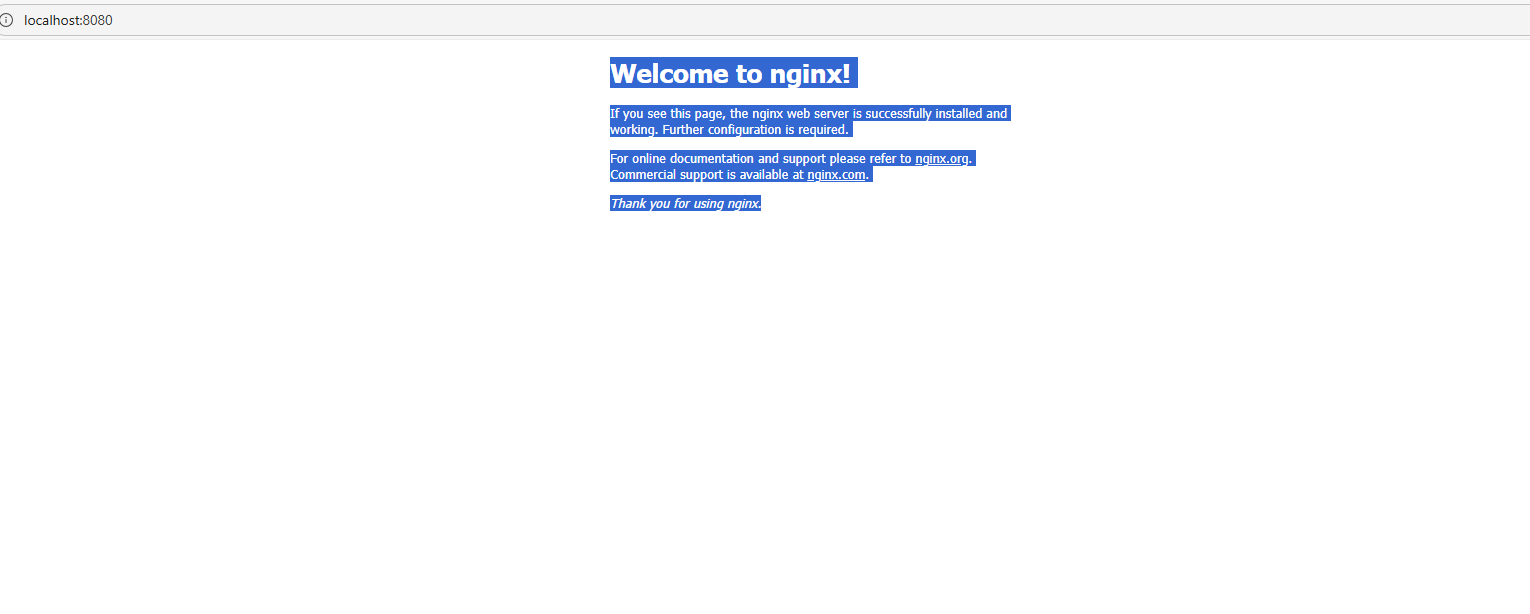
Welcome to nginx! If you see this page, the nginx web server is successfully installed and working. Further configuration is required. For online documentation and support please refer to nginx.org. Commercial support is available at nginx.com. Thank you for using nginx. # ===================== STAGE 1: Build ===================== FROM node:22-alpine AS builder WORKDIR /app # System deps + CA # Copy certs EARLY to allow apk to trust the corporate proxy/firewall COPY vitalograph-UK-SRV-CA2012-CA.crt /usr/local/share/ca-certificates/vitalograph.crt COPY firewall-ca.crt /usr/local/share/ca-certificates/firewall.crt # Manually append certs to the bundle so apk can use them immediately RUN cat /usr/local/share/ca-certificates/*.crt >> /etc/ssl/certs/ca-certificates.crt \ && apk add --no-cache ca-certificates curl \ && update-ca-certificates # Angular package files # Copy .npmrc first to ensure private packages can be installed COPY .npmrc ./ COPY apps/angular/package.json apps/angular/yarn.lock ./ RUN yarn install --frozen-lockfile # Angular source COPY apps/angular/ . # The build command might need to be adjusted if the base href is different RUN yarn build:prod && ls -laR /app/dist # ===================== STAGE 2: Production ===================== FROM nginx:stable-alpine RUN apk add --no-cache ca-certificates COPY vitalograph-UK-SRV-CA2012-CA.crt /usr/local/share/ca-certificates/ COPY firewall-ca.crt /usr/local/share/ca-certificates/ RUN update-ca-certificates # Clean default nginx content to ensure our app is the only thing there RUN rm -rf /usr/share/nginx/html/* COPY apps/angular/nginx.conf /etc/nginx/conf.d/default.conf COPY --from=builder /app/dist/ventra-hub-structure/browser /usr/share/nginx/html EXPOSE 80 CMD ["nginx", "-g", "daemon off;"] -
0
after login give this erro ?chunk-254I2BZV.js:7 ERROR TypeError: Cannot read properties of undefined (reading 'injector') at md (main-EMWKJFUY.js:2:37159) at Object.next (chunk-HKSPALXU.js:2:253392) at o.subscribe.a (chunk-254I2BZV.js:3:22833) at is._next (chunk-254I2BZV.js:3:13038) at is.next (chunk-254I2BZV.js:3:2664) at chunk-254I2BZV.js:3:21819 at is._next (chunk-254I2BZV.js:3:13038) at is.next (chunk-254I2BZV.js:3:2664) at chunk-254I2BZV.js:3:20167 at is._next (chunk-254I2BZV.js:3:13038) main-EMWKJFUY.js:6 TypeError: Cannot read properties of undefined (reading 'injector') at md (main-EMWKJFUY.js:2:37159) at Object.next (chunk-HKSPALXU.js:2:253392) at o.subscribe.a (chunk-254I2BZV.js:3:22833) at is._next (chunk-254I2BZV.js:3:13038) at is.next (chunk-254I2BZV.js:3:2664) at chunk-254I2BZV.js:3:21819 at is._next (chunk-254I2BZV.js:3:13038) at is.next (chunk-254I2BZV.js:3:2664) at chunk-254I2BZV.js:3:20167 at is._next (chunk-254I2BZV.js:3:13038)
-
0
after login redirect to http://localhost:4200/ and but give errror chunk-254I2BZV.js:7 ERROR TypeError: Cannot read properties of undefined (reading 'injector') at md (main-2JYYY7AC.js:2:37159) at Object.next (chunk-HKSPALXU.js:2:253392) at o.subscribe.a (chunk-254I2BZV.js:3:22833) at is._next (chunk-254I2BZV.js:3:13038) at is.next (chunk-254I2BZV.js:3:2664) at chunk-254I2BZV.js:3:21819 at is._next (chunk-254I2BZV.js:3:13038) at is.next (chunk-254I2BZV.js:3:2664) at chunk-254I2BZV.js:3:20167 at is._next (chunk-254I2BZV.js:3:13038) main-2JYYY7AC.js:6 TypeError: Cannot read properties of undefined (reading 'injector') at md (main-2JYYY7AC.js:2:37159) at Object.next (chunk-HKSPALXU.js:2:253392) at o.subscribe.a (chunk-254I2BZV.js:3:22833) at is._next (chunk-254I2BZV.js:3:13038) at is.next (chunk-254I2BZV.js:3:2664) at chunk-254I2BZV.js:3:21819 at is._next (chunk-254I2BZV.js:3:13038) at is.next (chunk-254I2BZV.js:3:2664) at chunk-254I2BZV.js:3:20167 at is._next (chunk-254I2BZV.js:3:13038)
-
0
I think the issue is in this line of the Dockerfile:
COPY --from=builder /app/dist/ventra-hub-structure/browser /usr/share/nginx/htmlThe Angular build output path doesn’t seem to match this location.
Since the build runs underapps/angular, the actualdistdirectory is very likely under:/app/apps/angular/dist/...Because of this, the Angular build artifacts (including
index.html) are not copied into Nginx’s web root, so Nginx falls back to its default page.Could you please try one of the following changes?
Option 1 (simplest):
COPY --from=builder /app/apps/angular/dist /usr/share/nginx/htmlOption 2 (keep the specific project folder):
COPY --from=builder /app/apps/angular/dist/ventra-hub-structure/browser /usr/share/nginx/htmlThis should make sure
index.htmlis present in/usr/share/nginx/htmland allow Nginx to serve the Angular app instead of the default page.Thanks.
-
0
Hello,
This issue is likely related to the path reference for the built
distfolder. Could you please ensure that the final copy command matches the output generated after runningyarn build:prod?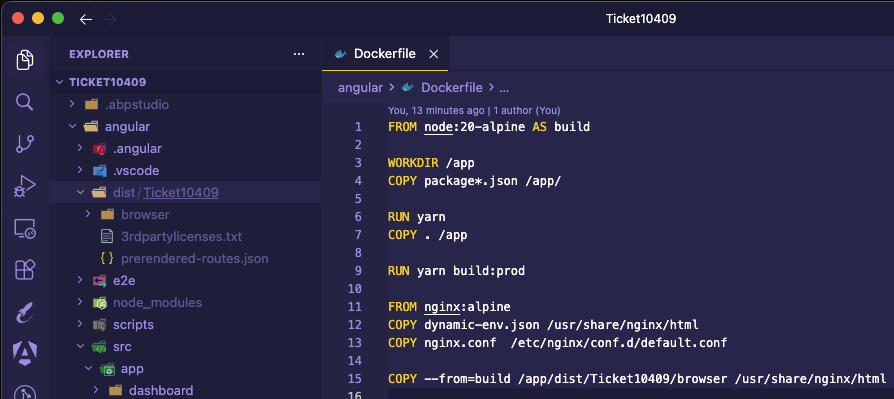
-
0
Hi I have still same issius .
#!/bin/sh
Generate dynamic-env.json from environment variables
FILE="/usr/share/nginx/html/dynamic-env.json"
echo "{" > "$FILE" echo ' "apis": {' >> "$FILE" echo ' "default": {' >> "$FILE" echo " "url": "${RemoteServices__Default__BaseUrl}"," >> "$FILE" echo ' "rootNamespace": "VentraHubStructure"' >> "$FILE" echo ' },' >> "$FILE" echo ' "AbpAccountPublic": {' >> "$FILE" echo " "url": "${AuthServer__Authority}"," >> "$FILE" echo ' "rootNamespace": "AbpAccountPublic"' >> "$FILE" echo ' }' >> "$FILE" echo ' },' >> "$FILE" echo ' "application": {' >> "$FILE" echo " "baseUrl": "${App__SelfUrl}"," >> "$FILE" echo ' "name": "VentraHubStructure"' >> "$FILE" echo ' },' >> "$FILE" echo ' "oAuthConfig": {' >> "$FILE" echo " "issuer": "${AuthServer__Authority}/"," >> "$FILE" echo " "redirectUri": "${App__SelfUrl}"," >> "$FILE" echo " "clientId": "${AuthServer__ClientId}"," >> "$FILE" echo ' "responseType": "code",' >> "$FILE" echo ' "scope": "offline_access openid profile email phone AuthServer IdentityService AdministrationService AuditLoggingService GdprService ChatService SaasService FileManagementService LanguageService",' >> "$FILE" echo " "requireHttps": ${AuthServer__RequireHttpsMetadata:-false}" >> "$FILE" echo ' }' >> "$FILE" echo "}" >> "$FILE"
Start Nginx
exec "$@"
===================== STAGE 1: Build =====================
FROM node:20 AS builder
WORKDIR /app
System deps + CA
RUN apt-get update
&& apt-get install -y --no-install-recommends ca-certificates curl
&& rm -rf /var/lib/apt/lists/*Corporate certs
COPY vitalograph-UK-SRV-CA2012-CA.crt /usr/local/share/ca-certificates/ COPY firewall-ca.crt /usr/local/share/ca-certificates/ RUN update-ca-certificates
Angular package files
COPY apps/angular/package*.json apps/angular/yarn.lock ./ RUN yarn install --frozen-lockfile
Angular source
COPY apps/angular/ . RUN yarn build:prod
===================== STAGE 2: Production =====================
FROM nginx:stable-alpine
RUN apk add --no-cache ca-certificates COPY vitalograph-UK-SRV-CA2012-CA.crt /usr/local/share/ca-certificates/ COPY firewall-ca.crt /usr/local/share/ca-certificates/ RUN update-ca-certificates
COPY apps/angular/nginx.conf /etc/nginx/conf.d/default.conf COPY --from=builder /app/dist/ventra-hub-structure/browser /usr/share/nginx/html
Copy entrypoint script
COPY apps/angular/docker-entrypoint.sh /usr/local/bin/ RUN apk add --no-cache dos2unix && dos2unix /usr/local/bin/docker-entrypoint.sh RUN chmod +x /usr/local/bin/docker-entrypoint.sh
EXPOSE 80
ENTRYPOINT ["docker-entrypoint.sh"] CMD ["nginx", "-g", "daemon off;"]
** this is my docker compose ** angular: build: context: . dockerfile: apps/angular/Dockerfile container_name: vhs-angular depends_on: webgateway: condition: service_started authserver: condition: service_healthy ports: - "4200:80" environment: <<: [ *abp_common_env, *abp_license_env ]
App__SelfUrl: "http://localhost:4200" App__HealthCheckUrl: "/" AuthServer__Authority: "http://localhost:44317" AuthServer__RequireHttpsMetadata: "false" AuthServer__ClientId: "Angular" AuthServer__MetaAddress: "http://authserver:8080" RemoteServices__Default__BaseUrl: "http://localhost:44356" volumes: - *abp_cli_token_mount restart: unless-stopped networks: - ventrahubstructure-network -
0
can we get support for this problem please ?
-
0
Hello,
I’ve tried to reproduce the issue on my end, but I wasn’t able to replicate it.
If you’re still seeing the default Nginx page, it’s likely that either a different Dockerfile or build context is being used, or the Angular build is failing. In that case,
/app/dist/ventra-hub-structure/browser/index.htmlmay not be getting generated, rather than the Dockerfile pointing to the wrongdistfolder.Could you please confirm whether the Angular build completes successfully within Docker?
-
0
Hi, The Angular build completes successfully inside Docker. The dist/ventra-hub-structure/browser/index.html file is generated correctly, and the container starts without errors. The application loads properly, and the login page is displayed as expected.
The issue occurs after a successful login. The AuthServer redirects back to:
http://localhost:4200/?code=...
At that point, the Angular application loads but displays a white screen. In the browser console, we see the following error:
TypeError: Cannot read properties of undefined (reading 'injector')
Request URL http://localhost:44317/Account/Login?ReturnUrl=%2Fconnect%2Fauthorize%3Fresponse_type%3Dcode%26client_id%3DAngular%26state%3Dd3g3Q0JRR1M0NXcxNHhmMklPa3lQa0UyUGxlNHNvfmZ5blhVaUpjX21TTDRl%26redirect_uri%3Dhttp%253A%252F%252Flocalhost%253A4200%26scope%3Doffline_access%2520openid%2520profile%2520email%2520phone%2520AuthServer%2520IdentityService%2520AdministrationService%2520AuditLoggingService%2520GdprService%2520ChatService%2520SaasService%2520FileManagementService%2520LanguageService%26code_challenge%3DmdMSn76QBG0Wyd3B1NMzCTHJMmvgpJy73fxCQlrwqVM%26code_challenge_method%3DS256%26nonce%3Dd3g3Q0JRR1M0NXcxNHhmMklPa3lQa0UyUGxlNHNvfmZ5blhVaUpjX21TTDRl%26culture%3Den-GB%26ui-culture%3Den-GB Request Method POST Status Code 302 Found Remote Address [::1]:44317 Referrer Policy strict-origin-when-cross-origin
Request URL http://localhost:44317/connect/authorize?response_type=code&client_id=Angular&state=d3g3Q0JRR1M0NXcxNHhmMklPa3lQa0UyUGxlNHNvfmZ5blhVaUpjX21TTDRl&redirect_uri=http%3A%2F%2Flocalhost%3A4200&scope=offline_access%20openid%20profile%20email%20phone%20AuthServer%20IdentityService%20AdministrationService%20AuditLoggingService%20GdprService%20ChatService%20SaasService%20FileManagementService%20LanguageService&code_challenge=mdMSn76QBG0Wyd3B1NMzCTHJMmvgpJy73fxCQlrwqVM&code_challenge_method=S256&nonce=d3g3Q0JRR1M0NXcxNHhmMklPa3lQa0UyUGxlNHNvfmZ5blhVaUpjX21TTDRl&culture=en-GB&ui-culture=en-GB Request Method GET Status Code 302 Found Remote Address [::1]:44317 Referrer Policy strict-origin-when-cross-origin true access-control-allow-origin http://localhost:44317 access-control-expose-headers _AbpErrorFormat,Abp-Tenant-Resolve-Error cache-control no-cache,no-store content-length 0 date Wed, 11 Feb 2026 14:29:49 GMT expires Thu, 01 Jan 1970 00:00:00 GMT location /connect/authorize?response_type=code&client_id=Angular&state=d3g3Q0JRR1M0NXcxNHhmMklPa3lQa0UyUGxlNHNvfmZ5blhVaUpjX21TTDRl&redirect_uri=http%3A%2F%2Flocalhost%3A4200&scope=offline_access%20openid%20profile%20email%20phone%20AuthServer%20IdentityService%20AdministrationService%20AuditLoggingService%20GdprService%20ChatService%20SaasService%20FileManagementService%20LanguageService&code_challenge=mdMSn76QBG0Wyd3B1NMzCTHJMmvgpJy73fxCQlrwqVM&code_challenge_method=S256&nonce=d3g3Q0JRR1M0NXcxNHhmMklPa3lQa0UyUGxlNHNvfmZ5blhVaUpjX21TTDRl&culture=en-GB&ui-culture=en-GB pragma no-cache server Kestrel set-cookie .AspNetCore.Identity.Application=CfDJ8OrhRs_CNItCn7UpKyPFPt_glNtZ80CBA34BOLiaNzPV8kIE46QC_VX1ipM1_Dao-L5ie5ftjlhM0idxoxd6zLxQH0pF95CgjrZbyRFqMc8RzhmbdFsrEaoNZv3E1shd7ZjW0MNcrY14FniXzTtmb2M3Rba704qI-PpcsIXnFxp7UX6sAhJRbBpAFynL3bJKOuDtqeaNQUCHIxhO2sSLyp7qvuDVIqpAt2AOfHNvV-rLRNmnD5UZpcQ29rPA5cvbIRwFauM7Hmjuk8SQznngxTLX-mxIl0AU5ylpDZ5dp1gtoyHYPPvD-_HLIGY7y47-d9_Jac8tQ6Ks9B145Pm1e_wFm69uFiUZu1d_mZr3BG43GXoC0oaDRZKjy8v74OTuphaOikAx2Jf0MFduTpl4fOaTX3rtFlKubmHYEsmZHsUQA_kjnuSH8WloWFVCmmg-BAR7DjKWD-ra4fJPQV28SRTdytw_VH3zvT-TCIVY3Hr9TTIXBN8DzHKPKSFAhl2j3fAungOXRKxA0mD_zA9_bhyPN8KvL2HutfRrg_RfWUuW9k4-gxFBW8VrLuJn6X4I-udkfDF4Y58eV0Wur8LeTr_7wSzH-c8DUgmSPdyBcSqgubp88EzZhL2Lhq46Dymkgdjttb_plt5Ou4o-C9WOLkYJX3Q5vU2DL-MGb6gK2JBh4tDILoVGuZcK3Cc4LY97oiSnRLJ3DTFzoAbTk3a2FfQKXnTPg3AHTwvIkRHaWchSCQazX1kUSebZ43D41cH8Cnrf1Xi1CgOSMOMp50Mm_EC5jg8FTF7K5ktUjOjCJMBIgBg5dKRlE32BAGA8XpBM3AjTzbTObbmBRP-GMqG-pB2Y6WqZqlbzabLnZHrwRHHoy7yGypzZcSfTX8xzUddIR8OFlxNwj71o4ViKIMe4M; path=/; samesite=lax; httponly vary Origin x-content-type-options nosniff x-correlation-id bf4b36746d5843ca8a19219261d3bcb4 x-frame-options SAMEORIGIN x-xss-protection 1; mode=block
no-store content-length 0 date Wed, 11 Feb 2026 14:29:49 GMT expires Thu, 01 Jan 1970 00:00:00 GMT location http://localhost:4200?code=jEnfRmjINLh2eEo30Wnw8Va8GOCronMWdvKVxKq1wo0&state=d3g3Q0JRR1M0NXcxNHhmMklPa3lQa0UyUGxlNHNvfmZ5blhVaUpjX21TTDRl&iss=http%3A%2F%2Flocalhost%3A44317%2F&culture=en-GB&ui-culture=en-GB pragma no-cache server Kestrel set-cookie .AspNetCore.Culture=c%3Den-GB%7Cuic%3Den-GB; expires=Fri, 11 Feb 2028 14:29:49 GMT; path=/ x-correlation-id 2cc52308ee5d4967a59123fc91431458
Request URL http://localhost:4200/?code=jEnfRmjINLh2eEo30Wnw8Va8GOCronMWdvKVxKq1wo0&state=d3g3Q0JRR1M0NXcxNHhmMklPa3lQa0UyUGxlNHNvfmZ5blhVaUpjX21TTDRl&iss=http%3A%2F%2Flocalhost%3A44317%2F&culture=en-GB&ui-culture=en-GB Request Method GET Status Code 200 OK Remote Address [::1]:4200 Referrer Policy strict-origin-when-cross-origin
accept-ranges bytes connection keep-alive content-length 4469 content-type text/html date Wed, 11 Feb 2026 14:29:49 GMT etag "698c9200-1175" last-modified Wed, 11 Feb 2026 14:28:16 GMT server nginx/1.28.2
-
0
Thank you again for your response. Could you please clarify the following points for this specific case?
Please verify that all
@abp/ng-*and Angular packages are on compatible versions. If possible, could you share yourpackage.jsonfile?Is there any custom
APP_INITIALIZERor other startup logic that could be affecting this behavior?Are you able to reproduce the issue locally (without Docker)? If the same error occurs after login in a local environment, it would indicate that the problem is related to Angular/runtime rather than Docker or Nginx.
-
0
Hello,
Thank you for your guidance.
Please find the requested details below:
1️⃣ Package Versions I am sharing the package.json file with this email for your review. All @abp/ng-* packages are aligned to the same version, and Angular core packages are on matching compatible versions. However, I would appreciate it if you could confirm whether there are any known compatibility issues with the versions currently used.
2️⃣ APP_INITIALIZER / Startup Logic There is no custom APP_INITIALIZER implemented beyond the default ABP Angular setup. No additional custom startup logic has been introduced that modifies authentication flow or injector behavior.
3️⃣ Local Reproduction (Without Docker) Yes, the issue can also be reproduced locally without Docker. The flow is as follows:
Application loads correctly
Login page works
Authorization code is returned successfully
After redirect back to Angular, the application displays a white screen
Console shows: TypeError: Cannot read properties of undefined (reading 'injector')
{ "name": "VentraHubStructure", "version": "0.0.0", "scripts": { "ng": "ng", "start": "ng serve", "build": "ng build", "build:prod": "ng build ventra-hub-structure --configuration production", "watch": "ng build --watch --configuration development", "test": "ng test", "lint": "ng lint", "symlinks:setup": "cd scripts && pwsh ./setup-symlinks.ps1", "symlinks:remove": "cd scripts && pwsh ./remove-symlinks.ps1" }, "private": true, "dependencies": { "@abp/ng.components": "~10.0.2", "@abp/ng.feature-management": "~10.0.2", "@abp/ng.core": "~10.0.2", "@abp/ng.oauth": "~10.0.2", "@abp/ng.setting-management": "~10.0.2", "@abp/ng.theme.shared": "~10.0.2", "@volo/abp.commercial.ng.ui": "~10.0.2", "@volo/abp.ng.account": "~10.0.2", "@volo/abp.ng.identity": "~10.0.2", "@volo/abp.ng.openiddictpro": "~10.0.2", "@volo/abp.ng.audit-logging": "~10.0.2", "@volo/abp.ng.gdpr": "~10.0.2", "@volo/abp.ng.file-management": "~10.0.2", "@volo/abp.ng.chat": "~10.0.2", "@volo/abp.ng.saas": "~10.0.2", "@volo/abp.ng.language-management": "~10.0.2", "@volo/abp.ng.text-template-management": "~10.0.2", "@volosoft/abp.ng.theme.lepton-x": "~5.0.2", "@angular/animations": "~20.0.0", "@angular/common": "~20.0.0", "@angular/compiler": "~20.0.0", "@angular/core": "~20.0.0", "@angular/forms": "~20.0.0", "@angular/localize": "~20.0.0", "@angular/platform-browser-dynamic": "~20.0.0", "@angular/platform-browser": "~20.0.0", "@angular/router": "~20.0.0", "rxjs": "~7.8.0", "tslib": "^2.0.0", "zone.js": "~0.15.0" }, "devDependencies": { "@abp/ng.schematics": "~10.0.2", "@angular-eslint/builder": "~20.0.0", "@angular-eslint/eslint-plugin": "~20.0.0", "@angular-eslint/eslint-plugin-template": "~20.0.0", "@angular-eslint/schematics": "~20.0.0", "@angular-eslint/template-parser": "~20.0.0", "@angular/cli": "~20.0.0", "@angular/compiler-cli": "~20.0.0", "@angular/language-service": "~20.0.0", "@angular/build": "^20.0.0", "@types/jasmine": "~3.6.0", "@types/node": "^20.0.0", "@typescript-eslint/eslint-plugin": "^7.0.0", "@typescript-eslint/parser": "^7.0.0", "eslint": "^8.0.0", "jasmine-core": "~4.0.0", "karma": "~6.3.0", "karma-chrome-launcher": "~3.1.0", "karma-coverage": "~2.1.0", "karma-jasmine": "~4.0.0", "karma-jasmine-html-reporter": "^1.0.0", "ng-packagr": "~20.0.0", "typescript": "~5.8.0" } }
-
0
Thank you for sharing the related details. However, I cannot produce the same problem on my end. Could you share a minimal reproducible example via e-mail? Here is my address: sumeyye.kurtulus@volosoft.com
Thank you for your cooperation.
-
0
Hello again,
If you are unable to share a full example, could you please provide the following details from your application:
Your
angular.jsonfile, so we can review the build and configuration settings.Your
app.config.tsfile (if you're using the standalone API). Alternatively, if your project uses the NgModule-based structure, please share yourapp.module.tsfile instead.
Thank you for your cooperation.



