






Hi ABP Team,
I am working with the registration flow and I would like to simplify the user experience.
Goal: I want to remove the "User name" field from the registration form (as shown in the attached image) and only require Email address and Password.
Requirements:
The registration form should no longer display or require the "User name" input.
The system should automatically set the UserName to be the same as the Email during the registration process.
Validation should still work correctly (ensuring the email is unique).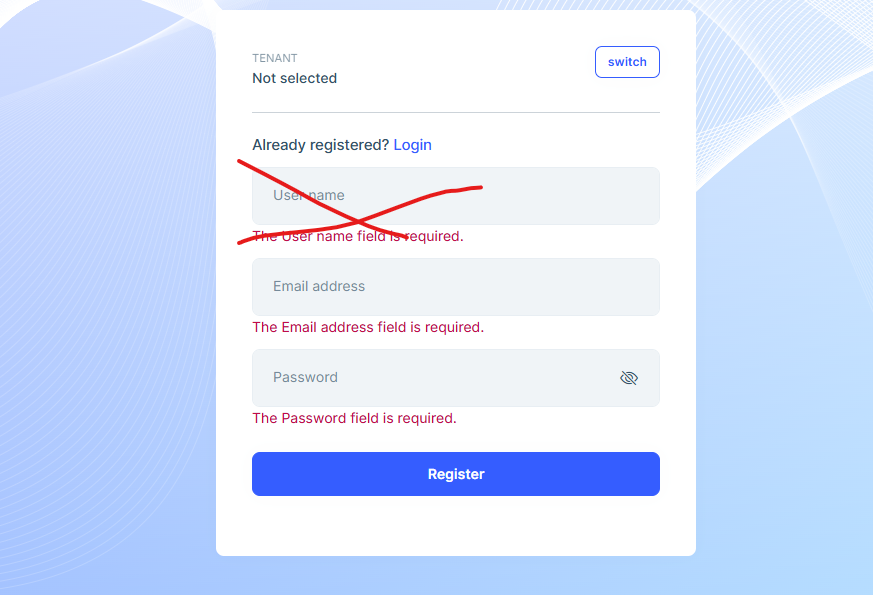
4 Answer(s)
-
0
- Override the registration UI page and remove the
UserNameinput. - Set
UserName = EmailAddressbefore callingAccountAppService.RegisterAsync(...)so the backend always uses email as the username. - Keep email uniqueness validation as-is (ABP/Identity will already validate uniqueness and return a proper error).
1) MVC / Razor Pages UI (HttpApi.Host or Web project)
Create (or override) the register page under your UI project:
Pages/Account/Register.cshtmlPages/Account/Register.cshtml.cs
In
Register.cshtml, remove the username field:
@page @addTagHelper *, Microsoft.AspNetCore.Mvc.TagHelpers @addTagHelper *, Volo.Abp.AspNetCore.Mvc.UI @addTagHelper *, Volo.Abp.AspNetCore.Mvc.UI.Bootstrap @addTagHelper *, Volo.Abp.AspNetCore.Mvc.UI.Bundling @using Microsoft.AspNetCore.Mvc.Localization @using Volo.Abp.Account.Localization @model YourCompany.YourApp.Pages.Account.CustomRegisterModel @inject IHtmlLocalizer<AccountResource> L <div class="card mt-3 shadow-sm rounded"> <div class="card-body p-5"> <strong> @L["AlreadyRegistered"] <a href="@Url.Page("./Login", new {returnUrl = Model.ReturnUrl, returnUrlHash = Model.ReturnUrlHash})" class="text-decoration-none">@L["Login"]</a> </strong> <form method="post" class="mt-4"> <abp-input asp-for="Input.EmailAddress" auto-focus="true" /> @if (!Model.IsExternalLogin) { <abp-input asp-for="Input.Password" /> } <abp-button button-type="Primary" type="submit" class="btn-lg btn-block mt-4"> @L["Register"] </abp-button> </form> </div> </div>- In
Register.cshtml.cs, set username from email when registering. Create a custom model inheriting ABP’sRegisterModeland override the registration method:
using System.Threading.Tasks;
using Volo.Abp.Account;
using Volo.Abp.Account.Web.Pages.Account;

namespace YourCompany.YourApp.Pages.Account;

public class CustomRegisterModel : RegisterModel
{
    public CustomRegisterModel(IAccountAppService accountAppService)
        : base(accountAppService)
    {
    }

    protected override async Task RegisterLocalUserAsync()
    {
        // Ensure the backend gets username even though UI doesn't ask for it:
        Input.UserName = Input.EmailAddress;

        await base.RegisterLocalUserAsync();
    }
}
That’s enough to:
- remove the username input from the form
- automatically use email as username for local registration
2) Blazor UI
If you are using Blazor and still seeing the MVC register page, you can override the same page by adding it under your Blazor project:
YourApp.Blazor/Pages/Account/Register.cshtmlYourApp.Blazor/Pages/Account/Register.cshtml.cs
Apply the same changes above (remove
Input.UserNamefrom the.cshtml, setInput.UserName = Input.EmailAddressin the model code-behind).
References (validated)
- https://abp.io/community/articles/setup-email-confirmation-on-user-registration-q0vgxang
- https://docs.abp.io/en/abp/latest/Modules/Account
This response was generated by AI. If it didn’t solve your problem, feel free to post a new answer — our support team will jump in to help you soon.
Markdown supported.Copy, paste, or drag & drop images and files (max 100 MB per file, 100 MB total per post) - Override the registration UI page and remove the
-
0
I'm using ABP v 10.0.3 , Blazor Web Assembly project
Markdown supported.Copy, paste, or drag & drop images and files (max 100 MB per file, 100 MB total per post) -
0
You can create and override the file under the HttpApiHost project at /Pages/Account/Register.cshtml. There is documentation here: https://abp.io/docs/latest/framework/ui/mvc-razor-pages/customization-user-interface
Markdown supported.Copy, paste, or drag & drop images and files (max 100 MB per file, 100 MB total per post)



