






When I try to add AI Module to my Blazor solution I can't add migration coz Semantic Kernel version have critical severity issue: The running command stopped because the preference variable "ErrorActionPreference" or common parameter is set to Stop: EntityFrameworkCore.csproj : warning NU1904: Package 'Microsoft.SemanticKernel.Core' 1.67.1 has a known critical severity vulnerability, https://github.com/advisories/GHSA-2ww3-72rp-wpp4
See the image:
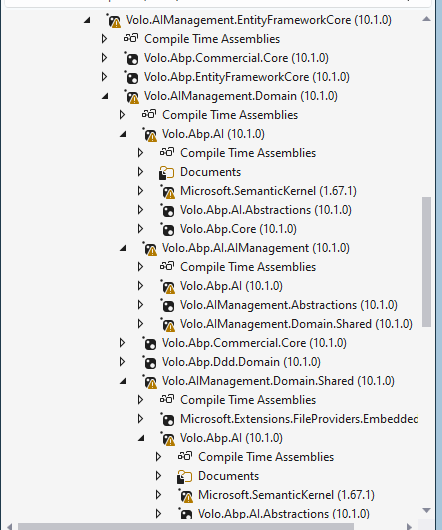
Abp suite it's adding wrong module dependencies also, to my projects I need know what is the most secure option to add AI Module to my existing App.
4 Answer(s)
-
0
NU1904is coming from your build treating NuGet vulnerability advisories as errors (PowerShell showsErrorActionPreference = Stop). In your case, the transitive dependencyMicrosoft.SemanticKernel.Core1.67.1 (brought by the ABP AI packages you added) is flagged with a critical advisory, so the migration command stops.- The secure option is not to suppress the warning, but to move to an ABP package set that references a non-vulnerable Semantic Kernel version, or override the transitive package version to a patched one.
What to do (secure, practical)
Upgrade ABP Commercial packages to the latest 10.1.x patch (recommended).
- ABP AI/Ai-Management is actively evolving and dependency updates are typically delivered via patch releases.
- After upgrading packages, re-run migrations.
If you must stay on 10.1.0 right now, override the vulnerable transitive package centrally:
- Add a central package version pin (recommended approach) in your solution (e.g.,
Directory.Packages.props) or add an explicitPackageReferencein the project that ends up referencingMicrosoft.SemanticKernel.Core. - Example (central management):
- Add a central package version pin (recommended approach) in your solution (e.g.,
<Project> <ItemGroup> <PackageVersion Include="Microsoft.SemanticKernel.Core" Version="<!-- set to a non-vulnerable version -->" /> </ItemGroup> </Project>- Then restore and run migrations again.
- About “ABP Suite adding wrong module dependencies”:
- For Blazor UI, ensure you added the Blazor UI packages for AI Management (not MVC/Angular packages). If Suite picked the wrong UI package, remove the wrong one and add the Blazor-specific module package(s) only, then rebuild.
Important note about the advisory link
- The advisory URL shown in your error (
https://github.com/advisories/GHSA-2ww3-72rp-wpp4) is not reachable from my URL validator right now, so I can’t verify its contents.
References
- https://abp.io/docs/latest/framework/infrastructure/artificial-intelligence/microsoft-semantic-kernel
- https://abp.io/docs/latest/modules/ai-management
- https://github.com/abpframework/abp
This response was generated by AI. If it didn’t solve your problem, feel free to post a new answer — our support team will jump in to help you soon.
Markdown supported.Copy, paste, or drag & drop images and files (max 100 MB per file, 100 MB total per post) -
0
Hi @jhsanc,
Thank you for reporting this. The issue is confirmed -- the ABP AI packages currently reference
Microsoft.SemanticKernelversion 1.67.1, which has a critical vulnerability (CVE-2026-25592 -- Arbitrary File Write inSessionsPythonPlugin). The fix requires version 1.70.0 or later.Immediate Workaround (for your project)
Until a new ABP patch release ships with the updated version, you can override the transitive dependency in your solution's
Directory.Packages.props(if using Central Package Management) or add an explicitPackageReferencein your EntityFrameworkCore project:Option A: Central Package Management (Directory.Packages.props)
<PackageVersion Include="Microsoft.SemanticKernel" Version="1.71.0" />
<PackageVersion Include="Microsoft.SemanticKernel.Abstractions" Version="1.71.0" />
<PackageVersion Include="Microsoft.SemanticKernel.Core" Version="1.71.0" />
Option B: Direct PackageReference override (in your .EntityFrameworkCore.csproj)
<PackageReference Include="Microsoft.SemanticKernel.Core" Version="1.71.0" />After adding either override, run
dotnet restoreand then retry your migration command.Internal Fix
We have updated the Semantic Kernel version to 1.71.0 in the ABP framework's central package management. This fix will be included in the next patch release.
Markdown supported.Copy, paste, or drag & drop images and files (max 100 MB per file, 100 MB total per post) -
0
Related Framework change has been done in PR: https://github.com/abpframework/abp/pull/24891
It'll be included as a patch to
v10.1and the future versionsMarkdown supported.Copy, paste, or drag & drop images and files (max 100 MB per file, 100 MB total per post)



