






Hi ABP Team,
First off, I want to extend my thanks for this wonderful framework. It has immensely helped our team ship enterprise applications faster.
I usually use ABP with Angular as the frontend. I understand that the LeptonX Theme is heavily dependent on Bootstrap CSS framework. If we want to replace it with another design system, we need to replace it with a different implementation.
I am trying to get the source code of the @abp/ng.theme.lepton-x package. I was able to get it by downloading the source of Volo.Abp.LeptonXLiteTheme module.
But when I checked the dependency graph of the package, I saw that it depends on other internal packages:
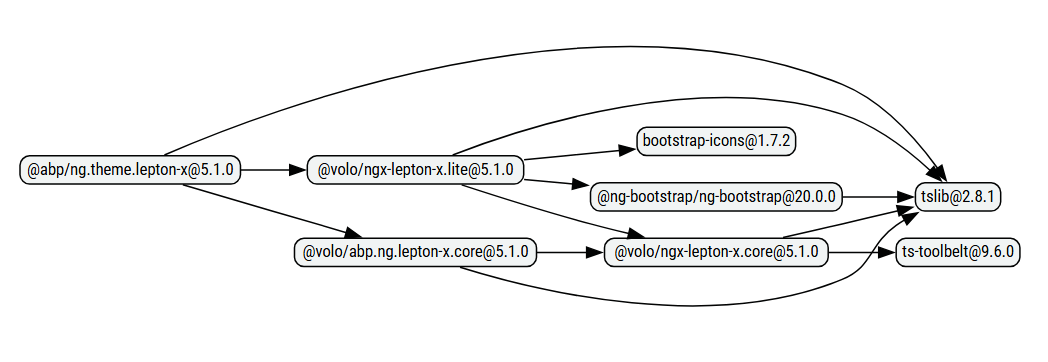
Could you let me know where I can get the source code for
- @volo/ngx-lepton-x.lite
- @volo/abp.ng.lepton-x.core
- @volo/ngx-lepton-x.core
And may I point out that the whole package naming convention for these packages are very confusing.
My understanding is that these LeptonX Lite packages are open source. If there is any problem in sharing the source of these packages, could you at least provide us some guidance on how to reimplement these components in a different design system and component library, say like Angular Material or Taiga UI?
Thanks, Chandrahas
5 Answer(s)
-
0
- Those NPM packages (
@volo/ngx-lepton-x.lite,@volo/abp.ng.lepton-x.core,@volo/ngx-lepton-x.core) are shipped as compiled artifacts on NPM; their TypeScript sources are not published as separate public GitHub repositories. - The supported way to obtain the full theme sources (including the Angular packages they are built from) is to download the theme source package via ABP CLI (or ABP Suite):
- LeptonX (Pro/commercial):
abp get-source Volo.Abp.LeptonXTheme.Pro- Lepton (older theme, not LeptonX):
abp get-source Volo.LeptonTheme- If you want to reimplement LeptonX UI with another design system (Angular Material/Taiga UI), the practical approach is not to “swap Bootstrap out of LeptonX”, but to replace the theme UI layer by implementing your own layout/components and (if needed) using ABP Angular’s component replacement/override mechanisms; then keep using
@abp/ng.coreand the module UIs as needed, replacing their UI pieces progressively.
Links (verified):
- https://abp.io/docs/latest/ui-themes/lepton-x/
- https://abp.io/support/questions/4668
- https://abp.io/support/questions/462
- https://abp.io/support/questions/673
This response was generated by AI. If it didn’t solve your problem, feel free to post a new answer — our support team will jump in to help you soon.
Markdown supported.Copy, paste, or drag & drop images and files (max 100 MB per file, 100 MB total per post) - Those NPM packages (
-
0
Hi,
I tried downloading the source of
Volo.Abp.LeptonXTheme.Promodule as well.It has one npm package named
@volosoft/abp.ng.theme.lepton-xand it has the following dependencies:- @volo/abp.commercial.ng.ui
- @volo/abp.ng.lepton-x.core
- @volosoft/ngx-lepton-x
Where do I get the source for these?
Thanks, Chandrahas
Markdown supported.Copy, paste, or drag & drop images and files (max 100 MB per file, 100 MB total per post) -
0
Hello,
You can obtain the source code using the Suite tool, as described in the documentation: https://abp.io/docs/latest/suite/source-code
You may also find the CLI tool helpful, as it provides related commands for retrieving the source code: https://abp.io/docs/latest/cli#get-source
You can let us know if you need further assistance.
Thank you for your cooperation.
Markdown supported.Copy, paste, or drag & drop images and files (max 100 MB per file, 100 MB total per post) -
0
Hi @sumeyye.kurtulus,
As I mentioned in the first post, I have already downloaded the source code of the package using the CLI tool. But the problem is that it doesn't contain the complete source code. There are some dependencies for which the source code is not available.
Kindly re-read my initial question.
Thanks, Chandrahas
Markdown supported.Copy, paste, or drag & drop images and files (max 100 MB per file, 100 MB total per post) -
0
Hello,
If the Suite tooling does not directly include the packages you need, you can install them along with their source code using the following CLI commands:
abp add-package @volosoft/ngx-lepton-x --with-source-code
abp add-package @volo/abp.ng.lepton-x.core --with-source-code
abp add-package @volo/abp.commercial.ng.ui --with-source-code
Please let us know if you need any further assistance.
Markdown supported.Copy, paste, or drag & drop images and files (max 100 MB per file, 100 MB total per post)



