






0
rferrarin created
@page "/test/ai"

@using Volo.AIManagement.Client.Blazor.Components
@using Volo.Abp.AspNetCore.Components.Web

<ChatClientChat ShowStreamCheckbox="false" WorkspaceName="myWorkspace" />

@code {
}
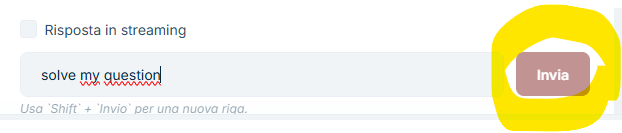
this is my test page. the send button is always disabled...what am I missing?
Markdown supported.
Copy, paste, or drag & drop images and files (max 100 MB per file, 100 MB total per post)
2 Answer(s)
-
0
ChatClientChatdisables the Send button until it can successfully resolve the workspace (byWorkspaceName) from the AI Management backend configuration. If the workspace doesn’t exist (or the current user can’t access it), the component stays in a “not ready” state and the button remains disabled.Fix:
- Go to AI Management > Workspaces in your app.
- Create a workspace with Name =
myWorkspace(must matchWorkspaceNameexactly), and configure at least one provider/model (so the workspace is usable). - Ensure the current user has permission to use that workspace (if you limited it by permissions/tenants/users).
(Optional but recommended) Provide a stable
ConversationIdso the widget can persist history:
<ChatClientChat ShowStreamCheckbox="false" WorkspaceName="myWorkspace" ConversationId="@($"my-conversation-{CurrentUser.Id}")" />- If it’s still disabled after creating/configuring the workspace, check the browser DevTools Network tab for failing calls (401/403/404) to the AI Management endpoints; that indicates missing permissions/authentication.
Sources:
- https://abp.io/docs/10.1/modules/ai-management/
This response was generated by AI. If it didn’t solve your problem, feel free to post a new answer — our support team will jump in to help you soon.
Markdown supported.Copy, paste, or drag & drop images and files (max 100 MB per file, 100 MB total per post)



