






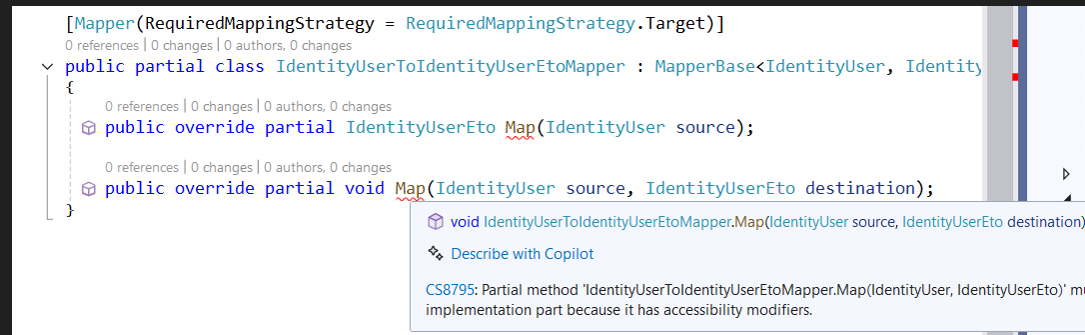
When upgrade from ABP8 to ABP 10, follow Mapperly migration guide web page, the old code just simply sentence to map from IdentityUser to IdentityUserEto, with new code:
6 Answer(s)
-
0
The compiler error you’re seeing (CS8795: “Partial method … must have an implementation part because it has accessibility modifiers”) happens when the Mapperly source generator doesn’t run / doesn’t generate code for that
[Mapper]class.
In that case, yourpublic override partial … Map(...)declarations remain “unimplemented”, and C# reports CS8795.In ABP v10, the correct pattern (
public override partial ...) is valid only if:- the project references Mapperly (and ABP’s Mapperly integration), and
- the Mapperly source generator is executed during build, producing the other part of the partial class.
Fix (step-by-step)
Ensure you installed ABP Mapperly integration package in the project where the mapper class exists:
Volo.Abp.Mapperly
Ensure the module registers Mapperly (at least in that layer):
using Volo.Abp.Modularity; using Volo.Abp.Mapperly; [DependsOn(typeof(AbpMapperlyModule))] public class YourModule : AbpModule { public override void ConfigureServices(ServiceConfigurationContext context) { context.Services.AddMapperlyObjectMapper<YourModule>(); // or (if you want it as default provider) // context.Services.AddMapperlyObjectMapper(); } }- Ensure the Mapperly generator package is present (directly or transitively). If CS8795 persists, add it explicitly to the same
.csprojwhere the mapper lives:
<ItemGroup>
     <PackageReference Include="Riok.Mapperly" Version="*" PrivateAssets="all" />
   </ItemGroup>
Then Clean + Rebuild (not just Build).
- Make sure the mapper class is in a buildable project (not a shared project with generation disabled) and that you are not disabling analyzers/source generators (e.g.,
<RunAnalyzers>false</RunAnalyzers>or similar build settings).
After these, the generated file for your mapper should appear under Dependencies → Analyzers → Riok.Mapperly (VS) / Generated files, and the CS8795 error will disappear.
- https://abp.io/docs/10.0/release-info/migration-guides/AutoMapper-To-Mapperly
- https://abp.io/docs/latest/framework/infrastructure/object-to-object-mapping
- https://abp.io/community/articles/l9f5ii8s
This response was generated by AI. If it didn’t solve your problem, feel free to post a new answer — our support team will jump in to help you soon.
Markdown supported.Copy, paste, or drag & drop images and files (max 100 MB per file, 100 MB total per post) -
0
I checked all steps you mentioned, under Dependencies -> Analyzers -> Rick.Mapperly, there is empty class generated
public partial class IdentityUserToIdentityUserEtoMapper
{
}
}
Markdown supported.Copy, paste, or drag & drop images and files (max 100 MB per file, 100 MB total per post) -
0
I tried Visual Studio 2026 Enterprise V18.4.0 and Visual Studio 2022 17.14.28
Markdown supported.Copy, paste, or drag & drop images and files (max 100 MB per file, 100 MB total per post) -
0
hi
Can you build the project using the
dotnet buildcommand?I think this is related to the VS version. maybe you can upgrade vs to latest version
Related to https://github.com/riok/mapperly/issues/2134
Thanks.
Markdown supported.Copy, paste, or drag & drop images and files (max 100 MB per file, 100 MB total per post) -
0
Finally figure out the solution, I am using VS 2026 or command line to build, still got same build error. First make sure the two partial override has no any implementation, public override partial IdentityUserEto Map(IdentityUser source); public override partial void Map(IdentityUser source, IdentityUserEto destination);
And add these lines to project file: <PropertyGroup> <EmitCompilerGeneratedFiles>true</EmitCompilerGeneratedFiles> <CompilerGeneratedFilesOutputPath>Generated</CompilerGeneratedFilesOutputPath> </PropertyGroup> <ItemGroup> <Compile Remove="$(CompilerGeneratedFilesOutputPath)/**/*.cs" /> </ItemGroup>
Markdown supported.Copy, paste, or drag & drop images and files (max 100 MB per file, 100 MB total per post)



