






Check the docs before asking a question: https://abp.io/docs/latest Check the samples to see the basic tasks: https://abp.io/docs/latest/samples The exact solution to your question may have been answered before, and please first use the search on the homepage.
Provide us with the following info:
🧐 Hint: If you are using the ABP Studio, you can see all the information about your solution from the configuration window, which opens when you right-click on the solution and click on the Solution Configuration button.
Hello!
We're looking to customize how tenant impersonation works in our ABP tiered solution. From the SaaS > Tenants option we have the ability to impersonate a tenant using the option: "Login with this tenant", however the default user that's displayed for the impersonation is the "admin" user from the tenant :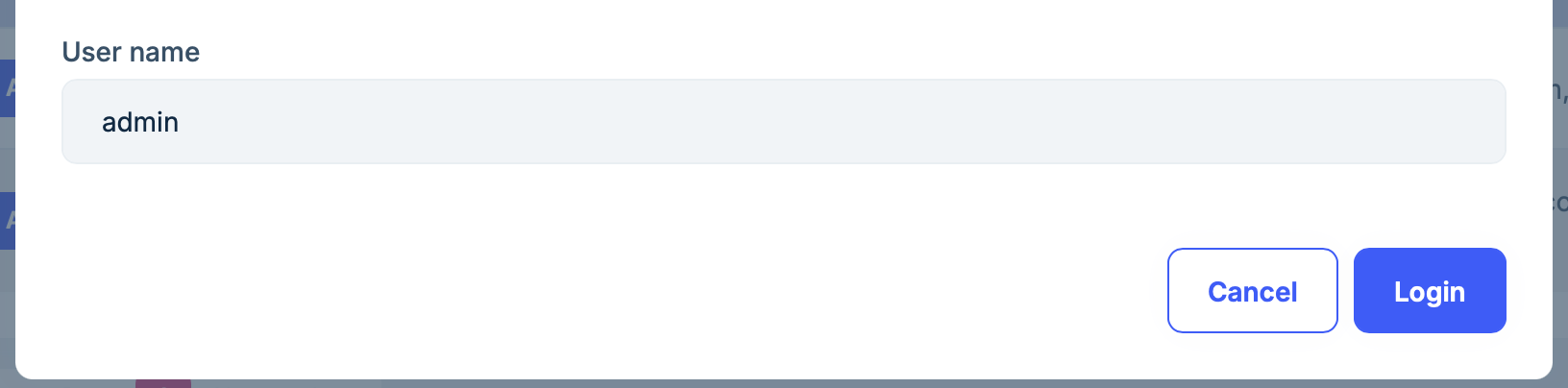 Is it possible to modify this behavior? we would like the default user for impersonation to change depending on the user that logged into the host. For example, if the user that logged into the host is not an admin we don't want to allow them to impersonate the admin of the tenant.
13 Answer(s)
-
0
- In ABP, tenant impersonation (“Login with this tenant”) is implemented as part of the Account impersonation system. The UI is intentionally designed to ask a user name to impersonate inside the target tenant, and it prefills that textbox with
admin(the conventional tenant admin username created by the templates/seed). - There is no supported configuration point (setting/option) in ABP that changes this default/prefilled username based on the currently logged-in host user.
- The supported way to enforce your rule (“non-admin host users must not impersonate tenant admin”) is to prevent/limit the action, not to rely on changing the prefilled username:
- Restrict the permission for tenant impersonation to a specific host role (e.g., only Host Admins). In practice, remove/grant the tenant impersonation permission only to allowed host-side roles/users so non-admin host users can’t use “Login with this tenant” at all.
- If you need finer control than simple permission/role checks, implement your own “Login with this tenant” flow (custom UI + custom application service) and validate the requested target username/user on the server side before generating the impersonation URL (i.e., deny impersonating
adminunless the current host user meets your criteria).
Sources:
- https://abp.io/docs/latest/modules/account/impersonation
This response was generated by AI. If it didn’t solve your problem, feel free to post a new answer — our support team will jump in to help you soon.
Markdown supported.Copy, paste, or drag & drop images and files (max 100 MB per file, 100 MB total per post) - In ABP, tenant impersonation (“Login with this tenant”) is implemented as part of the Account impersonation system. The UI is intentionally designed to ask a user name to impersonate inside the target tenant, and it prefills that textbox with
-
0
We want to have finer control so implementing our own “Login with this tenant” flow would be the way to go. Can you point me to some documentation on how to do this?
Markdown supported.Copy, paste, or drag & drop images and files (max 100 MB per file, 100 MB total per post) -
0
The official entry point is the Account module’s impersonation feature. The documentation explains the concept (tenant impersonation + user impersonation) and the built-in endpoints/flow you can replicate from your own UI:
- Use the built-in impersonation endpoints (from your own button/action) and then redirect the browser to the returned URL to complete the impersonation.
In practice, your “custom Login with this tenant” flow is:
- Create your own UI action/button on the tenant list row.
- Call the Account impersonation API (tenant/user impersonation, depending on what you want).
- Apply your custom server-side rules before calling/allowing impersonation (e.g., deny if target user is
adminand current host user is not allowed). - Redirect to the URL returned by the impersonation endpoint.
Links:
- https://abp.io/docs/latest/modules/account/impersonation
This response was generated by AI. If it didn’t solve your problem, feel free to post a new answer — our support team will jump in to help you soon.
Markdown supported.Copy, paste, or drag & drop images and files (max 100 MB per file, 100 MB total per post) -
0
The overall flow of what needs to be done is clear to me but how do I call the Account impersonation API? is there a service or controller I need to override? also how do I replace the original "Login with this tenant option" from the tenant dropdown?
Markdown supported.Copy, paste, or drag & drop images and files (max 100 MB per file, 100 MB total per post) -
0
Hi,
The username field in the "Login with this tenant" modal is editable by design. It defaults to
admin(configured viaAbpAccountOptions.TenantAdminUserName), but any host user with theSaas.Tenants.Impersonationpermission can change it to any tenant username. TheTenantAdminUserNameoption only controls the default pre-filled value, not a restriction.If you want to restrict which tenant users can be impersonated based on the current host user's role, you need to add server-side validation logic. Here's what you should override depending on your setup:
For Tiered / Auth Server Separated Solutions (OpenIddict)
Create a custom class that inherits from
ImpersonationExtensionGrantand override theImpersonateTenantAsyncmethod:public class MyImpersonationExtensionGrant : ImpersonationExtensionGrant { protected override async Task<IActionResult> ImpersonateTenantAsync( ExtensionGrantContext context, ClaimsPrincipal principal, Guid tenantId, string tenantUserName) { // Add your custom validation logic here. // For example, check the current user's role and restrict target username accordingly: // // var currentUserRoles = principal.FindAll(ClaimTypes.Role).Select(c => c.Value); // if (!currentUserRoles.Contains("admin") && tenantUserName == "admin") // { // // Return forbidden or force a different username // } return await base.ImpersonateTenantAsync(context, principal, tenantId, tenantUserName); } }Then register it in your AuthServer project's module class by replacing the grant in
AbpOpenIddictExtensionGrantsOptions:public override void ConfigureServices(ServiceConfigurationContext context) { Configure<AbpOpenIddictExtensionGrantsOptions>(options => { options.Grants[ImpersonationExtensionGrant.ExtensionGrantName] = new MyImpersonationExtensionGrant(); }); }Note:
ImpersonationExtensionGrantis not registered via dependency injection. It is instantiated directly and stored in theAbpOpenIddictExtensionGrantsOptions.Grantsdictionary, so you must replace it through Options configuration as shown above.For Non-Tiered Solutions (MVC/Blazor without separate Auth Server)
Override the
OnPostAsyncmethod inImpersonateTenantModel:[ExposeServices(typeof(ImpersonateTenantModel))] public class MyImpersonateTenantModel : ImpersonateTenantModel { public MyImpersonateTenantModel( IPermissionChecker permissionChecker, ICurrentPrincipalAccessor currentPrincipalAccessor) : base(permissionChecker, currentPrincipalAccessor) { } public override async Task<IActionResult> OnPostAsync() { // Add your custom validation logic here before calling base. return await base.OnPostAsync(); } }This class is located in the
Volo.Abp.Account.Pro.Public.Webpackage.Since you mentioned you're using a tiered solution, you should focus on the first approach — replacing
ImpersonationExtensionGrantin your AuthServer project. The validation logic runs on the server side, so even if the user modifies the username in the UI, your restriction will still be enforced.Markdown supported.Copy, paste, or drag & drop images and files (max 100 MB per file, 100 MB total per post) -
0
Thank you!
This looks exactly like I was looking for, one more question: Is it possible to override the dialog as well? We might want to remove or replace the username input in the dialog all together.
Markdown supported.Copy, paste, or drag & drop images and files (max 100 MB per file, 100 MB total per post) -
0
Yes, you can override the dialog. I'm sharing the full source code of the
TenantManagementBlazor component below so you can customize it. Please send an email to liming.ma@volosoft.comHere are the steps to override it in your Blazor project:
1. Create a single Razor file in your Blazor project
Create
MyTenantManagement.razor(e.g., underPages/Saas/Host/). Use@inherits TenantManagementto inherit the base class — no.razor.csfile is needed since all the logic is inherited from the parent class.@page "/saas/host/tenants" @using Volo.Saas.Host.Blazor.Pages.Saas.Host @inherits TenantManagement @* Copy the full content from the original TenantManagement.razor here, then modify the impersonation modal section as needed. *@2. Modify the modal section
Remove or modify the username
<Field>in the impersonation modal:@if (Options.Value.EnableTenantImpersonation) { <Modal @ref="TenantImpersonationModal" Closing="ClosingModal" Size="ModalSize.Large" Centered="true"> <ModalContent> <form method="post" action="Account/ImpersonateTenant" id="ImpersonationForm"> <ModalHeader> <ModalTitle>@L["LoginWithThisTenant"] - @CurrentImpersonationTenantName</ModalTitle> <CloseButton Clicked="CloseTenantImpersonationModal" /> </ModalHeader> <ModalBody> <input type="hidden" name="TenantId" id="ImpersonationTenantId"> @* Username input removed - server side will determine the target user *@ </ModalBody> <ModalFooter> <Button Color="Color.Primary" Outline Clicked="CloseTenantImpersonationModal">@L["Cancel"]</Button> <Button Color="Color.Primary" Clicked="@ImpersonationTenantAsync"> @L["Login"]</Button> </ModalFooter> </form> </ModalContent> </Modal> }3. Server-side enforcement
Remember to also override the server-side
ImpersonationExtensionGrant(as described in the previous answer) to handle the empty username and apply your custom logic. Otherwise, the server will fall back to the defaultadminusername.Markdown supported.Copy, paste, or drag & drop images and files (max 100 MB per file, 100 MB total per post) -
0
Hi, Thank you for the code, I was able to override the impersonation dialog. However I couldn't override ImpersonationExtensionGrant. I created the class and inherited from ImpersonationExtensionGrant:
 As you can see I always return forbidden so it should fail but it doesn't it aways succeeds.
I also added the code in configure services:
 I added logs and ran it with the debugger attached but that code never runs.Markdown supported.Copy, paste, or drag & drop images and files (max 100 MB per file, 100 MB total per post)
 -
0
Can you try to override
OpenIddictImpersonateTenantModel. This class is registered via DI with[ExposeServices], so it can be properly replaced:[ExposeServices(typeof(ImpersonateTenantModel))] [Dependency(ReplaceServices = true)] public class MyImpersonateTenantModel : OpenIddictImpersonateTenantModel { public MyImpersonateTenantModel( IPermissionChecker permissionChecker, ICurrentPrincipalAccessor currentPrincipalAccessor, IOptions<AbpAccountOpenIddictOptions> options) : base(permissionChecker, currentPrincipalAccessor, options) { } public override async Task<IActionResult> OnPostAsync() { // Add your custom validation logic here. // For example: // if (!CurrentUser.IsInRole("admin") && TenantUserName == "admin") // { // throw new BusinessException("..."); // } return await base.OnPostAsync(); } }Place this class in your AuthServer project (or whichever project references
Volo.Abp.Account.Pro.Public.Web.OpenIddict). You can remove the previousImpersonationExtensionGrantoverride, as it is not needed for Blazor.Markdown supported.Copy, paste, or drag & drop images and files (max 100 MB per file, 100 MB total per post) -
0
Overriding
OpenIddictImpersonateTenantModelas above didn't work either but I noticed that the constructor of the class I createdMyImpersonateTenantModelwas being called, it was theOnPostAsyncmethod that was never called. I also noticed that theOnGetAsyncmethod is being called when I impersonate so I instead overrode that method like this:
And it worked:

Can you confirm this is okay?
Markdown supported.Copy, paste, or drag & drop images and files (max 100 MB per file, 100 MB total per post) -
0
hi
You are right — in a tiered solution, the impersonation request is redirected from the Blazor host to the AuthServer as a GET request with
access_token, soOnGetAsyncis the correct method to override, notOnPostAsync.Your approach of overriding
OnGetAsyncinOpenIddictImpersonateTenantModelis correct.Thanks.
Markdown supported.Copy, paste, or drag & drop images and files (max 100 MB per file, 100 MB total per post) -
0
Awesome! Thank you very much for all the help. Closing the ticket now.
Markdown supported.Copy, paste, or drag & drop images and files (max 100 MB per file, 100 MB total per post)



