






Hi everyone,
I am having difficulty deploying an ABP 10.0.x Blazor WebAssembly project to Azure App Service.
Project Configuration:
Structure: Non-tiered, layered architecture.
Authentication: Integrated within the Web API project.
Cache: No Redis (intentional for this stage).
I’ve attempted both containerized (Docker) and non-containerized deployments, but both are failing with various errors during startup. Could someone provide a step-by-step blueprint or a guide for this specific setup on Azure? Any advice on common pitfalls with ABP/Azure integration would be greatly appreciated.
5 Answer(s)
-
0
- Deploy ABP Blazor WASM (v10.1.0) to Azure App Service (recommended blueprint)
For a non-tiered ABP Blazor WebAssembly solution, the most reliable App Service setup is two separate deployments:- HttpApi.Host → Azure App Service (Web App)
- Blazor (WASM static site) → Azure Static Web App (recommended) or a separate App Service that serves static files
- Step-by-step (Azure)
Create Azure resources
- Create your Azure SQL Database
- Create hosting resources (Web App for API, Static Web App for Blazor)
- Follow ABP’s Azure deployment “Step 1” to create the Azure resources.
Run database migrations (once per environment)
- Run
YourApp.DbMigratoragainst the Azure SQL connection string before starting the production app. - This ensures the schema + initial seed data exist (including OpenIddict app registrations, permissions, etc.).
- Run
Set Production configuration (critical for ABP startup) In Azure App Service Configuration → Application settings, set (at minimum):
ConnectionStrings__Default=<your Azure SQL connection string>App__SelfUrl=https://<your-api-app>.azurewebsites.net(or your custom domain)AuthServer__Authority=https://<your-api-app>.azurewebsites.net- Also ensure the Blazor app’s settings point to the correct API URL (see below).
ABP’s “Step 2” doc lists the exact places these values must be consistent across projects (HttpApi.Host, Blazor, DbMigrator).
Deploy HttpApi.Host to Azure Web App
- Publish
YourApp.HttpApi.Host(Release) and deploy to the Web App. - Ensure the app starts cleanly in Azure logs before deploying the UI.
- Publish
Deploy Blazor WASM
- Preferred: deploy
YourApp.Blazorto Azure Static Web Apps. - In the Blazor app configuration (
wwwroot/appsettings.jsonin the Blazor project), set:App:SelfUrlto the Blazor site URLAuthServer:Authorityto the API URLRemoteServices:Default:BaseUrlto the API URL
- Preferred: deploy
- Common ABP-on-Azure pitfalls that cause “startup failures”
- Mismatched URLs (most common)
App__SelfUrl,AuthServer__Authority, BlazorRemoteServices:Default:BaseUrlmust match your real Azure endpoints.
- DbMigrator not executed for Azure SQL
- The API can fail at startup or behave incorrectly if migrations/seeding were not applied.
- Hosting WASM incorrectly
- If you try to host WASM from the API without proper middleware/fallback mapping, you’ll get blank pages/404s after refresh.
- If you want a single deployable (API serves WASM), use the “ASP.NET Core Hosted” approach (see source below).
- Mismatched URLs (most common)
- Optional: single-app deployment (API hosts the WASM)
If you specifically want one App Service only (HttpApi.Host serves the WASM), follow the ABP community guide for “Blazor WebAssembly ASP.NET Core Hosted”:
- Add
UseBlazorFrameworkFiles()beforeUseStaticFiles() - Add
MapFallbackToFile("index.html") - Point Blazor settings to the same Host URL
- Add
- Verified references
- https://abp.io/docs/10.1/solution-templates/layered-web-application/deployment/azure-deployment/step1-create-azure-resources
- https://abp.io/docs/10.1/solution-templates/layered-web-application/deployment/azure-deployment/step2-configuration-application
- https://abp.io/community/articles/zbjvgrc9
- https://abp.io/community/articles/ub4u5ax5
- https://github.com/bartvanhoey/AbpGoesAzure.git
This response was generated by AI. If it didn’t solve your problem, feel free to post a new answer — our support team will jump in to help you soon.
Markdown supported.Copy, paste, or drag & drop images and files (max 100 MB per file, 100 MB total per post) - Deploy ABP Blazor WASM (v10.1.0) to Azure App Service (recommended blueprint)
-
0
 Markdown supported.Copy, paste, or drag & drop images and files (max 100 MB per file, 100 MB total per post)
 -
0
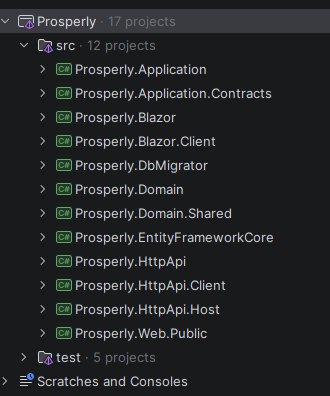
Your screenshot shows the standard ABP “Blazor WebAssembly” layered solution (non-tiered) with these key projects:
- Properly.HttpApi.Host = the actual backend host (auth + API + OpenIddict endpoints)
- Properly.Blazor.Client = the real Blazor WASM app (static files compiled to
wwwroot) - Properly.Blazor = the host/entry project for the WASM client (commonly used to serve the WASM; you deploy this instead of deploying the
.Clientproject) - Properly.Web.Public = optional public website (separate web app)
Deployment blueprint that matches this structure on Azure App Service
Deploy
Properly.HttpApi.Hostto an Azure Web App (API)- Set App Service settings:
ConnectionStrings__Default(Azure SQL)App__SelfUrl=https://<api-app>.azurewebsites.netAuthServer__Authority=https://<api-app>.azurewebsites.netApp__CorsOriginsmust include your Blazor site URL (see step 3)
- Run
Properly.DbMigratoragainst Azure SQL once (so OpenIddict clients/redirect URIs are seeded correctly).
- Set App Service settings:
Deploy
Properly.Blazor(NOTProperly.Blazor.Client) to an Azure Web App (UI)- The
.Clientproject alone is just static WASM output; the ABP template expects theProperly.Blazorhost project for serving it in the default setup.
- The
Make sure URLs are consistent (most common cause of “loads forever”) In Properly.Blazor/wwwroot/appsettings.json (or its environment-specific variant you deploy), set:
App:SelfUrl=https://<blazor-app>.azurewebsites.netAuthServer:Authority=https://<api-app>.azurewebsites.netRemoteServices:Default:BaseUrl=https://<api-app>.azurewebsites.net
In Properly.HttpApi.Host configuration, ensure:
App:CorsOriginsincludeshttps://<blazor-app>.azurewebsites.netApp:RedirectAllowedUrlsincludeshttps://<blazor-app>.azurewebsites.net
Alternative (simplest operationally): host WASM inside HttpApi.Host and deploy only one App Service If you want one Azure Web App only, follow the “Blazor WebAssembly ASP.NET Core Hosted” approach (ABP community guide). This makes
HttpApi.Hostserve the WASM files too:- Add
app.UseBlazorFrameworkFiles()before static files - Add
MapFallbackToFile("index.html") - Point Blazor settings (
SelfUrl,Authority,BaseUrl) to the same host URL
(This approach is explicitly documented in the ABP community article below.)
- Add
Links (verified reachable)
- https://abp.io/docs/10.1/solution-templates/layered-web-application/deployment/azure-deployment/step1-create-azure-resources
- https://abp.io/docs/10.1/solution-templates/layered-web-application/deployment/azure-deployment/step2-configuration-application
- https://abp.io/community/articles/zbjvgrc9
This response was generated by AI. If it didn’t solve your problem, feel free to post a new answer — our support team will jump in to help you soon.
Markdown supported.Copy, paste, or drag & drop images and files (max 100 MB per file, 100 MB total per post) -
0
hi
non-containerized deployments, but both are failing with various errors during startup.
Could you share the error messages you encountered?
https://abp.io/docs/latest/deployment
Thanks.
Markdown supported.Copy, paste, or drag & drop images and files (max 100 MB per file, 100 MB total per post)



