






Check the docs before asking a question: https://abp.io/docs/latest Check the samples to see the basic tasks: https://abp.io/docs/latest/samples The exact solution to your question may have been answered before, and please first use the search on the homepage.
Provide us with the following info:
🧐 Hint: If you are using the ABP Studio, you can see all the information about your solution from the configuration window, which opens when you right-click on the solution and click on the Solution Configuration button.
- Template: app
- Created ABP Studio Version: 1.0.2
- Current ABP Studio Version: 1.4.1
- Tiered: Yes
- Multi-Tenancy: Yes
- UI Framework: blazor-server
- Theme: leptonx
- Theme Style: system
- Theme Menu Placement: side
- Run Install Libs: Yes
- Database Provider: ef
- Database Management System: sqlserver
- Separate Tenant Schema: Yes
- Create Initial Migration: Yes
- Run Db Migrator: Yes
- Mobile Framework: maui
- Public Website: Yes
- Social Login: Yes
- Include Tests: Yes
- Kubernetes Configuration: No
- Distributed Event Bus: rabbitmq
- Use Local References: No
- Optional Modules:
- GDPR
- FileManagement
- TextTemplateManagement
- LanguageManagement
- AuditLogging
- Chat
- OpenIddictAdmin
- Selected Languages: English, English (United Kingdom), 简体中文, Español, العربية, हिन्दी, Português (Brasil), Français, Русский, Deutsch (Deuthschland), Türkçe, Italiano, Čeština, Magyar, Română (România), Svenska, Suomi, Slovenčina, Íslenska, 繁體中文
- Default Language: English
- Create Command: abp new NewApp -t app --tiered --ui-framework blazor-server --mobile maui --database-provider ef --database-management-system sqlserver --theme leptonx --separate-tenant-schema --public-website --without-cms-kit --dont-run-bundling -chat -file-management
- Exception message and full stack trace:
- Steps to reproduce the issue:
I have a question regarding the default behavior of the ABP Suite templates, specifically related to file upload fields (as shown in the attached screenshot).
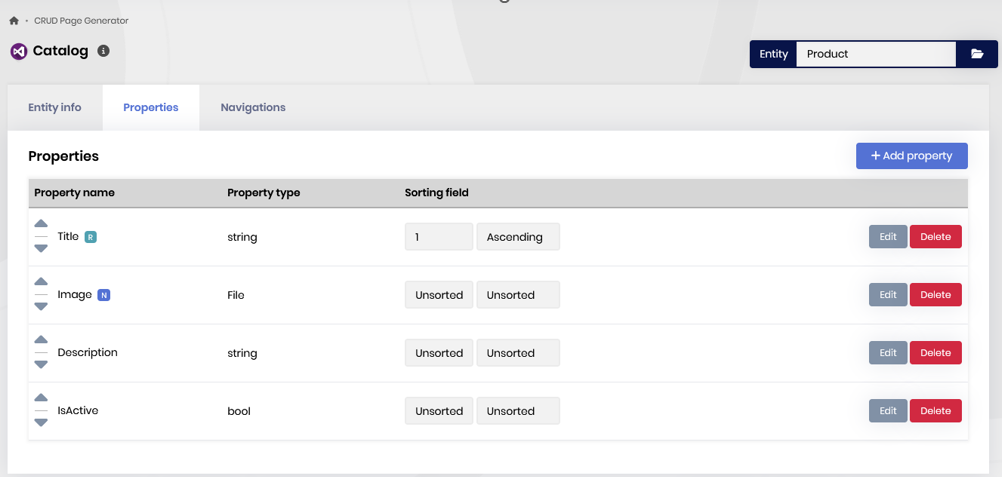
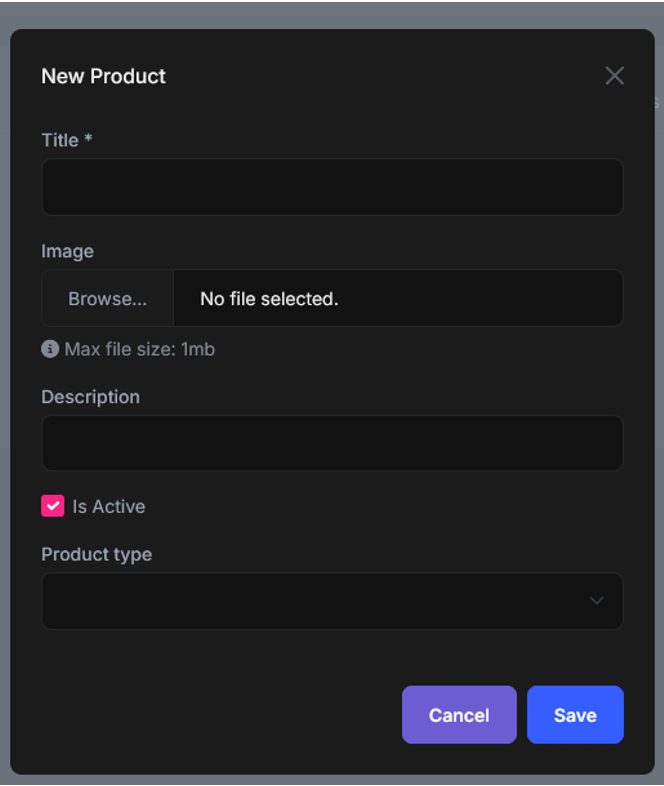
By default, when the user selects an image in the input field, the upload is triggered immediately on the frontend. The problem is that if the user cancels the operation like refreshing the page (F5) or closes/discards the form the uploaded file remains stored both in the file descriptor and in Blob Storage and there is no instruction on how to avoid it or cleanup procedure.
I would like to know what you recommend for handling this scenario, the ABP Architecture recomendation on how to handle this issue, as example below but not limited to them.
- Is there a way to adjust or extend the ABP Suite templates so that the upload only occurs during the Create action (i.e., only after the user clicks the SAVE button)?
- Is this issue mapped by ABP and there is a workaround solution until the fix to be implemented on a future release?
- Alternatively, is there a recommended approach to automatically clean up previously uploaded files when the user cancels the form?
I understand that it is possible to implement a fully custom upload flow but I preffer to keep as much as possible the standard ABP solution/architecture. Before going down that path for customization, I would like to know whether ABP Suite provides any recommended extension points or best practices to modify this default behavior.
Thank you in advance for your guidance.
3 Answer(s)
-
0
- In the ABP Suite-generated Blazor CRUD pages, the “File” property uses a select file → upload immediately UX. With BLOB Storage/File Management this means a
FileDescriptor+ blob content can be created before the main entity is saved. If the user closes the modal / refreshes, those uploaded blobs can remain orphaned unless you add a cleanup strategy. - There isn’t a built-in ABP Suite switch (template option) that changes this to “upload only on Save” for generated pages (no verified source available for a Suite extension point that flips this behavior).
Recommended ABP-style approaches
A) “Upload on Save” (recommended if you want zero orphan risk)
Implement the create/edit form so it does not call the server on file selection. Instead:
- On file selection, keep the file in memory (or stream) on the Blazor side and only show a preview.
- When the user clicks Save, call your Application Service
CreateAsync(...)and pass the file content asIRemoteStreamContent(or a byte[] if small), then inside the same application service method:- Create the entity
- Save the blob
- Store the blob/file id on the entity
- Commit once (same unit of work)
This matches ABP’s general “do it in the application service in a single use-case” style and avoids a “temporary upload” concept entirely.
B) Keep immediate upload, but add an automatic cleanup (recommended if you want to keep Suite UX)
If you keep the default immediate upload, use a “temporary upload” + scheduled cleanup pattern:
- When the file is uploaded, mark it as temporary (e.g., store a flag/metadata, or put it under a “temp/” naming convention, or store it in a dedicated container).
- When the user clicks Save and the entity is created, “finalize” the file:
- clear the temporary flag (or move/rename)
- associate it with the created entity
- Run a background job (periodic worker) that deletes temporary files older than X minutes/hours (and their descriptors).
ABP’s Blob Storing API supports deleting blobs, so the cleanup job can safely remove old temporary items.
C) Compensating cleanup on Cancel (best-effort only)
In the modal’s Cancel/Close handler (and on dispose/navigation), call an endpoint to delete the already-uploaded file descriptor/blob if it hasn’t been finalized. This reduces leftovers but won’t cover hard refresh/tab close/network loss—so you still typically want (B) as the safety net.
Minimal cleanup code idea (server side)
Use ABP Blob Storing’s container API to remove orphaned blobs when needed (e.g., in a background worker or explicit cancel endpoint):
public class MyFileCleanupService : ITransientDependency
{
    private readonly IBlobContainer<MyFileContainer> _container;

    public MyFileCleanupService(IBlobContainer<MyFileContainer> container)
    {
        _container = container;
    }

    public Task DeleteAsync(string blobName)
    {
        return _container.DeleteAsync(blobName);
    }
}
You’d combine this with whatever “temporary” tracking you use (DB table/flag, naming convention, etc.) to find candidates to delete.
References (verified)
- https://docs.abp.io/en/abp/latest/Blob-Storing
- https://abp.io/community/articles/d01cbe12
- https://abp.io/community/articles/sr7t3w4p
This response was generated by AI. If it didn’t solve your problem, feel free to post a new answer — our support team will jump in to help you soon.
Markdown supported.Copy, paste, or drag & drop images and files (max 100 MB per file, 100 MB total per post) - In the ABP Suite-generated Blazor CRUD pages, the “File” property uses a select file → upload immediately UX. With BLOB Storage/File Management this means a
-
0
Hi ABP Folks,
I´d like to get an architect guy guidance instead of bot answer to be as close as possible of the ABP solution evolution.
Markdown supported.Copy, paste, or drag & drop images and files (max 100 MB per file, 100 MB total per post) -
0
Hi @chrisalves,
Thanks for the detailed explainations! To answer your questions directly:
This is the current default behavior of ABP Suite. When a file/image property is generated, the upload is triggered immediately upon file selection before the Create action is called. This is by design in the current Suite templates, and there is no built-in option or template switch to defer the upload to the Save step.
Regarding cleanup of orphaned files: there is currently no default mechanism in ABP Suite to handle this, and we don't have a tracked issue to support one of these options natively at the Suite level. The handling of this scenario is left to you as the developer.
That said, here are the two approaches I'd recommend:
Periodic Background Worker (recommended if you want to stay close to Suite-generated code)
Create a background worker that periodically:
- Queries all existing file/image IDs from your database (e.g., your
ProductImageIDs stored on the entity). - Lists the blobs in the relevant Blob Storing container.
- Identifies blobs that have no corresponding entity record (orphaned blobs).
- Deletes the unused ones using
IBlobContainer.DeleteAsync(blobName).
ABP's Blob Storing API supports
DeleteAsyncsafely, it won't throw if a blob doesn't exist. This approach requires no changes to the Suite-generated UI or application service code.Manually adjust the upload logic:
You can modify the generated Blazor component so that the file is held in memory on selection (no server call), and only uploaded when the user actually clicks Save. This gives you zero orphan risk, but does require you to customize the generated code, which means you'll need to manage that customization across future regenerations.
Since you mentioned preferring to stay close to the Suite-generated code, Option 1 is the more practical path for your case.
Hope this helps clarify the situation.
Best Regards.
Markdown supported.Copy, paste, or drag & drop images and files (max 100 MB per file, 100 MB total per post) - Queries all existing file/image IDs from your database (e.g., your



