






Hello Team, can you please help me with below:-
Where can I download or explore the Example Application code shown in the demo (https://demo.abp.io) for my learning purposes
Currently, I am exploring low-code, and I want to know how I can build a single dynamic form to allow users to create an order and its line items. Below is an example I am trying, but it looks like it is not working as expected. Am I doing it correctly?
[DynamicEntityUI("Order")]
public class Order : DynamicEntityBase
{
    // Navigation property initialised to prevent null ref issues
    [DynamicForeignKey("DemoApp.Orders.OrderLineItem", "OrderLineItemId")]
    public List<OrderLineItem> Items { get; set; } = new();
}

[DynamicEntityUI("OrderLineItem")]
public class OrderLineItem : DynamicEntityBase
{
    [DynamicForeignKey("DemoApp.Orders.Order", "OrderId")]
    public Guid? OrderId { get; set; }
}
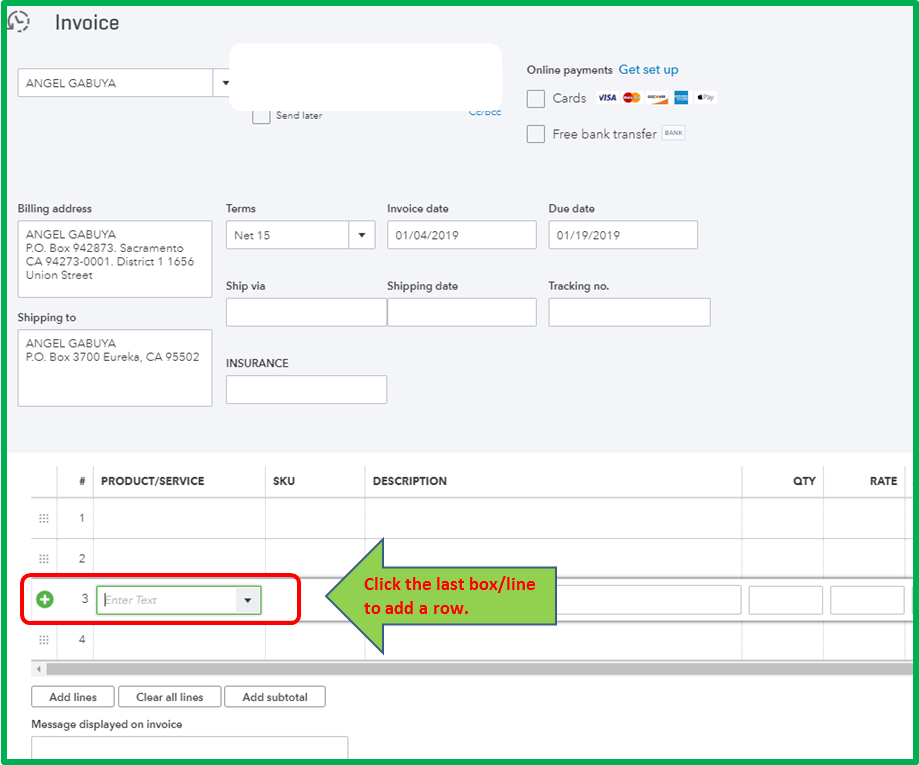
- How can I design order-form.json so that the user can add order info and its line item info on one form, which maps to the above Order class? Example image I want to build
Thank you Pooja
8 Answer(s)
-
0
For demo.abp.io: there isn’t a publicly provided “download this exact demo’s full source code” link I can verify from the available ABP docs/context for that specific demo instance.
What you can use for learning are the official ABP sample/reference applications:- eShopOnAbp (microservice reference solution) – source is public.
- abp-samples repository (many focused samples).
For ABP Commercial modules / UI package source (if what you saw in the demo is related to commercial modules): you can download module source code via ABP Suite or ABP CLI (requires the appropriate license for commercial/pro source, depending on your license type). The CLI approach is
abp get-source <ModuleName>(example:abp get-source Volo.Account.Pro). This is a verified ABP support guidance.For your Low-code dynamic form (master-detail: Order + line items) questions (#2 and #3): I can’t provide a definitive “correct”
DynamicEntityUI/DynamicForeignKeymodel and anorder-form.jsonthat works for a single master-detail form because I could not retrieve any verified ABP documentation/source in the provided knowledge/tools that defines:- how
DynamicForeignKeyis intended to be used for collection navigation properties (List<OrderLineItem> Items) - a supported nested/grid/inline-repeat component schema in
*-form.jsonfor low-code forms that would map a child collection to the parent entity in one screen
So I’m not able to confirm whether your attributes are correct or to give a working
order-form.jsonfor this scenario with verified sources.- how
If this low-code feature is part of ABP Commercial (ABP Suite / Low Code), please contact the ABP team with your exact scenario; they can confirm current support/limitations and provide the correct JSON/schema guidance:
- https://abp.io/contact
Sources (verified)
- https://github.com/abpframework/eShopOnAbp
- https://github.com/abpframework/abp-samples
- https://abp.io/support/questions/632
- https://demo.abp.io
- https://abp.io/contact
This response was generated by AI. If it didn’t solve your problem, feel free to post a new answer — our support team will jump in to help you soon.
Markdown supported.Copy, paste, or drag & drop images and files (max 100 MB per file, 100 MB total per post) -
0
I can understand that it's not available publicly. You can send me the demo code link to my email address in the file.
For Low-Code, I will wait for an agent to reply; maybe it is in preview, that's why you cannot find it in the documentation
Markdown supported.Copy, paste, or drag & drop images and files (max 100 MB per file, 100 MB total per post) -
0
Hi,
1. Example applications on demo.abp.io
The example applications on the demo site are custom code written only for the demo. They aren't part of the startup templates or the modules, and we don't share that source code, so we can't send it by email either. For learning, you can check the sample applications here: https://abp.io/docs/latest/samples
2. The Order and OrderLineItem entities
There are two problems in the code:
- Add
[DynamicEntity]to both classes so Low-Code can discover them.[DynamicEntityUI]only sets the display name. - The parent-child relation is defined on the child, with
[DynamicEntity(typeof(Order))]. Low-Code adds theOrderIdproperty to the child for you. A collection property likeList<OrderLineItem> Itemsisn't supported, so please remove it.
[DynamicForeignKey]is for lookup fields, for example aProductIdthat points to aProductentity. Its second parameter is the property shown in the dropdown (like"Name"), not the foreign key name.Here are the corrected classes:
using System;
using System.ComponentModel.DataAnnotations;
using Volo.Abp.LowCode;
using Volo.Abp.LowCode.Entities;

namespace DemoApp.Orders;

[DynamicEntity(DefaultDisplayPropertyName = nameof(OrderNumber))]
[DynamicEntityUI("Orders")]
public class Order : DynamicEntityBase
{
    [Required]
    [MaxLength(32)]
    [DynamicPropertyUnique]
    public string OrderNumber { get; set; } = null!;

    [DynamicPropertyType(EntityPropertyType.Date)]
    public DateOnly OrderDate { get; set; }

    [MaxLength(128)]
    public string? CustomerName { get; set; }
}

[DynamicEntity(typeof(Order), DefaultDisplayPropertyName = nameof(ProductName))]
[DynamicEntityUI("Order Line Items")]
public class OrderLineItem : DynamicEntityBase
{
    [Required]
    [MaxLength(128)]
    public string ProductName { get; set; } = null!;

    public int Quantity { get; set; }

    [DynamicPropertyType(EntityPropertyType.Money)]
    public decimal UnitPrice { get; set; }
}
Since these are C# classes, they also need to be mapped in your
DbContext, like any other EF Core entity. Use your existingDbContext(the one that already callsConfigureDynamicEntities()andConfigureLowCode()) and keep everything else in it as is.Add the
DbSetproperties:public DbSet<Order> Orders { get; set; } public DbSet<OrderLineItem> OrderLineItems { get; set; }And add the mappings at the end of your existing
OnModelCreatingmethod.DbTablePrefixandDbSchemaare the ones already defined in your project:builder.Entity<Order>(b => { b.ToTable(DbTablePrefix + "Orders", DbSchema); b.ConfigureByConvention(); b.Property(x => x.OrderNumber).IsRequired().HasMaxLength(32); b.Property(x => x.CustomerName).HasMaxLength(128); }); builder.Entity<OrderLineItem>(b => { b.ToTable(DbTablePrefix + "OrderLineItems", DbSchema); b.ConfigureByConvention(); b.Property(x => x.ProductName).IsRequired().HasMaxLength(128); b.Property(x => x.UnitPrice).HasColumnType("decimal(18,2)"); });Then add a new EF Core migration and apply it to the database. The
OrderIdcolumn is created in theOrderLineItemstable automatically.3. Order and line items on one form
The Low-Code System is still in preview, and its forms can't show an editable line items grid inside the order form yet.
What works now: create the order first, then add its line items from the order row. Low-Code shows the child entity as a related grid for each order. Click Actions > Order Line Items on an order row, and use New in that dialog to add lines. The
OrderIdis filled in automatically.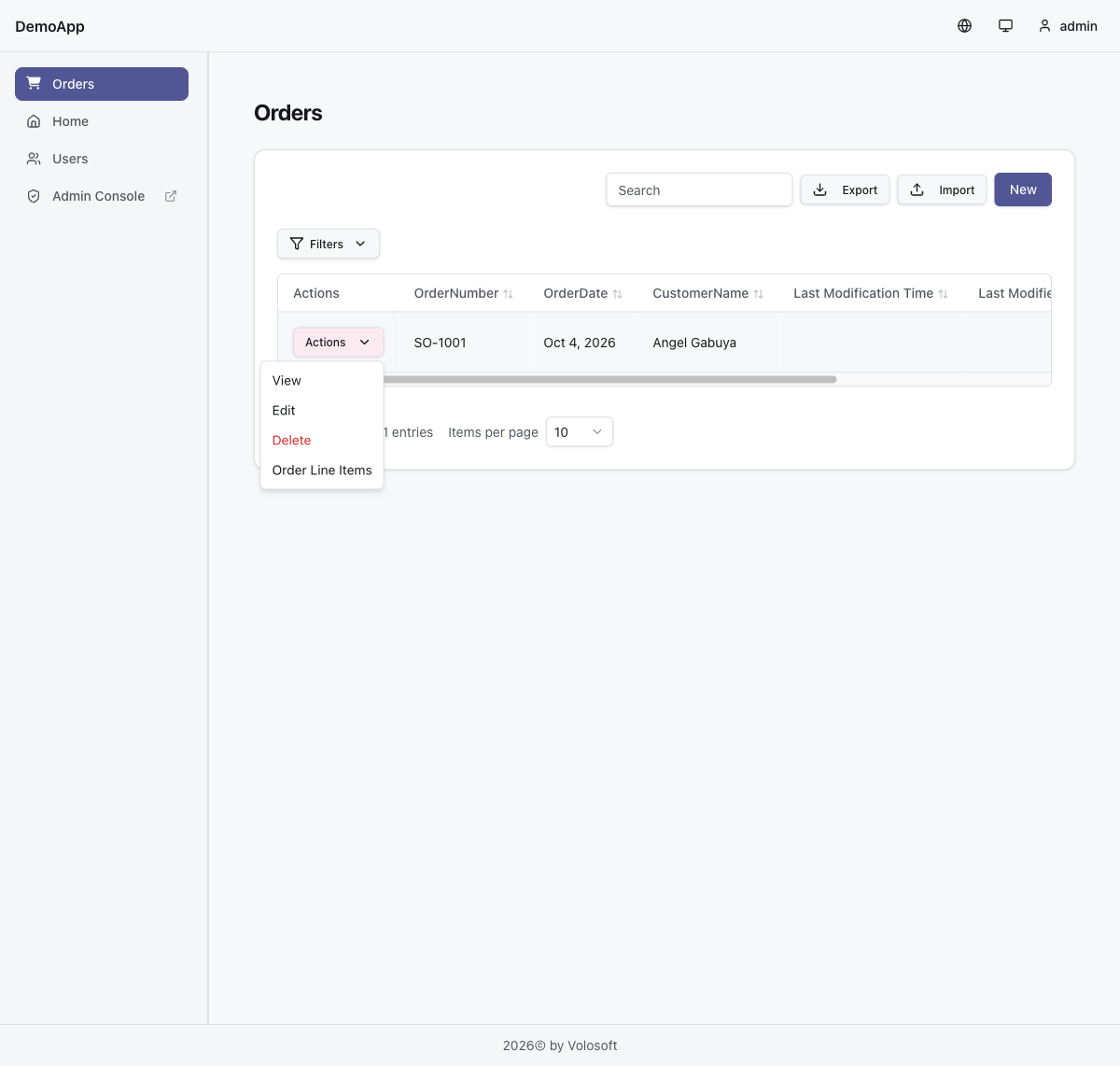
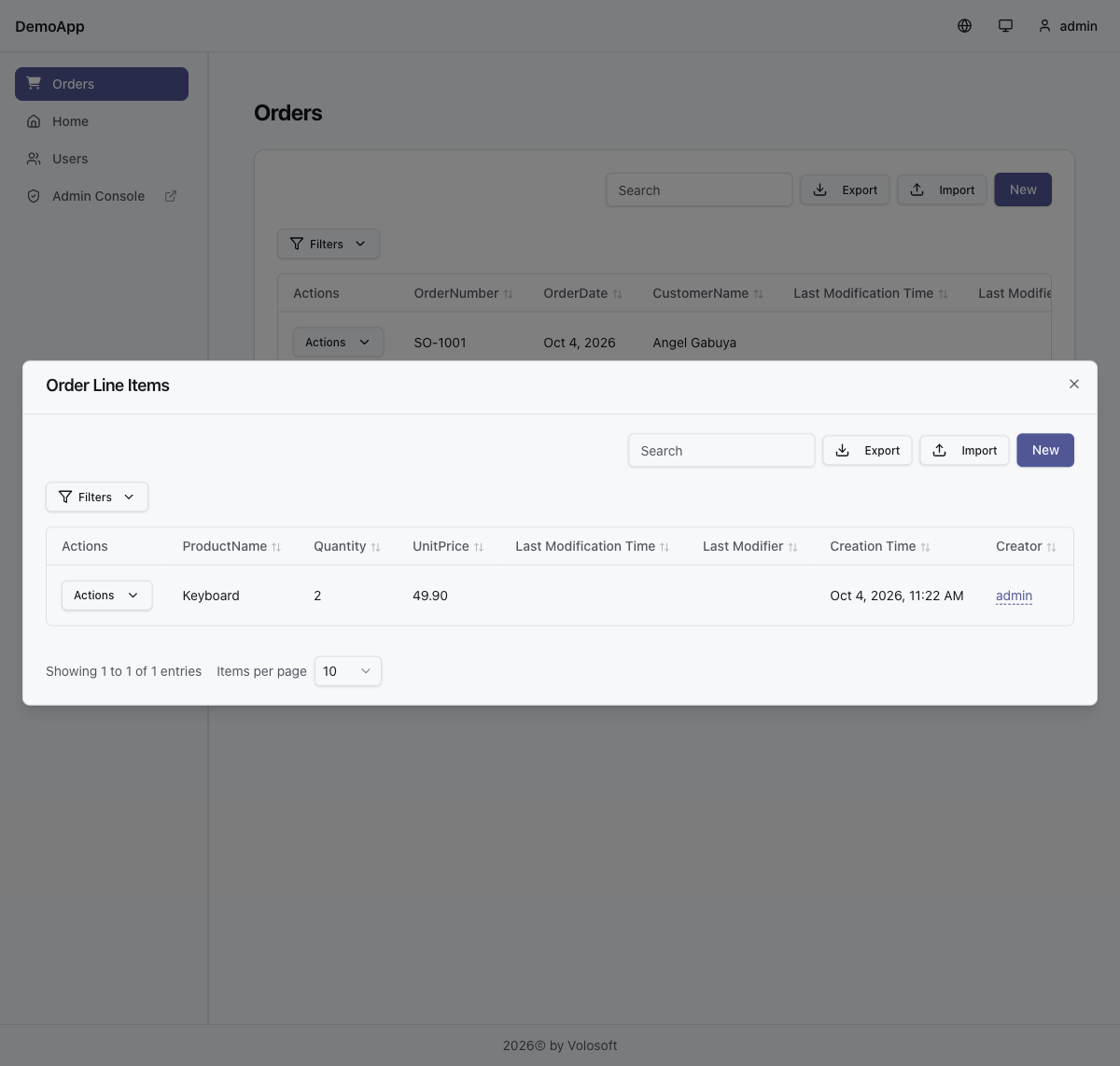
Here is the
order-form.jsonand the page for the order itself. Put them under the_Dynamic/model/forms/and_Dynamic/model/pages/folders of your project. In a layered solution_Dynamicis in the Domain project, and in a single-layer solution it's in the Host project:_Dynamic/model/forms/order-form.json{ "name": "order-form", "entityName": "DemoApp.Orders.Order", "fields": [ { "id": "order-number", "label": "Order Number", "type": "text", "binding": "OrderNumber" }, { "id": "order-date", "label": "Order Date", "type": "date", "binding": "OrderDate" }, { "id": "customer-name", "label": "Customer", "type": "text", "binding": "CustomerName" } ], "layout": { "tabs": [ { "id": "main", "title": "Order", "isDefault": true, "groups": [ { "id": "header", "title": "Order Info", "isDefault": true, "fields": [ { "fieldId": "order-number", "row": 0, "colSpan": 2, "colStart": 1 }, { "fieldId": "order-date", "row": 0, "colSpan": 2, "colStart": 3 }, { "fieldId": "customer-name", "row": 1, "colSpan": 4 } ] } ] } ] }, "rules": [] }_Dynamic/model/pages/orders.json{ "name": "orders", "title": "Orders", "icon": "fa-solid fa-cart-shopping", "type": "dataGrid", "entityName": "DemoApp.Orders.Order", "createFormName": "order-form", "editFormName": "order-form", "columns": [ { "propertyName": "OrderNumber", "order": 0, "visible": true }, { "propertyName": "OrderDate", "order": 1, "visible": true }, { "propertyName": "CustomerName", "order": 2, "visible": true } ] }Replace
DemoApp.Orders.Orderwith the full name of yourOrderclass. You can check the files with:dotnet run --project <your-host-project> -- --check-lowcode-model-filesDocumentation:
- https://abp.io/docs/latest/low-code
- https://abp.io/docs/latest/low-code/fluent-api
- https://abp.io/docs/latest/low-code/model-json
Thanks
Markdown supported.Copy, paste, or drag & drop images and files (max 100 MB per file, 100 MB total per post) - Add
-
0
Hi,
Thank you for your update. I don't think this will help me with my project, and it won't be a good user experience. What do you think about me creating a custom page to show the Order Add/Edit page with OrderLineItems on the same page?
If I create a page in TypeScript to display Order & its line items, can you suggest how I can use const queryParams: GetOrderWithLineItems ={} and onSubmit with a dynamic api "/api/low-code/..."
When can we expect the low-code to be out of Preview?
Thanks in advance Pooja
Markdown supported.Copy, paste, or drag & drop images and files (max 100 MB per file, 100 MB total per post) -
0
Hi,
A custom page is a good way to do this. The samples below are for ABP 10.6.0 and the React UI template.
Calling the Low-Code API directly
These are the endpoints for your
orderspage:- Order:
GET/PUT/api/low-code/pages/orders/data/{id}andPOST/api/low-code/pages/orders/data - Line items:
GET/POST/api/low-code/pages/orders/children/DemoApp.Orders.OrderLineItem/data, andPUT/DELETE.../data/{lineId}
Property values are sent as strings (or null). Creating an order:
{
  "properties": {
    "OrderNumber": "SO-1001",
    "OrderDate": "2026-10-06",
    "CustomerName": "Contoso"
  }
}
Creating a line item, with the
Idof the order you created:{ "properties": { "OrderId": "<order-id>", "ProductName": "Keyboard", "Quantity": "2", "UnitPrice": "12.34" } }To read the lines of one order, filter by
OrderIdwith these query parameters:filters[0].name=OrderId,filters[0].value={orderId},filters[0].filterType=1. The result is paged.The problem is that saving the page this way needs several requests: one for the order and one for each line. They don't run in one transaction, so a later request can fail after the order or some lines have already been saved.
Saving the order and its lines in one request
The
/api/low-code/...create and update endpoints above save one record per request. A better way is your own small endpoint,/api/app/order, that saves the order and all its lines in one request. When database transactions are enabled (they are in a SQL Server solution), the order and all lines are saved or rolled back together. The SQLite template disables transactions, so there the save isn't atomic.It uses
IDynamicPageAppService, so the Low-Code validation, unique checks, permissions and interceptors still run as they do on the generated pages.Add range rules to the
OrderLineItemclass from my previous reply. Low-Code validates them on every save, so negative values are rejected even if a client skips its own checks:[Range(0, int.MaxValue)] public int Quantity { get; set; } [Range(0, double.MaxValue)] [DynamicPropertyType(EntityPropertyType.Money)] public decimal UnitPrice { get; set; }using System; using System.Collections.Generic; using System.ComponentModel.DataAnnotations; using System.Globalization; using System.Linq; using System.Threading.Tasks; using Microsoft.AspNetCore.Authorization; using Volo.Abp; using Volo.Abp.LowCode; using Volo.Abp.LowCode.Pages; using Volo.Abp.Uow; namespace DemoApp.Services.Orders; public class OrderWithLineItemsDto { public DynamicEntityDto Order { get; set; } = new(); public List<DynamicEntityDto> LineItems { get; set; } = new(); } public class OrderLineInput { public Guid? Id { get; set; } [Required] public Dictionary<string, string?> Properties { get; set; } = null!; } public class SaveOrderWithLineItemsInput { [Required] public Dictionary<string, string?> Properties { get; set; } = null!; [Required] public List<OrderLineInput> LineItems { get; set; } = null!; } [Authorize] public class OrderAppService : DemoAppAppService { private const string PageName = "orders"; private const string ChildEntityName = "DemoApp.Orders.OrderLineItem"; private readonly IDynamicPageAppService _pages; public OrderAppService(IDynamicPageAppService pages) { _pages = pages; } public virtual async Task<OrderWithLineItemsDto> GetAsync(Guid id) { return new OrderWithLineItemsDto { Order = await _pages.GetRecordAsync(PageName, id), LineItems = await GetLinesAsync(id) }; } [UnitOfWork(true)] public virtual async Task<OrderWithLineItemsDto> CreateAsync( SaveOrderWithLineItemsInput input) { ValidateInput(input); if (input.LineItems.Any(x => x.Id.HasValue)) { throw new UserFriendlyException("New order lines must not contain an ID."); } var order = await _pages.CreateAsync(PageName, new DynamicEntityCreateInput { Properties = input.Properties }); var orderId = GetId(order); foreach (var line in input.LineItems) { await _pages.CreateChildAsync(PageName, ChildEntityName, new DynamicEntityCreateInput { Properties = GetLineProperties(orderId, line) }); } return await GetAsync(orderId); } [UnitOfWork(true)] public virtual async Task<OrderWithLineItemsDto> UpdateAsync( Guid id, SaveOrderWithLineItemsInput input) { ValidateInput(input); await _pages.GetRecordAsync(PageName, id); var existingIds = (await GetLineIdsAsync(id)).ToHashSet(); var suppliedIds = input.LineItems .Where(x => x.Id.HasValue) .Select(x => x.Id!.Value) .ToList(); if (suppliedIds.Distinct().Count() != suppliedIds.Count || suppliedIds.Any(x => !existingIds.Contains(x))) { throw new UserFriendlyException("Invalid or duplicate order line ID."); } await _pages.UpdateAsync(PageName, id, new DynamicEntityUpdateInput { EntityId = id, Properties = input.Properties }); foreach (var line in input.LineItems) { var properties = GetLineProperties(id, line); if (line.Id.HasValue) { await _pages.UpdateChildAsync(PageName, ChildEntityName, line.Id.Value, new DynamicEntityUpdateInput { EntityId = line.Id.Value, Properties = properties }); } else { await _pages.CreateChildAsync(PageName, ChildEntityName, new DynamicEntityCreateInput { Properties = properties }); } } foreach (var removedId in existingIds.Except(suppliedIds)) { await _pages.DeleteChildAsync(PageName, ChildEntityName, removedId); } await CurrentUnitOfWork!.SaveChangesAsync(); return await GetAsync(id); } private async Task<List<DynamicEntityDto>> GetLinesAsync(Guid orderId) { // Read full records, so fields hidden on a line item DataGrid page are still returned. var lines = new List<DynamicEntityDto>(); foreach (var lineId in await GetLineIdsAsync(orderId)) { lines.Add(await _pages.GetChildRecordAsync(PageName, ChildEntityName, lineId)); } return lines; } private async Task<List<Guid>> GetLineIdsAsync(Guid orderId) { var result = new List<DynamicEntityDto>(); while (true) { var page = await _pages.GetChildDataAsync(PageName, ChildEntityName, new DynamicEntityListRequestDto { SkipCount = result.Count, MaxResultCount = 100, Filters = new() { new() { Name = "OrderId", Value = orderId.ToString(), FilterType = DynamicEntityFilterType.Equal } }, Sortings = new() { new() { Name = "Id", IsDescending = false } } }); result.AddRange(page.Items); if (result.Count >= page.TotalCount) { return result.Select(GetId).ToList(); } if (page.Items.Count == 0) { throw new UserFriendlyException("Order lines changed. Reload the order."); } } } private static Dictionary<string, string?> GetLineProperties( Guid orderId, OrderLineInput line) { var properties = new Dictionary<string, string?>(line.Properties); properties["OrderId"] = orderId.ToString(); return properties; } private static Guid GetId(DynamicEntityDto row) { return Guid.Parse(Convert.ToString(row["Id"], CultureInfo.InvariantCulture)!); } private static void ValidateInput(SaveOrderWithLineItemsInput input) { if (input.Properties == null || input.LineItems == null || input.LineItems.Any(x => x == null || x.Properties == null)) { throw new UserFriendlyException("Order properties and line items are required."); } } }Change
PageName,ChildEntityName(the full name of your line item class) and the base classDemoAppAppServiceto match your project. ABP exposes it asGET /api/app/order/{id},POST /api/app/orderandPUT /api/app/order/{id}.TypeScript
Put this in
src/lib/api/orderEditor.ts. It's for the React template and its axios instance. The base URL of that instance already ends with/api, so the paths start with/app/order. If you use another UI, call the same/api/app/orderendpoints with that UI's own HTTP client.import type { AxiosInstance } from 'axios'; export interface GetOrderWithLineItems { id: string; } export interface DynamicOrder { Id: string; OrderNumber: string; OrderDate: string; CustomerName?: string | null; } export interface DynamicOrderLine { Id: string; OrderId: string; ProductName: string; Quantity: number; UnitPrice: number; } export interface OrderWithLineItems { order: DynamicOrder; lineItems: DynamicOrderLine[]; } export interface OrderFormState { id?: string; orderNumber: string; orderDate: string; customerName?: string | null; lineItems: Array<{ id?: string; productName: string; quantity: number; unitPrice: number; }>; } export function createOrderEditorApi(api: AxiosInstance) { async function load(queryParams: GetOrderWithLineItems): Promise<OrderFormState> { const { data } = await api.get<OrderWithLineItems>( `/app/order/${encodeURIComponent(queryParams.id)}`, ); return { id: data.order.Id, orderNumber: data.order.OrderNumber, orderDate: data.order.OrderDate, customerName: data.order.CustomerName, lineItems: data.lineItems.map((line) => ({ id: line.Id, productName: line.ProductName, quantity: line.Quantity, unitPrice: line.UnitPrice, })), }; } async function onSubmit(form: OrderFormState): Promise<OrderWithLineItems> { const input = { properties: { OrderNumber: form.orderNumber, OrderDate: form.orderDate, CustomerName: form.customerName ?? null, }, lineItems: form.lineItems.map((line) => ({ id: line.id, properties: { ProductName: line.productName, Quantity: String(line.quantity), UnitPrice: String(line.unitPrice), }, })), }; const response = form.id ? await api.put<OrderWithLineItems>( `/app/order/${encodeURIComponent(form.id)}`, input, ) : await api.post<OrderWithLineItems>('/app/order', input); return response.data; } return { load, onSubmit }; }The next reply has a full React page that uses this helper, with the order header and the editable line items grid.
A few things to keep in mind:
- On update, send all current lines of the order. Lines that aren't in the list are deleted. Sending
lineItems: []removes all lines. - The service reads the order and its lines before and after saving, so the user needs the View permission, plus Create for new orders and lines, Update when saving an existing order and its existing lines, and Delete for removed lines. These are the Low-Code page permissions. Line item operations use the permissions of the line item's own DataGrid page if it has one, otherwise the order page permissions.
- The sample doesn't check which version of the order the user loaded. A save from an old copy can overwrite newer changes. Add a version check if you need to prevent that.
About the preview: the Low-Code System is still in preview. The 10.6 documentation doesn't give a stable release date.
Thanks
Markdown supported.Copy, paste, or drag & drop images and files (max 100 MB per file, 100 MB total per post) - Order:
-
0
Hi,
Here is a page that uses the
orderEditor.tshelper from my previous reply, built with the shadcn components of the React template. It shows the order header and an editable line items grid, like your screenshot.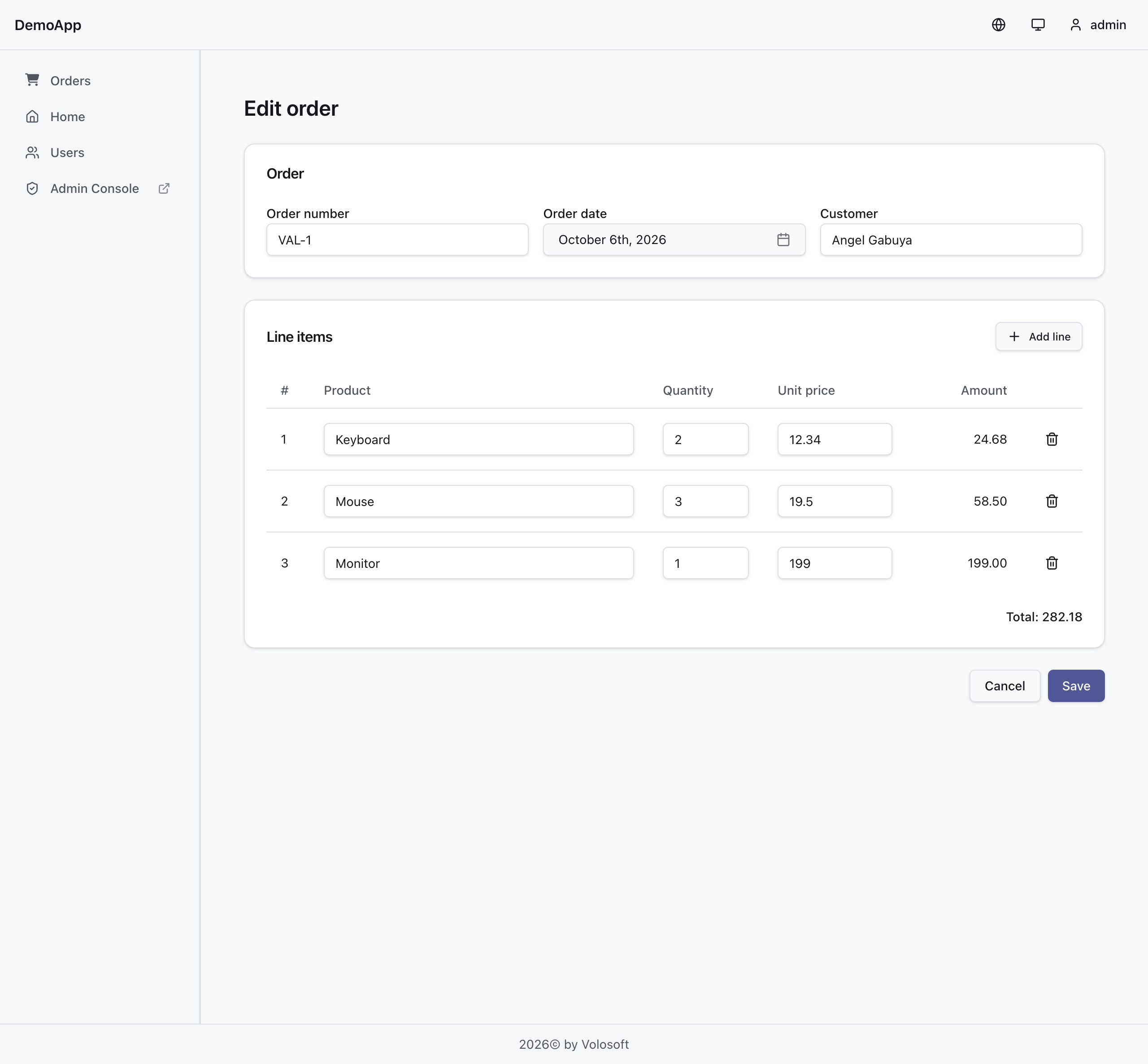
src/pages/orders/OrderEditorPage.tsximport { useEffect, useState } from 'react' import { useNavigate, useParams } from '@tanstack/react-router' import { Plus, Trash2 } from 'lucide-react' import { toast } from 'sonner' import { isAxiosError } from 'axios' import { api } from '@/lib/api/axios' import { createOrderEditorApi } from '@/lib/api/orderEditor' import type { GetOrderWithLineItems, OrderFormState, OrderWithLineItems } from '@/lib/api/orderEditor' import { Button } from '@/components/ui/button' import { Card, CardContent, CardHeader, CardTitle } from '@/components/ui/card' import { DatePicker } from '@/components/ui/date-picker' import { Input } from '@/components/ui/input' import { Label } from '@/components/ui/label' import { Table, TableBody, TableCell, TableHead, TableHeader, TableRow } from '@/components/ui/table' const { load, onSubmit } = createOrderEditorApi(api) type LineItem = OrderFormState['lineItems'][number] const emptyForm: OrderFormState = { orderNumber: '', orderDate: '', customerName: '', lineItems: [], } function toForm(data: OrderWithLineItems): OrderFormState { return { id: data.order.Id, orderNumber: data.order.OrderNumber, orderDate: data.order.OrderDate, customerName: data.order.CustomerName, lineItems: data.lineItems.map((line) => ({ id: line.Id, productName: line.ProductName, quantity: line.Quantity, unitPrice: line.UnitPrice, })), } } export function OrderEditorPage() { const { orderId } = useParams({ strict: false }) as { orderId?: string } // Remount when the route changes, so a new order never keeps the state of the previous one. return <OrderEditor key={orderId ?? 'new'} orderId={orderId} /> } function OrderEditor({ orderId }: { orderId?: string }) { const navigate = useNavigate() const [form, setForm] = useState<OrderFormState>(emptyForm) const [loading, setLoading] = useState(!!orderId) const [loadError, setLoadError] = useState(false) const [saving, setSaving] = useState(false) useEffect(() => { if (!orderId) { return } let cancelled = false const run = async () => { try { const queryParams: GetOrderWithLineItems = { id: orderId } const form = await load(queryParams) if (!cancelled) setForm(form) } catch { if (!cancelled) setLoadError(true) } finally { if (!cancelled) setLoading(false) } } void run() return () => { cancelled = true } }, [orderId]) const updateLine = (index: number, patch: Partial<LineItem>) => setForm((f) => ({ ...f, lineItems: f.lineItems.map((line, i) => (i === index ? { ...line, ...patch } : line)), })) const addLine = () => setForm((f) => ({ ...f, lineItems: [...f.lineItems, { productName: '', quantity: 1, unitPrice: 0 }], })) const removeLine = (index: number) => setForm((f) => ({ ...f, lineItems: f.lineItems.filter((_, i) => i !== index) })) const validate = (): string | undefined => { if (!form.orderNumber.trim()) return 'Order number is required.' if (!form.orderDate) return 'Order date is required.' for (const [i, line] of form.lineItems.entries()) { const row = `Line ${i + 1}` if (!line.productName.trim()) return `${row}: product is required.` if (!Number.isInteger(line.quantity) || line.quantity < 0 || line.quantity > 2147483647) { return `${row}: quantity must be a whole number, 0 or more.` } if (!Number.isFinite(line.unitPrice) || line.unitPrice < 0) { return `${row}: unit price must be 0 or more.` } } return undefined } const lineAmount = (line: LineItem) => line.quantity * line.unitPrice const total = form.lineItems.reduce( (sum, line) => (Number.isFinite(lineAmount(line)) ? sum + lineAmount(line) : sum), 0, ) const save = async () => { const validationError = validate() if (validationError) { toast.error(validationError) return } setSaving(true) try { const result = await onSubmit(form) setForm(toForm(result)) toast.success('Order saved.') if (!form.id) { await navigate({ to: '/order-editor/$orderId', params: { orderId: result.order.Id } }) } } catch (error) { const remoteError = isAxiosError(error) ? error.response?.data?.error : undefined const details = (remoteError?.validationErrors as { message: string }[] | undefined) ?.map((x) => x.message) .join(' ') toast.error(details || remoteError?.message || 'Could not save the order.') } finally { setSaving(false) } } if (loading) { return <p className="p-6 text-muted-foreground">Loading...</p> } if (loadError) { return ( <div className="mx-auto max-w-5xl p-6"> <Card> <CardHeader> <CardTitle>Could not load the order</CardTitle> </CardHeader> <CardContent className="space-y-4"> <p className="text-sm text-muted-foreground"> The order doesn't exist or you don't have permission to view it. </p> <Button variant="outline" onClick={() => navigate({ to: '/' })}> Back </Button> </CardContent> </Card> </div> ) } return ( <div className="mx-auto max-w-5xl space-y-6 p-6"> <h1 className="text-2xl font-semibold">{form.id ? 'Edit order' : 'New order'}</h1> {/* Lock the form while saving, so edits made during the request are not lost. */} <fieldset disabled={saving} className="space-y-6"> <Card> <CardHeader> <CardTitle>Order</CardTitle> </CardHeader> <CardContent className="grid gap-4 sm:grid-cols-3"> <div className="space-y-2"> <Label htmlFor="orderNumber">Order number</Label> <Input id="orderNumber" value={form.orderNumber} onChange={(e) => setForm({ ...form, orderNumber: e.target.value })} /> </div> <div className="space-y-2"> <Label htmlFor="orderDate">Order date</Label> <DatePicker id="orderDate" disabled={saving} value={form.orderDate} onChange={(value) => setForm({ ...form, orderDate: value })} /> </div> <div className="space-y-2"> <Label htmlFor="customerName">Customer</Label> <Input id="customerName" value={form.customerName ?? ''} onChange={(e) => setForm({ ...form, customerName: e.target.value })} /> </div> </CardContent> </Card> <Card> <CardHeader className="flex flex-row items-center justify-between space-y-0"> <CardTitle>Line items</CardTitle> <Button variant="outline" size="sm" onClick={addLine}> <Plus /> Add line </Button> </CardHeader> <CardContent> <Table> <TableHeader> <TableRow> <TableHead className="w-12">#</TableHead> <TableHead>Product</TableHead> <TableHead className="w-32">Quantity</TableHead> <TableHead className="w-40">Unit price</TableHead> <TableHead className="w-32 text-right">Amount</TableHead> <TableHead className="w-12" /> </TableRow> </TableHeader> <TableBody> {form.lineItems.length === 0 && ( <TableRow> <TableCell colSpan={6} className="text-center text-muted-foreground"> No line items yet. </TableCell> </TableRow> )} {form.lineItems.map((line, index) => ( <TableRow key={line.id ?? `new-${index}`}> <TableCell>{index + 1}</TableCell> <TableCell> <Input aria-label={`Product ${index + 1}`} value={line.productName} onChange={(e) => updateLine(index, { productName: e.target.value })} /> </TableCell> <TableCell> <Input aria-label={`Quantity ${index + 1}`} type="number" min={0} step={1} value={Number.isNaN(line.quantity) ? '' : line.quantity} onChange={(e) => updateLine(index, { quantity: e.target.valueAsNumber })} /> </TableCell> <TableCell> <Input aria-label={`Unit price ${index + 1}`} type="number" min={0} step="0.01" value={Number.isNaN(line.unitPrice) ? '' : line.unitPrice} onChange={(e) => updateLine(index, { unitPrice: e.target.valueAsNumber })} /> </TableCell> <TableCell className="text-right"> {Number.isFinite(lineAmount(line)) ? lineAmount(line).toFixed(2) : '—'} </TableCell> <TableCell> <Button variant="ghost" size="icon" aria-label={`Remove line ${index + 1}`} onClick={() => removeLine(index)} > <Trash2 /> </Button> </TableCell> </TableRow> ))} </TableBody> </Table> <div className="mt-4 flex justify-end text-sm font-medium">Total: {total.toFixed(2)}</div> </CardContent> </Card> <div className="flex justify-end gap-2"> <Button variant="outline" onClick={() => navigate({ to: '/' })}> Cancel </Button> <Button onClick={save} disabled={saving}> {saving ? 'Saving...' : 'Save'} </Button> </div> </fieldset> </div> ) }Register the routes in
src/routes/router.tsx, one for a new order and one for editing:import { OrderEditorPage } from '@/pages/orders/OrderEditorPage' const orderEditorNewRoute = createRoute({ getParentRoute: () => rootRoute, path: '/order-editor', component: OrderEditorPage, beforeLoad: authGuard, }) const orderEditorEditRoute = createRoute({ getParentRoute: () => rootRoute, path: '/order-editor/$orderId', component: OrderEditorPage, beforeLoad: authGuard, }) const routeTree = rootRoute.addChildren([ orderEditorNewRoute, orderEditorEditRoute, // ...your existing routes ])Open
/order-editorto create an order and/order-editor/<order-id>to edit one. Link to these pages from your own menu or order list.On the edit page the order ID comes from the route, and
load({ id })reads the order with all lines. A new order starts with an empty form and doesn't callload. After saving, the page refreshes the form from the returned data, so new lines get their IDs before the next save.Thanks
Markdown supported.Copy, paste, or drag & drop images and files (max 100 MB per file, 100 MB total per post) -
0
Hi Maliming,
You are awesome :-)
Markdown supported.Copy, paste, or drag & drop images and files (max 100 MB per file, 100 MB total per post) -
0
Hi,
I'll close this question now. If you run into anything else with the Low-Code page or the order editor, feel free to open a new question.
Thanks
Markdown supported.Copy, paste, or drag & drop images and files (max 100 MB per file, 100 MB total per post)



