






Hi,
I created a new Modular Monolith project about a month ago, and I now want to add a test project to my existing solution.
Could you please guide me on how to add a test project to an existing solution? I noticed that the option to add a test project appears when creating a new solution, but I cannot seem to find it for an existing one.
I have attached a screenshot showing the option as it appears in the "New Solution" menu for reference..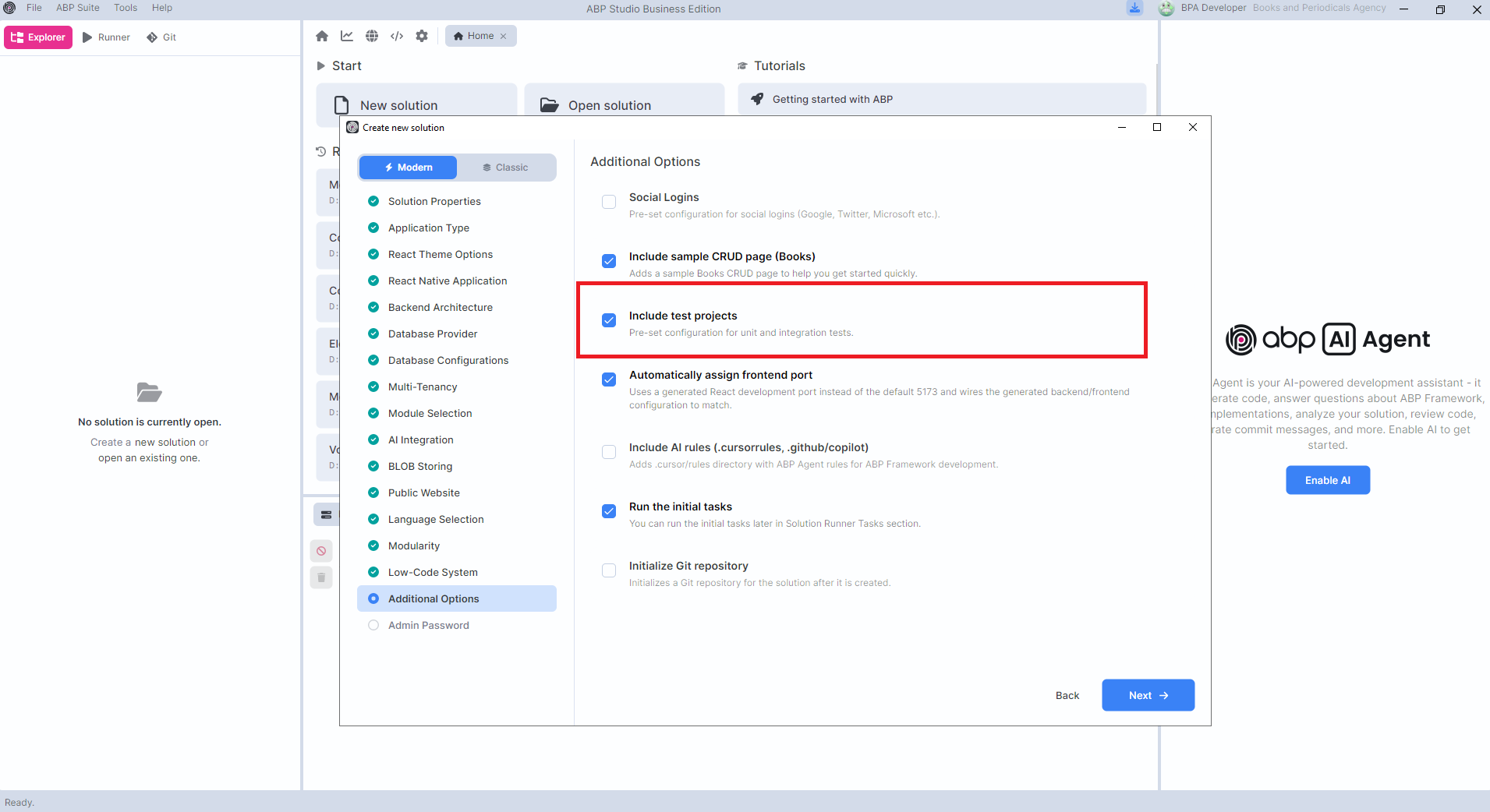
Thanks
2 Answer(s)
-
0
- In ABP Studio, the “Include test projects” option exists only in the New Solution wizard. There isn’t a supported “add test projects to an existing solution” wizard/button afterward.
- The recommended way to add tests to an existing modular monolith solution is to create the test projects manually (or scaffold a throwaway solution with tests enabled and copy the test projects into your solution).
What to do (practical approach)
Create new test projects in your existing solution (same naming convention ABP uses):
YourCompany.YourProject.TestBaseYourCompany.YourProject.Domain.TestsYourCompany.YourProject.Application.TestsYourCompany.YourProject.EntityFrameworkCore.Tests(orMongoDB.Testsif applicable)YourCompany.YourProject.Web.Tests(if you have a Web UI / host to integration-test)
Reference the right layers (typical pattern)
*.Domain.Testsreferences:*.Domain*.TestBase
*.Application.Testsreferences:*.Application*.TestBase
*.EntityFrameworkCore.Testsreferences:*.EntityFrameworkCore*.Application.Tests(so it can “implement” abstract tests against a real EF Core provider)
*.Web.Testsreferences:*.Web(or your host/UI project)*.Application.Tests*.EntityFrameworkCore.Tests
Follow ABP’s current recommended test structure
- ABP’s newer approach is to keep many tests in
Domain.Tests/Application.Testsas abstract base tests, then create concrete implementations inEntityFrameworkCore.Tests(orMongoDB.Tests) so tests are less coupled to the DB provider.
- ABP’s newer approach is to keep many tests in
References (verified)
- https://abp.io/docs/latest/testing/unit-tests
- https://abp.io/community/articles/4vvvp2oy
This response was generated by AI. If it didn’t solve your problem, feel free to post a new answer — our support team will jump in to help you soon.
Markdown supported.Copy, paste, or drag & drop images and files (max 100 MB per file, 100 MB total per post) -
0
Hi,
The test projects option is only in the new solution and new module wizards. For an existing solution, you can generate the same solution again with tests in a temp folder, then copy the test project into your solution.
Open your
.abpslnfile. UndercreatingStudioConfiguration, you'll findcreatedAbpStudioVersionandcreateCommand.Install that CLI version into a separate folder, so you get the same template your solution was created from. Then run the
createCommandwith it in an empty folder, and add--tests --skip-initial-tasksat the end:
dotnet tool install Volo.Abp.Studio.Cli --version <createdAbpStudioVersion> --tool-path C:\Temp\abp-cli mkdir C:\Temp\with-tests cd C:\Temp\with-tests C:\Temp\abp-cli\abp new YourCompany.YourProject -t app-nolayers --modern --modular ... --tests --skip-initial-tasks- Copy the generated
YourCompany.YourProject.Testsfolder into your solution folder, next to the main project. Then go back to your solution folder, add it to the solution and run the tests:
cd <your solution folder>
dotnet sln YourCompany.YourProject.slnx add YourCompany.YourProject.Tests/YourCompany.YourProject.Tests.csproj
dotnet test YourCompany.YourProject.Tests/YourCompany.YourProject.Tests.csproj
If you've upgraded ABP or .NET since you created the solution, update the package versions and
TargetFrameworkin the test.csprojfirst.If you have the Books sample page,
Should_Create_A_Valid_Bookmay fail with aFOREIGN KEY constraint failederror. The test doesn't setAuthorId. Add these usings to theBookAppService_Testsfile:using YourCompany.YourProject.Entities.Authors; using Volo.Abp.Domain.Repositories;And change the create part of the test like this:
var author = await WithUnitOfWorkAsync(() => GetRequiredService<IRepository<Author, Guid>>().FirstAsync());

var result = await _bookAppService.CreateAsync(
    new CreateUpdateBookDto
    {
        Name = "New test book 42",
        AuthorId = author.Id,
        Price = 10,
        PublishDate = DateTime.Now,
        Type = BookType.ScienceFiction
    }
);
Modules work the same way. With the same CLI, create a module with the same name, template and database provider in the temp solution:
C:\Temp\abp-cli\abp new-module YourCompany.YourProject.ModuleName -t module:standard-modern -d ef -ts C:\Temp\with-tests\YourCompany.YourProject.abpsln -o C:\Temp\with-tests\modules\modulenameUse
-t module:ddd-modernfor a DDD module, and-d mongodbif the module uses MongoDB. Then copy the test projects to the same place in your module (for a standard module it's the*.Testsfolder, for a DDD module it's the wholetestfolder). Also copy the test entries from the temp module's.slnxand.abpmdlfiles into yours, and rundotnet teston the module's.slnx.Thanks
Markdown supported.Copy, paste, or drag & drop images and files (max 100 MB per file, 100 MB total per post)



