






Hi,
This is the error i have

This is IdentityUser Data Type for the attribute
| Attribute | |
| --------- | --- |
| usermaintenanceUserId | 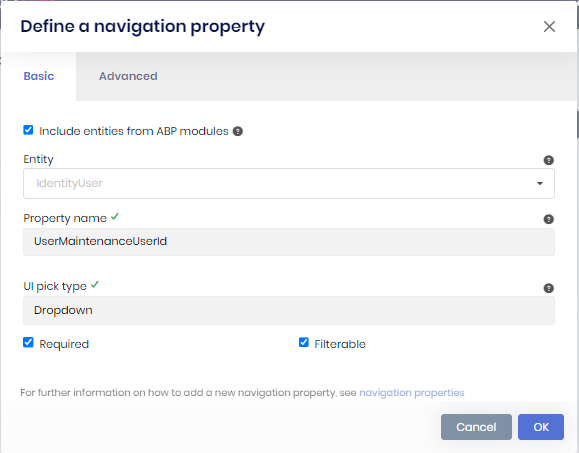 |
| supervidorId |
|
| supervidorId | 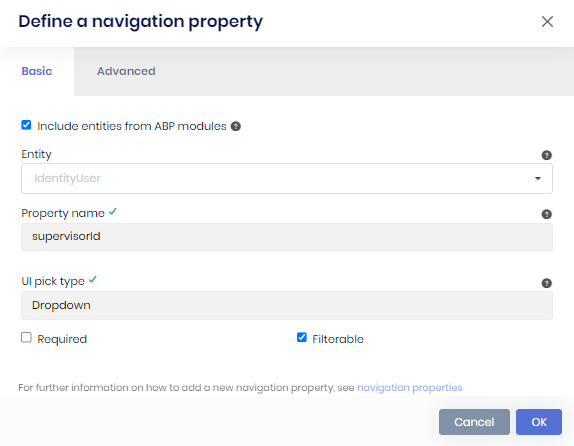 |
|
3 Answer(s)
-
0
Hi,
When two navigation properties point to the same entity (
IdentityUserhere), ABP Suite generates the lookup only for the first one inUserMaintenances.razor.cs. The razor page still usessupervisorCollection, so the build fails.For now, you can add the missing part to
UserMaintenances.Extended.razor.cs. Suite doesn't overwrite this file when you regenerate the page.using System; using System.Collections.Generic; using System.Threading.Tasks; using AbpSolution1.Shared; namespace AbpSolution1.Blazor.Pages; public partial class UserMaintenances { private IReadOnlyList<LookupDto<Guid>> supervisorCollection { get; set; } = new List<LookupDto<Guid>>(); protected override async Task OnParametersSetAsync() { supervisorCollection = (await UserMaintenancesAppService.GetsupervisorLookupAsync(new LookupRequestDto())).Items; } }The app service already has
GetsupervisorLookupAsync, so nothing else needs to change.This is fixed in ABP Suite 10.7.0. After you upgrade Suite and regenerate the page, remove this code from the extended file, because the generated file will have
supervisorCollectionitself.Thanks
Markdown supported.Copy, paste, or drag & drop images and files (max 100 MB per file, 100 MB total per post) -
0
Hi, I have 2 question as below:
- How to do the version update
- Will there be impact to the code generated previously
Markdown supported.Copy, paste, or drag & drop images and files (max 100 MB per file, 100 MB total per post) -
0
Hi,
Which ABP version is your solution on? The steps below are for upgrading a 10.6.x solution to 10.7.0. If you're on an older version, let me know first.
- Commit or back up your work, and close Suite. Then run these in the solution folder:
abp update --version 10.7.0
abp suite update --version 10.7.0
abp updatedoesn't update the other packages your projects reference directly. Align them with ABP 10.7.0, otherwise you can get restore or startup errors. In a Blazor Server solution created with 10.6, these are:Microsoft.AspNetCore.*,Microsoft.EntityFrameworkCore.*andMicrosoft.Extensions.*packages:10.0.9to10.0.11Blazorise.Bootstrap5andBlazorise.Icons.FontAwesome:2.2.1to2.3.0
The full list is here: https://abp.io/docs/10.7/package-version-changes
Then check the migration guide: https://abp.io/docs/10.7/release-info/migration-guides/abp-10-7. If
app.UseAntiforgery();comes beforeapp.UseAuthorization();in your Blazor module, move it after.Build the solution, then start Suite again and regenerate
UserMaintenance. Suite reads its templates from the built solution.- Updating the packages doesn't change your generated code. Regenerating an entity rewrites the generated files. Keep
Customizable codeenabled when you regenerate. Suite keeps your code in the extended files and the custom code blocks of the pages, and your texts in the localization files. Changes made directly in other generated code are overwritten, so check the diff after regenerating.
After you regenerate
UserMaintenance:- Remove the workaround from
UserMaintenances.Extended.razor.cs. The generated page hassupervisorCollectionnow, so keeping it causes a duplicate definition error. - If
EfCoreUserMaintenanceRepository.cshasusing AbpSolution1.using Microsoft.EntityFrameworkCore;and a separateEntityFrameworkCore;line at the top, replace those two lines with:
using Microsoft.EntityFrameworkCore;
using AbpSolution1.EntityFrameworkCore;
Then build the solution again and check the page.
The broken usings come from Suite 10.7.0, and we've already fixed it in the 10.7 branch. If you'd upgrade only for this issue, you can also stay on your current version and keep the workaround.
Thanks
Markdown supported.Copy, paste, or drag & drop images and files (max 100 MB per file, 100 MB total per post)


