


Hi,
This is the error i have

This is IdentityUser Data Type for the attribute
| Attribute | |
| --------- | --- |
| usermaintenanceUserId | 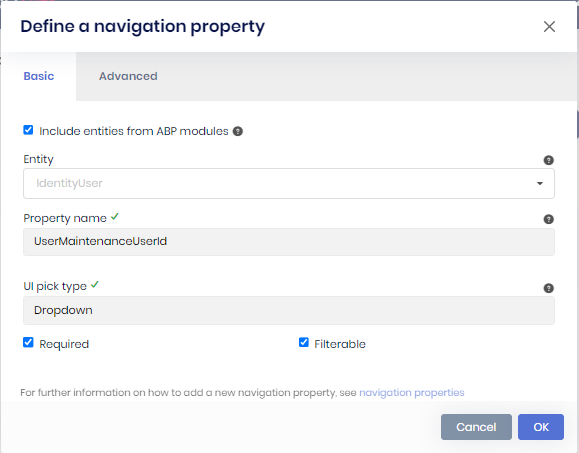 |
| supervidorId |
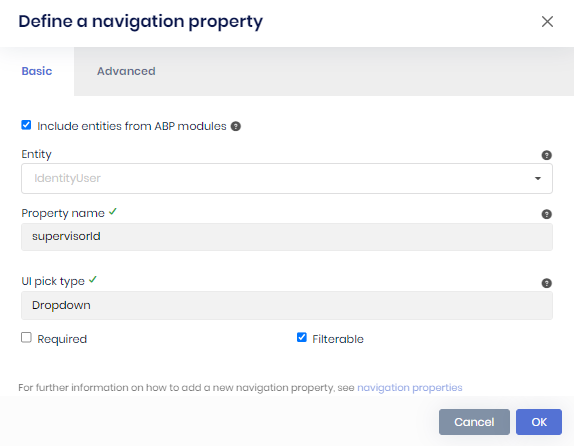 |
7 Answer(s)
-
0
Hi,
When two navigation properties point to the same entity (
IdentityUserhere), ABP Suite generates the lookup only for the first one inUserMaintenances.razor.cs. The razor page still usessupervisorCollection, so the build fails.For now, you can add the missing part to
UserMaintenances.Extended.razor.cs. Suite doesn't overwrite this file when you regenerate the page.using System; using System.Collections.Generic; using System.Threading.Tasks; using AbpSolution1.Shared; namespace AbpSolution1.Blazor.Pages; public partial class UserMaintenances { private IReadOnlyList<LookupDto<Guid>> supervisorCollection { get; set; } = new List<LookupDto<Guid>>(); protected override async Task OnParametersSetAsync() { supervisorCollection = (await UserMaintenancesAppService.GetsupervisorLookupAsync(new LookupRequestDto())).Items; } }The app service already has
GetsupervisorLookupAsync, so nothing else needs to change.This is fixed in ABP Suite 10.7.0. After you upgrade Suite and regenerate the page, remove this code from the extended file, because the generated file will have
supervisorCollectionitself.Thanks
Markdown supported.Copy, paste, or drag & drop images and files (max 100 MB per file, 100 MB total per post) -
0
Hi, I have 2 question as below:
- How to do the version update
- Will there be impact to the code generated previously
Markdown supported.Copy, paste, or drag & drop images and files (max 100 MB per file, 100 MB total per post) -
0
Hi,
Which ABP version is your solution on? The steps below are for upgrading a 10.6.x solution to 10.7.0. If you're on an older version, let me know first.
- Commit or back up your work, and close Suite. Then run these in the solution folder:
abp update --version 10.7.0
abp suite update --version 10.7.0
abp updatedoesn't update the other packages your projects reference directly. Align them with ABP 10.7.0, otherwise you can get restore or startup errors. In a Blazor Server solution created with 10.6, these are:Microsoft.AspNetCore.*,Microsoft.EntityFrameworkCore.*andMicrosoft.Extensions.*packages:10.0.9to10.0.11Blazorise.Bootstrap5andBlazorise.Icons.FontAwesome:2.2.1to2.3.0
The full list is here: https://abp.io/docs/10.7/package-version-changes
Then check the migration guide: https://abp.io/docs/10.7/release-info/migration-guides/abp-10-7. If
app.UseAntiforgery();comes beforeapp.UseAuthorization();in your Blazor module, move it after.Build the solution, then start Suite again and regenerate
UserMaintenance. Suite reads its templates from the built solution.- Updating the packages doesn't change your generated code. Regenerating an entity rewrites the generated files. Keep
Customizable codeenabled when you regenerate. Suite keeps your code in the extended files and the custom code blocks of the pages, and your texts in the localization files. Changes made directly in other generated code are overwritten, so check the diff after regenerating.
After you regenerate
UserMaintenance:- Remove the workaround from
UserMaintenances.Extended.razor.cs. The generated page hassupervisorCollectionnow, so keeping it causes a duplicate definition error. - If
EfCoreUserMaintenanceRepository.cshasusing AbpSolution1.using Microsoft.EntityFrameworkCore;and a separateEntityFrameworkCore;line at the top, replace those two lines with:
using Microsoft.EntityFrameworkCore;
using AbpSolution1.EntityFrameworkCore;
Then build the solution again and check the page.
The broken usings come from Suite 10.7.0, and we've already fixed it in the 10.7 branch. If you'd upgrade only for this issue, you can also stay on your current version and keep the workaround.
Thanks
Markdown supported.Copy, paste, or drag & drop images and files (max 100 MB per file, 100 MB total per post) -
0
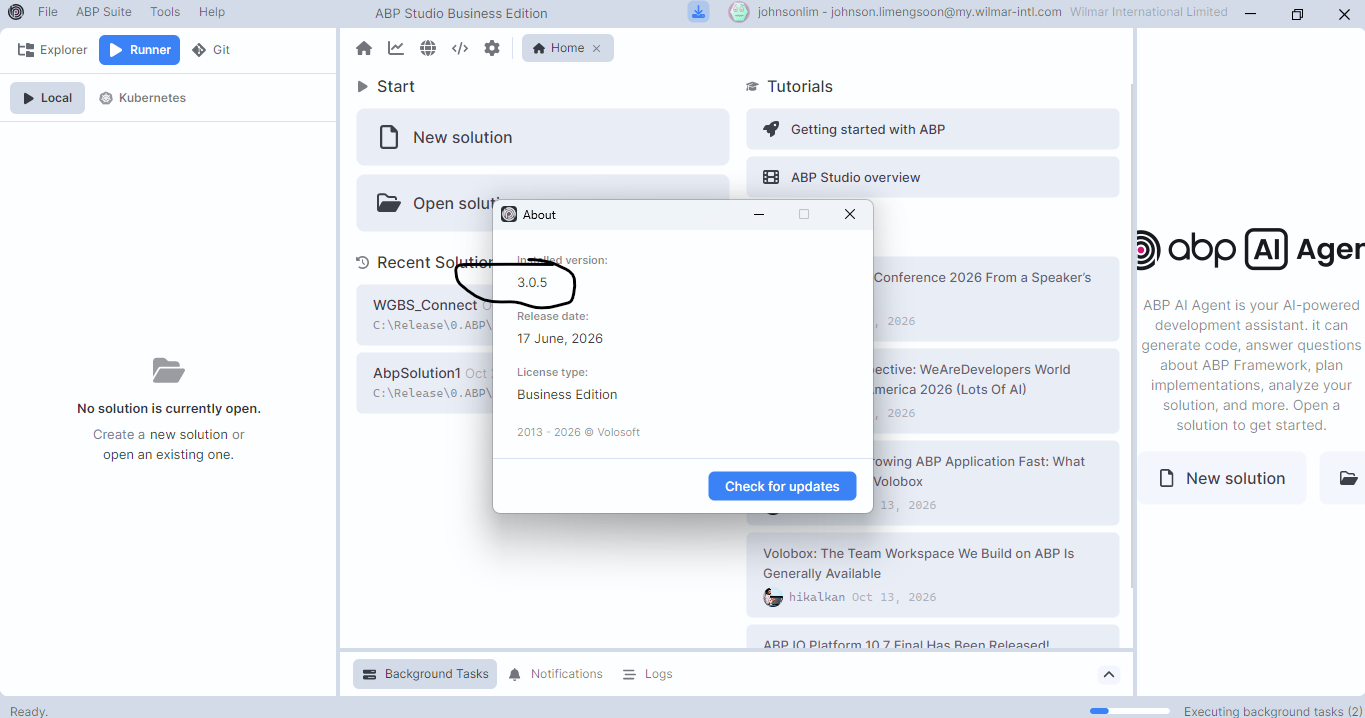
Hi Maliming, my abp version is 3.0.5
 Markdown supported.Copy, paste, or drag & drop images and files (max 100 MB per file, 100 MB total per post)
-
0
Hi,
3.0.5 is the ABP Studio version. Studio 3.0.5 uses ABP 10.4.1 for new solutions. To confirm your solution's version, check the
Volo.Abp.Identity.Pro.Domainpackage version insrc/AbpSolution1.Domain/AbpSolution1.Domain.csproj.If it's 10.4.1, follow my previous reply with these changes:
- Use these commands, so the LeptonX packages are updated too:
abp update --version 10.7.0 --leptonx-version 5.7.0 abp suite update --version 10.7.0- Update your direct
Microsoft.AspNetCore.*,Microsoft.EntityFrameworkCore.*andMicrosoft.Extensions.*references from10.0.7to10.0.11, andBlazorise.Bootstrap5andBlazorise.Icons.FontAwesomefrom2.0.4to2.3.0. - Check the 10.5 and 10.6 migration guides too: https://abp.io/docs/10.7/release-info/migration-guides/abp-10-5 https://abp.io/docs/10.7/release-info/migration-guides/abp-10-6
- If your solution uses EF Core, add a new migration after the solution builds, and run the
DbMigratorproject before starting the app. 10.6 adds aCompletionTimecolumn to the background jobs table.
cd src/AbpSolution1.EntityFrameworkCore
dotnet ef migrations add Upgraded_To_10_7
Then continue with the regenerate steps in my previous reply.
The workaround from my first reply also works on 10.4.1, so you can keep it if you don't want to upgrade now.
Thanks
Markdown supported.Copy, paste, or drag & drop images and files (max 100 MB per file, 100 MB total per post) -
0
Hi Maliming,
my version is10.4.1.
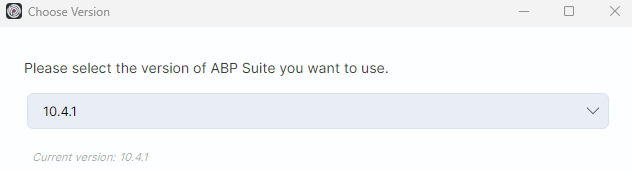
I have few question below can you help?
- Is10.7.0. is a stable version?
This is my first time doing the upgrade. Need to check with you in details for step below.
- Where and how to run these command?

- Where and how to do the below update

- My application is using EF Core. What do you mean by add a new migration? You are referring to add dummy attribute to existing table? Where and how to run these command?

- Is there any step i miss out apart from the step above?
- What is the consequences if the update fail? Will the abp studio or abp suites collapse?
Markdown supported.Copy, paste, or drag & drop images and files (max 100 MB per file, 100 MB total per post) -
0
Hi,
Yes, 10.7.0 is the current stable release.
You can do most of the upgrade in ABP Studio. These steps replace the two commands in my previous reply. Wait for each step to finish before you start the next one.
Commit or back up your code, and back up your database. Close ABP Suite and stop the running applications.
In ABP Studio's Solution Explorer, right-click the solution and select
ABP CLI>Update ABP Packages. It updates the ABP NuGet and NPM packages to the latest stable versions, which are ABP 10.7.0 and LeptonX 5.7.0 now.Change the versions of a few other packages in these
.csprojfiles. You can open them in Visual Studio or any text editor, and replaceVersion="10.0.7"withVersion="10.0.11", andVersion="2.0.4"withVersion="2.3.0":src/AbpSolution1.Blazor/AbpSolution1.Blazor.csprojsrc/AbpSolution1.DbMigrator/AbpSolution1.DbMigrator.csprojsrc/AbpSolution1.Domain.Shared/AbpSolution1.Domain.Shared.csprojsrc/AbpSolution1.EntityFrameworkCore/AbpSolution1.EntityFrameworkCore.csproj
Without this, the build fails with a package downgrade error (
NU1605).In
src/AbpSolution1.Blazor/AbpSolution1BlazorModule.cs, move theapp.UseAntiforgery();line to just afterapp.UseAuthorization();.If you have your own code that overrides or replaces ABP services, also check the migration guides for changes that apply to it: https://abp.io/docs/10.7/release-info/migration-guides/abp-10-5 https://abp.io/docs/10.7/release-info/migration-guides/abp-10-6 https://abp.io/docs/10.7/release-info/migration-guides/abp-10-7
Build the solution, in Visual Studio or in ABP Studio (right-click the solution,
Dotnet CLI>Build). Keep the workaround from my first reply for now.Update the database. ABP 10.6 adds a new
CompletionTimecolumn to ABP's background jobs table. A migration is the file EF Core creates for this change, so you don't add anything to your own entities.- In ABP Studio's Solution Explorer, right-click
AbpSolution1.EntityFrameworkCoreand selectEF Core CLI>Add Migration. Enter a name likeUpgraded_To_10_7, uncheckUpdate Database, and click OK. - Then run the
AbpSolution1.DbMigratorproject. It applies the migration to your database. You can run it from Visual Studio, or right-click the solution in ABP Studio, selectOpen with>Terminal, and run:
cd src/AbpSolution1.DbMigrator dotnet run- In ABP Studio's Solution Explorer, right-click
Open ABP Suite from the
ABP Suite>Openmenu in ABP Studio. If Studio asks to install ABP Suite 10.7.0, accept it. Then regenerateUserMaintenance. KeepCustomizable codeenabled, and check the diff afterwards, because changes made directly in the generated code are overwritten.Remove the workaround from
UserMaintenances.Extended.razor.cs. IfEfCoreUserMaintenanceRepository.cshasusing AbpSolution1.using Microsoft.EntityFrameworkCore;and a separateEntityFrameworkCore;line at the top, replace those two lines with:using Microsoft.EntityFrameworkCore; using AbpSolution1.EntityFrameworkCore;Build the solution, run the application and check the
UserMaintenancepage.
If something goes wrong:
- Updating the packages doesn't change the ABP Studio app itself. Restore your code backup to go back.
- To use ABP Suite 10.4.1 again, close Suite first, then select
ABP Suite>Change Versionin ABP Studio. - Restoring the code doesn't undo the database changes, so restore the database backup too.
If you prefer to upgrade later, the workaround is enough to fix this issue on 10.4.1.
Thanks
Markdown supported.Copy, paste, or drag & drop images and files (max 100 MB per file, 100 MB total per post)


