






- Template: app-nolayers
- Template Type: Modern
- Created ABP Studio Version: 3.1.1
- Current ABP Studio Version: 3.1.6
- Multi-Tenancy: Yes
- UI Framework: react
- Theme: leptonx
- Theme Style: system
- Database Provider: ef
- Database Management System: sqlserver
- Public Website: Yes
- Social Login: Yes
- Include Tests: Yes
- Use Local References: No
- Optional Modules:
- GDPR
- TextTemplateManagement
- AuditLogging
- OpenIddictAdmin
- LowCode
- Elsa
- Selected Languages: Italian, English
- AI Management Enabled: Yes
- Selected AI Providers: OpenAI
- Default Language: Italian
- Create Command: abp new Nicma.Idp -t app-nolayers --modern --modular --ui-framework react --database-provider ef --database-management-system sqlserver --theme leptonx --tests --public-website --without-cms-kit --dont-run-install-libs --dont-run-bundling -no-file-management -no-language-management -low-code --elsa
Hello,
if i run default abp studio unit test generated works fine in abp studio. But if i run the unit tests in terminal or in other IDEs (Visual studio, riders) give some errors.
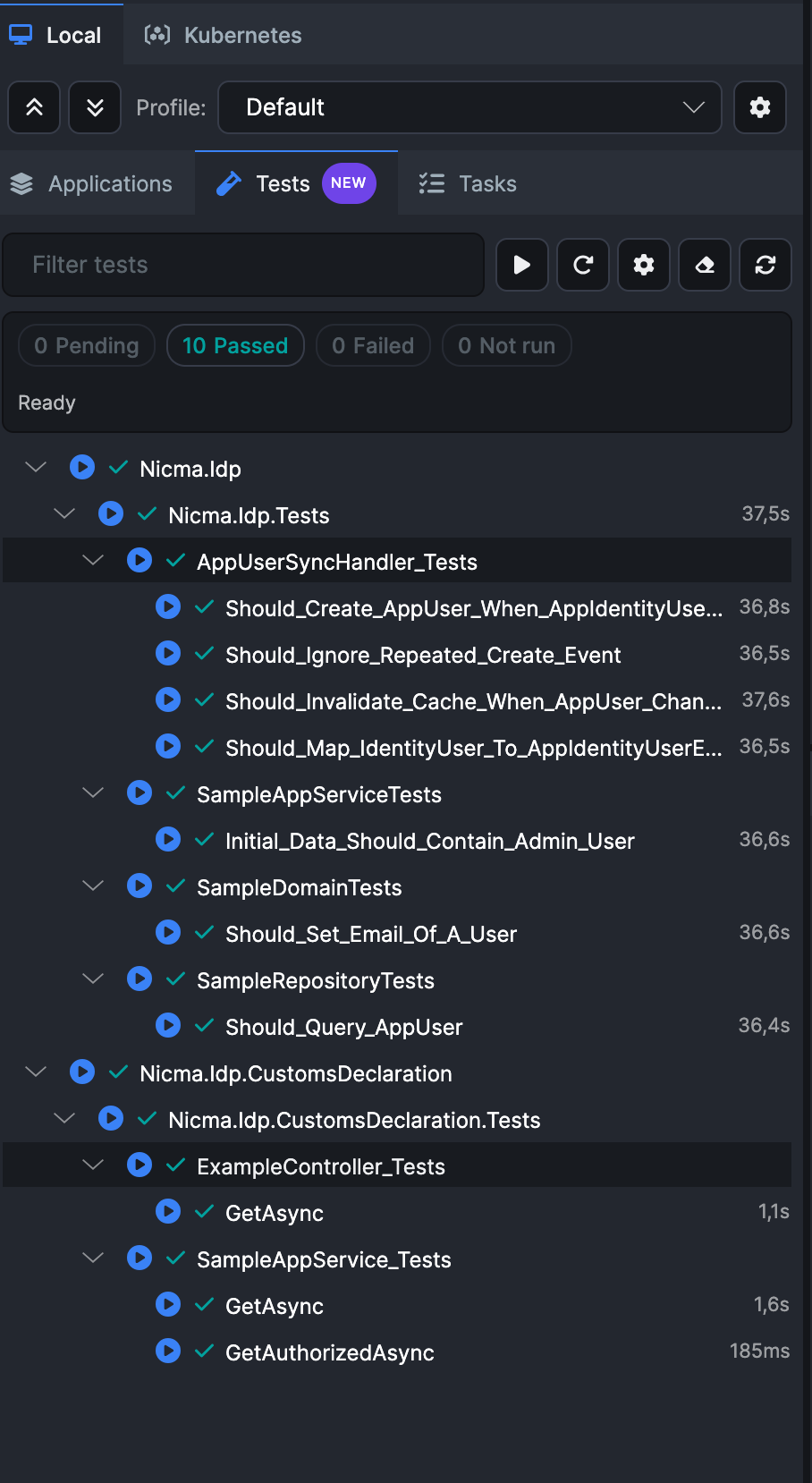
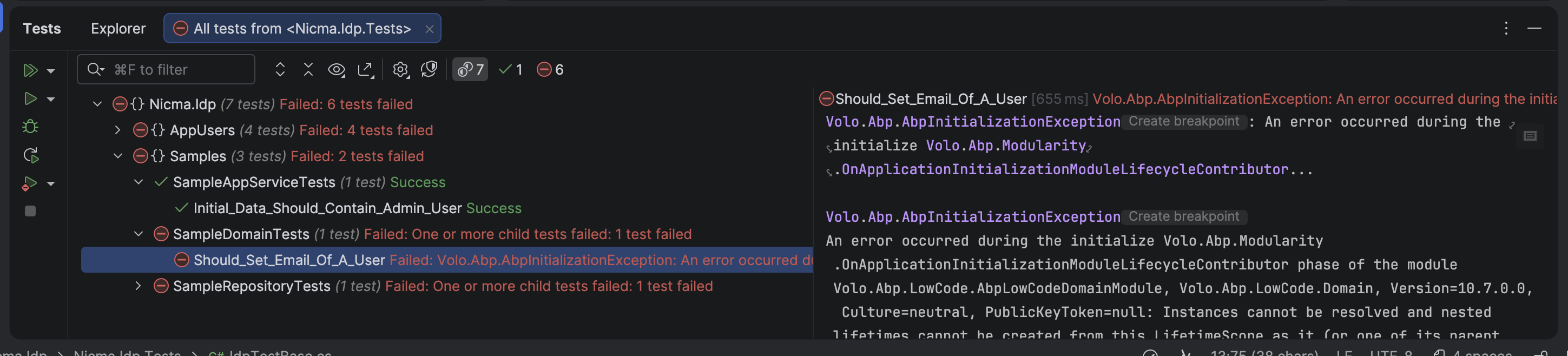
Following files are the logs: log_all_tests.log test.log
3 Answer(s)
-
0
This is not an “ABP Studio vs. CLI” problem by itself. What’s happening is: when you run tests inside ABP Studio, it sets up some environment / working-directory / configuration in a way that your test host can initialize successfully; but when you run from terminal / VS / Rider, the test host starts with different defaults and your ABP app initialization fails with:
Volo.Abp.AbpInitializationException ... OnApplicationInitializationModuleLifecycleContributor ...Instances cannot be resolved and nested lifetimes cannot be created from this lifetimeScope ...(mentions Volo.Abp.LowCode.AbpLowCodeDomainModule)
Solution
1) Run your tests from the “root” EFCore test project (not Domain/Application abstract tests)
ABP templates use abstract tests in
.Domain.Tests/.Application.Testsand concrete implementations in.EntityFrameworkCore.Tests(or.MongoDB.Tests). If you execute the abstract test projects directly (common in Rider/VS “Run all tests”), initialization can differ and you may hit DI/runtime issues.Run tests specifically from:
*.EntityFrameworkCore.Tests(and/or*.Web.Testsif you have it)
In CLI:
dotnet test test/Nicma.Idp.EntityFrameworkCore.Tests/Nicma.Idp.EntityFrameworkCore.Tests.csproj2) Disable UoW transactions and dynamic permission/feature stores for test host
The failure you show is during module initialization and often occurs in integration test environments due to transactional/UoW behavior + initialization-time DB operations (feature/permission caches, etc.). Configure your EF Core test module to disable those behaviors.
In your
NicmaIdpEntityFrameworkCoreTestModule(or equivalent EFCore test module class), add:using Volo.Abp.FeatureManagement; using Volo.Abp.PermissionManagement; using Volo.Abp.Uow; using Microsoft.Extensions.DependencyInjection; public override void ConfigureServices(ServiceConfigurationContext context) { Configure<FeatureManagementOptions>(options => { options.SaveStaticFeaturesToDatabase = false; options.IsDynamicFeatureStoreEnabled = false; }); Configure<PermissionManagementOptions>(options => { options.SaveStaticPermissionsToDatabase = false; options.IsDynamicPermissionStoreEnabled = false; }); context.Services.AddAlwaysDisableUnitOfWorkTransaction(); Configure<AbpUnitOfWorkDefaultOptions>(options => { options.TransactionBehavior = UnitOfWorkTransactionBehavior.Disabled; }); }This makes the test host much more deterministic across runners (CLI/VS/Rider/Studio).
3) Ensure the test runner uses the correct environment/appsettings
Also make sure your test project has the expected environment (many templates assume
ASPNETCORE_ENVIRONMENT=Testand loadappsettings.Test.jsonor similar). In terminal you can force it:PowerShell
$env:ASPNETCORE_ENVIRONMENT="Test"
dotnet test
bash
ASPNETCORE_ENVIRONMENT=Test dotnet test(ABP Studio may already be doing this for you.)
Sources
- https://abp.io/docs/10.7/testing/integration-tests
- https://abp.io/docs/latest/testing/unit-tests
This response was generated by AI. If it didn’t solve your problem, feel free to post a new answer — our support team will jump in to help you soon.
Markdown supported.Copy, paste, or drag & drop images and files (max 100 MB per file, 100 MB total per post) -
0
I run the "ASPNETCORE_ENVIRONMENT=Test dotnet test" command in the solution root but i've the same errors.
Markdown supported.Copy, paste, or drag & drop images and files (max 100 MB per file, 100 MB total per post) -
0
If i run every test as a single unit test in riders they works, but if i run the entire collections, the first one pass and the others no!
Markdown supported.Copy, paste, or drag & drop images and files (max 100 MB per file, 100 MB total per post)



