


After installing the AI Management module in an existing ABP Angular application, I regenerated the application proxies using: abp generate-proxy -t ng
The Angular application no longer compiles because the generated proxies contain invalid TypeScript.
Environment
- ABP version: 10.7
- Angular UI
- abp/ng.schematics: 10.7
- volo/abp.ng.ai-management: 10.7
- Conflicting ActionResult declarations
src/app/proxy/microsoft/asp-net-core/mvc/models.ts contains: export interface ActionResult { }
export interface ActionResult<TValue> { result?: ActionResult | null; value?: TValue | null; }
export interface IActionResult { }
This produces two instances of: All declarations of 'ActionResult' must have identical type parameters.
It also produces: Generic type 'ActionResult<TValue>' requires 1 type argument(s).
The generated src/app/proxy/volo/aimanagement/client/controllers/chat-completions.service.ts imports ActionResult and uses ActionResult<object>.
- Invalid ChatRole declaration
src/app/proxy/microsoft/extensions/ai/models.ts contains: export interface ChatRole extends any { value?: string; }
This produces: An interface cannot extend a primitive type like 'any'. It can only extend other named object types.
The generated src/app/proxy/volo/aimanagement/client/chat/models.ts imports and uses ChatRole.
These errors appeared after installing AI Management and regenerating proxies; I have not customized these module types or endpoints.
Is this a known issue in ABP 10.7? Is there a supported fix or configuration to prevent these AI Management client types from being generated as part of the default application proxies, while retaining the AI Management Angular interface and backend functionality?
18 Answer(s)
-
0
What you’re seeing is coming from the Angular proxy generator trying to translate some problematic server-side types that the AI Management module exposes in its HTTP API contract (via
/api/abp/api-definition?includeTypes=true). In ABP 10.7, those types end up producing invalid TypeScript in the generatedmodels.tsfiles:- Duplicate / conflicting
ActionResultdeclarations (non-generic + generic with the same name). ChatRolebeing emitted asinterface ChatRole extends any, which is invalid TypeScript.
- Duplicate / conflicting
There isn’t a supported switch to say “keep module backend/UI functionality but don’t generate its client-side types when I run the default
abp generate-proxy -t ng”. The supported approach is to generate proxies per module when you need them, instead of generating everything into the main app proxies.Supported workaround (recommended): generate only the AI Management proxies separately
- Remove (or revert) the broken generated proxies in your main app proxy folder (since they are already invalid TS).
- Generate only AI Management proxies using the module-scoped command:
abp generate-proxy -t ng --module aiManagementThis is the documented way to generate the AI Management module’s Angular services/models.- If you want to avoid pulling AI Management contracts into your default app proxy output, keep using the default generation for your app module:
abp generate-proxy -t ng --module appand generate AI Management only when/where you need it using the
--module aiManagementcommand above.- If you must generate everything in one shot (single proxy tree), then the only reliable workaround is manually fixing the generated TypeScript after generation (but that is not a stable/supported workflow because regeneration will overwrite).
Sources (validated)
- https://abp.io/docs/10.7/modules/ai-management/
- https://docs.abp.io/en/abp/latest/UI/Angular/Service-Proxies
This response was generated by AI. If it didn’t solve your problem, feel free to post a new answer — our support team will jump in to help you soon.
Markdown supported.Copy, paste, or drag & drop images and files (max 100 MB per file, 100 MB total per post) -
0
Getting an error with the command abp generate-proxy -t ng --module aiManagement. Found that this is not the correct module name and used ai-management as the module name but now getting the same ActionResult and ChatRole errors and even more now related to the ai management workspaces. Is this functionality actually production ready?
Markdown supported.Copy, paste, or drag & drop images and files (max 100 MB per file, 100 MB total per post) -
0
Hi,
The chat controller in the AI Management client package (
ChatCompletionsController) ends up in your app proxies. The invalidActionResultandChatRoletypes come from it.You don't need to generate proxies for AI Management. The
@volo/abp.ng.ai-managementpackage already ships them (@volo/abp.ng.ai-management/proxy).For now, you can hide this controller from the API definition. The endpoint keeps working, the AI Management Angular UI calls it by URL. It's only hidden from Swagger and proxy generation.
Add this class to your HttpApi.Host project:
using Microsoft.AspNetCore.Mvc.ApplicationModels;
using Volo.AIManagement.Client.Controllers;

namespace YourCompany.YourProject;

public class HideChatCompletionsControllerConvention : IControllerModelConvention
{
    public void Apply(ControllerModel controller)
    {
        if (controller.ControllerType != typeof(ChatCompletionsController))
        {
            return;
        }

        controller.ApiExplorer.IsVisible = false;
        foreach (var action in controller.Actions)
        {
            action.ApiExplorer.IsVisible = false;
        }
    }
}
Then register it in
ConfigureServicesof your HttpApi.Host module. The module file needsusing Microsoft.AspNetCore.Mvc;andusing Microsoft.Extensions.DependencyInjection;:Configure<MvcOptions>(options => { options.Conventions.Add(new HideChatCompletionsControllerConvention()); });After that:
- Delete the
src/app/proxyfolder in your Angular app. Itsgenerate-proxy.jsonremembers that you generatedai-management, so it gets generated again on every run. - Restart the host and run
abp generate-proxy -t ngagain, without--module.
We'll fix the controller in the next release. Your ticket has been refunded.
Thanks
Markdown supported.Copy, paste, or drag & drop images and files (max 100 MB per file, 100 MB total per post) - Delete the
-
0
Thanks, that did the trick.
Couple more things to mention:
During the install of the AIManagement module, the installer misses adding a 'using Volo.AIManagement;' to the projects Application Module.This crashes out the install process. Need to manually fix and re-run the install so that it reaches the end of the install process and updates the solution to indicate that the new module is installed. Also, the Angular ai management package doesn't get installed and need to run it manually after the fact.
Thanks
Markdown supported.Copy, paste, or drag & drop images and files (max 100 MB per file, 100 MB total per post) -
0
Hi,
The AI Management installer doesn't include the Angular installation info, so ABP Studio skips the Angular part. We'll fix the Angular installation in an upcoming version. For now, you can set it up manually in your Angular app.
If you haven't already, install the package from your
angularfolder:yarn add @volo/abp.ng.ai-management@10.7.0If it's missing, add the config provider to the existing
providersarray inapp.config.ts:import { provideAIManagementConfig } from '@volo/abp.ng.ai-management/config'; export const appConfig: ApplicationConfig = { providers: [ // ... provideAIManagementConfig(), ], };If it's missing, add this route to the routes array in
app.routes.ts:{ path: 'ai-management', loadChildren: () => import('@volo/abp.ng.ai-management').then(c => c.createRoutes()), },About the missing
using Volo.AIManagement;: ABP Studio checks the module file as plain text before adding a using. If the file has a commented-outusing Volo.AIManagement;line, it skips the using but still adds theDependsOn, and the build fails. We'll fix this as well. Adding the using manually, as you did, is the right fix for now.If your Application module didn't contain that text before the install, could you share the file from before the install (from your git history) and your ABP Studio version? You can send them to liming.ma@volosoft.com if you prefer.
Thanks
Markdown supported.Copy, paste, or drag & drop images and files (max 100 MB per file, 100 MB total per post) -
0
Hi,
Thanks for the files. Neither of them has
using Volo.AIManagement;, even in a comment, so my earlier explanation doesn't apply to your case. I tried bothabp add-moduleandabp install-modulewith your two files on a 10.7.0 solution, and the using was added each time.Could you send:
- the exact install command, with options, and the folder you ran it from
- the output of
abp --version - your OS
- the full install output
If you still have the failed branch, please also send the
git diffof the affected module file and its.csprojfrom before you added the using manually.Thanks
Markdown supported.Copy, paste, or drag & drop images and files (max 100 MB per file, 100 MB total per post) -
0
Hi,
I just used the command specified on the ABP AI Management (Pro) documentation page. So it was 'abp add-module Volo.AIManagement.'
The output of abp --verision is 3.1.6 The OS is Windows 11 26H2. I don't have the install output anymore and I don't have the failed files anymore. It's all been corrected and the failures were never commited. Here's the Domain csproj from before the install if that helps at all Whitecap.COE.Domain.csproj
Thanks, Ruven
Markdown supported.Copy, paste, or drag & drop images and files (max 100 MB per file, 100 MB total per post) -
0
Hi,
abp add-moduleaddsAIManagementOpenAIModuleto theDependsOnof your Domain module, but it adds the wrong using for it. The class is in theVolo.AIManagement.OpenAInamespace.Adding this using to the Domain module fixes it:
using Volo.AIManagement.OpenAI;We'll fix this.
Thanks
Markdown supported.Copy, paste, or drag & drop images and files (max 100 MB per file, 100 MB total per post) -
0
OK. Thanks,
On the Workspace Create/Edit modal, the documenation for this module indicates the the Provider should be a dropdown. However, on my interface it's just a textbox. My interface has other differences from the documentation, so just wondering if there's an issue or the interface has just changed since the documentation was created?
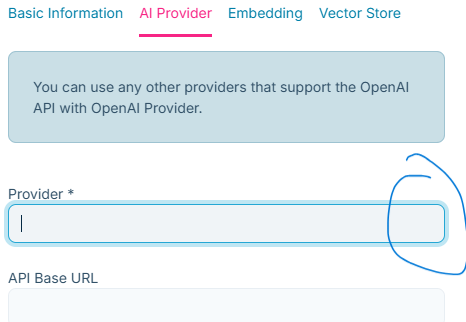
Thanks
Markdown supported.Copy, paste, or drag & drop images and files (max 100 MB per file, 100 MB total per post) -
0
Hi,
The documentation shows an older MVC modal. The Angular modal has a different layout and uses an autocomplete input for Provider. Click the field to see the available providers, such as
OpenAI: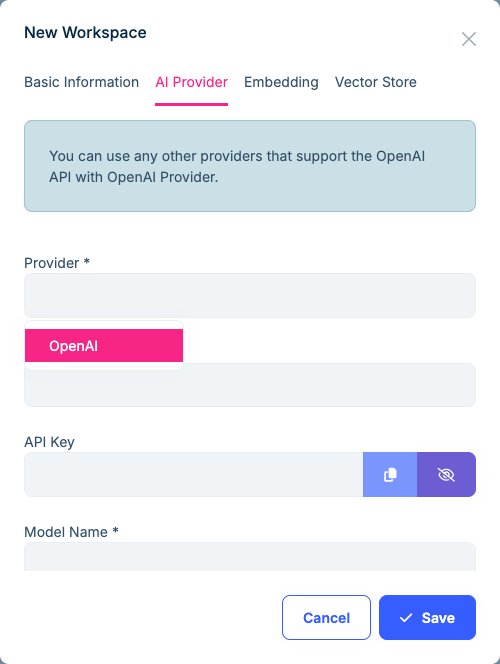
If no providers appear, please send the response from
/api/ai-management/workspaces/providersin your browser's Network tab.Thanks
Markdown supported.Copy, paste, or drag & drop images and files (max 100 MB per file, 100 MB total per post) -
0
Hi,
Clicking on the input doesn't bring up any options. No errors in the console either and the providers response in the Network tab looks clean.
{ "totalCount": 1, "items": [ { "provider": "OpenAI", "displayName": "OpenAI", "defaultApiBaseUrl": "https://api.openai.com/v1" } ] }
Thanks
Markdown supported.Copy, paste, or drag & drop images and files (max 100 MB per file, 100 MB total per post) -
0
Hi,
On my side, with the same response,
OpenAIappears when I click the field.Could you type
Openin Provider, keep the field focused for a second, and let me know:- whether any options appear
- whether typing sends a new
/api/ai-management/workspaces/providersrequest; if so, its status and response - whether the Elements tab contains an
ngb-typeahead-windowwithOpenAIinside, even if no options are visible
Please also send the installed versions of
@volo/abp.ng.ai-management,@volo/abp.commercial.ng.ui,@ng-bootstrap/ng-bootstrapand@angular/core.Thanks
Markdown supported.Copy, paste, or drag & drop images and files (max 100 MB per file, 100 MB total per post) -
0
Hi,
When I type Open into the Provider input, I do not see any options but I do see another provider call with the addition of a filter value set to Open. The source in the Elements tab does contain an ngb-typeahead-window with OpenAI in it.
@angular/core -> 22.1.0 @volo/abp.ng.ai-management -> 10.7.0 @volo/abp.commercial.ng.ui -> 10.7.0 (Lepton-x 5.7.0) @ng-bootstrap/ng-bootstrap -> 20.0.0
Thanks
Markdown supported.Copy, paste, or drag & drop images and files (max 100 MB per file, 100 MB total per post) -
0
Hi,
The
OpenAIoption is already in the popup. Could you try this temporary rule in your globalstyles.scssand let me know whether the options appear?body > ngb-typeahead-window { z-index: 1070 !important; }If they still don't appear, could you send your Angular project to liming.ma@volosoft.com, without
node_modules,dist,.angularor.git?If you can't share the whole project, please send
angular.json,package.json, your lock file,app.config.ts(orapp.module.ts),index.htmland your global styles, including imported files and third-party style overrides. Include any custom theme/layout or replacement components used on this page, with their styles.Before sending, remove credentials, tokens and private configuration from environment files,
.env,.npmrcand other config files.Thanks
Markdown supported.Copy, paste, or drag & drop images and files (max 100 MB per file, 100 MB total per post) -
0
Hi,
You're response seems to have changed after I got the email for your response.
Not sure if you still need the response of that code snippet, but here it is:
'{\n "parent": "BODY",\n "styles": {\n "display": "block",\n "visibility": "visible",\n "opacity": "1",\n "position": "absolute",\n "zIndex": "1070",\n "transform": "matrix(1, 0, 0, 1, 704, 342)",\n "color": "rgb(50, 81, 104)",\n "backgroundColor": "rgb(255, 255, 255)"\n },\n "rect": {\n "x": 704,\n "y": 342,\n "width": 160,\n "height": 51,\n "top": 342,\n "right": 864,\n "bottom": 393,\n "left": 704\n },\n "viewport": {\n "width": 1860,\n "height": 858\n },\n "topAtPopup": {\n "tag": "LABEL",\n "className": ""\n },\n "overlays": [\n {\n "tag": "NGB-MODAL-BACKDROP",\n "zIndex": "11001"\n },\n {\n "tag": "NGB-MODAL-WINDOW",\n "zIndex": "11002"\n }\n ]\n}'
I can't send the whole Angular project but will send the individual files you requested to your email.
BTW, in the workspace interface, is the model selection supposed to be a selection as well? Or is it a free text input?
Thanks
Markdown supported.Copy, paste, or drag & drop images and files (max 100 MB per file, 100 MB total per post) -
0
Hi,
I updated my previous answer. Sorry for the confusion.
Your
_abp.scsssets the modal toz-index: 11002, while the Provider popup is still at1070. Datepickers inside your modals have the same problem. Replace the1070rule in your globalstyles.scsswith:body > ngb-typeahead-window, body > ngb-datepicker.ngb-dp-body { z-index: 11002 !important; }With your styles, the options and the calendar are visible and selectable, and confirmation dialogs still stay above them.
Model Name is a text input with optional model suggestions, loaded using the selected provider, API Base URL and API Key. You can enter the model ID yourself even if no suggestions are available.
Thanks
Markdown supported.Copy, paste, or drag & drop images and files (max 100 MB per file, 100 MB total per post) -
0
Hi,
That did it! Thanks for the help! I talked to the team and the z-index change was made so that error/warning/confirm modals appear above other modals
BTW the model hints displayed for OpenAi are quite old nothing recent shown.
Thanks
Markdown supported.Copy, paste, or drag & drop images and files (max 100 MB per file, 100 MB total per post) -
0
Hi,
Thanks for confirming.
The model suggestions come from OpenAI, but the list is sorted by name and limited to 20 matches. Type part of the model ID, for example
gpt-5, to narrow the list. You can also enter the full model ID directly.Thanks
Markdown supported.Copy, paste, or drag & drop images and files (max 100 MB per file, 100 MB total per post)



