


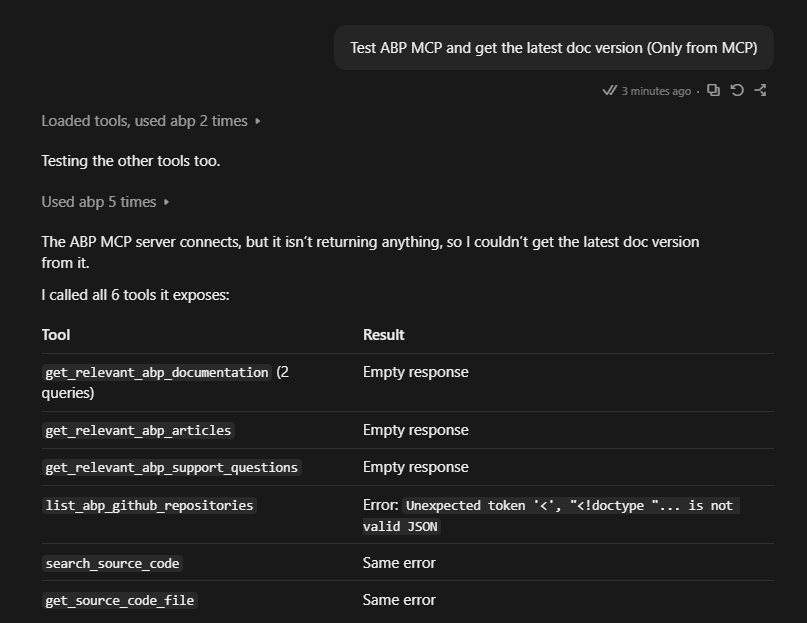
The ABP MCP server connects and lists its 6 tools, but no tool call returns any data.
Steps to reproduce:
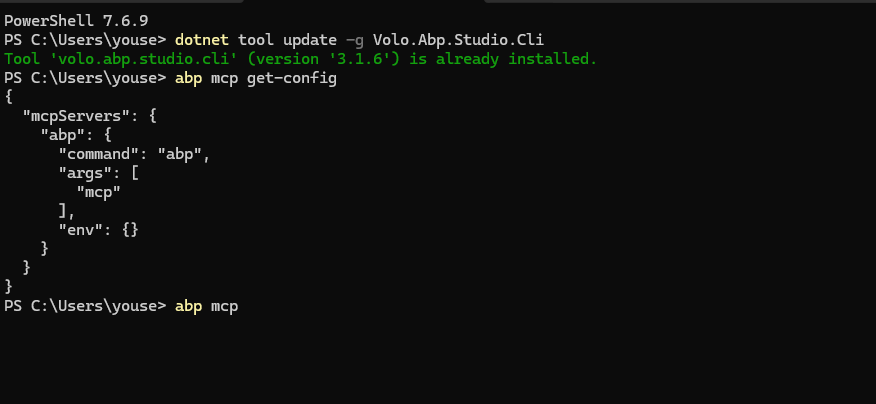
Connect the ABP MCP server in Claude Code (desktop app, Windows 11 & Mac). Call any tool, for example list_abp_github_repositories or get_relevant_abp_documentation with the query “latest ABP version release notes”.
Observed:
list_abp_github_repositories, search_source_code and get_source_code_file fail with: Unexpected token '<', "<!doctype "... is not valid JSON get_relevant_abp_documentation, get_relevant_abp_articles and get_relevant_abp_support_questions return an empty response for every query.
3 Answer(s)
-
0
- The
Unexpected token '<', "<!doctype "... is not valid JSONerror means the MCP tool call is receiving HTML instead of JSON. In practice (for ABP CLI/Studio), this typically happens when the underlying ABP backend endpoint returns an HTML error/login/forbidden page rather than the expected JSON payload. - For the ABP MCP server tools, the most common trigger for HTML responses is authentication/session/license state in ABP CLI/Studio being invalid/expired, so the server-side returns an HTML page (e.g., 403/redirect) and the client tries to parse it as JSON.
- Fix steps (do these exactly):
- Update ABP Studio CLI (you already have 3.1.6; keep it updated):
dotnet tool update -g Volo.Abp.Studio.Cli- Re-authenticate ABP CLI (this resets the auth tokens used by ABP’s remote services that MCP relies on):
abp logout abp login- Restart the MCP server process / reconnect it in Claude after login.
- If you still get empty responses for the “relevant docs/articles/support questions” tools after re-login: that indicates the MCP server still can’t access its backend data sources (typically the same auth issue). Re-check step (2) and ensure the
abp loginactually succeeds in the same environment/user that Claude is launchingabp mcpfrom.
Sources:
- https://abp.io/support/questions/3757
- https://abp.io/docs/10.7/cli/
This response was generated by AI. If it didn’t solve your problem, feel free to post a new answer — our support team will jump in to help you soon.
Markdown supported.Copy, paste, or drag & drop images and files (max 100 MB per file, 100 MB total per post) - The
-
0
I have done that. Same issue.
Markdown supported.Copy, paste, or drag & drop images and files (max 100 MB per file, 100 MB total per post)



