






0
christophe.baille created
- ABP Framework version: v4.3.0
- UI type: Angular
- DB provider: EF Core
- Tiered (MVC) or Identity Server Separated (Angular): no
- Exception message and stack trace: No
- Steps to reproduce the issue:
- Login and open any list view containing more than 10 records
- If not opened from amobile, go to develop mode on your browser and click "Responsive Mode"
The result is that the paginations buttons do not looks good:
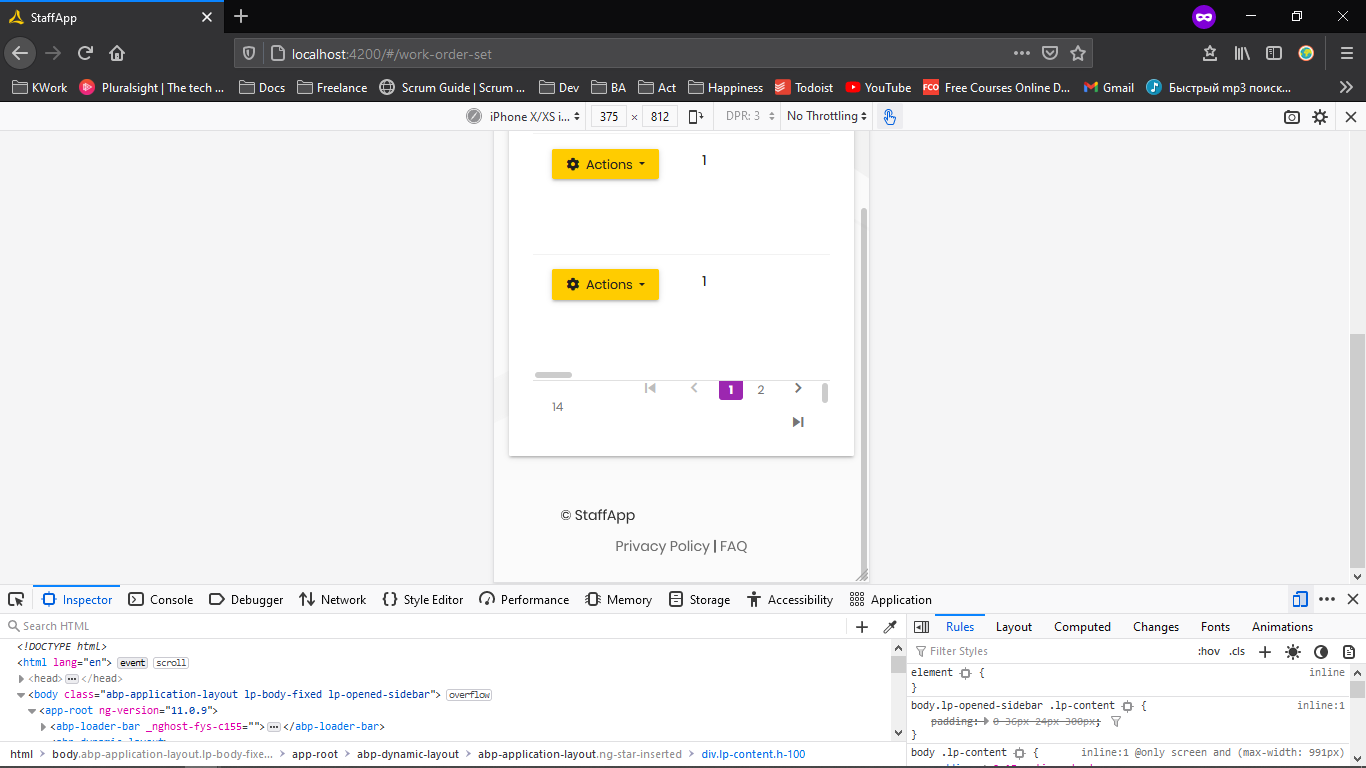
I did see a similar issue which have been fixed on version 4.2 apparently but for MVC only
https://github.com/abpframework/abp/issues/7183
https://github.com/abpframework/abp/commit/cbc61af768dd4ffc786df47db0038856bf3e6fcc
Is there any schedule to be fixed for Angular (if not done already), or any way to fix it?
Update on 13/05/2021: I upgrade to ABP.IO 4.3.0 and still got the issue (I created the error while in version 4.2.1)
Thanks
Markdown supported.
Copy, paste, or drag & drop images and files (max 100 MB per file, 100 MB total per post)
2 Answer(s)
-
0
Hello,
This is a known issue of the datatable library used in angular template. It still has not been fixed but there is a piece of css shared in the issue that can solve it for you. You can find it here
Markdown supported.Copy, paste, or drag & drop images and files (max 100 MB per file, 100 MB total per post) -
0
I just try and fixed my issue yes.
Thanks a lot
Markdown supported.Copy, paste, or drag & drop images and files (max 100 MB per file, 100 MB total per post)


