






- ABP Framework version: v7.0.2
- UI type: Angular
- DB provider: EF Core
- Tiered (MVC) or Identity Server Separated (Angular): yes
- Exception message and stack trace: ERROR TypeError: item_r1.visible is not a function
- Steps to reproduce the issue:" Create a new module via abp suite, choose "basic theme" then run the angular application.
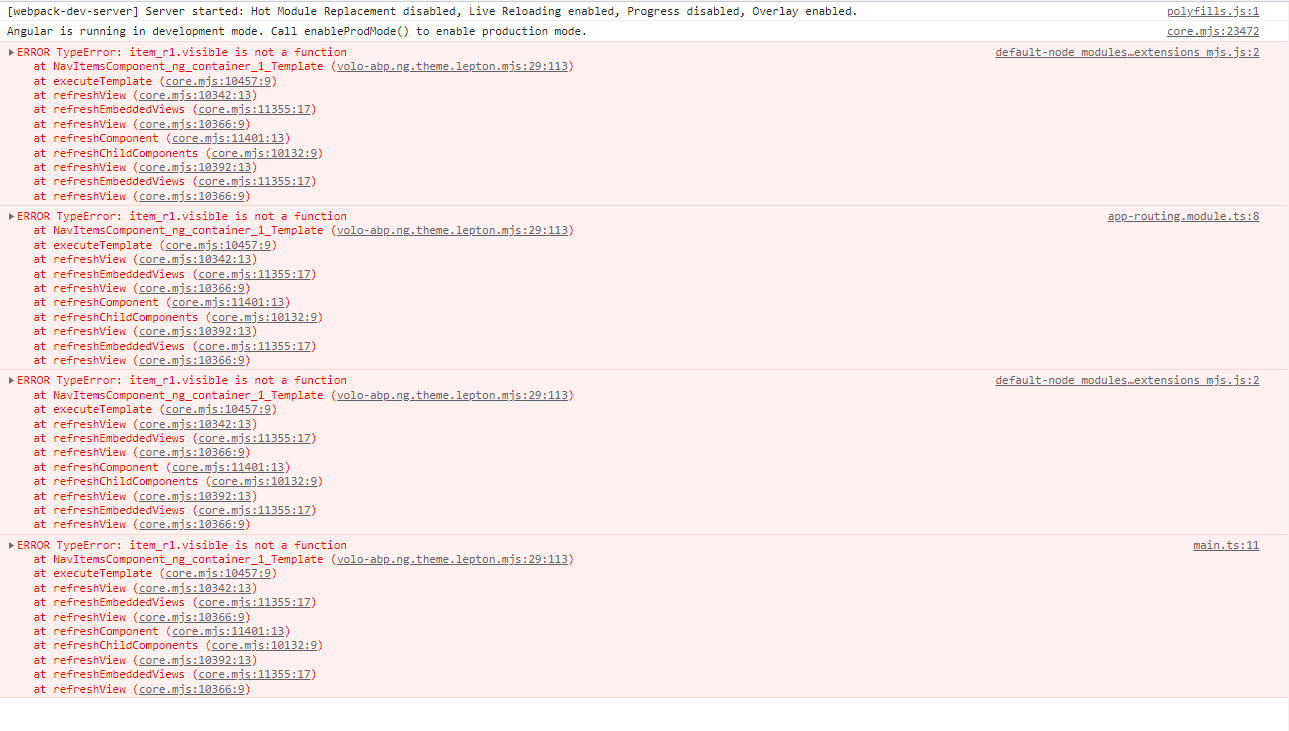
I need the basic theme in order to customize another theme.
Thank you.
10 Answer(s)
-
0
Could you describe how to produce that issue ? I have created an Angular app with AbpSuite. I have added a module, but the module template doesn't have a UI selection option. Please give me more information to produce issue.
Markdown supported.Copy, paste, or drag & drop images and files (max 100 MB per file, 100 MB total per post) -
0
Hi Mahmut, The below image is steps to reproduce, and about choosing a basic template, it was my bad, I just picked the module after choosing the basic template from the application template.
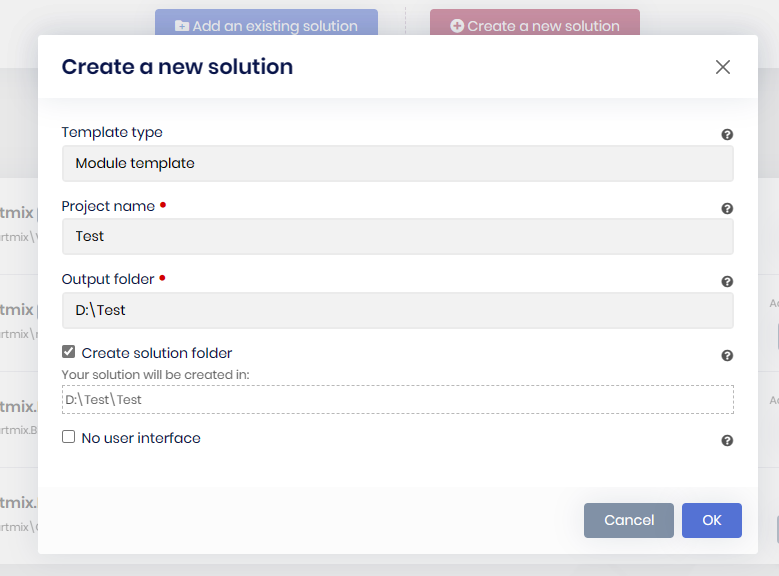
Another question what would be better if I am planning to change the whole theme? starting from basic or lepton theme?
Regards, Mustafa Issa.
Markdown supported.Copy, paste, or drag & drop images and files (max 100 MB per file, 100 MB total per post) -
0
I have the same problem
I upgraded my angular project's packages from 7.0.0 to 7.1.0 ERROR TypeError: item_r1.visible is not a function
When I upgrade from 7.0.0 to 7.0.2 everything is normal
Markdown supported.Copy, paste, or drag & drop images and files (max 100 MB per file, 100 MB total per post) -
0
I have the same problem
I upgraded my angular project's packages from 7.0.0 to 7.1.0 ERROR TypeError: item_r1.visible is not a function
When I upgrade from 7.0.0 to 7.0.2 everything is normal
Could you describe your steps? You created an app in 7.0, updated to 7.1, and got the error?
Markdown supported.Copy, paste, or drag & drop images and files (max 100 MB per file, 100 MB total per post) -
0
Hi Mahmut, The below image is steps to reproduce, and about choosing a basic template, it was my bad, I just picked the module after choosing the basic template from the application template.
Another question what would be better if I am planning to change the whole theme? starting from basic or lepton theme?
Regards, Mustafa Issa.
If I changed the whole theme in ABP, I would choose the basic theme because that is much lighter. there is no providers or theme based logics in "Basic Theme". it just plain bootstrap implemetation.
Markdown supported.Copy, paste, or drag & drop images and files (max 100 MB per file, 100 MB total per post) -
0
I have produced the issue. For a now, you can use 7.0.2 or use Lepton-X instead of Lepton. we will release a patch in the soon.
Markdown supported.Copy, paste, or drag & drop images and files (max 100 MB per file, 100 MB total per post) -
0
Also there is a solution for this bug You can change your buggy navbar component with ABP Component-Replacement https://docs.abp.io/en/abp/latest/UI/Angular/Component-Replacement
https://gist.github.com/mahmut-gundogdu/6e1db9cebc6084274ac4d56be8aac963
when the following week. The issue will be resolved with the release of a new patch.
Markdown supported.Copy, paste, or drag & drop images and files (max 100 MB per file, 100 MB total per post) -
0
For the angular follow the steps (just a there is a minor issue in docs, use
yarn add @volosoft/abp.ng.theme.lepton-xinstead of @ previewyarn add @volosoft/abp.ng.theme.lepton-x@previewhttps://docs.abp.io/en/commercial/latest/themes/lepton-x/angularfor the backend go to
host/YourModuleName.AuthServer/package.jsonremove"@volo/abp.aspnetcore.mvc.ui.theme.lepton": "xxx",add"@volosoft/abp.ng.theme.lepton-x": "^2.0.0"openhost/YourModuleName.AuthServer/YourModuleName.AuthServer.csprojwith a text editor. remove<PackageReference Include="Volo.Abp.LeptonTheme.Management.HttpApi" Version="7.x.0" /> <PackageReference Include="Volo.Abp.LeptonTheme.Management.Application" Version="7.x.0" /> <PackageReference Include="Volo.Abp.LeptonTheme.Management.Domain" Version="7.x.0" />find
<PackageReference Include="Volo.Abp.AspNetCore.Mvc.UI.Theme.Lepton" Version="7.x.0" />replace
<PackageReference Include="Volo.Abp.AspNetCore.Mvc.UI.Theme.LeptonX" Version="2.0.0" />open
MyModuleProAppAuthServerModule.cswith text editor//Remove using Volo.Abp.LeptonTheme; using Volo.Abp.LeptonTheme.Management; //Remove typeof(LeptonThemeManagementHttpApiModule), typeof(LeptonThemeManagementApplicationModule), typeof(LeptonThemeManagementDomainModule), // Replace //using Volo.Abp.AspNetCore.Mvc.UI.Theme.Lepton; using Volo.Abp.AspNetCore.Mvc.UI.Theme.LeptonX;run abp install-libs on
host/YourModuleName.AuthServerthen open
YourModuleName.HttpApi.Host.csprojwith text editor// remove <PackageReference Include="Volo.Abp.LeptonTheme.Management.Application" Version="7.x.0" /> <PackageReference Include="Volo.Abp.LeptonTheme.Management.Domain" Version="7.x.0" /> //replace // <PackageReference Include="Volo.Abp.AspNetCore.Mvc.UI.Theme.Lepton" Version="7.1.0" /> <PackageReference Include="Volo.Abp.AspNetCore.Mvc.UI.Theme.LeptonX" Version="2.0.0" />then open
YourModuleNameHttpApiHostModule.cs//Remove using Volo.Abp.LeptonTheme.Management; //... typeof(LeptonThemeManagementApplicationModule), typeof(LeptonThemeManagementDomainModule), //Replace // using Volo.Abp.AspNetCore.Mvc.UI.Theme.Lepton; using Volo.Abp.AspNetCore.Mvc.UI.Theme.LeptonX; //... // typeof(AbpAspNetCoreMvcUiLeptonThemeModule), typeof(AbpAspNetCoreMvcUiLeptonXThemeModule),then your backend and frontend work with Lepton-X
Markdown supported.Copy, paste, or drag & drop images and files (max 100 MB per file, 100 MB total per post)



