0
deathmid2233@gmail.com created
-
ABP framework version: v7.0.0 - UI Type: Angular
- Database provider: EF Core
- Hierarchical (MVC) or Identity Server Separation (Angular): No
- Exception message and stack trace:
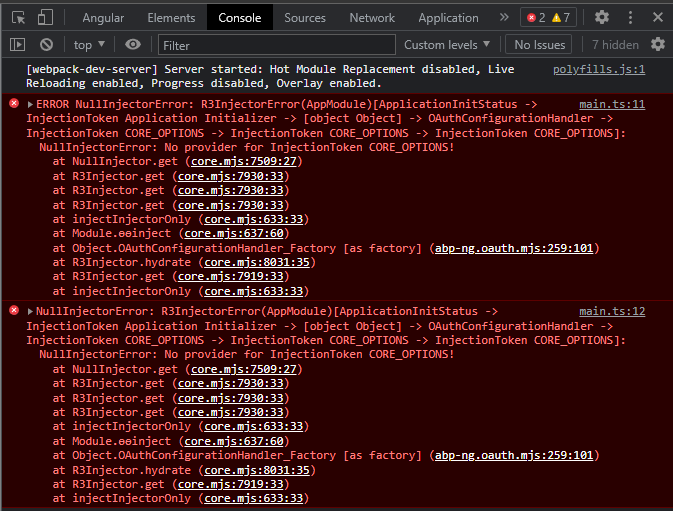
- ! image.png
- Steps to reproduce the problem:"
- Run the angular app, the compilation is successful. Open the browser console to see the error in the screenshot. core.mjs:8416 错误 NullInjectorError: R3InjectorError(AppModule)[ApplicationInitStatus -> InjectionToken Application Initializer -> [object Object] -> OAuthConfigurationHandler -> InjectionToken CORE_OPTIONS -> InjectionToken CORE_OPTIONS -> InjectionToken CORE_OPTIONS]: NullInjectorError: No provider for InjectionToken CORE_OPTIONS! at NullInjector.get(core.mjs:7509:27) at R3Injector.get(core.mjs:7930:33) at R3Injector.get(core.mjs:7930:33) at R3Injector.get(core.mjs:7930:33) at injectInjectorOnly (core.mjs:633:33) In Module.ɵɵinject (core.mjs:637:60) at Object.OAuthConfigurationHandler_Factory [as factory] (abp-ng.oauth.mjs:259:101) at R3Injector.hydrate(core.mjs:8031:35) at R3Injector.get(core.mjs:7919:33) at injectInjectorOnly (core.mjs:633:33)
I tried deleting node_modules, package-lock.json, clearing npm cache and trying npm install again, but it still doesn't work!
Markdown supported.
Copy, paste, or drag & drop images and files (max 100 MB per file, 100 MB total per post)
3 Answer(s)
-
0
CORE_OPTIONS is defined in CoreModule.Could you please check your app to see if Root() is defined?
and The app is new created app or how can I produce the issue?
I have created new app and tested, There is no issue.
Markdown supported.Copy, paste, or drag & drop images and files (max 100 MB per file, 100 MB total per post) -
0
CORE_OPTIONS is defined in CoreModule.Could you please check your app to see if Root() is defined?
and The app is new created app or how can I produce the issue?
I have created new app and tested, There is no issue.
This is my
app.modules.tsfile:import { HTTP_INTERCEPTORS, HttpClientModule } from '@angular/common/http'; import { HttpErrorComponent, ThemeLeptonModule } from '@volo/abp.ng.theme.lepton'; import { APP_ROUTE_PROVIDER } from './route.provider'; import { AbpOAuthModule } from '@abp/ng.oauth'; import { AccountAdminConfigModule } from '@volo/abp.ng.account/admin/config'; import { AccountPublicConfigModule } from '@volo/abp.ng.account/public/config'; import { AppComponent } from './app.component'; import { AppRoutingModule } from './app-routing.module'; import { AuditLoggingConfigModule } from '@volo/abp.ng.audit-logging/config'; import { BrowserAnimationsModule } from '@angular/platform-browser/animations'; import { BrowserModule } from '@angular/platform-browser'; import { CURRENCIES_CURRENCY_ROUTE_PROVIDER } from './currencies/currency/providers/currency-route.provider'; import { CommercialUiConfigModule } from '@volo/abp.commercial.ng.ui/config'; import { CoreModule } from '@abp/ng.core'; import { AppHttpInterceptor } from './http-interceptor'; import { FeatureManagementModule } from '@abp/ng.feature-management'; import { FormsModule } from '@angular/forms'; import { GdprConfigModule } from '@volo/abp.ng.gdpr/config'; import { IdentityConfigModule } from '@volo/abp.ng.identity/config'; import { LanguageManagementConfigModule } from '@volo/abp.ng.language-management/config'; import { NgModule } from '@angular/core'; import { OpeniddictproConfigModule } from '@volo/abp.ng.openiddictpro/config'; import { SaasConfigModule } from '@volo/abp.ng.saas/config'; import { SettingManagementConfigModule } from '@abp/ng.setting-management/config'; import { TextTemplateManagementConfigModule } from '@volo/abp.ng.text-template-management/config'; import { ThemeSharedModule } from '@abp/ng.theme.shared'; import { environment } from '../environments/environment'; import { registerLocale } from '@volo/abp.ng.language-management/locale'; import { LocationStrategy, HashLocationStrategy } from '@angular/common'; @NgModule({ declarations: [AppComponent], imports: [ AbpOAuthModule.forRoot(), BrowserModule, BrowserAnimationsModule, AppRoutingModule, CoreModule.forRoot({ environment, registerLocaleFn: registerLocale(), }), ThemeSharedModule.forRoot({ httpErrorConfig: { errorScreen: { component: HttpErrorComponent, forWhichErrors: [401, 403, 404, 500], hideCloseIcon: true, }, }, }), AccountAdminConfigModule.forRoot(), AccountPublicConfigModule.forRoot(), IdentityConfigModule.forRoot(), LanguageManagementConfigModule.forRoot(), SaasConfigModule.forRoot(), AuditLoggingConfigModule.forRoot(), OpeniddictproConfigModule.forRoot(), TextTemplateManagementConfigModule.forRoot(), SettingManagementConfigModule.forRoot(), ThemeLeptonModule.forRoot(), CommercialUiConfigModule.forRoot(), FeatureManagementModule.forRoot(), GdprConfigModule.forRoot({ cookieConsent: { privacyPolicyUrl: 'gdpr-cookie-consent/privacy', cookiePolicyUrl: 'gdpr-cookie-consent/cookie', }, }), FormsModule, HttpClientModule, ], providers: [ APP_ROUTE_PROVIDER, CURRENCIES_CURRENCY_ROUTE_PROVIDER, { provide: HTTP_INTERCEPTORS, useClass: AppHttpInterceptor, multi: true, }, { provide: LocationStrategy, useClass: HashLocationStrategy }, ], bootstrap: [AppComponent], }) export class AppModule {}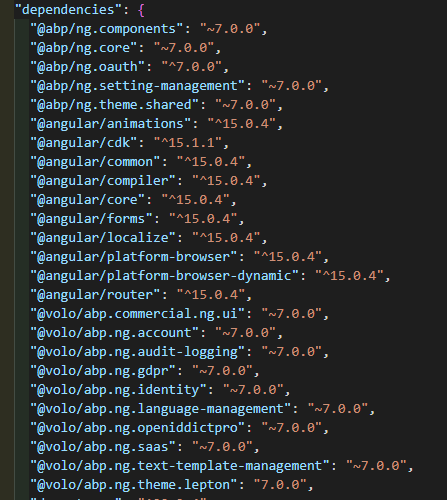
Please check it for me,thank you!
Markdown supported.Copy, paste, or drag & drop images and files (max 100 MB per file, 100 MB total per post) -
0
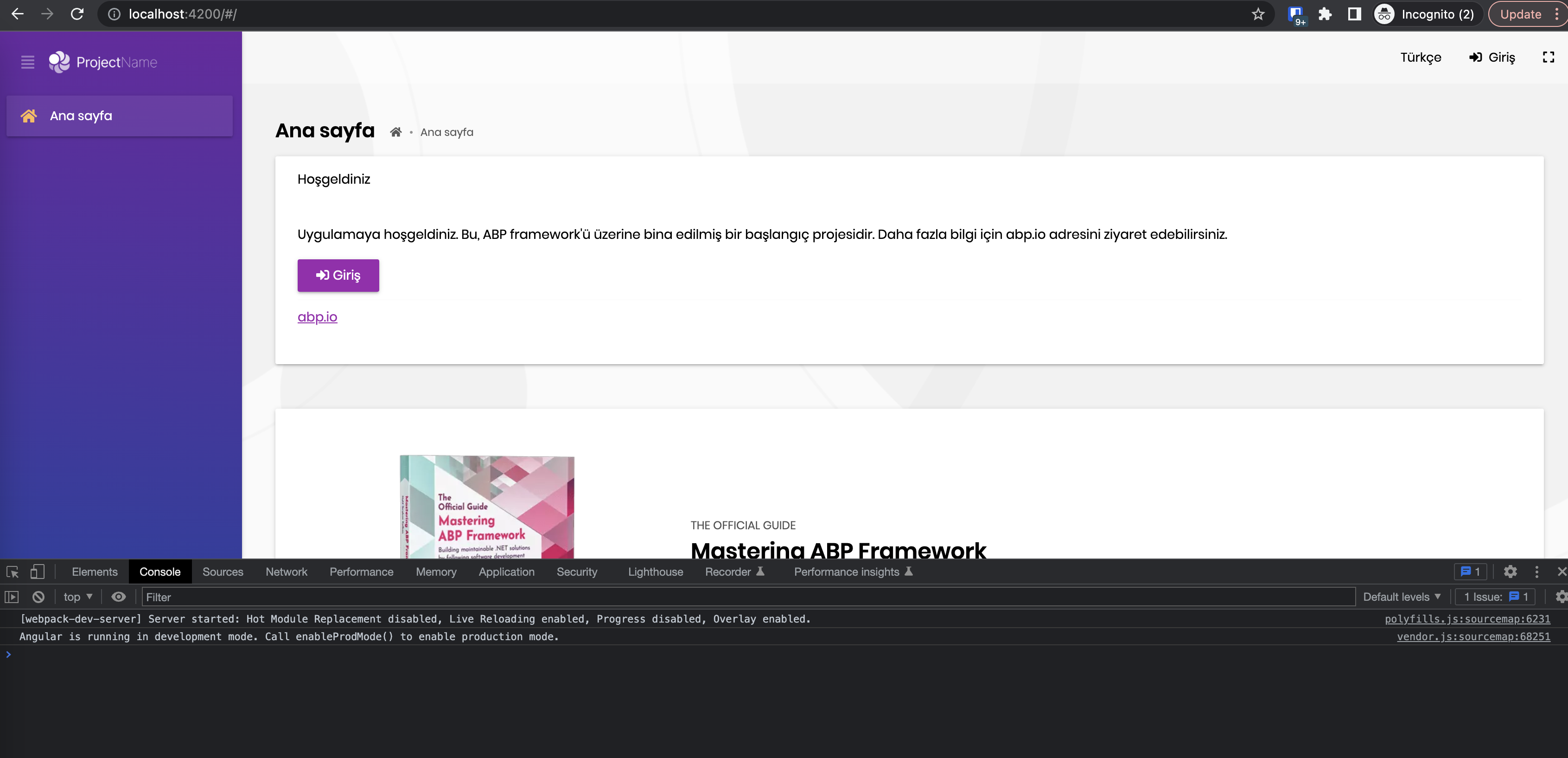
I have copied your app.module.ts in newly created abp app. It works. I couldn't produce
 Markdown supported.Copy, paste, or drag & drop images and files (max 100 MB per file, 100 MB total per post)