






- ABP Framework version: v7.2.2
- UI Type: Blazor WASM
- Database System: EF Core/PostgreSQL
- Tiered (for MVC) or Auth Server Separated (for Angular): yes
Hi,
I am trying to reference and load an XML file into an XMLDocument type (.net) from my Blazor MenuContributor class so it can be used to dynamically build a portion of the left navigation menu. I am running in a local docker environment and have the Public site sup up as the Blazor Host. How do I load an XML file using the VirtualFileSystem or is there a better way where I can just reference the physical file directly?
Thanks.
3 Answer(s)
-
0
How do I load an XML file using the VirtualFileSystem or is there a better way where I can just reference the physical file directly?
Hi,
You can check the document to know How use the Virtual File System: https://docs.abp.io/en/abp/latest/Virtual-File-System
Markdown supported.Copy, paste, or drag & drop images and files (max 100 MB per file, 100 MB total per post) -
0
You didn't answer my question. Yes, I've looked at this documentation several times, but it this link DOES NOT address doing this within a local docker container and being hosted by the ABP suite generated public site.
Could you please provide guidance as to the question I am asking vs just sending a link to documentation that has been read over several times.
Thanks.
Markdown supported.Copy, paste, or drag & drop images and files (max 100 MB per file, 100 MB total per post) -
0
Hi,
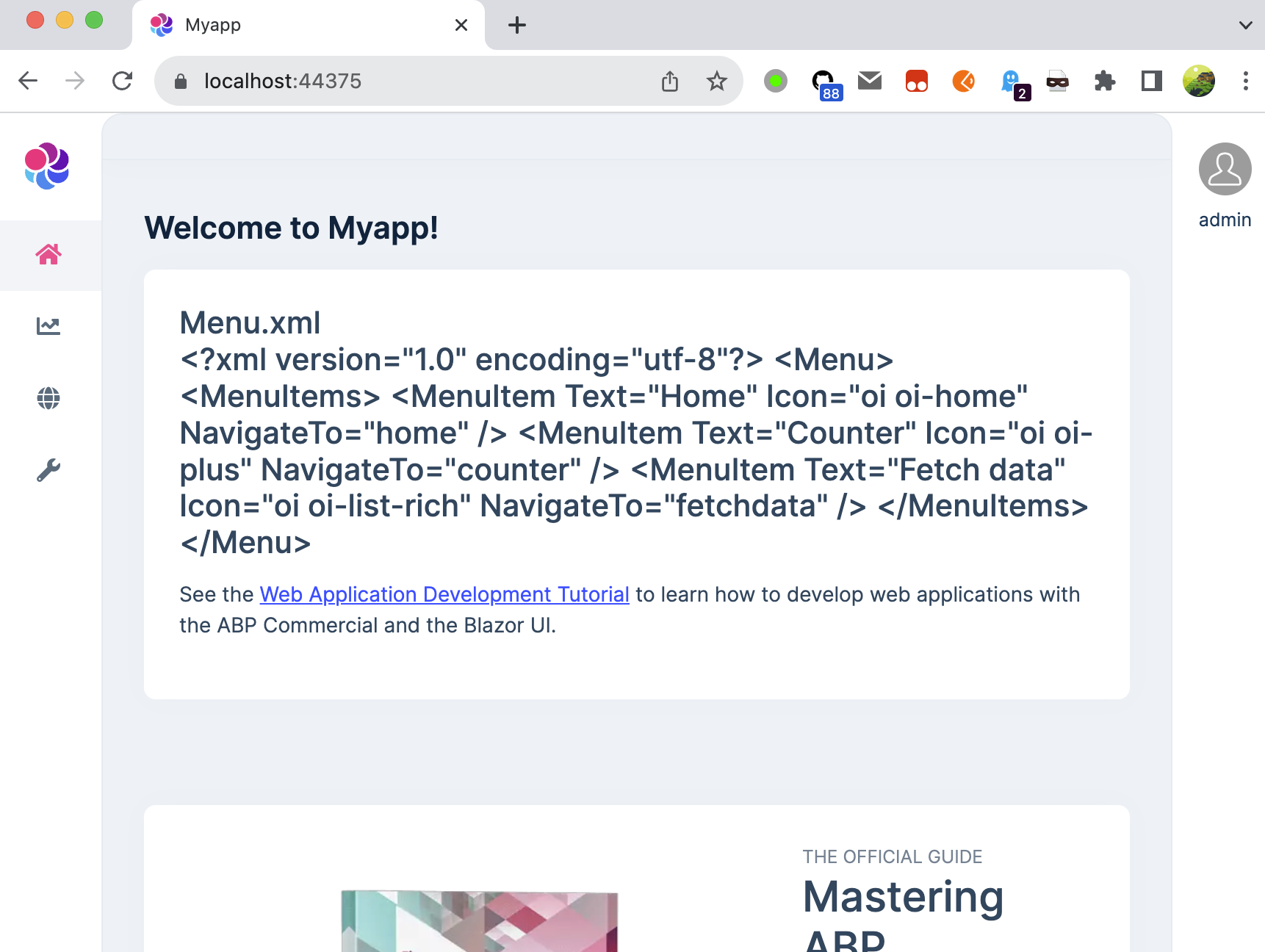
I don't know what is the exact question, I can use the virtual file system to read XML files in the Blazor application.
Here is my code:
<?xml version="1.0" encoding="utf-8"?>
<Menu>
  <MenuItems>
    <MenuItem Text="Home" Icon="oi oi-home" NavigateTo="home" />
    <MenuItem Text="Counter" Icon="oi oi-plus" NavigateTo="counter" />
    <MenuItem Text="Fetch data" Icon="oi oi-list-rich" NavigateTo="fetchdata" />
  </MenuItems>
</Menu>

---------------

Configure<AbpVirtualFileSystemOptions>(options =>
{
    options.FileSets.AddEmbedded<MyappBlazorModule>(baseFolder: "Resources");
});


---------------

public partial class Index
{
    [Inject]
    public IVirtualFileProvider VirtualFileProvider { get; set; }

    private IFileInfo FileInfo { get; set; }

    protected override void OnInitialized()
    {
        FileInfo = VirtualFileProvider.GetFileInfo("/Myapp/Blazor/Resources/Menu.xml");
    }
}


---------------

<h4>
    @FileInfo.Name
    <br/>
    @FileInfo.ReadAsString()
</h4>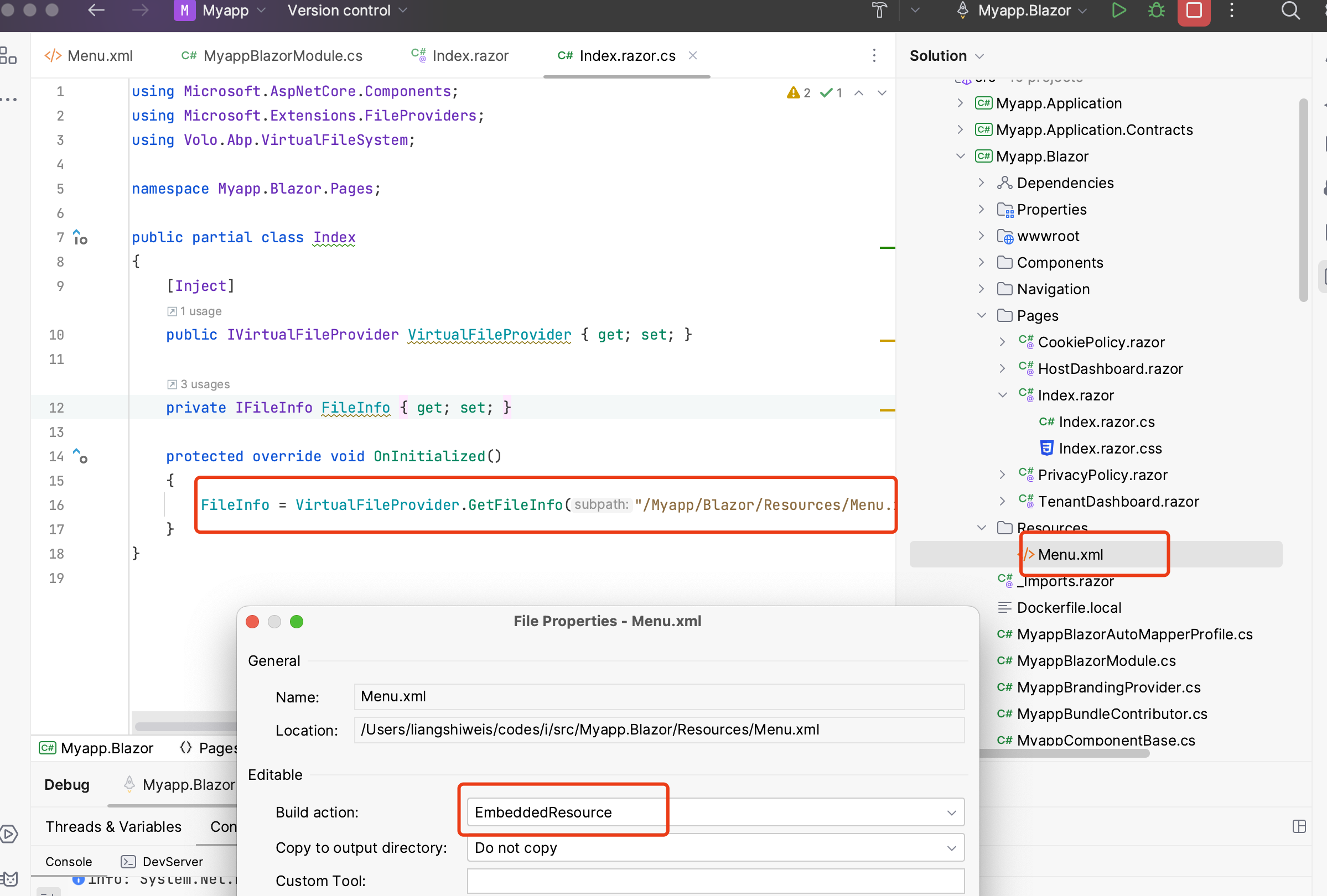
 Markdown supported.Copy, paste, or drag & drop images and files (max 100 MB per file, 100 MB total per post)


