






- ABP Framework version: v7.2.3
- UI Type: Angular
- Database System: EF Core (SQL Server)
- Tiered (for MVC) or Auth Server Separated (for Angular): no
- Exception message and full stack trace:
- Steps to reproduce the issue:
ABP commercial has LeptonX theme as its default theme. There are 4 styles in LeptonX: Light, Dark, Dim, and System. My app has Angular UI. And the default theme style seems to be System - it changes to Light or Dark automatically when the OS settings change.
I cannot find any documentation on how to change this behavior. I want to fix the style to Light mode always in Angular UI.
7 Answer(s)
-
0
Hi,
Could you please try to change
ConfigureThemein YourProject.Host -> HttpApiHostModule.cs fromSystemtoLight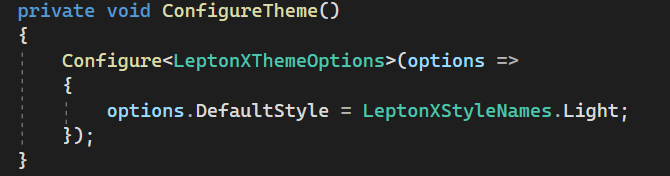 Markdown supported.Copy, paste, or drag & drop images and files (max 100 MB per file, 100 MB total per post)
 -
0
Thanks for your reply. But I am using Angular UI, and that does not work.
Markdown supported.Copy, paste, or drag & drop images and files (max 100 MB per file, 100 MB total per post) -
0
Hi, I am also using Angular UI, it works at my end. Could you please check your solution explorer at backend it has solution
***.HttpAPI.Hostat the end of list.Markdown supported.Copy, paste, or drag & drop images and files (max 100 MB per file, 100 MB total per post) -
0
We will add easier way to define default theme. I have opened issue. But for a now. go to your app.module.ts
import {LPX_THEMES,LPX_THEME_STYLES_DEFAULTS} from "@volosoft/ngx-lepton-x"; const defaultThemes = [...LPX_THEME_STYLES_DEFAULTS].map((theme) => { const defaultTheme = theme.styleName === "dim"; return {...theme,defaultTheme} }) // add this as proveder/ { provide:LPX_THEMES, useValue: defaultThemes }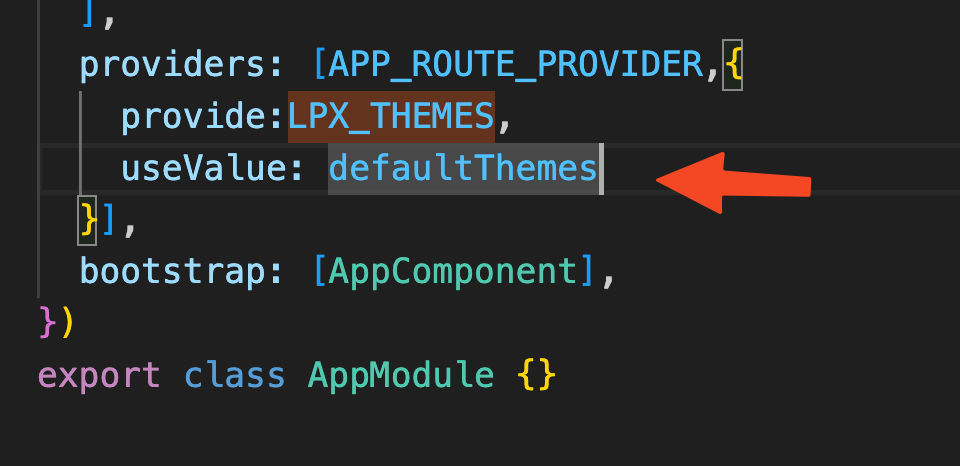 Markdown supported.Copy, paste, or drag & drop images and files (max 100 MB per file, 100 MB total per post)
 -
0
Hi, I am also using Angular UI, it works at my end. Could you please check your solution explorer at backend it has solution
***.HttpAPI.Hostat the end of list.Yes. You should test in Chrome Incognito Window.
Markdown supported.Copy, paste, or drag & drop images and files (max 100 MB per file, 100 MB total per post) -
0
Found the solution.
-- app.component.cs --
import { ThemeService, StyleNames, lightTheme } from '@volosoft/ngx-lepton-x';

export class AppComponent {

  constructor(private themeService: ThemeService) {
    if (this.themeService.selectedStyle.styleName != StyleNames.Light) {
      this.themeService.setTheme(lightTheme);
    }
  }
}
Markdown supported.Copy, paste, or drag & drop images and files (max 100 MB per file, 100 MB total per post)



