






Hi,
I was wondering if there is a way to add additional settings to Administration pages,
Beside, I want to add main menu and sub menus in Angular?
ABP Framework version: v.7.3.2 UI Type: Angular Database System: MongoDB Tiered (for MVC) or Auth Server Separated (for Angular): yes Exception message and full stack trace: Steps to reproduce the issue:
8 Answer(s)
-
0
Hi
You can check those:
https://docs.abp.io/en/abp/latest/Modules/Setting-Management#angular-ui https://docs.abp.io/en/abp/latest/UI/Angular/Modifying-the-Menu#how-to-add-a-navigation-element
Markdown supported.Copy, paste, or drag & drop images and files (max 100 MB per file, 100 MB total per post) -
0
I mean Administration, not Setting tab
Markdown supported.Copy, paste, or drag & drop images and files (max 100 MB per file, 100 MB total per post) -
0
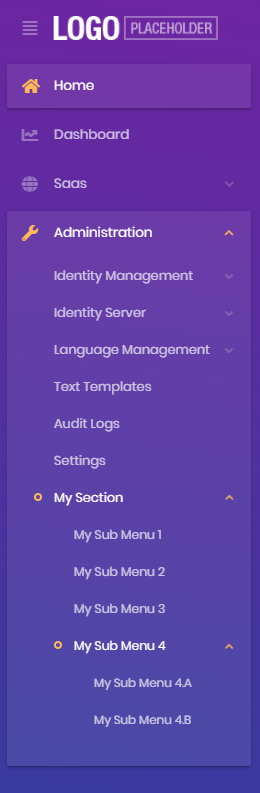 Markdown supported.Copy, paste, or drag & drop images and files (max 100 MB per file, 100 MB total per post)
 -
0
See: https://docs.abp.io/en/abp/latest/UI/Angular/Modifying-the-Menu#how-to-add-a-navigation-element
For example:
 {
    path: '/your-path',
    name: 'Your navigation',
    parentName: eThemeSharedRouteNames.Administration
    order: 101,
    iconClass: 'fas fa-question-circle',
    requiredPolicy: 'permission key here',
    layout: eLayoutType.application,
  },
Markdown supported.Copy, paste, or drag & drop images and files (max 100 MB per file, 100 MB total per post) -
0
How about registering the route for that? I mean, click on the menu to open my component
Markdown supported.Copy, paste, or drag & drop images and files (max 100 MB per file, 100 MB total per post) -
0
Hi,
How about registering the route for that? I mean, click on the menu to open my component
It uses routing to reach components.
Maybe you can check the Tutorials first: https://docs.abp.io/en/commercial/latest/tutorials/book-store/part-1?UI=NG&DB=EF
Markdown supported.Copy, paste, or drag & drop images and files (max 100 MB per file, 100 MB total per post) -
0
It works now :D
thank you @liangshiwei
Markdown supported.Copy, paste, or drag & drop images and files (max 100 MB per file, 100 MB total per post) -
0
: )
Markdown supported.Copy, paste, or drag & drop images and files (max 100 MB per file, 100 MB total per post)


