0
dev@veek.vn created
Hi,
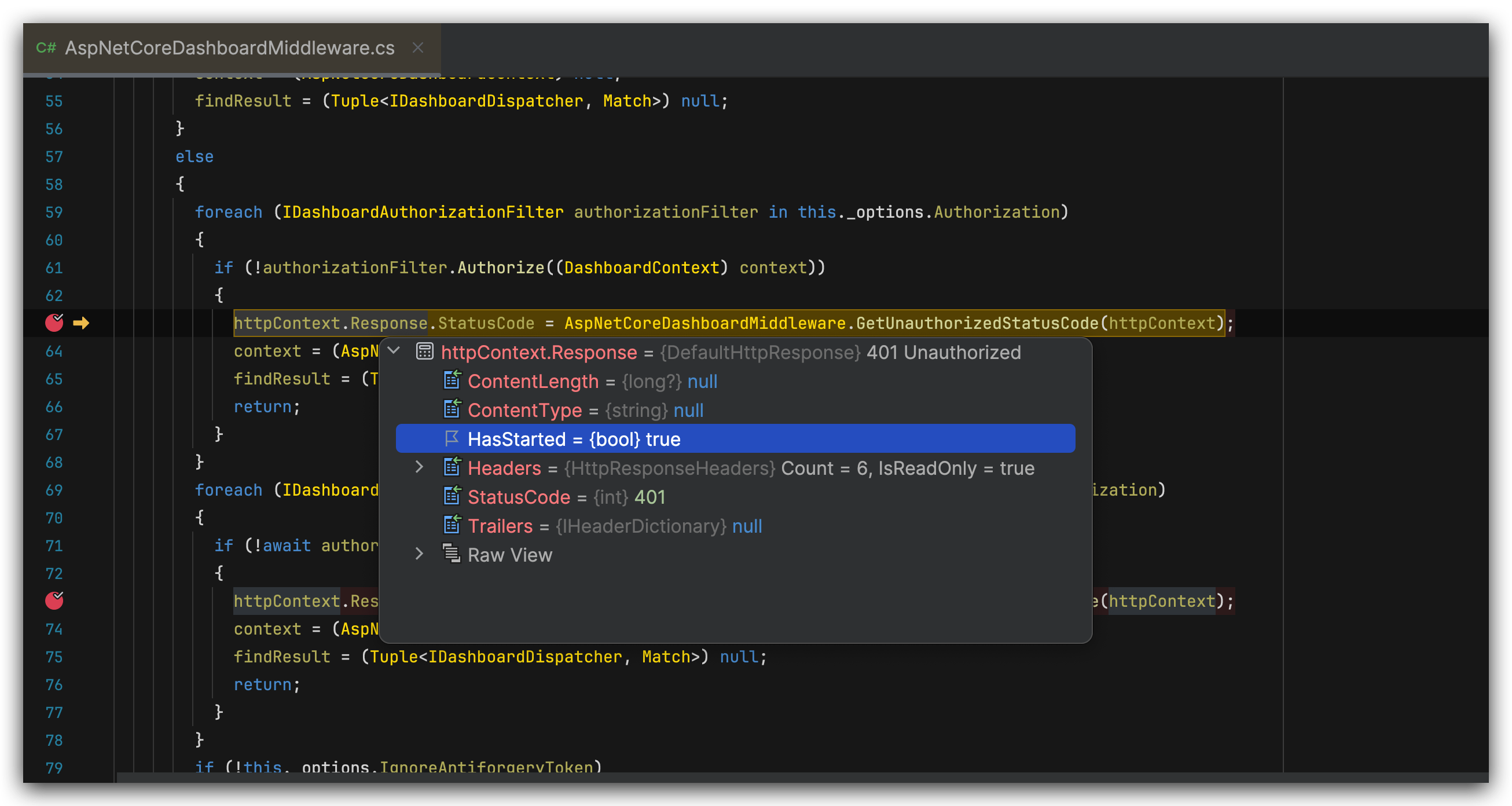
I created a job project and installed Hangfire, but I encountered an issue when running it. Please help me. If you need the full code, could you please provide me with an email address?
JobModule:
using AA.Core.BackOffice.Configurations;
using AA.Core.BackOffice.Jobs;
using AA.Core.BackOffice.MongoDB;
using Hangfire;
using Hangfire.Console;
using Hangfire.Mongo;
using Hangfire.Mongo.Migration.Strategies;
using Hangfire.Mongo.Migration.Strategies.Backup;
using Volo.Abp;
using Volo.Abp.AspNetCore.Mvc;
using Volo.Abp.AspNetCore.Serilog;
using Volo.Abp.Autofac;
using Volo.Abp.AutoMapper;
using Volo.Abp.Modularity;
using Volo.Abp.BackgroundJobs.Hangfire;
using HangfireBasicAuthenticationFilter;
using MongoDB.Driver;

namespace AA.Core.BackOffice;

[DependsOn(typeof(AbpAutofacModule),
              typeof(AbpAspNetCoreSerilogModule),
              typeof(AbpBackgroundJobsHangfireModule),
              typeof(BackOfficeApplicationModule),
              typeof(BackOfficeDomainModule),
              typeof(BackOfficeMongoDbModule),
              typeof(AbpAutoMapperModule),
              typeof(AbpAspNetCoreMvcModule))]
public class BackOfficeJobModule : AbpModule
{
    public override void ConfigureServices(ServiceConfigurationContext context)
    {
        var configuration = context.Services.GetConfiguration();

        ConfigureHangfire(context, configuration);

        context.Services.AddAutoMapperObjectMapper<BackOfficeJobModule>();
        Configure<AbpAutoMapperOptions>(options => { options.AddMaps<BackOfficeJobModule>(validate: true); });

        var backOfficeApiConfig = (configuration.GetSection(nameof(BackOfficeApi))).Get<BackOfficeApi>();
        if (backOfficeApiConfig != null)
        {
            context.Services.AddSingleton(backOfficeApiConfig);
        }
    }

    private void ConfigureHangfire(ServiceConfigurationContext context, IConfiguration configuration)
    {
        // hangfire - disable retry
        GlobalJobFilters.Filters.Add(new AutomaticRetryAttribute { Attempts = 0 });

        var mongoUrlBuilder = new MongoUrlBuilder(configuration.GetConnectionString("Default"));
        var mongoClient     = new MongoClient(mongoUrlBuilder.ToMongoUrl());

        context.Services.AddHangfire(config => config.SetDataCompatibilityLevel(CompatibilityLevel.Version_170)
                                                     .UseSimpleAssemblyNameTypeSerializer()
                                                     .UseRecommendedSerializerSettings()
                                                     .UseConsole()
                                                     .UseMongoStorage(mongoClient,
                                                                      mongoUrlBuilder.DatabaseName,
                                                                      new MongoStorageOptions
                                                                      {
                                                                          MigrationOptions = new MongoMigrationOptions
                                                                          {
                                                                              MigrationStrategy = new MigrateMongoMigrationStrategy(),
                                                                              BackupStrategy    = new CollectionMongoBackupStrategy()
                                                                          },
                                                                          Prefix                  = "HangfireJob",
                                                                          CheckConnection         = false,
                                                                          CheckQueuedJobsStrategy = CheckQueuedJobsStrategy.TailNotificationsCollection
                                                                      }));

        context.Services.AddHangfireServer(serverOptions =>
        {
            serverOptions.ServerName    = "HangfireJob";
            serverOptions.ServerTimeout = TimeSpan.FromMinutes(10);
        });
    }

    public override void OnApplicationInitialization(ApplicationInitializationContext context)
    {
        var app = context.GetApplicationBuilder();
        var env = context.GetEnvironment();

        app.UseForwardedHeaders();

        // Configure the HTTP request pipeline.
        if (env.IsDevelopment())
        {
            app.UseExceptionHandler("/Error");

            // // The default HSTS value is 30 days. You may want to change this for production scenarios, see https://aka.ms/aspnetcore-hsts.
            // app.UseHsts();
        }

        app.UseHsts();

        app.UseStaticFiles();
        app.UseRouting();
        app.UseConfiguredEndpoints();

        app.UseHangfireDashboard("", new DashboardOptions
        {
            Authorization = new[] { new HangfireCustomBasicAuthenticationFilter { User = "admin", Pass = "123321" } }
        });

        app.UseHttpsRedirection();

        var hostEnvironment = context.ServiceProvider.GetRequiredService<IHostEnvironment>();

        InitJobs.Setup(hostEnvironment);
    }
}
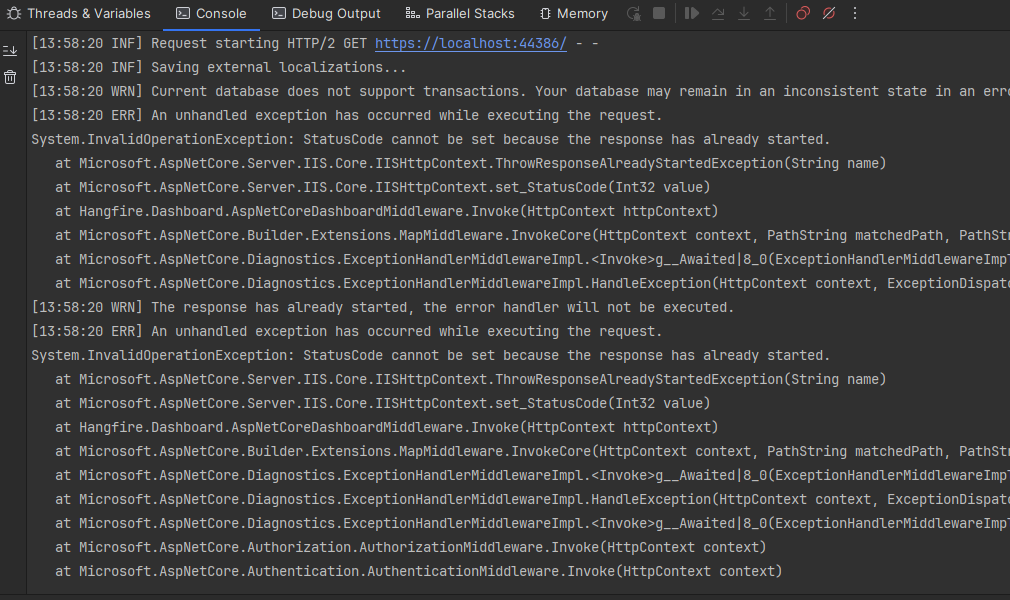
System.InvalidOperationException: StatusCode cannot be set because the response has already started.
   at Microsoft.AspNetCore.Server.Kestrel.Core.Internal.Http.HttpProtocol.ThrowResponseAlreadyStartedException(String value)
   at Microsoft.AspNetCore.Server.Kestrel.Core.Internal.Http.HttpProtocol.set_StatusCode(Int32 value)
   at Hangfire.Dashboard.AspNetCoreDashboardMiddleware.Invoke(HttpContext httpContext)
   at Microsoft.AspNetCore.Builder.Extensions.MapMiddleware.InvokeCore(HttpContext context, PathString matchedPath, PathString remainingPath)
   at Microsoft.AspNetCore.Authorization.AuthorizationMiddleware.Invoke(HttpContext context)
   at Microsoft.AspNetCore.Authentication.AuthenticationMiddleware.Invoke(HttpContext context)
   at Microsoft.AspNetCore.Server.Kestrel.Core.Internal.Http.HttpProtocol.ProcessRequests[TContext](IHttpApplication`1 application)
Markdown supported.
Copy, paste, or drag & drop images and files (max 100 MB per file, 100 MB total per post)
9 Answer(s)
-
0
Yes, please check your mail
Markdown supported.Copy, paste, or drag & drop images and files (max 100 MB per file, 100 MB total per post) -
0
 Markdown supported.Copy, paste, or drag & drop images and files (max 100 MB per file, 100 MB total per post)
 -
0
hi
Can you try this?
If it still doesn't work, please share a project that I can run.
public override void OnApplicationInitialization(ApplicationInitializationContext context)
{
    var app = context.GetApplicationBuilder();
    var env = context.GetEnvironment();

    app.UseForwardedHeaders();

    // Configure the HTTP request pipeline.
    if (env.IsDevelopment())
    {
        app.UseExceptionHandler("/Error");

        // // The default HSTS value is 30 days. You may want to change this for production scenarios, see https://aka.ms/aspnetcore-hsts.
        // app.UseHsts();
    }

    app.UseHsts();

    app.UseHttpsRedirection();
    app.UseStaticFiles();
    app.UseRouting();

    app.UseHangfireDashboard("", new DashboardOptions
    {
        Authorization = new[] { new HangfireCustomBasicAuthenticationFilter { User = "admin", Pass = "123321" } }
    });

    var hostEnvironment = context.ServiceProvider.GetRequiredService<IHostEnvironment>();

    InitJobs.Setup(hostEnvironment);

    app.UseConfiguredEndpoints();

}
Markdown supported.Copy, paste, or drag & drop images and files (max 100 MB per file, 100 MB total per post) -
0
hi, I have shared again
thanks
Markdown supported.Copy, paste, or drag & drop images and files (max 100 MB per file, 100 MB total per post) -
0
Hi @maliming, please let me know if the issue has been resolved.
Markdown supported.Copy, paste, or drag & drop images and files (max 100 MB per file, 100 MB total per post)