






- ABP Framework version: v5.3.3
- UI Type: Angular
- Database System: EF Core
- Tiered (for MVC) or Auth Server Separated (for Angular): no
- Exception message and full stack trace:
- Steps to reproduce the issue:
I have an abp project consisting of the addresses https://online.abc.com (angular) and https://online-api.abc.com. Additionally, I have another abp project using https://account.abc.com as an external login. In other words, when a user wants to log in, they are redirected to https://account.abc.com and log in successfully. However, when they log out, the call to https://online-api.abc.com/connect/endsession is made for logout. Despite wanting to log out from https://account.abc.com as well (meaning, calling https://account.abc.com/connect/endsession), it doesn't log out. How can I achieve this?
online.abc.com HostModule : (Enable Local Login = false)
context.Services.AddAuthentication().AddAbpOpenIdConnect("oidc", options =>
            {
                options.Authority = configuration["ExternalProvider:Authority"];
                options.RequireHttpsMetadata = Convert.ToBoolean(configuration["ExternalProvider:RequireHttpsMetadata"]); ;
                options.ResponseType = OpenIdConnectResponseType.CodeIdToken;
                options.ClientId = configuration["ExternalProvider:ClientId"];
                options.ClientSecret = configuration["ExternalProvider:ClientSecret"];
                options.UsePkce = true;
                options.SaveTokens = true;
                options.GetClaimsFromUserInfoEndpoint = true;
                options.Scope.Add("role");
                options.Scope.Add("email");
                options.Scope.Add("phone");
                options.ClaimActions.MapJsonKey(ClaimTypes.NameIdentifier, "sub");
            });

14 Answer(s)
-
0
hi
. However, when they log out, the call to https://online-api.abc.com/connect/endsession is made for logout. Despite wanting to log out from https://account.abc.com as well (meaning, calling https://account.abc.com/connect/endsession), it doesn't log out. How can I achieve this?
Your application should be redirected to
account.abc.comwhen logged out instead of callingconnect/endsessionThis is the default behavior of our template projects.
Markdown supported.Copy, paste, or drag & drop images and files (max 100 MB per file, 100 MB total per post) -
0
Hi Maliming, steps:
- Click login button on online.abc.com
- It redirects to account.abc.com login page (https://account.abc.com/Account/Login?ReturnUrl=/connect/authorize/callback?client_id=A_App&redirect_uri=https://online-api.abc.com/signin-oidc&response_type=code id_token&scope=openid profile role email phone&response_mode=form_post (url is decoded)
- I logged in and it redirects me to online.abc.com (logged in)
- when click logout button and it redirects online-api.abc.com(Signed out , You have been signed out and you will be redirected soon, Click here to return application)
- It redirects to online.abc.com (logged out)
- I click login button again
- It redirects me to account.abc.com, but redirects me again to online.abc.com without asking for my username/password on the login page
Markdown supported.Copy, paste, or drag & drop images and files (max 100 MB per file, 100 MB total per post) -
0
hi
when click logout button and it redirects online-api.abc.com(Signed out , You have been signed out and you will be redirected soon, Click here to return application)
Can you share an online URL and test user?
liming.ma@volosoft.com
Markdown supported.Copy, paste, or drag & drop images and files (max 100 MB per file, 100 MB total per post) -
0
hi
when click logout button and it redirects online-api.abc.com(Signed out , You have been signed out and you will be redirected soon, Click here to return application)
You logout from https://test-ffe-api.xxx.com/Account/Logout
But your website tries to log in: https://test-api.xxx.com/connect/authorize; this website has not logged out.
Markdown supported.Copy, paste, or drag & drop images and files (max 100 MB per file, 100 MB total per post) -
0
hi, If https://test-ffe-api.xxx.com has logged out, I tried to manually invoke the connect/endsession endpoint with the code below, but couldn't succeed. I think I need to call the connect/endSession endpoint with a similar code?
options.Events = new OpenIdConnectEvents // required for single sign out
                {
                    OnRedirectToIdentityProviderForSignOut = async (context) => { var client = new HttpClient(); await client.GetAsync($"{configuration["ExternalProvider:Authority"]}/connect/endsession?id_token_hint={await context.HttpContext.GetTokenAsync("id_token")}&post_logout_redirect_uri={configuration["Abp:SelfUrl"]}"); }
                };
Markdown supported.Copy, paste, or drag & drop images and files (max 100 MB per file, 100 MB total per post) -
0
Hi, We have two separate projects on the same codebase. The first project needs to work with local login, while the second one needs to use external provider. Therefore, we need two identity servers. Currently, when we log out from the Angular UI (authorization code flow), it logouts from our project, but not from the external provider.
Markdown supported.Copy, paste, or drag & drop images and files (max 100 MB per file, 100 MB total per post) -
0
hi
Angular will only log out the authserverA, this is by design. you can let angular open an authserverB page, and this page will log out authserverB.
Markdown supported.Copy, paste, or drag & drop images and files (max 100 MB per file, 100 MB total per post) -
0
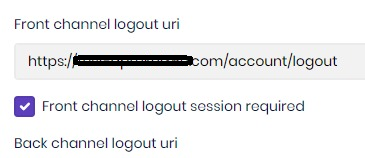
Hi, I found the solution; I set the 'Front Channel Logout URI' value to https://account.abc.com/account/logout, and my problem was resolved. However, if I upgrade my abp project to v.6+, it seems that you don't have such a solution in your OpenID Connect configuration
 Markdown supported.Copy, paste, or drag & drop images and files (max 100 MB per file, 100 MB total per post)
 -
0
hi
However, if I upgrade my abp project to v.6+, it seems that you don't have such a solution in your OpenID Connect configuration
I checked. You can update the
Client.FrontChannelLogoutUrion the Edit page.Markdown supported.Copy, paste, or drag & drop images and files (max 100 MB per file, 100 MB total per post)


