






Check the docs before asking a question: https://docs.abp.io/en/commercial/latest/ Check the samples, to see the basic tasks: https://docs.abp.io/en/commercial/latest/samples/index The exact solution to your question may have been answered before, please use the search on the homepage.
ABP Framework version: v4.0.0
UI type: Angular
Tiered (MVC) or Identity Server Seperated (Angular): no
Steps to reproduce the issue:
abp new Acme.BookStore -u angular -m none -csf
build the solution
run dbmigrator project
run httpapi.host project
there is no login button shown on the swagger api // attempting to use the /api/account/login post endpoint to login gives an error
Exception message and stack trace: 2020-12-10 12:05:25.045 -05:00 [DBG] Error Url: /Account/Error 2020-12-10 12:05:25.045 -05:00 [DBG] Error Id Parameter: errorId 2020-12-10 12:05:25.049 -05:00 [ERR] The required antiforgery cookie ".AspNetCore.Antiforgery.gYxNi6c7Ut0" is not present. 2020-12-10 12:05:25.050 -05:00 [INF] Authorization failed for the request at filter 'Volo.Abp.AspNetCore.Mvc.AntiForgery.AbpAutoValidateAntiforgeryTokenAuthorizationFilter'. 2020-12-10 12:05:25.054 -05:00 [INF] Executing HttpStatusCodeResult, setting HTTP status code 400
There are related tickets/pull requests which were closed indicating this is in v4.0, but testing indicates otherwise
- https://github.com/abpframework/abp/issues/1874
- https://github.com/abpframework/abp/issues/5803
- https://github.com/abpframework/abp/pull/5864
6 Answer(s)
-
0
Hi,
You can open
/account/loginpage to login.After you login, you need to open the
/account/loginpage againMarkdown supported.Copy, paste, or drag & drop images and files (max 100 MB per file, 100 MB total per post) -
0
Hi,
IdentityServer project not need configure security Requirements for Swagger. Because you can login directly
Markdown supported.Copy, paste, or drag & drop images and files (max 100 MB per file, 100 MB total per post) -
0
Adding the [Authorize] attribute on the home controller eliminates the need to manually navigate to the login page. Since the Swagger UI cannot be used without logging in, you might as well add Authorize.
Markdown supported.Copy, paste, or drag & drop images and files (max 100 MB per file, 100 MB total per post) -
0
Hi guys, I see the Authorize button in the Host project's Swagger UI.
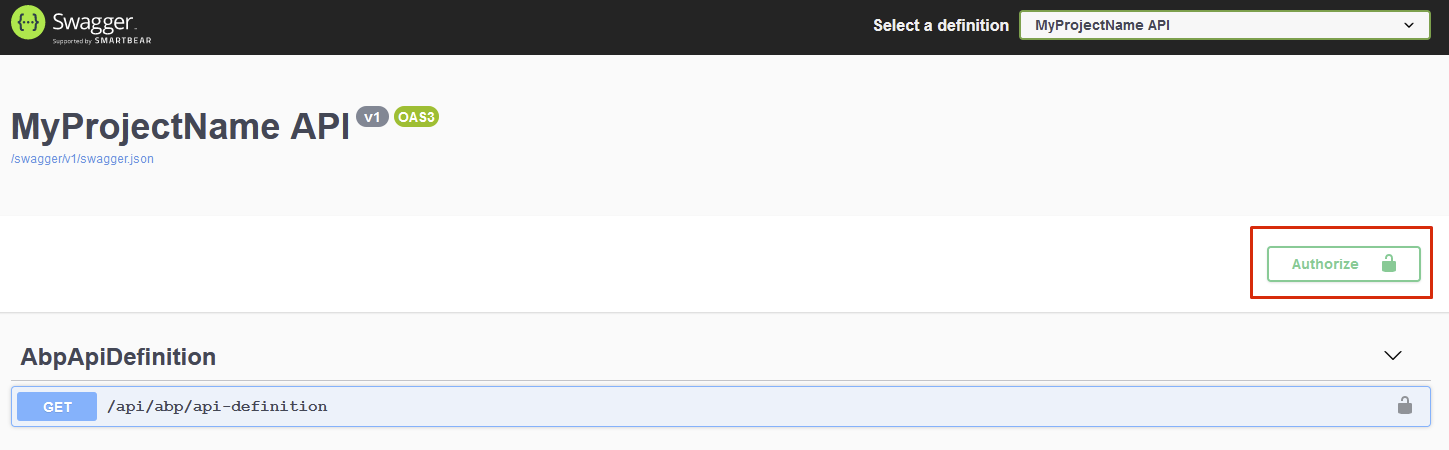
For your existing project you need to replace Swashbuckle package with Abp Swashbuckle.

Then use
UseAbpSwaggerUIinstead of ~~UseSwaggerUI~~ in yourHttpApiHostModule.cs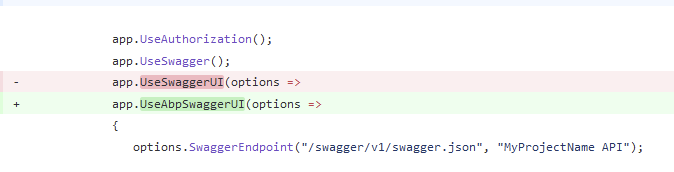 Markdown supported.Copy, paste, or drag & drop images and files (max 100 MB per file, 100 MB total per post)
 -
0
Hi,
We have enabled swagger login for HostWithIds project: https://github.com/abpframework/abp/pull/6818
Markdown supported.Copy, paste, or drag & drop images and files (max 100 MB per file, 100 MB total per post)



